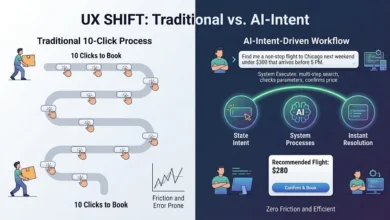
The technology landscape is perpetually abuzz with the promise of revolutionary new tools designed to reshape our daily lives. Yet, a closer examination of user behavior and evolving digital habits reveals a consistent truth: most individuals do not require an ever-expanding arsenal of distinct applications. Instead, the true unmet need lies in the intelligent and unobtrusive integration of useful capabilities, designed to align seamlessly with our deeply ingrained mental models. This principle is at the heart of effective user experience (UX) design, particularly in the burgeoning field of artificial intelligence interfaces.
This exploration into the demand for integrated AI functionalities is brought to you by Design Patterns For AI Interfaces, a comprehensive video course on UX and design patterns by Vitaly. The course offers practical insights and real-world examples, aiming to equip designers and developers with the knowledge to create AI-powered features that resonate with users and solve genuine problems.
The allure of "shiny new" workflows, often accompanied by complex commands or the need to navigate a labyrinth of chat interactions, frequently falls short of user expectations. The underlying frustration stems not from a lack of functionality, but from the friction created by disjointed experiences. Users are not inherently excited by the prospect of learning entirely new systems or wrestling with unintuitive interfaces. Their primary desire is for practical solutions that address problems characterized by high severity, high frequency, and a significant degree of user frustration. This is where the concept of "Quiet AI" and thoughtful integration becomes paramount.
The Evolution of User Expectations and the Rise of Integrated AI
For decades, software development has focused on building discrete tools, each designed to perform a specific set of functions. This approach, while effective in its time, has led to a fragmentation of digital experiences. Users have cultivated sophisticated mental models based on years of interacting with these established tools. For instance, the concept of a "folder" for organizing files is a deeply embedded mental model. When new technologies, including AI, fail to acknowledge and build upon these existing frameworks, they often encounter resistance or are underutilized.
The initial wave of AI products often adopted an "AI-first" approach. While this methodology can accelerate development cycles, it risks overlooking the nuanced design decisions that have shaped user expectations over time. These long-standing design choices have cultivated specific mental models, guiding how users anticipate and interact with technology. An "AI-first" product, by definition, might prioritize the novel capabilities of AI without fully accounting for the established pathways of user interaction. This can lead to experiences that feel alien, requiring users to unlearn established habits and adapt to entirely new paradigms, a process that is often met with reluctance.

The "Quiet AI" Paradigm: Invisible Assistance, Tangible Results
In contrast to the "AI-first" approach, the concept of "Quiet AI" offers a more user-centric path forward. These are AI systems designed to operate subtly in the background, performing essential tasks on behalf of the user without demanding overt attention. They are not characterized by flashy interfaces or constant notifications. Instead, they act as intelligent assistants, streamlining repetitive, frustrating, or time-consuming tasks that can be automated or augmented with smart assistance.
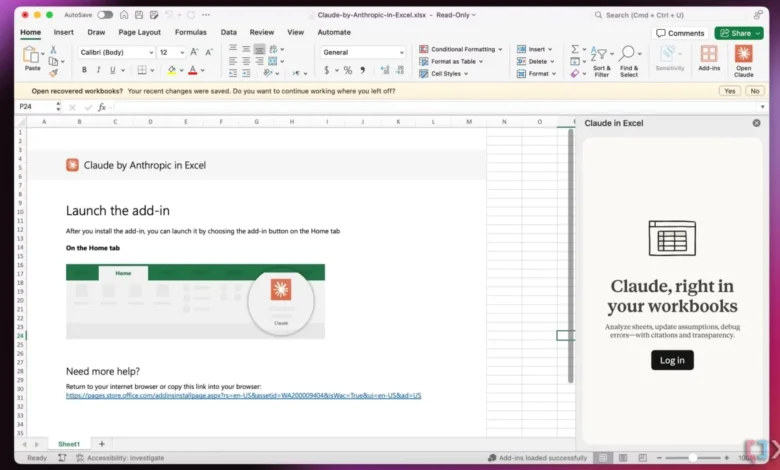
A prime example of this "Quiet AI" philosophy in action is the integration of Claude within Microsoft’s productivity suite, including Excel, PowerPoint, and Word. This integration allows users to leverage AI capabilities directly within the familiar context of their existing workflows. For instance, a user working with a spreadsheet can utilize Claude to analyze specific rows or columns without the need to switch between applications or engage with a separate AI interface. This contextual assistance significantly reduces friction and enhances productivity by meeting users where they are. The ability to perform these AI-driven tasks without disrupting the flow of work is a hallmark of effective integration.
The impact of such integrations can be quantified by observing user engagement patterns. In traditional workflows, users might spend considerable time navigating between different software packages, copying and pasting data, and reformatting information. This manual effort not only consumes valuable time but also increases the likelihood of errors. Integrated AI solutions, like Claude in Excel, aim to eliminate these pain points. By providing assistance directly within the application, they empower users to focus on their core tasks, leading to a measurable increase in efficiency and a reduction in the cognitive load associated with task completion. Data from early adopters of such integrated AI tools often indicates a preference for these seamless experiences, with users reporting higher satisfaction and a greater perceived value from their software.

Folder Instructions: Empowering Users Through Contextual AI
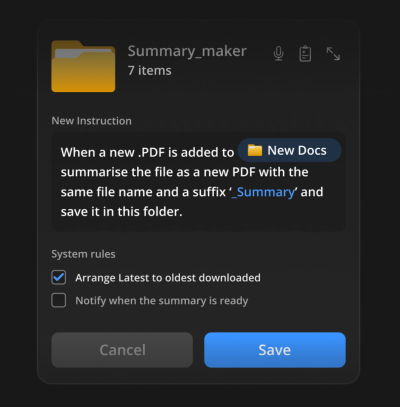
The principle of integrating AI into existing mental models is powerfully illustrated by the concept of "Folder Instructions." This innovative approach allows users to define the intended purpose and behavior of specific folders, effectively turning them into intelligent organizational units. Instead of manually managing files and sub-folders, users can set a folder’s intent once, and the system will then autonomously manage its contents according to the defined rules.
This system operates by allowing users to specify what a folder is intended for, how files should be organized within it, how sub-folders should function, and what actions can be performed on the files it contains. This shifts the paradigm from manual file management to intent-driven organization. For example, a user could create a folder named "Passport Application." Within this folder, they could set instructions for the AI to automatically identify and categorize documents related to passport renewal, such as application forms, supporting identification, and payment receipts. The AI could also be instructed to prompt the user for any missing documents or to pre-fill certain fields in the application form based on existing data.
The power of "Folder Instructions" lies in its seamless integration of AI capabilities precisely where and when users need them. These instructions are typically scoped locally to the user’s machine, respecting privacy and security by default. Unless explicitly granted, permissions and system rules do not extend beyond the user’s control. This granular control ensures that users remain in charge of their data and their AI assistants.

Consider the practical implications for tasks like managing project documentation or personal finances. A project manager could create a "Project Alpha" folder with instructions to automatically organize incoming documents by phase, client, or document type. The AI could also be tasked with generating regular summary reports of project progress based on the files within the folder. For personal finance, a user might set up a "Tax Documents" folder that automatically categorizes receipts, invoices, and bank statements, and even flags potential deductions or discrepancies. The system’s ability to perform these actions proactively, based on predefined rules, significantly reduces the time and effort users would otherwise spend on manual organization and analysis.
The "Folder Instructions" concept, as detailed in Karthikeya GS’s seminal post "Folder Instructions: Instructions For System-Level AI," represents a significant step towards making AI a truly integrated and user-friendly component of our digital lives. It acknowledges that users often think in terms of tasks and outcomes, not just abstract AI functionalities. By aligning AI actions with these user-defined intents within familiar organizational structures, the concept bridges the gap between powerful AI capabilities and practical, everyday usability.
The Broader Impact: Reducing Friction, Enhancing Productivity
The overarching takeaway from the discourse on AI integration and user experience is the critical importance of reducing friction in digital interactions. When users are forced to constantly switch between applications, navigate complex interfaces, or manually manage data, their productivity inevitably suffers, and the likelihood of errors increases. The true value of AI, therefore, is not in its mere existence as a tool, but in its ability to streamline workflows, alleviate frustrations, and automate tasks that would otherwise consume excessive time and effort.
The emphasis on seamless integration means that users can achieve more with less effort. It’s about augmenting existing workflows rather than disrupting them. This approach fosters a more positive and productive relationship between users and technology, leading to greater adoption and satisfaction. The concept of "Quiet AI" and context-aware functionalities, as exemplified by the Claude-Excel integration and the "Folder Instructions" paradigm, points towards a future where AI works collaboratively with users, often behind the scenes, to enhance their capabilities and simplify their digital lives.
The implications of this shift are far-reaching. For businesses, it means the potential for increased employee efficiency, reduced training overhead for new tools, and a more engaged workforce. For individuals, it translates to more time for creative pursuits, problem-solving, and personal well-being, as mundane and repetitive tasks are handled efficiently by intelligent systems. The success of AI will not be measured by the number of standalone AI applications available, but by the extent to which AI is woven into the fabric of our existing digital tools and workflows, becoming an invisible yet indispensable ally.
A Look Ahead: Designing for User-Centric AI
The ongoing evolution of AI interfaces necessitates a focus on user-centric design principles. This involves a deep understanding of user needs, existing mental models, and the contexts in which technology is used. As Vitaly’s work, particularly the "Design Patterns For AI Interfaces" course, emphasizes, the goal is to create AI features that are not only functional but also intuitive and genuinely helpful. By studying real-world examples and adhering to established UX guidelines, designers can craft AI experiences that resonate with users and drive meaningful engagement.

The recent advancements in AI integration within productivity suites and the innovative "Folder Instructions" concept are indicative of a broader trend towards more integrated and user-friendly AI. This approach acknowledges that the most impactful AI solutions are often those that enhance, rather than replace, existing user behaviors and workflows. As we move forward, the focus will undoubtedly remain on harnessing the power of AI to reduce friction, minimize frustration, and ultimately empower users to achieve their goals more effectively and efficiently. The future of AI is not about more tools, but about smarter, more integrated assistance that aligns perfectly with how we already think and work.