The Case Against More Tools: Why Seamless Integration is the Future of User Experience

The constant clamor for "shiny new tools" that promise to revolutionize our daily lives often overlooks a fundamental truth: most individuals do not require an ever-expanding arsenal of software. Instead, what users truly need are intelligently designed, seamless integrations of existing, valuable functionalities that align with their established mental models. This perspective is central to understanding the evolution of user experience (UX) design, particularly in the burgeoning field of artificial intelligence interfaces. This article delves into why the focus should shift from adding more tools to enhancing how existing capabilities are interwoven into our digital lives, drawing insights from the principles of Design Patterns for AI Interfaces, a comprehensive video course by Vitaly.
In an era saturated with technological advancements, the temptation to herald every new software release as a paradigm shift is pervasive. However, the practical reality for the average user paints a different picture. The proliferation of applications and platforms has, for many, led to an overwhelming cognitive load. Navigating complex workflows, deciphering cryptic command-line interfaces, or engaging in repetitive, context-switching chat interactions are not sources of user delight. Instead, they represent friction points that detract from productivity and satisfaction. The core demand, therefore, is for robust, unobtrusive integrations that address problems characterized by high severity, frequent occurrence, and significant user frustration.
The concept of "AI-first" products, while potentially accelerating development cycles, frequently fails to account for the decades of subtle and significant design decisions that have shaped user expectations. These historical design choices have cultivated deeply ingrained mental models – intuitive frameworks through which users understand and interact with technology. Introducing an "AI-first" approach without acknowledging these existing mental models can lead to interfaces that feel alien and disruptive, negating the very benefits AI is intended to provide.
A stark contrast to this approach is the burgeoning concept of "Quiet AI." This paradigm envisions AI as an invisible, background assistant, adept at handling repetitive, tedious, or frustrating tasks on behalf of the user. Quiet AI does not demand attention; it simply and effectively assists, streamlining processes without disrupting the user’s flow. This approach aligns perfectly with the principle of seamless integration, where AI capabilities are embedded within existing environments, enhancing them rather than requiring users to adopt entirely new, standalone systems.
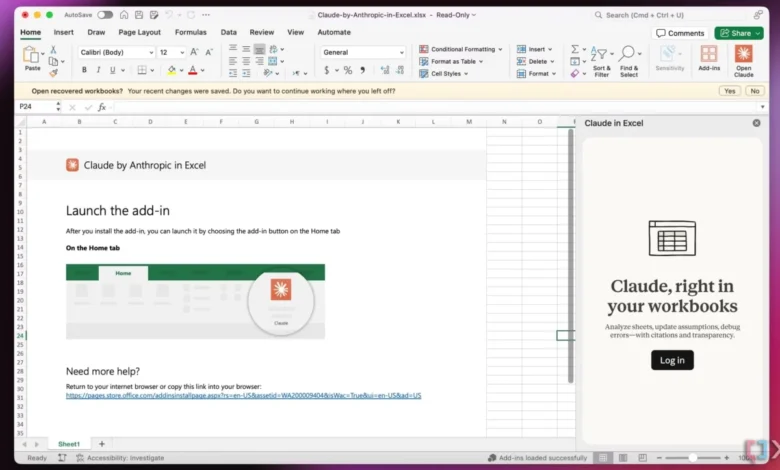
One compelling illustration of Quiet AI in action is the integration of Claude within Microsoft’s productivity suite, including Excel, PowerPoint, and Word. These integrations allow users to leverage AI capabilities directly within their familiar applications. For instance, in Excel, Claude can assist with analyzing specific rows or columns, performing complex data manipulations, or generating insights without the user needing to export data or switch to a separate AI tool. This contextual assistance dramatically reduces the cognitive effort and time associated with these tasks, demonstrating the power of seamless integration. Similarly, in Word, AI can assist with drafting, editing, or summarizing documents, and in PowerPoint, it can aid in generating slide content or refining presentations. The key here is that the AI acts as an enhancement to the existing tool, respecting the user’s established workflow and mental model of how these applications function.

The innovation of "Folder Instructions" represents a significant step forward in practical AI integration, embodying the principles of Quiet AI and user-centric design. This concept, detailed in Karthikeya GS’s article "Folder Instructions: Instructions For System-Level AI," proposes a mechanism for users to define the purpose and behavior of folders. Instead of manually managing files and their organization, users can set directives for specific folders, dictating how files should be categorized, how sub-folders should operate, and what automated actions should be triggered within that folder’s scope.
For example, a user could create a "Passport Application" folder. Within this folder, they could define instructions for the AI to automatically sort incoming documents into relevant sub-folders (e.g., "Application Forms," "Supporting Documents," "Receipts"), flag missing items based on a predefined checklist, and even initiate the process of filling out digital forms based on the contents of uploaded files. This approach liberates users from the minutiae of file management, allowing them to focus on the overarching goal of their work. The system, guided by the user’s instructions, quietly and efficiently handles the underlying organizational and processing tasks.
The implications of such a system are far-reaching. It represents a profound shift from users actively managing tools to systems intelligently responding to user intent. This is particularly relevant in professional contexts where document management can be a significant bottleneck. Imagine a legal team receiving a large volume of discovery documents. With folder instructions, they could designate specific folders for different case types or stages of litigation, with the AI automatically categorizing, tagging, and even summarizing key documents based on predefined criteria. This not only saves countless hours but also reduces the risk of critical information being overlooked due to manual errors.

Furthermore, the "Folder Instructions" model emphasizes local scoping of permissions and actions. Unless explicitly expanded by the user, these AI-driven functionalities are confined to the user’s machine. This addresses common concerns about data privacy and security, as sensitive information is not automatically uploaded to cloud services without explicit user consent. This localized control fosters trust and empowers users to leverage AI capabilities with a sense of security.
The development and adoption of such integrated AI features are not merely theoretical exercises; they are driven by a clear market demand for enhanced efficiency and reduced user friction. Data from various UX research studies consistently highlight that users abandon tools and platforms that are perceived as overly complex or difficult to integrate into their existing workflows. A 2023 report by Forrester found that organizations prioritizing seamless user experiences see a 20% increase in customer satisfaction and a 15% rise in employee productivity. This underscores the economic and operational imperative for investing in integration over the creation of standalone, often redundant, tools.
The evolution of digital interfaces has seen a gradual but significant shift away from command-line interfaces and standalone applications towards more integrated, intuitive experiences. Early operating systems, while powerful, often required users to memorize complex commands. The advent of graphical user interfaces (GUIs) revolutionized this, making computing accessible to a broader audience. However, even with GUIs, the fragmentation of functionality into disparate applications created new challenges. The modern push for seamless integration, particularly with AI, is the logical next step in this evolutionary trajectory. It seeks to bridge the gap between powerful underlying technologies and the user’s need for effortless interaction.

The broader impact of this shift towards seamless integration extends beyond individual productivity. It has the potential to democratize access to sophisticated AI capabilities. Instead of requiring specialized knowledge or separate subscriptions, users can benefit from AI assistance embedded within the tools they already use and understand. This can be particularly impactful in education, where AI can assist students with research, writing, and learning, or in small businesses, where access to advanced analytics or marketing tools might otherwise be cost-prohibitive.
The concept of "Quiet AI" and integrated functionalities is not about eliminating tools but about making them work in concert. It’s about creating an environment where technology serves the user’s goals without demanding excessive cognitive overhead. This approach respects the user’s time, effort, and existing knowledge, fostering a more positive and productive relationship with technology.
As we look towards the future, the success of AI in everyday applications will hinge on its ability to become an invisible, yet indispensable, partner. The focus must remain on delivering value through intelligent integration, aligning with established mental models, and reducing user frustration. This is the core message championed by Vitaly’s "Design Patterns For AI Interfaces," a comprehensive resource that provides real-world examples and UX guidelines for crafting AI features that resonate with users. By embracing the principles of seamless integration and "Quiet AI," designers and developers can create technology that truly empowers, rather than overwhelms, its users. The era of simply adding more tools is giving way to an era where existing tools become smarter, more connected, and ultimately, more useful.