
Securing a web application prior to its official public launch remains a critical administrative requirement for development teams, independent contractors, and enterprises alike. Whether staging a client deliverable, protecting proprietary internal dashboards, or shielding pre-release builds from premature web crawler indexing, restricting unauthorized access is paramount. Historically, developers relied on external dependencies, third-party authentication middleware packages, complex web server configurations involving Nginx or Apache, or cumbersome virtual private networks (VPNs). However, modern web frameworks increasingly offer native architectural primitives that streamline these operational hurdles without sacrificing security or performance.
Astro, a prominent modern static and hybrid web framework optimized for content-driven websites, features a robust built-in middleware pipeline. Combined with standard HTTP Basic Authentication—a universally supported browser mechanism—developers can implement resilient access control natively. This approach eliminates superfluous dependencies, minimizes configuration overhead, and reduces potential attack surfaces. Deploying this solution
requires an Astro adapter or runtime supporting on-demand rendering, a concise middleware script, and two environment variables to manage administrative credentials securely.
Background Context and Framework Evolution
The demand for lightweight, native security controls within modern JavaScript frameworks has risen alongside the adoption of server-side rendering (SSR) and hybrid architectures. Early iterations of static site generators prioritized purely static output, rendering server-side interventions like authentication difficult without external content delivery network (CDN) rules or reverse proxies. As Astro matured through its successive major releases, culminating in Astro 5, the framework expanded its hybrid capabilities, allowing developers to seamlessly blend static pre-rendered pages with dynamic, on-demand server routes.
Introduction of the astro:middleware API provided developers with programmatic control over the request-response lifecycle. Rather than routing traffic blindly through external modules, engineering teams can intercept inbound requests at the edge or server level. This architectural shift aligns with broader industry trends favoring zero-dependency software supply chains. By leveraging native browser authentication dialogs and environment-driven configurations, developers avoid the vulnerabilities frequently associated with bloated authentication libraries while maintaining compatibility across diverse deployment targets such as Cloudflare Pages, Vercel, Netlify, and Node.js servers.
Prerequisites for Implementation
Before initializing native HTTP Basic Authentication within an Astro project, development teams must verify that their development and production environments meet specific technical criteria. First, the project must utilize an Astro runtime or adapter capable of handling server-side, on-demand rendering. Static-only output modes cannot evaluate inbound request headers at runtime, rendering dynamic access control impossible without external edge-worker interventions.
Second, developers must have administrative access to their deployment target’s environment variable configuration interface. Because credentials should never be hardcoded directly into source code repositories, secure runtime injection via environment files (.env) for local development and platform dashboards for production is mandatory. Finally, a basic familiarity with TypeScript or modern JavaScript ES6 syntax is required to construct the middleware handler and helper utility functions.
Creating the Middleware File
The foundation of Astro’s request interception system resides in its middleware architecture. To implement access control, developers must create a designated middleware file located at src/middleware.ts for TypeScript projects, or src/middleware.js for standard JavaScript implementations. This file acts as a gatekeeper, processing every inbound HTTP request before the framework resolves the corresponding page component.
The initialization process begins by importing the defineMiddleware utility from the astro:middleware module. This wrapper function provides type safety and structural consistency, exposing both the request context object and a next callback function. The next function dictates whether the request pipeline proceeds toward the requested resource or halts due to policy violations.
import  defineMiddleware  from 'astro:middleware';

export const onRequest = defineMiddleware(async (context, next) =>
  // Authentication logic and interception rules execute here
  return next();
);
Writing the Authentication Check
HTTP Basic Authentication relies on a standardized challenge-response protocol between the client browser and the origin server. When a client requests a protected resource without valid credentials, the server responds with a status code indicating unauthorized access, accompanied by a specific authentication challenge header. Upon receiving this challenge, compliant browsers automatically present a native operating system or browser-level login modal, prompting the user for a username and password.
To evaluate incoming credentials within Astro, developers construct a validation function that reads environment variables, inspects the inbound Authorization header, and decodes the Base64-encoded string.
function isAuthenticated(request: Request): boolean  !pass)
    return true; // Bypass authentication if environment variables are unconfigured


  const authHeader = request.headers.get('Authorization');

  if (!authHeader?.startsWith('Basic '))
    return false;


  const encoded = authHeader.slice(6);
  const decoded = atob(encoded);
  const [providedUser, providedPass] = decoded.split(':');

  return providedUser === user && providedPass === pass;
The execution flow of this verification function is straightforward yet rigorous. First, it queries import.meta.env to retrieve the designated administrator username and password. If these variables remain undefined or blank, the system intentionally bypasses authentication to prevent accidental lockout during local testing or misconfigured deployments.
If credentials are defined, the function checks for the presence of an Authorization header. If the header is missing or does not utilize the Basic authentication scheme, validation fails. When a valid header format is detected, the system extracts the Base64-encoded payload, decodes it using the global atob utility (or Buffer.from in legacy Node.js runtimes), splits the resulting colon-separated string into discrete username and password variables, and performs a strict equality check against the environment variables.
Handling the 401 Unauthorized Response
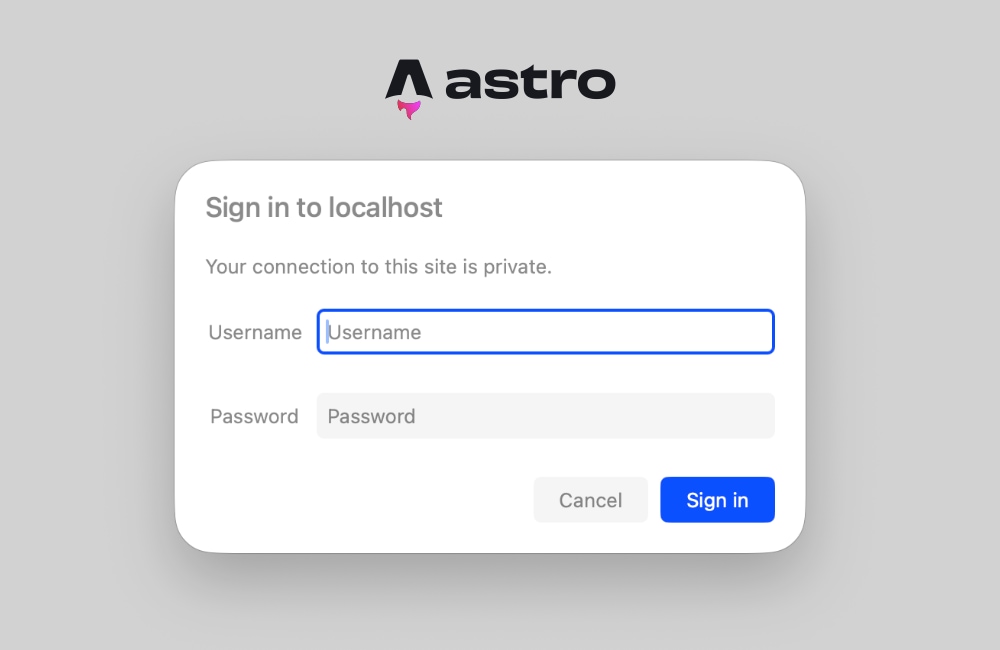
When the isAuthenticated validation function returns a negative result, the middleware must intercept the request pipeline and return an explicit HTTP 401 Unauthorized status response. Crucially, this response must include the WWW-Authenticate header. This specific header instructs the client browser to render its native authentication dialog box, enabling users to submit their credentials securely.
export const onRequest = defineMiddleware(async (context, next) =>
  if (!isAuthenticated(context.request))
    return new Response('Unauthorized',
      status: 401,
      headers:
        'WWW-Authenticate': 'Basic realm="Staging Area", charset="UTF-8"',
      ,
    );


  return next();
);
The realm parameter embedded within the WWW-Authenticate header serves as a human-readable identifier displayed inside the browser’s login prompt. While developers frequently utilize generic designations like "Staging" or "Restricted Access," this label can be customized to reflect specific project milestones or client environments. Once the user submits valid credentials, the browser automatically reformats and attaches the Base64-encoded Authorization header to all subsequent HTTP requests within that session, requiring no custom JavaScript forms or state management libraries.
Configuring Environment Variables
Securing production and development environments necessitates the proper configuration of runtime environment variables. Astro handles server-side environment variables natively through import.meta.env, drawing values from the operating system, hosting platform dashboards, or local environment files.
For local development workflows, developers establish a .env file in the root directory of their Astro project. This file must remain excluded from public version control systems (such as Git) via .gitignore configurations to prevent accidental credential leaks.
BASIC_AUTH_USER=secure-staging-user
BASIC_AUTH_PASS=cryptographically-secure-password
Upon deploying the application to production hosting providers—such as Cloudflare Pages, Vercel, Netlify, or AWS Amplify—developers must navigate to the platform’s site settings or environment variable management console. Entering identical variable names (BASIC_AUTH_USER and BASIC_AUTH_PASS) alongside robust, randomly generated passwords ensures that the live staging site remains shielded from public exposure.
Testing and Verification Procedures
Following the implementation of the middleware script and environment configuration, developers should execute their local development server using the standard framework command:
npm run devNavigating to http://localhost:4321 in a modern web browser should immediately trigger the native authentication modal. Entering the pre-configured credentials grants standard access to the site content, whereas canceling the prompt or entering incorrect details results in a standard plaintext "Unauthorized" response page.
Rigorous testing across multiple deployment environments—such as Cloudflare Pages running on edge runtimes—confirms that the middleware intercepts requests before rendering underlying components. The decoupling of authentication logic from page markup ensures consistent enforcement across all static and dynamic routes.
Troubleshooting Common Pitfalls and Prerender Conflicts
A frequent architectural hurdle encountered during the implementation of server-side middleware in Astro involves static prerendering conflicts. Developers may occasionally encounter runtime exceptions during build or execution phases, commonly manifesting as:
Astro.request.headers was used when rendering the route `src/pages/index.astro'. Astro.request.headers is not available on prerendered pages.This error surfaces when individual page components attempt to access request-specific data, such as incoming HTTP headers, while configured for static generation (prerender = true by default in certain template configurations). Because statically generated pages are compiled entirely at build time, no live HTTP request exists, rendering header inspection impossible.
To resolve this issue, engineering teams have two primary remediation pathways. First, developers can explicitly opt specific pages into server-side rendering by injecting a frontmatter configuration directive directly into the target .astro files:
---
export const prerender = false;
---
Alternatively, if an entire web application requires robust protection behind authentication middleware, developers can configure the global output mode to server-side rendering within the primary configuration file, astro.config.mjs:
// astro.config.mjs
import  defineConfig  from 'astro/config';
import node from '@astrojs/node';

export default defineConfig(
  output: 'server',
  adapter: node(
    mode: 'standalone'
  )
);
Enabling global server-side rendering ensures that every page is evaluated on demand, guaranteeing that request headers remain accessible to the middleware pipeline at all times. Individual routes requiring static performance optimizations can still be selectively reverted using export const prerender = true within their respective frontmatter blocks.
Broader Implications and Industry Analysis
The adoption of native, zero-dependency authentication patterns within modern frontend frameworks highlights a broader industry shift toward efficiency and maintainability. Historically, securing a pre-release web property required auxiliary infrastructure, ranging from dedicated reverse-proxy servers to complex commercial security packages. These external additions often introduced performance latency, increased maintenance overhead, and complicated continuous integration pipelines.
By utilizing framework-native primitives like Astro middleware and standard HTTP Basic Authentication, development agencies and enterprise engineering teams can secure assets with minimal technical debt. The entire security implementation requires approximately twenty-five lines of clean, readable code, proving that robust security does not inherently necessitate complex software bloat. As web frameworks continue to blur the boundaries between static generation and dynamic server rendering, leveraging platform-native features will likely remain a preferred best practice for modern web development.