How to Implement Secure HTTP Basic Authentication in Astro Sites Using Native Middleware


Securing modern web applications during development and pre-production phases remains a critical operational priority for engineering teams worldwide. Whether deploying a client-facing project for intermediate review or managing an internal enterprise utility, developers frequently need to restrict public access without introducing cumbersome third-party dependencies or convoluted server architectures. In the ecosystem of Astro—a popular modern frontend framework optimized for content-driven websites—developers often rely on external packages, complex Nginx reverse-proxy configurations, or virtual private networks to lock down private environments. However, these traditional measures invariably introduce unnecessary configuration overhead, deployment complexity, and potential points of failure. Recent updates to the Astro framework provide a native, streamlined solution: a built-in middleware execution pipeline combined with industry-standard HTTP Basic Authentication. By leveraging runtime environments and on-demand rendering adapters, developers can secure entire applications using less than thirty lines of custom JavaScript or TypeScript, eliminating external npm modules entirely while maintaining maximum compatibility across modern web browsers.
Background Context of the Feature Evolution
The evolution of modern static site generators and hybrid frameworks like Astro has fundamentally shifted how web architectures handle dynamic server-side logic. Historically, static site generators prioritized pre-building HTML at compile time to maximize performance and minimize hosting costs. While this approach delivered exceptional loading speeds and simplified global content delivery network distribution, it presented significant operational hurdles for staging environments, client review links, and authenticated internal dashboards. Engineering teams were forced to manage fragmented authentication layers, relying heavily on edge-routing rules provided by specific hosting vendors such as Vercel, Netlify, or Cloudflare, or writing brittle server configuration files.
To bridge this architectural gap, the Astro core development team introduced robust middleware support, allowing developers to intercept incoming HTTP requests before any page rendering or routing execution takes place. This middleware paradigm mirrors capabilities found in traditional backend frameworks like Express.js or Next.js, but is optimized specifically for Astro’s multi-adapter runtime architecture. Concurrently, HTTP Basic Authentication—a protocol defined in Internet Engineering Task Force specifications dating back to early HTTP standards—remains universally supported by every major desktop and mobile web browser. By marrying Astro’s middleware architecture with HTTP Basic Authentication, developers gain a lightweight, framework-agnostic security layer that functions uniformly regardless of whether the underlying host is Node.js, Deno, Bun, or an edge worker environment.
Step-by-Step Implementation Guide and Chronology of Setup
Implementing this native security measure requires a systematic approach, beginning with environment configuration and concluding with rigorous testing across targeted deployment runtimes. Engineering workflows typically follow a structured chronological sequence to ensure seamless integration without disrupting existing build pipelines.
Prerequisites and Environment Configuration
The primary prerequisite for implementing runtime authentication in Astro is the selection of an appropriate deployment adapter or runtime capable of supporting on-demand server-side rendering. Because static pre-rendered pages are generated exclusively at compile time—devoid of live HTTP request headers—the application must be configured to render routes dynamically.
The security credentials themselves are managed via environment variables to maintain compliance with modern application security best practices, preventing hardcoded secrets from entering source control repositories. Developers establish these credentials by defining BASIC_AUTH_USER and BASIC_AUTH_PASS within a local .env file during development stages, subsequently mirroring these variables within the production environment settings of cloud deployment platforms such as Cloudflare Pages, AWS Amplify, or Vercel.
Establishing the Middleware Architecture
The core operational logic resides within a dedicated middleware file located at src/middleware.ts for TypeScript environments, or src/middleware.js for standard JavaScript projects. Astro automatically detects this file within the source directory, invoking the exported onRequest handler for every incoming request processed by the server.
import  defineMiddleware  from 'astro:middleware';

export const onRequest = defineMiddleware(async (context, next) =>
  // Authentication validation logic executes here prior to page rendering
  return next();
);
The defineMiddleware utility function wraps the core request handler, supplying developers with a comprehensive execution context—including headers, cookies, and client IP addresses—alongside a next function that continues the request pipeline if authentication succeeds.
Writing the Credential Verification Function
The authentication verification mechanism relies on inspecting the incoming HTTP Authorization header, decoding the provided Base64 credentials, and comparing them against the established environment variables. If the required environment variables are absent from the runtime configuration, the middleware gracefully bypasses authentication to prevent accidental application lockouts during initial local bootstrapping.
function isAuthenticated(request: Request): boolean Handling the HTTP 401 Unauthorized Response
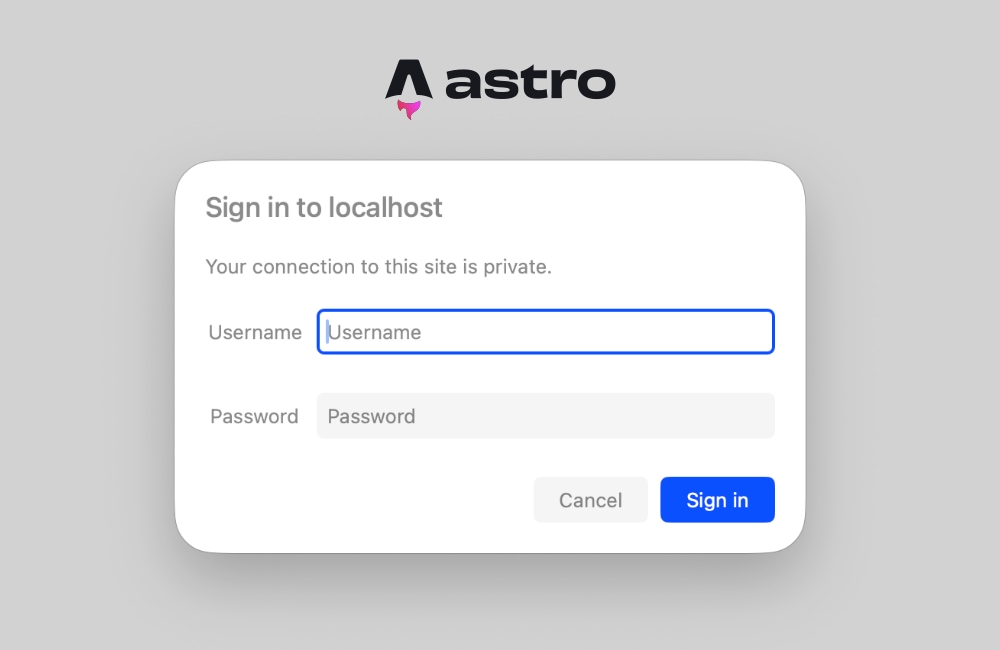
When an incoming request fails the credential verification check, the server must immediately abort the request pipeline and return an HTTP 401 Unauthorized status code accompanied by a WWW-Authenticate response header. This specific header instructs compliant web browsers to automatically render a native, secure login dialog box without requiring custom frontend modal components or complex JavaScript state management.
export const onRequest = defineMiddleware(async (context, next) =>
  if (!isAuthenticated(context.request))
    return new Response('Unauthorized Access Restricted',
      status: 401,
      headers:
        'WWW-Authenticate': 'Basic realm="Staging Environment", charset="UTF-8"',
      ,
    );


  return next();
);
The realm directive acts as an informative label displayed directly within the browser’s authentication prompt, enabling developers to clearly designate the specific environment—such as a staging server or internal utility—that the user is attempting to access.
Statements and Reactions from Engineering Communities
Web development professionals and systems architects have widely praised native middleware implementations for reducing dependency bloat in modern frontend toolchains. In technical forums and engineering roundtables, community feedback highlights a growing fatigue with installing third-party npm packages for foundational web standards.
Lead maintainers across various frontend frameworks have emphasized that leveraging native browser capabilities—such as the built-in HTTP Basic Authentication prompt—significantly enhances application performance while reducing potential security surface areas associated with external dependencies. Security analysts note that while Basic Authentication transmits credentials in an encoded (rather than encrypted) format, its deployment over mandatory Transport Layer Security (TLS/HTTPS) ensures that credentials remain fully protected during transit across public networks. Consequently, engineering teams can confidently deploy protected staging URLs without exposing proprietary intellectual property to automated web scrapers or indexers.
Broader Impact, Implications, and Troubleshooting
Transitioning an Astro application to utilize runtime authentication requires careful consideration of project configuration, particularly regarding rendering strategies. A common technical hurdle encountered by developers involves attempting to access Astro.request.headers within statically prerendered page components. Because Astro defaults to static HTML generation for optimal build performance, prerendered pages do not process live HTTP requests, resulting in compilation or runtime errors regarding unavailable request headers.
To resolve this behavior, developers must adopt one of two primary architectural adjustments:
- Granular Route Opt-Out: Individual pages can be explicitly configured for server-side rendering by injecting a frontmatter directive directly into the target
.astrofile:--- export const prerender = false; --- -
Global Server Output Mode: For projects where the entire application must remain strictly private—such as internal corporate dashboards or comprehensive client staging sites—developers can modify the primary configuration file to enforce server-side rendering globally:
// astro.config.mjs
import  defineConfig  from 'astro/config';
import node from '@astrojs/node';

export default defineConfig(
 output: 'server',
 adapter: node(
   mode: 'standalone'
 )
);
Adopting a global server output mode ensures that every route within the application is evaluated dynamically on-demand, guaranteeing that security middleware executes reliably before any sensitive layout or content is rendered to the client.
Future Outlook and Scalability of Native Middleware
As enterprise reliance on hybrid web frameworks continues to accelerate, the demand for lightweight, configuration-driven security practices will only intensify. The successful integration of HTTP Basic Authentication within Astro middleware demonstrates that complex third-party security plugins are frequently unnecessary for foundational access control. By relying on native web standards and optimized runtime environments, development teams can secure their pre-production pipelines efficiently, maintaining clean codebases, superior performance metrics, and robust protection against unauthorized data exposure.