The burgeoning field of artificial intelligence, while promising transformative capabilities, is currently experiencing a significant design bottleneck: conversational tunnel vision. Driven by the training data of Large Language Models (LLMs), which predominantly consists of dialogue, the industry has largely defaulted to chat-based interfaces for nearly every AI functionality. This pervasive reliance on the chat bubble, however, overlooks a fundamental principle of effective user experience (UX) design: the critical need to align the interface modality with the user’s context, intent, and cognitive load. The interface, experts argue, should adapt to the user, not the other way around.
This pervasive design trend is leading to inefficient and frustrating user interactions, particularly in contexts where hands, eyes, or significant cognitive focus are already occupied. While chat interfaces are undeniably powerful tools for certain tasks, they represent just one option in a much broader spectrum of interaction modalities. UX and product development teams are urged to adopt a more deliberate and nuanced approach to selecting how users input data and commands, and how systems present their outputs, ensuring that the chosen modality optimally serves the user’s immediate needs and environmental constraints.
The Limitations of the Ubiquitous Chatbot
The allure of the do-it-all chatbot stems from its apparent simplicity and flexibility from a product development perspective. It offers a seemingly blank slate, capable of handling a wide array of user inputs. However, this text-heavy interface often imposes a substantial "adaptation load" on users, significantly increasing their cognitive demands. Over time, this cognitive burden can evolve into a psychological tax, compelling individuals to alter their natural thought processes to accommodate the limitations of the machine.
When an interface relies exclusively on conversation, it introduces a dual challenge: a linguistic barrier for input and a cognitive hurdle for output.
Input: The Linguistic Barrier of the Text Box
A bare chat box can present a significant obstacle for users attempting to discover an AI tool’s capabilities. Unlike traditional graphical interfaces, which utilize menus and buttons to provide clear visual cues of available options, a chat interface often leads to "choice paralysis." Users are frequently forced to guess what the AI can do and, crucially, to recall the precise phrasing or technical terms required to elicit the desired result.
Consider the plight of a data analyst tasked with identifying a specific trend within a spreadsheet. In a conventional tool, this might involve a simple click on a filter or sort button. However, within a chat interface, the analyst is suddenly required to become a writer, articulating complex logical operations in a complete sentence. Similarly, a manager attempting to reorganize a team schedule intuitively uses drag-and-drop functionality on a calendar. Describing these same scheduling shifts via a text prompt adds an unnecessary layer of cognitive effort, making the task feel disproportionately more difficult.
Designing for input necessitates recognizing that composing a prompt is, in essence, a creative act. It demands that an individual translate a vague thought into a specific, actionable command. For many professionals, this process creates a linguistic barrier. A graphic designer, for instance, might have a crystal-clear vision for an image’s aesthetic, including precise lighting and texture, yet struggle to articulate these nuances effectively in a text prompt. In such scenarios, a visual input method, such as a slider or a color picker, would be a far more appropriate and efficient choice than a text box.
Output: The Cognitive Cost of Dense Text
Beyond the challenges of input, the AI’s output modality also imposes a significant cognitive cost. When an AI responds with lengthy blocks of text, it effectively transfers the interpretive work onto the user. Text, by its nature, is a serial medium; the brain must process information word by word to extract meaning, a process that inherently consumes time. While sequential reading is indispensable for complex analyses, such as intricate legal arguments or nuanced medical histories, defaulting to text for data that could be more rapidly communicated visually creates friction. Visual formats, conversely, enable parallel processing, allowing users to grasp patterns in charts or graphs in mere seconds.
Imagine requesting a project status update from an AI. Instead of a color-coded dashboard offering an at-a-glance overview, the user receives three dense paragraphs detailing every task completed that week. The user is then compelled to read the entire response and mentally summarize it to extract the single piece of information they truly needed. The efficiency of a quick visual check is replaced by the mental labor of a reading assignment.
The "cognitive tax" associated with this process can be particularly acute in professional settings where speed and accuracy are paramount. A doctor requiring a patient’s vital signs needs a clear, numerical display, not a narrative description of readings. A stock trader seeking confirmation of a price spike requires an immediate line graph, not a written account of hourly price movements. In both instances, a text-based response forces professionals through a slow and potentially error-prone extraction process, directly compromising the speed and accuracy critical to their roles.
A Taxonomy of Input and Output Modalities
To move beyond the chat-centric paradigm, practitioners require a shared vocabulary for the diverse range of available input and output modalities. Understanding these options and their optimal use cases is crucial for informed design decisions.
Input Modalities
| Modality | Best For | Example Contexts | Cognitive & Physical Rationale |
|---|---|---|---|
| Button / Tap | Single-step, binary actions | Launching a feature; confirming an alert | Eliminates recall overhead by utilizing recognition; maximizes execution speed during time-sensitive tasks. |
| Voice | Hands-busy or eyes-busy contexts | Field technician query; driving navigation | Offloads physical interaction to speech, though bounded by ambient noise and social privacy norms. |
| Natural Language Chat | Ambiguous or exploratory queries | Researching options; asking follow-up questions | Offers users freedom in what they can say; however, the user must figure out how to phrase their request clearly. |
| Form / Wizard | Structured, multi-field data entry | Filling out a contract; configuring a report | Keeps users from missing information by breaking down a complicated task into clear, step-by-step visual sections. |
| GUI (Filters, Sliders, Drag-and-drop) | Complex parameter setting or spatial tasks | Scheduling; data filtering; image editing | Prevents mistakes and ensures users don’t miss information by dividing complicated tasks into clear, step-by-step visual parts. |
| Multi-modal (Image + Text) | Visual input paired with description | Uploading a design mockup with annotation | Reduces the effort of explaining things because users can reference an object instead of having to describe it only with words. |
| Gesture | Hands-free spatial interaction | Waving a hand to acknowledge an alert in a sterile environment | Allows physical interaction without touching a surface. This keeps users safe and clean in contaminated environments and allows for quick input or acknowledgement. |
Output Modalities
| Modality | Best For | Example Contexts | Cognitive & Physical Rationale |
|---|---|---|---|
| Push Notification / Alert | Time-sensitive, ambient awareness | Price spike alert; task completion notice | Provides a quick update that the user can process at a glance. It delivers information without demanding a full break in concentration from their primary task. |
| Audio Summary | Hands-busy or eyes-busy contexts | Status updates while walking; conversational voice agents | Delivers information directly to the user’s ear. Removes the need to look at a screen, keeping the user safe and aware of their physical surroundings while moving or working. |
| Short Text Summary | Focused queries needing brief answers | Definition lookup; single-metric status | Gives a fast answer to a direct question. Users can read a short sentence quickly without experiencing the fatigue of scanning paragraphs of text. |
| Visual Dashboard | High-density, comparative analysis | Project status; resource allocation | Enables visual trend and outlier detection. Avoids the mental effort of reading data line-by-line and cross-referencing in real time. |
| Interactive Canvas | Generative or iterative creative tasks | Design iteration; layout adjustment | Allows users to manipulate the output directly instead of asking an AI to move it via text instructions, reflecting a more natural way to interact with the output. |
| Inline Confirmation | Guided task flows needing feedback | Step-by-step configuration wizard with in-line validation | Provides visual proof that the system recorded a choice correctly, reducing user anxiety about potential errors. |
These modalities represent a spectrum of cognitive load. Interactions that require minimal mental effort, such as a single button press or a glance at a push notification, sit at one end. At the other end are high-effort, focused experiences, such as complex data analysis requiring a visual dashboard or iterative design work on an interactive canvas. Understanding this "Cognitive Spectrum of Modality" is paramount for selecting the most appropriate interface for a given task.
Crucially, designing for modality inherently requires a strong focus on accessibility. Visual dashboards, while efficient for many, must be complemented by screen-reader-optimized audio alternatives for users with visual impairments. The goal of modality selection should be to multiply pathways to information, ensuring equitable access for all users.

Task Audit: A Framework for Evidence-Based Modality Selection
To move beyond assumptions and make informed modality choices, a rigorous "Task Audit" is essential before the interface design process even begins. This framework gathers concrete data about the physical, social, and cognitive context in which work is actually performed, thereby driving all input and output modality decisions.
A Task Audit typically focuses on four key areas:
- Physical Constraints: What are the real-world limitations imposed by the user’s environment and physical state? This includes factors like available hand dexterity, lighting conditions, and noise levels.
- Social Context: Who else is present, and how might their presence influence the interaction? This could involve privacy concerns or the need for collaborative input.
- Cognitive Load: How much mental effort is required for the task? This assesses the user’s capacity for information processing, memory recall, and decision-making.
- Intent and Urgency: What is the user trying to achieve, and how quickly do they need the information or action completed? This guides the selection of immediate, glanceable outputs versus more detailed, analytical ones.
The audit aims to answer two fundamental questions for every feature:
- What is the user trying to accomplish (their intent)?
- What are the environmental and cognitive conditions under which they are trying to accomplish it?
Evidence for the Task Audit can be gathered through various UX research methods:
1. Contextual Inquiry and Observation
This method offers the most direct insight into how users work in their natural settings, providing the richest data for identifying physical constraints. Observation is critical because users often engage in "hidden work"—small steps or workarounds they may forget to mention in interviews or environmental details they overlook due to habituation.
- The Approach: Researchers visit users in their actual workspaces, whether a field site, warehouse, or office. They then ask users to perform the task under study and observe closely.
- What to Look For: This method is particularly revealing for identifying constraints related to physical input (e.g., wearing gloves) and output (e.g., screen glare).
2. Focused Interviews
Interviews are invaluable for surfacing the mental models and decision points that direct observation might miss, making them most effective for understanding cognitive load.
- The Approach: One-on-one sessions are conducted with end-users and relevant stakeholders. A structured protocol focused on specific tasks is used, encouraging users to share stories about past successes and failures rather than general opinions.
- What to Look For: Insights into users’ mental processes, decision-making criteria, and perceived difficulties with existing or proposed interfaces.
3. Collaborative Workshops
Workshops are essential for defining task boundaries and establishing the required fidelity levels for AI interactions. Product managers and stakeholders bring foundational knowledge of system requirements, while researchers apply the audit criteria.
- The Approach: Workshops are used to build a shared "Task Inventory," mapping every step of a process with designers, engineers, product managers, and business analysts. Product managers and business analysts ensure factual accuracy, while the research team applies audit criteria to each step.
- What to Look For: A comprehensive understanding of the end-to-end workflow, identifying critical decision points, dependencies, and potential areas for AI intervention.
By systematically documenting physical, social, and cognitive constraints, design teams can eliminate unsuitable interface modalities, narrowing architectural choices to those that are genuinely viable within the user’s operational reality.

Input/Output Alignment Matrix: Bridging Intent and Modality
With the findings from the Task Audit in hand, an "Input/Output Alignment Matrix" can be utilized to formalize the connection between user intent and the optimal modality combination. This matrix is organized around the user’s goals in a given moment, acknowledging that intent can shift throughout a workday, and the interface should adapt accordingly.
| User Intent | Optimal Input Modality | Optimal Output Modality | Environmental Fit |
|---|---|---|---|
| Quick Status Check | Voice or Single-tap Button | Audio or Push Notification | Hands-busy, Eyes-busy (e.g., Technician on ladder) |
| Specific Detail Query | Natural Language Chat | Short Text Summary | Focused, low-density data need |
| Complex Analysis | GUI (Filters, Sliders) | Visual Dashboard (Charts, Tables) | Desk-based, high-resolution screen |
| Creative Generation | Multi-modal (Image + Text) | Interactive Canvas | Design or drafting environment |
| Monitoring / Alert | Passive (background system) | Push Notification or Audio Alert | Any environment; task is ambient awareness |
| Guided Task Completion | Structured Form or Step-by-step Wizard | Inline Confirmation + Progress Indicator | Focused workflow; user needs verification feedback |
Choosing the wrong modality can lead to user frustration. Information delivered through a difficult-to-process format, like extensive text updates, can be mentally draining. Precise commands buried within lengthy chat exchanges can foster anxiety about whether an action was correctly executed. Ultimately, poorly chosen modalities can force users into inefficient workarounds, compelling them to adapt to the machine’s methods rather than working in their most effective way. The right modality combination respects the user’s physical and cognitive state at the moment of interaction.
Case Study: Adaptive Modality for Field Technicians
A compelling real-world example of this adaptive modality approach was implemented for field technicians servicing high-voltage electrical grids. These professionals routinely face a dangerous misalignment between their work environment and traditional interface design.
The Problem: Cognitive Overload in High-Risk Environments
Field technicians, often required to wear heavy protective gloves and work at significant heights, found it nearly impossible to interact effectively with ruggedized tablets using standard touch interfaces. Reading complex, text-heavy diagnostic reports on a screen while maintaining situational awareness in a high-risk environment created a dangerous cognitive load that increased the likelihood of safety errors. The physical constraints of their work—thick gloves hindering precise screen taps, screen glare washing out displays, and the precarious balancing act required while operating equipment—made traditional interfaces not just inconvenient, but potentially hazardous.
Research Methods: Capturing the Reality of the Field
A Task Audit was conducted using contextual inquiry, observation, and focused interviews. Observations revealed technicians frequently operating in "hands-busy, eyes-busy" states, where any manual input was a significant barrier. Interviews with veteran technicians confirmed these challenges were widespread, not isolated incidents. They underscored the critical need for "glance verification" of vital signs, such as voltage and temperature readings, rather than having to parse lengthy narrative descriptions of system health. The primary need was for immediate, unambiguous confirmation—"Is this safe?" or "Where is the fault?"—not an extended diagnostic report.
The Resolution: A Multi-Modal Handoff Solution
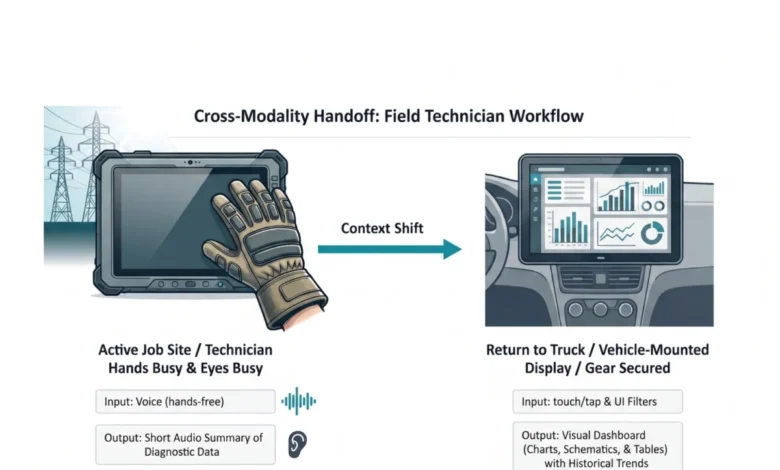
The resulting solution implemented an adaptive modality handoff designed to mitigate the identified barriers. While actively working on a job site, technicians use voice input for queries, allowing them to remain productive and safe, unhindered by thick gloves. The AI responds with concise audio summaries of immediate diagnostic data. This bypasses screen glare issues and allows technicians to maintain critical situational awareness of the high-voltage grid without looking away from dangerous equipment.
Upon returning to their service vehicle and securing safety gear, workflows automatically transition to a larger, 15-inch visual dashboard. This larger display, mounted inside the vehicle, provides adequate screen real estate for parallel processing of historical trend data and detailed electrical grid maps, a significant improvement over the limited space on a standard ruggedized tablet. This adaptive approach, born from a deep understanding of the technicians’ environment and intent, reduced diagnostic time by 20% and significantly increased daily tool adoption among field crews.

Designing for the Environment
An AI capability’s usability is inextricably linked to the interface that delivers it. Researchers and designers must resist the temptation to default to the path of least resistance—building a chatbot is fast and familiar, but it is often the wrong solution. Creating an interface that feels like a natural extension of a user’s existing workflow is more challenging, but it is where the true value lies.
The process must begin by leaving the screen. The Task Audit demands presence in the actual places where work occurs. The physical and social realities of these environments are not edge cases; they are the primary design brief. The future of AI interface design lies not in a single dominant modality, but in a diverse ecosystem of visual, vocal, haptic, and ambient interactions, meticulously calibrated to user intent and environmental context. The chat window is but one tool in this ecosystem, effective for specific jobs, but often misapplied to tasks for which it is ill-suited.
In order to maximize the likelihood of acceptance and use of AI capabilities, the modality must be fitted to the person and the place.
Where to Start
To immediately begin implementing these principles, a lightweight Task Audit can be conducted before the next design sprint. This involves spending a few hours observing a workflow in its actual environment, conducting a handful of interviews with users, and facilitating a short workshop with product managers and analysts to build a task inventory. While this may not yield exhaustive data, it provides sufficient evidence to make defensible modality recommendations, moving beyond convention and towards user-centric design. A Modality Task Audit Field Template can guide this process, allowing design and product teams to document specific physical barriers before any code is written.
The industry’s focus on training increasingly sophisticated AI models is commendable. However, equal attention must be paid to the human interfaces that deliver these powerful capabilities. A brilliant underlying model packaged within a lazy, ill-fitting text interface ultimately fails its users. By observing actual work environments and aligning interaction modalities accordingly, design teams can eliminate adaptation friction and create truly effective AI-powered experiences.