Revitalizing the Digital Dinosaur: Strategies for Enhancing User Experience in Legacy Systems

The persistent challenge of modernizing outdated digital infrastructure, often referred to as "legacy systems," is a critical hurdle for organizations worldwide. These systems, frequently developed over a decade ago, may be slow, unreliable, and possess significant accumulated user experience (UX) debt. Despite their flaws, they often form the backbone of daily operations, representing a substantial investment and a repository of embedded business logic and historical data. This article explores the complexities of improving the UX of such systems and outlines practical strategies for organizations to navigate this daunting landscape, drawing insights from experts in the field and providing a framework for successful digital transformation.
The Pervasive Reality of Legacy Systems
Legacy systems are far from being obsolete relics destined for immediate retirement. In many enterprises, they are deeply entrenched and indispensable for critical daily functions. These systems are frequently tailored to the specific needs of an organization, sometimes developed by external vendors without the benefit of comprehensive usability testing. Industry reports suggest that businesses can dedicate between 40% and 60% of their IT resources to managing, maintaining, and fine-tuning these aging platforms. While essential and vital, their continued operation incurs significant and often escalating costs.
One of the primary challenges is that these systems must coexist within a modern digital ecosystem. This often results in a patchwork of interfaces, where cutting-edge user experiences are juxtaposed with archaic and cumbersome functionalities, particularly in areas like data validation, error handling, and processing. This hybrid approach, while sometimes a pragmatic necessity, can lead to a fragmented and inconsistent user journey. The integration of a single, poorly designed, or unresponsive component within a complex user flow can undermine the perceived quality of the entire application, regardless of the significant design efforts invested elsewhere. Ultimately, addressing the UX shortcomings of legacy systems becomes an unavoidable imperative for sustained operational efficiency and user satisfaction.
Understanding the True Nature of Legacy UX Challenges
The perception that legacy products are on the verge of obsolescence is often misleading. In reality, they are frequently the silent workhorses powering critical business operations. Many of these systems have been extensively customized to meet the unique demands of their host organizations. It’s not uncommon for these platforms to have been built by third-party vendors, sometimes without the rigorous usability testing that modern product development mandates. The financial commitment to maintaining these systems is substantial, with companies often allocating between 40% and 60% of their IT budgets to their ongoing management and upkeep. This investment underscores their critical role, even as their operational costs continue to climb.
A significant hurdle arises from the fact that legacy systems are rarely standalone entities. They are often deeply integrated into a complex web of other technologies and processes. A decade-old system might be the foundation upon which newer, more modern applications are built. The original developers or implementers of these systems may no longer be with the company, leaving a void in institutional knowledge. This lack of documentation and expertise contributes to the "black box" nature of these systems, where their internal workings are poorly understood. This knowledge gap can be a major impediment when attempting to make improvements or migrate functionalities.

The design choices embedded within these systems reflect the technological constraints and design paradigms of their era. This can result in fragmented and inconsistent user interfaces, often created using discontinued design tools. When these legacy systems must interact with contemporary digital products, the resulting user experience can be jarring. It’s akin to assembling a Frankenstein’s monster of digital components – a blend of modern aesthetics and frustratingly slow, barely usable fragments, particularly evident in areas such as data validation, error messaging, and data processing. The cumulative effect of these design inconsistencies, coupled with the inherent performance limitations of older technologies, can create a user experience that is profoundly frustrating, despite the considerable efforts invested in other parts of the application.
Charting a Course: A UX Roadmap for Legacy Systems
The prospect of overhauling a legacy system can seem daunting, often leading to the initial inclination to discard it entirely and rebuild from scratch. However, this "big-bang" approach, while appealing in its comprehensiveness, is frequently unfeasible due to its exorbitant cost and protracted timeline. Such large-scale redesigns can take years to implement and require immense financial backing, often beyond the immediate reach of many organizations.
Crucially, legacy systems are not merely technological artifacts; they encapsulate invaluable institutional knowledge and represent years of refined business practices. Users and stakeholders, particularly in business-to-business (B2B) contexts, often develop a strong attachment to these systems, even with their known deficiencies. This attachment stems from the fact that these systems are deeply interwoven with the core operations of the business, and any disruption is perceived as a significant risk. Corporate users, by nature, tend to be risk-averse. Therefore, rather than outright dismissal, a more prudent strategy involves meticulously gathering and preserving the existing knowledge embedded within the legacy system.

Building on Existing Knowledge: The Foundation of Legacy Improvement
The inherent value of legacy systems lies not just in their functionality but in the accumulated business intelligence they represent. These systems, despite their age, perform essential tasks and have often been extensively customized over time to meet specific organizational needs. Stakeholders and end-users, particularly in business-to-business environments, frequently exhibit a strong reliance on these systems, even acknowledging their drawbacks. This deep-seated attachment arises because these platforms are central to daily business operations, and any proposed changes are viewed with considerable apprehension due to the perceived risks involved. Consequently, a direct, wholesale replacement is often not a viable or desirable option. Instead, a more pragmatic approach involves leveraging the existing knowledge base as a starting point for improvement.
Mapping Existing Workflows and Dependencies: Unveiling the Ecosystem
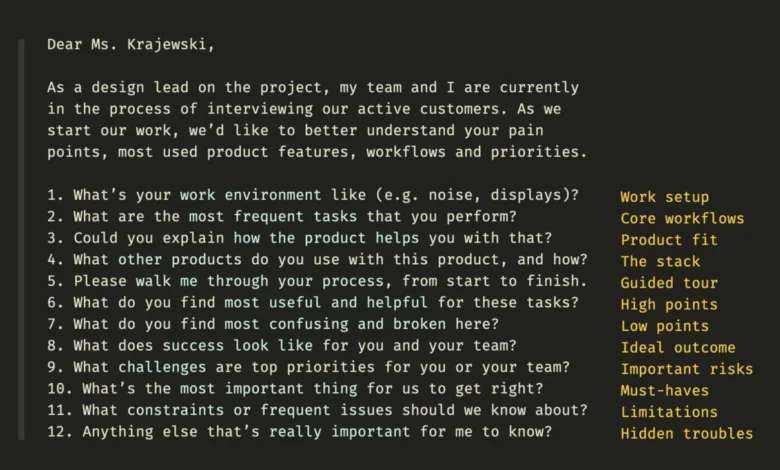
The initial and most critical step in addressing legacy UX is to comprehensively understand how and where these systems are utilized. This discovery process may reveal that seemingly isolated components of a legacy system are, in fact, integrated across a wide array of platforms, including internal business dashboards, external agency tools, and third-party services that incorporate the organization’s product.

A systematic approach to mapping these existing workflows and dependencies is paramount. This process often involves creating a visual representation, perhaps on a collaborative board, to illustrate the interconnectedness of various system components. It is essential to involve key stakeholders and, crucially, the "heavy users" – those individuals who rely most extensively on the legacy system for their daily tasks. While it may be impossible to fully "open the black box" of the underlying technology, gaining insights from the perspectives of those who depend on it can illuminate its functional areas and critical pathways.
Furthermore, it is common for legacy systems to have their own dependencies on other legacy systems, some of which may be even older and in a more precarious state. These interdependencies might not be apparent during a high-level redesign initiative, primarily because their existence and scope are unknown. By diligently documenting current workflows and dependencies, a clearer picture of the entire ecosystem emerges. This exercise should include capturing user behavior patterns, the frequency with which specific features are accessed, the desired outcomes of various tasks, the complexity of these tasks, and recurring patterns in user interactions. This detailed mapping provides a foundational understanding of how the legacy system operates within its broader context.
Following this mapping exercise, a critical step is to present these findings to users and stakeholders. This process helps to build confidence and assurance that no vital aspects of the current system have been overlooked. It also serves to visualize the intricate dependencies that the legacy tool has on various individuals and departments. It is important to recognize that replacing a legacy system is never a purely technical endeavor; it inherently involves migrating associated dependencies, established workflows, and ingrained operational habits.
Selecting the Right UX Migration Strategy: A Phased Approach

With a comprehensive understanding of the existing landscape, the next crucial decision involves selecting the most appropriate UX migration strategy. The choice typically lies between a "big-bang" relaunch and a more incremental upgrade. Several strategic options can be considered before committing to a path forward:
- Re-hosting (Lift and Shift): This involves moving the legacy application to a new infrastructure, such as cloud-based servers, with minimal changes to the application itself. While it can offer immediate cost savings and improved performance, it does not fundamentally address UX issues.
- Re-platforming: This approach involves migrating the application to a new platform or operating system, often with some modifications to optimize for the new environment. It can provide performance benefits and pave the way for future modernization, but UX improvements are still secondary.
- Refactoring: This involves restructuring the existing code of the legacy application to improve its performance, maintainability, and scalability, without changing its external behavior. This can indirectly lead to UX improvements by making the system more responsive.
- Re-architecting: This entails significant modifications to the application’s architecture to leverage modern technologies and design patterns, often breaking down monolithic systems into smaller, more manageable microservices. This approach offers substantial potential for UX enhancements.
- Rebuilding (Rip and Replace): This is the most extensive strategy, involving the complete redesign and redevelopment of the application from scratch using modern technologies and UX principles. This offers the greatest opportunity for transformative UX improvements but also carries the highest risk and cost.
When faced with a system that has been meticulously refined and extensively customized over many years, a complete rebuild within a short timeframe is rarely feasible. The years of development and embedded expertise cannot be replicated instantaneously. Therefore, a strategy of gradual, incremental improvement is often the most effective. This approach involves the continuous involvement of users, stakeholders, and engineers, ensuring that the transition is managed with sufficient buffer time and incorporates consistent feedback loops.
Key Considerations for Incremental Migration:
- Prioritization of Features: Not every feature of a legacy system needs to be migrated to a new platform. A thorough analysis should identify critical functionalities that deliver the most business value and are essential for user workflows.
- Phased Rollout: Implementing changes in stages allows for controlled deployment and minimizes the risk of widespread disruption. This can involve releasing new features to a pilot group of users before a broader rollout.
- User Feedback Loops: Establishing robust mechanisms for collecting and acting upon user feedback throughout the migration process is crucial. This ensures that the evolving system meets user needs and expectations.
- Continuous Integration and Deployment (CI/CD): Implementing CI/CD pipelines can accelerate the development and deployment of incremental updates, allowing for more agile responses to user feedback and evolving business requirements.
The Broader Impact and Implications of Legacy System Modernization

Modernizing legacy systems is not merely a technological undertaking; it is a strategic imperative with far-reaching implications for an organization’s competitiveness, operational efficiency, and user satisfaction. The success of such initiatives can foster significant improvements in employee productivity, reduce operational costs, and enhance the organization’s ability to adapt to rapidly evolving market demands.
The implications of failing to address legacy UX challenges are equally significant. Outdated systems can lead to decreased employee morale, hinder innovation, increase the risk of security breaches, and ultimately, result in a loss of market share to more agile competitors. The financial burden of maintaining inefficient legacy systems can divert resources from strategic investments in new technologies and business growth.
Navigating the Human Element: Stakeholder Management and Trust Building
The process of revamping a legacy system is often characterized by intense scrutiny, skepticism, and apprehension from various parties. Stakeholders and users may express concerns about potential disruptions, the loss of familiar functionalities, and the perceived risks associated with change. Therefore, building strong, collaborative relationships with key stakeholders and influential users is paramount. Sharing ownership of the transformation process and ensuring their active participation is essential for gaining their support and buy-in.

Stakeholders often articulate a desire for both the preservation of existing functionalities and the incorporation of new features. They may focus on edge cases, exceptions, and minor tasks, questioning design decisions and occasionally providing conflicting feedback. The expectation of flawless performance from day one of a new system is also common. The most effective approach is to involve them throughout the entire design and development lifecycle.
A successful pilot project can serve as a powerful tool for building trust and demonstrating the tangible benefits of the modernization effort. Regular progress reporting, transparent communication, and accounting for intensive phases of rigorous testing with legacy users are critical components of this process. By involving users in the testing and validation phases, organizations can ensure that the new system not only meets technical requirements but also aligns with the practical needs and expectations of those who will be using it daily.
Conclusion: A Transformative Journey with Lasting Rewards
Revitalizing a legacy system presents a formidable challenge, but one that rarely offers the option of failure. The scope of such projects extends beyond the migration of technical components to encompass the successful transition of users and their established workflows. Operating at the very core of a business means that these initiatives attract considerable attention and are often met with a mixture of anticipation, doubt, and concern.

The rewards for successfully navigating this complex terrain can be substantial. A well-executed legacy system modernization can lead to a team being "remembered, respected, and rewarded" for years to come. It signifies a commitment to innovation, efficiency, and user-centricity, ultimately positioning the organization for sustained success in an increasingly digital world. The journey may be arduous, but the impact of transforming these digital dinosaurs into agile, user-friendly platforms can redefine an organization’s operational capabilities and its competitive standing.
For those seeking to deepen their understanding and practical application of measuring and demonstrating the impact of UX work, resources like Vitaly Friedman’s "Measure UX & Design Impact" offer valuable insights. This practical guide, available as a video course and through live training sessions, focuses on helping designers and UX leads effectively track and visualize the business impact of their contributions. Such resources are instrumental in building the business case for significant UX investments, particularly when addressing the complexities of legacy systems.