How to Secure Your Astro Web Application Using Native HTTP Basic Authentication and Middleware


Building modern, high-performance web applications often involves balancing speed, aesthetic design, and robust security protocols, particularly during the developmental lifecycle. For developers utilizing Astro—a popular frontend framework designed for content-driven websites—securing a project prior to its official public launch is a frequent operational requirement. Whether an application is a work-in-progress destined for client review, a proprietary internal dashboard, or a staging environment intended solely for quality assurance testing, preventing premature indexing by search engines and unauthorized public access is paramount.
Traditionally, securing such web properties required complex configurations such as setting up a virtual private network (VPN), configuring reverse proxy authentication layers like Nginx htpasswd modules, or installing external Node.js authentication packages. However, these traditional methods introduce unnecessary technical debt, additional configuration files, and multiple points of failure. Fortunately, Astro features a native, highly efficient middleware architecture that executes whenever an application route or server endpoint is requested. By combining this built-in middleware system with HTTP Basic Authentication—a standardized authentication scheme supported universally by all modern web browsers—developers can establish a secure perimeter around their applications without relying on third-party dependencies or external infrastructural overhead.
Background Context and Technological Evolution
The challenge of securing pre-production web assets has evolved alongside modern web architecture. In the era of purely server-rendered monoliths, restricting access at the web server level via Apache .htpasswd files or Nginx configuration blocks was standard industry practice. As the web transitioned toward Jamstack architectures and static site generators (SSGs), security shifted entirely to hosting provider dashboards, where platforms offered platform-level password protection. However, modern frameworks like Astro occupy a hybrid space, supporting static generation, server-side rendering (SSR), and incremental static regeneration simultaneously.
Astro’s middleware capabilities, introduced to provide fine-grained control over the request-response lifecycle, bridge the gap between static optimization and dynamic security enforcement. By intercepting incoming HTTP requests at the edge or server runtime level, developers can evaluate security headers before any page rendering logic occurs. This capability is vital for teams utilizing modern edge runtimes—such as Cloudflare Pages, Vercel, Netlify, or Node.js environments—where on-demand rendering dictates the availability of runtime request data.
Prerequisites and Technical Requirements
Implementing native HTTP Basic Authentication within an Astro project requires specific environmental conditions. First, the project must be configured to support on-demand rendering (server-side rendering) rather than relying exclusively on build-time static HTML generation. This requires an appropriate Astro adapter matching the target deployment platform. Second, the development environment must support runtime environment variables, which are utilized to securely store administrative credentials without hardcoding sensitive data into the source code repository. Finally, developers need a basic understanding of asynchronous JavaScript functions, standard HTTP header manipulation, and Base64 encoding mechanisms.
Creating the Middleware Infrastructure
Astro handles middleware execution through a designated file located at src/middleware.ts (or src/middleware.js for JavaScript-based projects). This file acts as the interceptor for all incoming web traffic matching the project’s routing rules. The foundational structure utilizes Astro’s defineMiddleware utility function, which wraps the request handler and exposes the request context alongside a next callback function to continue the execution pipeline.
import  defineMiddleware  from 'astro:middleware';

export const onRequest = defineMiddleware(async (context, next) =>
  // Authentication validation logic executes here
  return next();
);
The primary objective of this middleware is to inspect every incoming request header before the application’s routing engine processes the requested page component. By evaluating the presence and accuracy of specific authorization parameters, the middleware determines whether to permit access or issue an immediate challenge response.
Writing the Authentication Validation Logic
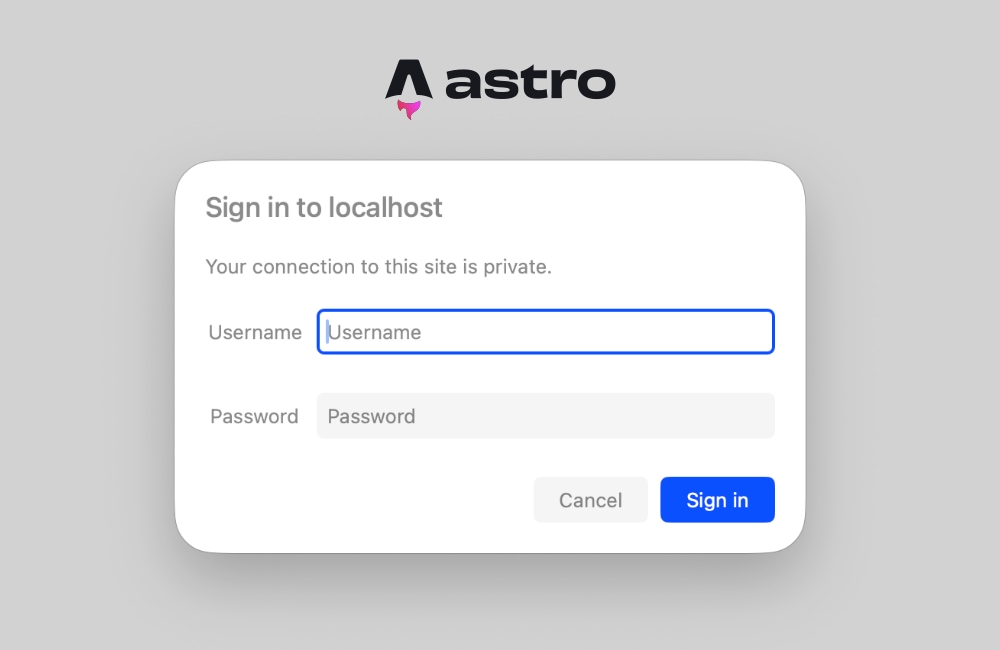
HTTP Basic Authentication operates through a stateless challenge-response mechanism. When a client requests a protected resource without prior authentication, the server responds with a 401 Unauthorized status code accompanied by a WWW-Authenticate header. Upon encountering this header, the client browser automatically presents a native operating system or browser-level login dialog box to the user. Once the user submits their credentials, the browser automatically encodes them using Base64 format and transmits them back to the server within the Authorization header on all subsequent requests.
To implement this logic within Astro middleware, developers construct a helper function that evaluates the request headers against pre-configured environment variables:
function isAuthenticated(request: Request): boolean The execution flow of this verification function is straightforward. If the administrative environment variables have not been explicitly defined, the system gracefully defaults to allowing traffic to prevent accidental lockouts during local development initialization. If the Authorization header is entirely absent or does not conform to the Basic authentication scheme standard, the function returns false. When a header is present, the utility strips the initial prefix, decodes the Base64 string utilizing the global atob method, splits the resulting colon-separated string into user and password components, and performs a strict equality comparison against the stored environment credentials. For legacy Node.js environments lacking global atob support, alternative decoding mechanisms such as Buffer.from(encoded, 'base64').toString() can be implemented interchangeably.
Handling the Unauthorized Response
When the authentication validation function determines that a request lacks valid credentials, the middleware must intercept the request pipeline and issue an explicit 401 response. This response instructs the client browser to render its native authentication prompt.
export const onRequest = defineMiddleware(async (context, next) =>
  if (!isAuthenticated(context.request))
    return new Response('Unauthorized',
      status: 401,
      headers:
        'WWW-Authenticate': 'Basic realm="Staging Environment", charset="UTF-8"',
      ,
    );


  return next();
);
The realm parameter embedded within the WWW-Authenticate header serves as an identifier displayed to the user within the browser’s native login dialog box. Developers can customize this string to accurately reflect the specific environment, such as "Client Staging", "Internal Dashboard", or "QA Testing". Because this entire authentication handshake is handled natively by the browser’s networking layer, developers do not need to construct custom login forms, manage frontend state management libraries, or store session tokens in local storage.
Configuring Environment Variables
Security best practices dictate that authentication credentials must never be committed directly to version control systems like Git. Instead, administrative usernames and passwords should be injected securely via runtime environment variables. Astro accesses these variables using the import.meta.env object for server-side execution contexts.
For local development workflows, developers establish a .env file located in the root directory of the project:
BASIC_AUTH_USER=staging-administrator
BASIC_AUTH_PASS=secure-staging-password-2026
When deploying the application to production or staging hosting providers—such as Cloudflare Pages, Vercel, Netlify, AWS Amplify, or traditional VPS environments—these exact environment variable keys and corresponding secure values must be provisioned within the platform’s administrative dashboard settings. Ensuring parity between local and remote environment configurations guarantees consistent security behavior across the entire software deployment lifecycle.
Testing and Verification Procedures
Following the implementation of the middleware file and the configuration of environment variables, developers can initiate the local development server using the standard package manager command:
npm run devUpon navigating to the local development URL within a web browser, the user is immediately greeted by the browser’s native authentication challenge dialog. Entering the correct credentials permits standard rendering of the application layout. Conversely, clicking cancel or submitting incorrect credentials results in a basic plaintext "Unauthorized" response page.
Rigorous testing across multiple deployment targets confirms that this architecture functions seamlessly on modern edge platforms. For instance, deployments executed on Cloudflare Pages operating with SSR adapters successfully intercept incoming requests at the network edge, ensuring that unauthenticated users never consume server rendering compute resources or view preliminary code iterations.
Troubleshooting Common Integration Challenges
A frequent obstacle encountered by developers adopting server-side middleware in Astro involves routing misconfigurations related to static pre-rendering. When attempting to access Astro.request.headers directly inside a static page component, developers may encounter runtime exceptions matching the following error signature:
Astro.request.headers was used when rendering the route `src/pages/index.astro'. Astro.request.headers is not available on prerendered pages.This error manifests because Astro defaults to static pre-rendering for pages unless explicitly configured otherwise. During the static build phase, no live HTTP request exists, meaning request headers are fundamentally unavailable. Even if the middleware successfully intercepts unauthorized requests at the entry point, individual page components attempting to evaluate request data during static generation will trigger compilation failures.
Resolving this issue requires adjusting the project’s rendering strategy. Developers have two primary architectural options. The first option involves explicitly opting individual pages out of static generation by declaring a prerender flag directly within the page frontmatter:
---
export const prerender = false;
---
This declaration instructs the Astro build engine to process the specific page on-demand during each request lifecycle, granting full access to request headers, cookies, and runtime environment data.
The second, more comprehensive option involves migrating the entire project to server-side rendering by modifying the central configuration file:
// astro.config.mjs
import  defineConfig  from 'astro:config';
import node from '@astrojs/node';

export default defineConfig(
  output: 'server',
  adapter: node(
    mode: 'standalone'
  )
);
Setting the output mode to 'server' ensures that all application routes are rendered dynamically on demand by default. Developers retain the flexibility to selectively opt specific static assets or informational pages back into static pre-building by applying export const prerender = true on a case-by-case basis. For applications requiring comprehensive authentication coverage across every available route, utilizing output: 'server' represents the most robust and maintainable architectural pattern.
Broader Impact and Implications for Web Development
The implementation of native HTTP Basic Authentication via Astro middleware highlights a broader industry trend toward lightweight, dependency-free development practices. By leveraging standardized web protocols and framework-native primitives, engineering teams can achieve enterprise-grade security controls without inflating bundle sizes, introducing software supply chain vulnerabilities, or increasing operational overhead.
Furthermore, this approach eliminates the friction traditionally associated with securing client review cycles. Stakeholders can review work-in-progress deployments securely and intuitively using native browser interfaces, streamlining feedback loops and accelerating time-to-market. As web frameworks continue to evolve toward edge-native execution models, leveraging middleware for perimeter security demonstrates how native platform capabilities can replace heavy third-party solutions, resulting in faster, cleaner, and more secure web applications.