The modern web development landscape places an unprecedented emphasis on user experience, micro-interactions, and visual feedback. As applications scale in complexity, frontend engineers increasingly turn to robust, accessible component libraries to accelerate delivery without compromising WCAG compliance or keyboard navigation standards. Among these, React Aria Components—developed and maintained by Adobe—has emerged as a foundational toolkit for building sophisticated, accessible design systems. Operating as a headless library, React Aria provides the underlying logic, state management, and accessibility attributes for complex UI patterns, intentionally leaving out visual styling and animations. While this headless architecture offers absolute design freedom for internal dashboards and enterprise software, customer-facing applications often demand the polish of smooth motion, easing curves, and spatial transitions to signal high software quality. Addressing this gap requires a deliberate strategy for bridging headless logic with browser-native or JavaScript-driven animation frameworks.
Understanding the Headless Paradigm and the Need for Motion
To appreciate the challenge of animating headless components, one must first examine the architecture of libraries like React Aria. Unlike traditional component libraries that bundle styles—such as Material-UI or Chakra UI—headless libraries decouple behavior from presentation. When a developer implements a modal, popover, or menu using React Aria, the library handles focus trapping, screen reader announcements, pointer interactions, and keyboard navigation. However, the DOM elements are rendered with zero default styles or transition hooks. Consequently, when a user triggers a popover or a modal, the element appears instantaneously, and when closed, it is pruned from the Document Object Model (DOM) without visual grace.
In consumer software, sudden layout shifts and abrupt UI appearances can disorient users, increasing cognitive load and diminishing the perceived quality of the application. Industry research into user experience consistently demonstrates that well-crafted transitions act as cognitive anchors. They help users maintain spatial awareness, understand the relationship between interface elements, and perceive software as responsive and reliable. Therefore, bridging the gap between headless functional components and fluid animation is no longer a luxury; it is a core requirement for modern web product engineering.
The Native CSS Approach: Leveraging Data States for Lightweight Transitions
For many production environments, the most efficient path to introducing motion avoids heavy JavaScript animation libraries entirely. Browsers have evolved to handle complex rendering and compositing efficiently via CSS, reducing the risk of main-thread bottlenecks. React Aria facilitates this native approach by automatically injecting specialized data attributes into conditionally mounting overlay components, including Popover, Modal, ModalOverlay, Tray, and Menu.
When an overlay component transitions into or out of view, React Aria applies the [data-entering] and [data-exiting] attributes. These attributes serve as lifecycle hooks within stylesheets, signaling the browser to apply specific transition or keyframe rules. Crucially, React Aria manages the unmounting lifecycle of the component, intercepting the removal request and keeping the element alive in the DOM until the exit transition completes.
Implementing a basic fade and slide effect requires minimal CSS configuration:
.react-aria-Popover
  transition: opacity 200ms ease, transform 200ms ease;


.react-aria-Popover[data-entering],
.react-aria-Popover[data-exiting]
  opacity: 0;
  transform: translateY(-8px);
In this architecture, when the Popover mounts, it momentarily holds the [data-entering] state before transitioning to its steady state, smoothly fading in while translating downward by eight pixels. Conversely, upon closure, the component enters the [data-exiting] state, executing the reverse transformation before the library safely removes it from the DOM. This method introduces zero JavaScript runtime overhead, utilizes hardware-accelerated CSS properties, and preserves optimal bundle sizes.
Advanced CSS Keyframe Control
While standard CSS transitions suffice for symmetrical fade-in and fade-out effects, advanced interface designs often demand asymmetrical timing functions. For instance, an entry animation should typically feature an ease-out curve—starting quickly and decelerating smoothly as it settles into place—while an exit animation benefits from an ease-in curve, accelerating away from the user’s view to convey responsiveness.
Developers can achieve this level of control by utilizing CSS @keyframes in conjunction with React Aria data states:
.react-aria-Popover[data-entering]
  animation: popover-enter 200ms cubic-bezier(0.16, 1, 0.3, 1);


.react-aria-Popover[data-exiting]
  animation: popover-exit 150ms cubic-bezier(0.7, 0, 0.84, 0);


@keyframes popover-enter
  from
    opacity: 0;
    transform: translateY(-8px);


@keyframes popover-exit
  to
    opacity: 0;
    transform: translateY(-4px);
By separating entry and exit keyframes, engineering teams maintain precise control over duration, easing, and spatial displacement without introducing external dependencies. It is important to note, however, that these dynamic data states are restricted to conditional overlay components. Non-overlay components—such as buttons, switches, and sliders—remain permanently mounted within the DOM, relying instead on pseudo-classes like :hover, :focus, or state attributes like [data-pressed] and [data-selected] for their interactive transitions.
Elevating Motion with Spring Physics and JavaScript Libraries
While CSS transitions and keyframes handle the vast majority of standard UI movements, certain interactive scenarios require capabilities beyond the scope of native stylesheets. Complex requirements such as spring-based physics, gesture-driven drag interactions, layout-aware animations, and orchestrating sequenced choreography across multiple component trees necessitate a dedicated JavaScript animation engine.
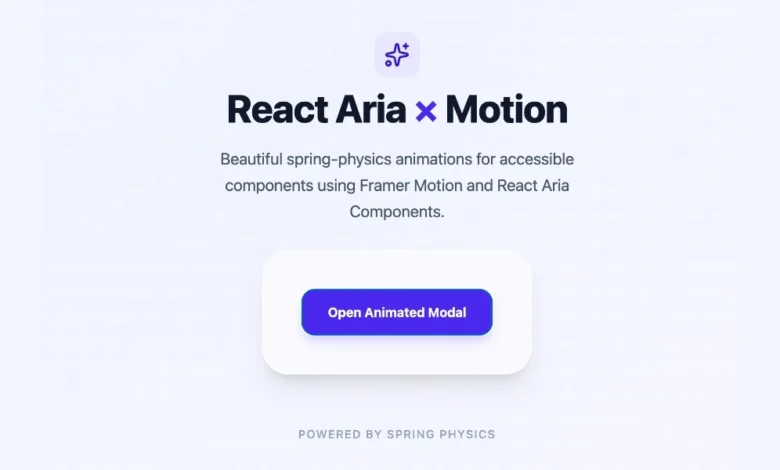
Among the ecosystem options, Motion (formerly Framer Motion) has gained widespread adoption for its declarative API and robust physics engine. Integrating Motion with React Aria Components is achieved through the motion.create() factory method, which wraps any headless React Aria component and endows it with advanced animation props such as initial, animate, exit, and transition.
To implement a spring-animated modal using this combination, developers first install the package:
npm install motionNext, the React Aria components are wrapped to create motion-compatible equivalents:
import  motion  from "motion/react";
import  Modal, ModalOverlay  from "react-aria-components";

const MotionModal = motion.create(Modal);
const MotionModalOverlay = motion.create(ModalOverlay);
When integrating these components into a functional view, managing the unmount lifecycle requires pairing Motion’s AnimatePresence component with React Aria’s state management hooks. This ensures that the exit animations execute fully before the component is unmounted from the virtual DOM tree:
import  AnimatePresence, motion  from "motion/react";
import  DialogTrigger, Button, Modal, ModalOverlay  from "react-aria-components";
import  useState  from "react";

const MotionModal = motion.create(Modal);
const MotionModalOverlay = motion.create(ModalOverlay);

function AnimatedModal()
  let [isOpen, setOpen] = useState(false);

  return (
    <>
      <Button onPress=() => setOpen(true) className="px-4 py-2 bg-blue-600 text-white rounded-md">
        Open Modal
      </Button>

      <AnimatePresence>
        isOpen && (
          <MotionModalOverlay
            isOpen
            onOpenChange=setOpen
            className="fixed inset-0 z-50 bg-black/50 backdrop-blur-sm"
            initial= opacity: 0
            animate= opacity: 1
            exit= opacity: 0
            transition= duration: 0.2
          >
            <MotionModal
              className="fixed inset-x-4 top-1/4 max-w-lg mx-auto bg-white rounded-xl p-6 shadow-2xl"
              initial= scale: 0.95, y: 20
              animate= scale: 1, y: 0
              exit= scale: 0.95, y: 20
              transition=
                type: "spring",
                damping: 25,
                stiffness: 300

            >
              <h2 className="text-xl font-semibold mb-2">Spring Physics Modal</h2>
              <p className="text-gray-600">This component enters with authentic physical momentum and exits smoothly.</p>
              <Button onPress=() => setOpen(false) className="mt-4 px-3 py-1 bg-gray-200 rounded">
                Close
              </Button>
            </MotionModal>
          </MotionModalOverlay>
        )
      </AnimatePresence>
    </>
  );
In this pattern, the AnimatePresence wrapper monitors the presence of the child elements. When isOpen switches to false, AnimatePresence halts the immediate removal of the DOM nodes, allowing Motion to calculate and render the values specified in the exit prop. Once the transition concludes, the element is safely unmounted.
Comparative Analysis: Choosing the Right Animation Strategy
Engineering leadership and frontend architects must evaluate project requirements carefully when selecting an animation strategy for React Aria components. Adopting an overly complex JavaScript library for simple fades can unnecessarily inflate bundle sizes and impact execution performance on low-powered mobile devices. Conversely, restricting an application to basic CSS transitions when building gesture-heavy interfaces can lead to a rigid, unrefined user experience.
| Approach | Primary Mechanism | Ideal Use Cases | Performance Impact | Bundle Overhead |
|---|---|---|---|---|
| CSS Transitions | Browser-native rendering via [data-entering] and [data-exiting] hooks |
Simple fades, sliding menus, tooltips, dropdowns, and basic modal reveals | Extremely High (Hardware-accelerated compositing) | Zero (Native browser capability) |
| CSS Keyframes | Custom timeline rules with asymmetrical entry and exit easing | Polished popovers, dropdowns requiring distinct entry and exit acceleration curves | Extremely High | Zero |
| Motion Library | motion.create() wrapper paired with AnimatePresence and spring physics |
Drag gestures, layout layout shifts, complex choreography, spring physics | Moderate to High (Depends on complexity of JS calculations) | Moderate (Requires external dependency) |
Industry Best Practices and Architectural Guidelines
As web applications continue to prioritize inclusive design and high performance, the integration of headless UI libraries with animation frameworks represents a mature standard in frontend engineering. Industry experts recommend adhering to progressive enhancement principles when styling and animating accessible components.
Developers should initiate all styling and transition work using native CSS and React Aria’s built-in data attributes. This foundation guarantees that core visual feedback is established with maximum performance and minimum dependency risk. Only when product requirements explicitly call for advanced physical interactions, multi-element orchestration, or complex gesture tracking should engineering teams introduce JavaScript-driven animation libraries like Motion.
Furthermore, maintainability and accessibility must remain paramount throughout the animation lifecycle. Designers and developers must ensure that transition durations remain brief—typically between 150 milliseconds and 300 milliseconds—to prevent interface lag. Long animations can frustrate users and hinder efficient task completion. Additionally, applications should consistently respect user operating system preferences regarding motion reduction by utilizing media queries such as prefers-reduced-motion. By combining the robust accessibility foundations of React Aria Components with thoughtful, performant transition strategies, development teams can deliver digital products that meet rigorous enterprise standards while providing the fluid, polished interactions modern users expect.