How to Secure Your Astro Web Application Using Built-In Middleware and HTTP Basic Authentication


The modern web development ecosystem offers an abundance of third-party libraries, external services, and complex deployment pipelines designed to solve common security challenges. However, for developers utilizing the Astro web framework, securing a staging environment, client preview, or internal tool does not necessitate the integration of heavy external packages or cumbersome configuration files. By leveraging Astro’s native middleware architecture alongside the standardized HTTP Basic Authentication protocol, development teams can establish a robust, dependency-free security layer in minutes. This approach eliminates the maintenance overhead associated with external npm packages, VPN setups, or web server-level configurations like Nginx authentication files, streamlining both the development and deployment lifecycles.
Background Context of Astro and Modern Rendering Paradigms
Astro has experienced a meteoric rise in popularity within the front-end development community since its initial release, celebrated primarily for its "Server Islands" architecture and its unique focus on delivering zero-JavaScript runtime overhead by default for static content. Traditionally, Astro projects defaulted to static site generation (SSG), compiling entire websites into raw HTML assets during the build phase. While this paradigm yields exceptional performance metrics and low hosting costs, it introduces architectural friction when developers need to implement dynamic, request-time security measures such as password protection.
To address these dynamic use cases, the Astro framework introduced comprehensive support for on-demand server-side rendering (SSR) via server adapters compatible with platforms such as Node.js, Vercel, Netlify, Cloudflare Pages, and AWS. Concurrently, the platform rolled out a robust middleware system. Middleware in Astro intercepts HTTP requests before they reach the page rendering engine, allowing developers to execute arbitrary JavaScript code—such as session validation, header manipulation, and authentication checks—globally across the application. Combining this middleware capability with HTTP Basic Authentication—a challenge-response mechanism natively understood by every modern web browser—provides a streamlined mechanism for protecting sensitive web assets without altering the underlying user interface or introducing external authentication providers.
Step-by-Step Implementation Chronology
Implementing HTTP Basic Authentication within an Astro project requires a systematic approach, beginning with environment configuration and culminating in rigorous deployment testing. Developers can establish this system by following a precise technical chronology.
Prerequisites and Environment Configuration
The foundational step involves defining the security credentials that the server will use to validate incoming requests. Because hardcoding usernames and passwords directly into source code introduces severe security vulnerabilities, these credentials must be managed via environment variables.
In a standard Astro project, developers create a .env file in the root directory during local development. Within this file, two specific variables are declared: BASIC_AUTH_USER and BASIC_AUTH_PASS. For production environments, these exact keys must be populated within the hosting provider’s dashboard—such as Cloudflare Pages’ environment variable settings or Vercel’s project configuration panel.
Using Astro’s server-side environment utility, import.meta.env, the application securely accesses these variables at runtime without exposing sensitive strings to the client-side bundle. If either variable is omitted, developers can configure the system to gracefully bypass authentication to prevent accidental lockouts during local testing phases.
Constructing the Middleware Handler
With the environment configured, the next phase involves establishing the middleware file. Astro expects middleware logic to reside within src/middleware.ts (or src/middleware.js for JavaScript projects).
The core of this file utilizes Astro’s defineMiddleware utility function. This wrapper accepts an asynchronous callback function containing two primary arguments: context, which provides access to the incoming Request object, cookies, and local state; and next, a function that advances the request pipeline to the targeted page component if authorization succeeds.
Within this middleware file, developers author a dedicated authentication helper function—typically named isAuthenticated. This function performs several sequential checks:
- It verifies whether the
BASIC_AUTH_USERandBASIC_AUTH_PASSenvironment variables are defined. - It inspects the incoming request headers for the presence of an
Authorizationheader. - It validates that the header string begins with the
Basicprefix, indicating standard base64-encoded credentials. - It decodes the base64 string using native browser or Node.js runtime utilities—such as
atob()orBuffer.from()—splits the resulting credential pair at the colon separator, and rigorously compares the provided username and password against the environment variables.
Handling Unauthorized Requests and the 401 Challenge
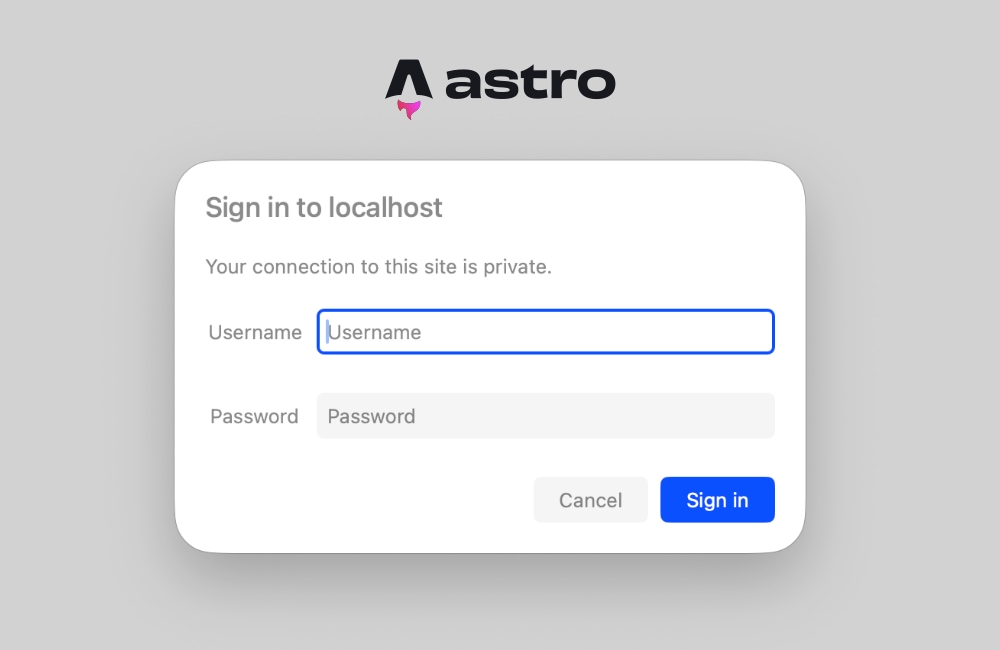
When an unauthenticated user attempts to access a protected route, or when incorrect credentials are supplied, the middleware must intercept the request and return a standardized HTTP response. Rather than redirecting the user to a custom login form—which requires additional routing logic and UI components—the server issues a 401 Unauthorized status code accompanied by a specific WWW-Authenticate header.
The WWW-Authenticate header instructs the browser to natively trigger a secure, modal login prompt. This dialog box displays a realm parameter—such as Basic realm="Staging"—which informs the user of the context in which they are authenticating. Upon entering their credentials, the browser automatically encodes them and appends the Authorization header to all subsequent HTTP requests made during that session. This native browser behavior completely removes the necessity for custom client-side JavaScript or dedicated login user interfaces.
Technical Analysis and Troubleshooting Common Pitfalls
While implementing HTTP Basic Authentication via Astro middleware is conceptually straightforward, developers frequently encounter specific architectural hurdles, most notably related to Astro’s hybrid rendering model.
The Prerendering Conflict
A prevalent issue developers face when securing Astro applications involves runtime errors concerning request headers. If a project combines static pages with server-rendered routes, attempting to access properties such as Astro.request.headers inside a static page component will trigger a build-time or runtime exception stating that request headers are unavailable on prerendered pages.
This occurs because Astro prerenders static pages during the build phase, generating flat HTML files in the absence of a live HTTP server or incoming request context. Even if the middleware successfully intercepts unauthorized traffic, individual page components attempting to read request data during static generation will fail.
Resolving the Prerendering Conflict
To mitigate this issue, developers have two primary architectural options:
- Granular Opt-Out: Developers can explicitly disable prerendering on individual page components by exporting a configuration flag within the page’s frontmatter:
export const prerender = false;. This instructs Astro to render that specific route on-demand for every incoming request, ensuring that request headers, cookies, and middleware context remain fully accessible. - Global Server Rendering: For applications intended to sit entirely behind a password wall—such as internal client previews, corporate dashboards, or staging environments—developers can switch the entire project’s output mode to server-side rendering by modifying the
astro.config.mjsconfiguration file:
// astro.config.mjs
export default defineConfig(
  output: 'server',
);
Configuring the project output to server ensures that all pages are rendered on demand by default. Developers retain the flexibility to opt specific public pages back into static generation by explicitly defining export const prerender = true where necessary. For fully secured applications, the global server output mode represents the most reliable approach, guaranteeing that authentication middleware executes seamlessly across every route.
Broader Industry Implications and Best Practices
Implementing authentication at the middleware layer reflects a broader industry movement toward edge computing and lightweight serverless architectures. By executing security logic directly within edge-compatible runtimes—such as Cloudflare Workers or Vercel Serverless Functions—development teams reduce their reliance on monolithic backend servers or expensive enterprise security gateways.
However, security engineers emphasize that HTTP Basic Authentication, while exceptionally useful for staging environments, internal tools, and rapid client previews, possesses inherent limitations. Because credentials are transmitted as base64-encoded strings rather than cryptographically hashed tokens, Basic Authentication must always be deployed over HTTPS to prevent interception via man-in-the-middle attacks. Furthermore, for production-grade consumer-facing applications, developers should transition from HTTP Basic Authentication to robust identity and access management (IAM) solutions, such as OAuth 2.0, OpenID Connect, or token-based session cookies backed by secure database stores.
Conclusion
Securing an Astro web application does not require heavy configuration files, complex third-party dependencies, or inflated hosting costs. By combining Astro’s native middleware architecture with standard HTTP Basic Authentication, developers can erect a reliable, password-protected security perimeter using fewer than thirty lines of clean, maintainable JavaScript or TypeScript code. Whether safeguarding a client work-in-progress on Cloudflare Pages or locking down internal tooling before a public launch, this built-in approach offers an efficient, performant, and secure solution that honors Astro’s core philosophy of simplicity and speed.