Building modern, high-performance web applications often requires balancing public accessibility with stringent access controls. As developers increasingly adopt Astro—the popular web framework designed for content-driven websites—the necessity to secure work-in-progress client previews, internal tools, and staging environments has become a critical operational requirement. Traditionally, securing a web property involved complex infrastructure changes, such as implementing virtual private networks (VPNs), configuring NGINX reverse-proxy authentication, or installing third-party npm modules that introduce bloat and potential security vulnerabilities.
However, modern architectural paradigms within Astro offer a streamlined native alternative. By combining Astro’s built-in middleware system with standard HTTP Basic Authentication, developers can secure entire applications or specific subdirectories using roughly twenty-five lines of custom code. This approach relies entirely on web standards supported universally by modern web browsers, eliminating external dependencies while maintaining the high performance and flexibility that define the Astro ecosystem.
The Architectural Evolution of Astro and Server-Side Rendering
Released initially as a static site generator (SSG) focused on shipping zero client-side JavaScript by default, Astro has evolved significantly. Modern iterations of the framework support on-demand rendering (formerly known as Server-Side Rendering or SSR), enabling developers to choose whether individual pages are pre-rendered at build time or generated dynamically upon request. This flexibility is what makes native HTTP authentication viable within the framework without requiring auxiliary infrastructure.
In enterprise and agency environments, the deployment workflow frequently utilizes staging platforms like Vercel, Netlify, Cloudflare Pages, or AWS Amplify. While these platforms often feature proprietary access-control mechanisms, relying on platform-specific authentication can lock teams into a particular vendor’s ecosystem. A native middleware solution ensures that access control travels directly with the application code, maintaining consistent security policies regardless of the underlying hosting provider.
Prerequisites for Implementation
Implementing native HTTP Basic Authentication in an Astro project requires specific configuration elements to be present within the development environment:
- An Astro project configured with an adapter supporting on-demand rendering (such as
@astrojs/node,@astrojs/cloudflare,@astrojs/vercel, or@astrojs/netlify). - Node.js version 18.0.0 or higher, ensuring global availability of native web APIs such as
atobfor base64 decoding. - Access to project environment variables via Astro’s built-in
import.meta.envutility.
Creating the Middleware Infrastructure
Astro middleware operates as an interceptor pipeline, executing server-side logic whenever a page or endpoint is requested. The framework designates src/middleware.ts (or src/middleware.js for JavaScript projects) as the entry point for this functionality.
To initialize the authentication pipeline, developers export an onRequest handler wrapped with the defineMiddleware utility function provided by astro:middleware. This function accepts the current request context and a next callback function, which continues the request lifecycle if authentication succeeds.
import  defineMiddleware  from 'astro:middleware';

export const onRequest = defineMiddleware(async (context, next) =>
  // Authentication logic executes here
  return next();
);
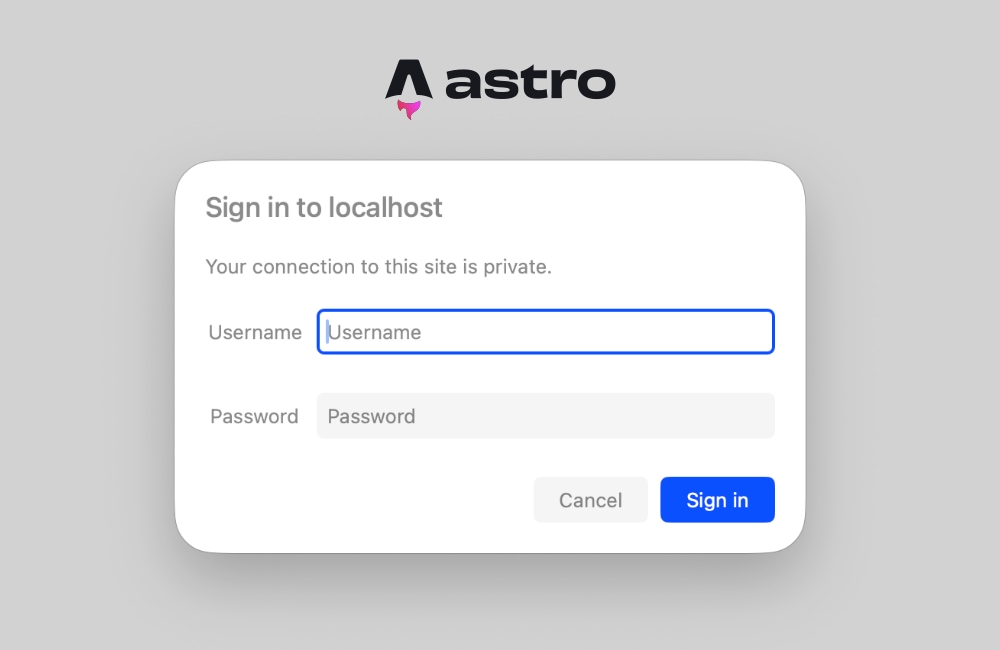
The underlying mechanism of HTTP Basic Authentication relies on two primary components: the Authorization client request header containing base64-encoded credentials, and a 401 Unauthorized server response accompanied by a WWW-Authenticate header when validation fails. Upon receiving the WWW-Authenticate header, compliant web browsers automatically intercept the response and render a native credentials prompt to the user.
Writing the Authentication Validation Function
The validation function must securely parse incoming headers and compare them against predefined administrative environment variables. If the required environment variables are omitted, the middleware gracefully fails open to prevent accidental lockout during local development, though production environments should strictly enforce credential requirements.
function isAuthenticated(request: Request): boolean The execution flow evaluates the request systematically. First, it verifies the existence of BASIC_AUTH_USER and BASIC_AUTH_PASS. Second, it inspects the request headers for the Authorization key, verifying that the authentication scheme matches the Basic standard. Finally, it strips the scheme prefix, decodes the base64 payload, splits the resulting string at the colon separator, and evaluates equality against the environment variables. For legacy Node.js environments lacking global atob support, developers may alternatively utilize Buffer.from(encoded, 'base64').toString().
Handling the 401 Unauthorized Response
When the validation function returns false, the middleware intercepts the pipeline and halts execution, returning a standardized HTTP 401 status code. The response must include the WWW-Authenticate header to trigger the browser’s native login dialog.
export const onRequest = defineMiddleware(async (context, next) =>
  if (!isAuthenticated(context.request))
    return new Response('Unauthorized',
      status: 401,
      headers:
        'WWW-Authenticate': 'Basic realm="Staging Environment", charset="UTF-8"',
      ,
    );


  return next();
);
The realm parameter embedded within the header serves as an informational label displayed to the user within the browser’s authentication dialog box. Developers can customize this string to accurately reflect the protected environment, such as designating "Staging" or "Client Review Portal." Once the user submits valid credentials, the browser automatically formats and appends the Authorization header to all subsequent requests within that session.
Configuring Environment Variables
Security best practices dictate that credentials should never be hardcoded into source code repositories. Astro manages environment variables securely through runtime configuration files and deployment dashboard settings. For local testing, developers create a .env file at the root of the project directory:
BASIC_AUTH_USER=secure-admin-user
BASIC_AUTH_PASS=complex-staging-password
When deploying the application to production platforms—such as Cloudflare Pages, Vercel, Netlify, or self-hosted Node.js servers—these exact variable names must be registered within the platform’s environment variable configuration panel. This ensures that the server-side runtime can safely access the credentials via import.meta.env.BASIC_AUTH_USER and import.meta.env.BASIC_AUTH_PASS without exposing them to the client-side JavaScript bundle.
Troubleshooting Prendering Conflicts and Request Headers
A common obstacle encountered by developers implementing server-side logic in Astro is the static prerendering conflict. By default, Astro prioritizes static generation, building pages into pure HTML files at compile time. Because static pages do not process live HTTP requests, they lack runtime headers, triggering errors when middleware attempts to evaluate incoming requests:
Astro.request.headers was used when rendering the route `src/pages/index.astro'. Astro.request.headers is not available on prerendered pages.To resolve this limitation, developers must configure the project to support dynamic, on-demand rendering. This can be achieved using two distinct methodologies depending on project scope:
- Page-Level Opt-Out: Individual pages can be configured for server-side execution by exporting a prerender flag directly within the page frontmatter:
--- export const prerender = false; --- -
Global Project Configuration: For applications entirely dedicated to protected internal tools or staging portals, the entire project output can be transitioned to server-side rendering within the Astro configuration file:
// astro.config.mjs
import  defineConfig  from 'astro/config';
import node from '@astrojs/node';

export default defineConfig(
 output: 'server',
 adapter: node(
   mode: 'standalone'
 )
);
Adopting global server-side rendering ensures that every incoming route is evaluated by the middleware before rendering, guaranteeing that request headers are consistently available across the application architecture.
Security Implications and Production Considerations
While HTTP Basic Authentication provides a lightweight and effective barrier against casual scrapers, search engine indexers, and unauthorized human visitors, security professionals emphasize that it is not a silver bullet. Because base64 encoding is easily reversible, Basic Authentication must always be paired with Transport Layer Security (TLS/HTTPS). Transmitting credentials over unencrypted HTTP exposes usernames and passwords to interception via packet sniffing.
For enterprise applications requiring granular access controls, role-based permissions, or audit logging, developers can readily extend the core middleware pattern established in Astro. Rather than comparing environment variables against hardcoded strings, the onRequest function can be adapted to query external identity providers, validate JSON Web Tokens (JWTs), or verify session cookies against a secure database backend.
Ultimately, leveraging Astro’s native middleware for HTTP Basic Authentication demonstrates the power of utilizing standard web platform primitives. By avoiding unnecessary third-party dependencies, development teams can secure staging environments and internal applications efficiently while maintaining optimal site performance and architectural simplicity.