Securing modern web properties often introduces layers of computational complexity, dependency bloat, and configuration overhead. For developers utilizing Astro—a modern web framework optimized for building fast, content-driven websites—protecting an application from unauthorized public indexing typically leads to external plugin installations, complex reverse-proxy rules, or heavy VPN configurations. However, by leveraging Astro’s native middleware architecture alongside standard HTTP protocols, developers can implement robust, zero-dependency access control in minimal time.
This comprehensive guide details the technical mechanism of integrating HTTP Basic Authentication directly into an Astro application. By capitalizing on native environment variables and server-side rendering adapters, teams can safeguard staging environments, client work-in-progress builds, and internal company tools securely and efficiently.
The Architectural Challenge of Securing Static and Hybrid Frameworks
As frontend tooling has evolved, frameworks like Astro have gained massive traction due to their "Islands Architecture" and default zero-JavaScript output for static sites. While this default behavior provides exceptional performance and lightning-fast Time to First Byte (TTFB), it presents unique challenges for access management.
Traditionally, securing a web asset required infrastructure-level controls. Administrators would configure Nginx or Apache authentication modules, deploy proprietary edge-worker scripts, or enforce virtual private network (VPN) boundaries for engineering teams. While effective, these methods decouple security configuration from the application codebase, making ephemeral deployments—such as preview branches on Vercel, Netlify, or Cloudflare Pages—difficult to manage uniformly.
Furthermore, relying on external npm packages to handle security layers can introduce supply chain vulnerabilities and unnecessary bloat. Astro’s middleware system, introduced to provide fine-grained request interception, offers an elegant alternative. By executing code on the server prior to rendering a page or API endpoint, middleware acts as a reliable gatekeeper, intercepting incoming HTTP traffic before any sensitive markup or data is compiled and transmitted to the client.
Understanding the Mechanics of HTTP Basic Authentication
HTTP Basic Authentication is a venerable web standard defined originally in Internet Engineering Task Force (IETF) Request for Comments (RFC) 7235. Despite its age, it remains universally supported by every modern web browser, HTTP client, and testing utility.
The security handshake operates through a deterministic exchange of headers:
- The client requests a protected resource without credentials.
- The server intercepts the request and responds with an HTTP status code of
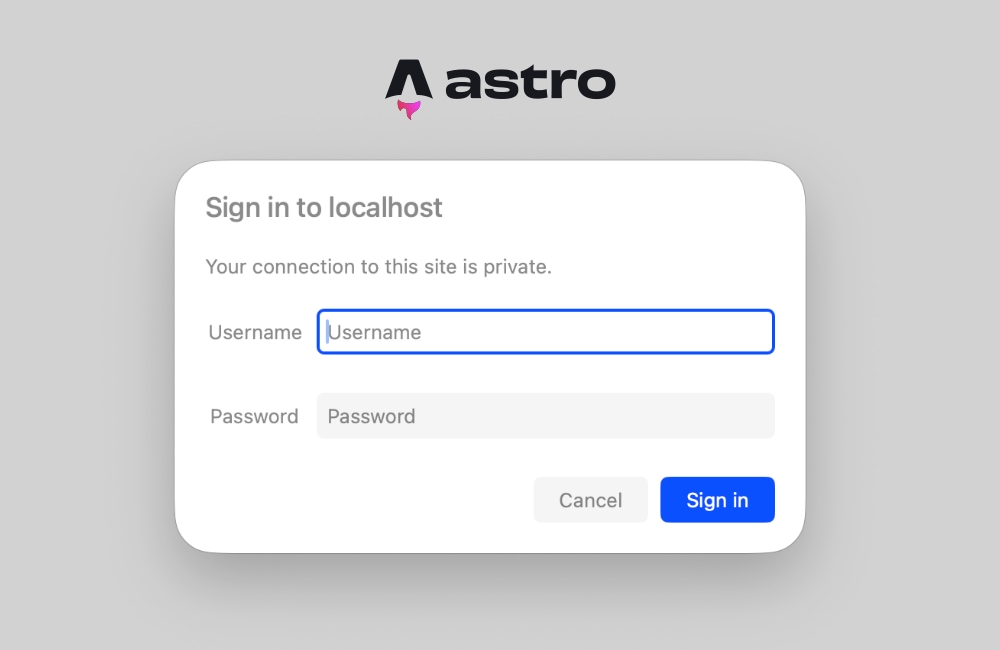
401 Unauthorized, accompanied by aWWW-Authenticateresponse header specifying a realm and authentication scheme. - Upon receiving this header, the user agent (browser) automatically renders a native, modal login dialogue prompting the user for a username and password.
- The browser securely encodes these credentials using Base64 encoding, prefixes them with the string "Basic ", and submits them within the
Authorizationheader on subsequent requests. - The server decodes, validates, and either grants access via the
next()execution pipeline or rejects the credentials.
Because this entire flow is managed natively by the browser and HTTP protocol specifications, developers do not need to construct custom login pages, manage session databases, or write client-side validation scripts for simple administrative protection.
Prerequisites and Environment Configuration
To successfully deploy HTTP Basic Authentication within an Astro project, developers must ensure their infrastructure supports server-side rendering (SSR). Because authentication requires evaluating incoming request headers in real time, static site generation (SSG) alone is insufficient, as static pages are pre-compiled at build time when no active HTTP request exists.
Step 1: Configuring Environment Variables
The foundation of secure authentication relies on keeping credentials strictly separated from source code version control. Astro utilizes standard environment variable handling via import.meta.env for server-side execution.
Developers must create or update a .env file in the root directory of their project for local development:
BASIC_AUTH_USER=staging-administrator
BASIC_AUTH_PASS=secure-random-password-2026
When deploying to production or staging environments—such as Cloudflare Pages, AWS Amplify, Vercel, or Node.js servers—these exact variable names must be registered within the platform’s respective dashboard settings under environment variables or secret management modules.
Step 2: Configuring the Astro Runtime
To ensure request headers can be evaluated dynamically, the Astro configuration file (astro.config.mjs) must be set to support server-side rendering. For projects requiring global protection, setting the output mode to server is recommended:
// astro.config.mjs
import  defineConfig  from 'astro/config';
import node from '@astrojs/node';

export default defineConfig(
  output: 'server',
  adapter: node(
    mode: 'standalone'
  )
);
For applications utilizing hybrid rendering, individual pages can be selectively controlled using frontmatter configurations, ensuring only sensitive routes invoke runtime checks.
Constructing the Astro Middleware Implementation
Astro middleware resides within the src/ directory, conventionally named middleware.ts (or middleware.js for JavaScript-only codebases). This file exports an onRequest handler wrapped by Astro’s defineMiddleware utility.
Implementing the Credential Validation Logic
The following module handles header parsing, Base64 decoding, and credential comparison:
import  defineMiddleware  from 'astro:middleware';

function isAuthenticated(request: Request): boolean

export const onRequest = defineMiddleware(async (context, next) =>
  if (!isAuthenticated(context.request))
    return new Response('Authentication Required',
      status: 401,
      headers:
        'WWW-Authenticate': 'Basic realm="Restricted Staging Environment", charset="UTF-8"',
      ,
    );


  return next();
);
Analysis of the Middleware Logic
- Environment Variable Fallback: If the
BASIC_AUTH_USERorBASIC_AUTH_PASSvariables are missing from the runtime environment, the function returnstrueby default. This fail-safe mechanism prevents accidental deployment lockouts if environment files fail to sync during CI/CD pipelines. - Header Interception: The script queries
request.headers.get('Authorization'). If the header is missing or does not utilize theBasicschema prefix, validation immediately fails. - Safe String Parsing: Using native
atob()decoding combined with strict index searching (indexOf(':')) prevents edge-case parsing errors if passwords contain colons. - Challenge Response Generation: When verification fails, the middleware yields a standard HTTP
401 Unauthorizedresponse accompanied by theWWW-Authenticateheader, instructing the browser to display its native authentication modal.
Comprehensive Testing and Verification Workflow
Once the middleware file is established and environment variables are populated, developers can test the implementation locally by executing the development server:
npm run devNavigating to http://localhost:4321 in any modern web browser will immediately trigger the browser’s native login popup. Entering the credentials defined in the .env file grants full access to the application. Choosing to cancel or entering incorrect credentials results in a standard browser-handled unauthorized state or the plain text response defined in the response body.
This architecture has been verified across multiple edge and server runtimes, including Cloudflare Pages, Vercel Serverless Functions, and traditional Node.js standalone servers. Because the validation executes entirely within the request pipeline, performance overhead is virtually negligible, executing in fractions of a millisecond.
Troubleshooting Common Implementation Errors
Developers transitioning existing static sites to dynamic middleware implementations occasionally encounter specific runtime exceptions related to prerendering constraints.
Prerendering and Header Access Conflicts
A frequent error encountered during implementation is:
Astro.request.headers was used when rendering the route
src/pages/index.astro. Astro.request.headers is not available on prerendered pages.
This exception occurs because Astro optimizes routes by attempting to prerender static HTML at build time. When a page is prerendered, no active HTTP request exists, meaning request headers cannot be evaluated, even if middleware is intercepting traffic globally.
Resolution Strategies
- Explicit Route Opt-Out: Developers can explicitly disable prerendering for individual pages by declaring frontmatter directives within the specific page component:
--- export const prerender = false; --- - Global Server Mode: For projects where the entire codebase requires restriction—such as internal corporate tools or strict client staging environments—setting the project-wide output mode to server within
astro.config.mjsensures all components default to on-demand rendering.
Broader Implications and Enterprise Best Practices
Implementing native HTTP Basic Authentication within an Astro middleware layer offers a lean, highly maintainable alternative to heavy security plugins. By utilizing standard web APIs (Request, Response, and standard encoding primitives), the implementation remains framework-agnostic in concept, lightweight in execution, and independent of external package maintenance lifecycles.
While HTTP Basic Authentication over standard HTTP transmits credentials in clear text (requiring TLS/HTTPS encryption in transit), it remains an industry-standard mechanism for non-public environments, pre-production reviews, and internal system tooling. For teams seeking advanced authorization models, this exact middleware pattern can be seamlessly extended to validate JSON Web Tokens (JWT), query database sessions, or integrate with corporate Single Sign-On (SSO) identity providers—proving that Astro’s native architecture provides both the simplicity required for rapid prototyping and the extensibility demanded by enterprise infrastructure.