Web developers deploying staging sites, client previews, or internal enterprise dashboards frequently encounter the immediate necessity of restricting public access. While traditional methodologies often involve configuring complex web server directives, deploying external virtual private networks (VPNs), or installing third-party package dependencies, modern web frameworks frequently offer native capabilities that streamline security implementation. The Astro web framework, widely adopted for its performance-focused architecture and island-based rendering model, features a robust, built-in middleware system capable of handling authentication natively without bloating the project codebase with external dependencies.
Implementing HTTP Basic Authentication within an Astro environment requires leveraging standard web protocols alongside the framework’s on-demand rendering adapters. By combining a concise middleware script with environment-variable-driven credentials, developers can secure entire applications or specific subroutes efficiently. This guide examines the structural prerequisites, step-by-step implementation details, architectural implications, and troubleshooting protocols necessary to secure an Astro-powered web application using only native framework features.
Understanding the Technical Foundation and Prerequisites
Before implementing security layers within an Astro project, developers must understand how the framework processes requests. Astro operates primarily as a static site generator by default, producing pre-rendered HTML files at build time. However, securing a site with HTTP Basic Authentication relies on intercepting live incoming HTTP requests, inspecting headers, and issuing conditional server responses—specifically, the standard 401 Unauthorized status code accompanied by a WWW-Authenticate header.
Consequently, deploying this authentication pattern requires an Astro adapter or hosting runtime that supports on-demand rendering (Server-Side Rendering, or SSR). Platforms such as Cloudflare Pages, Vercel, Netlify, Node.js servers, and various containerized environments natively support these runtimes. Without an active server adapter, the application cannot evaluate runtime request headers dynamically.
Furthermore, developers must prepare two core environment variables to store sensitive authentication credentials securely. Hardcoding usernames and passwords directly into source code violates fundamental security protocols and risks accidental exposure in public version control repositories. By isolating these credentials into environment variables, development teams maintain separation of concerns between codebases and deployment configurations.
Establishing the Middleware File Structure
Astro processes incoming requests through a centralized middleware pipeline located in the src/ directory. To initialize this system, developers create a TypeScript or JavaScript file named src/middleware.ts (or src/middleware.js). This file acts as the interceptor for all HTTP traffic entering the application routing system.
The core structure relies on Astro’s defineMiddleware utility function. This function wraps a custom request handler, granting access to two primary arguments: the request context (which encompasses headers, cookies, and localized route parameters) and a next function that passes control forward in the execution pipeline if authentication succeeds.
import  defineMiddleware  from 'astro:middleware';

export const onRequest = defineMiddleware(async (context, next) =>
  // Authentication validation logic executes here
  return next();
);
This modular approach ensures that security logic remains decoupled from individual page components, centralizing access control and reducing maintenance overhead across larger projects.
Writing the Authentication Verification Logic
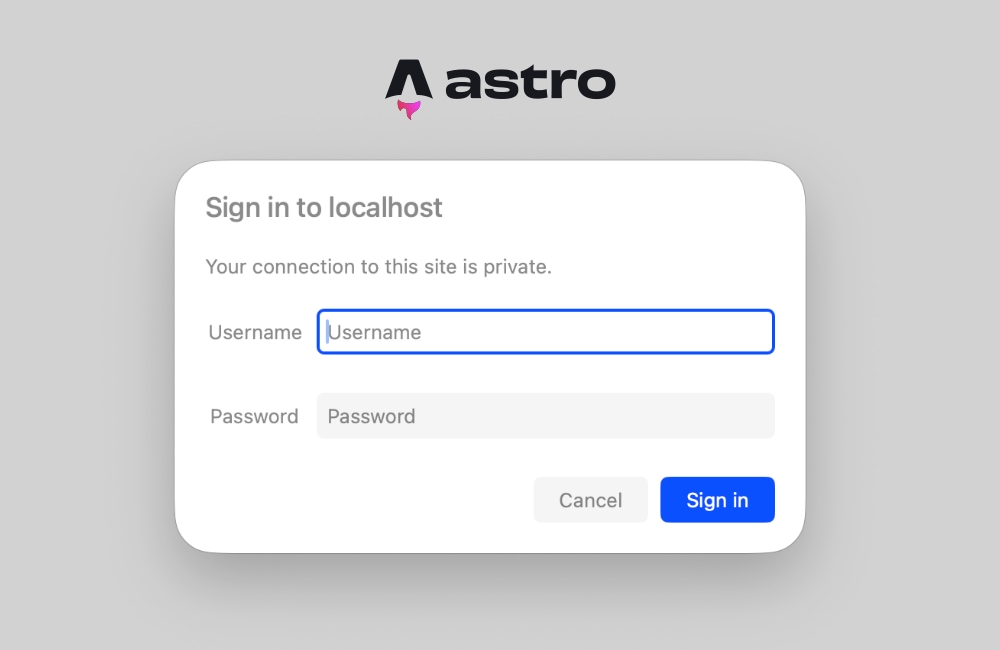
HTTP Basic Authentication operates on a standardized, stateless challenge-response mechanism. When a browser requests a protected resource without prior credentials, the server responds with a 401 Unauthorized status and a specific challenge header. The browser subsequently presents a native operating system or browser-level login prompt to the user, encodes the submitted credentials using Base64 formatting, and automatically attaches them to subsequent requests within the Authorization header.
To evaluate these incoming headers within Astro middleware, developers implement a validation function that reads environment variables, inspects the request headers, and decodes the Base64 string for comparison.
function isAuthenticated(request: Request): boolean
  const user = import.meta.env.BASIC_AUTH_USER;
  const pass = import.meta.env.BASIC_AUTH_PASS;

  // If environment variables are omitted, allow traffic (fail-open or bypass mode)
  if (!user
The execution flow follows a strict logical sequence. First, the system checks whether the deployment environment has defined the BASIC_AUTH_USER and BASIC_AUTH_PASS variables. If these variables are absent, the middleware gracefully permits traffic, preventing accidental lockouts in local development environments where environment files might not yet be configured.
If the environment variables are present, the function examines the Authorization header. If the header is missing or does not utilize the Basic authentication scheme, the request is rejected. When the header is present, the application decodes the Base64 payload using the global atob function (or Node.js buffer utilities in legacy runtime environments), splits the resulting string at the colon separator, and compares the provided username and password against the secure environment variables.
Handling the 401 Unauthorized Response and Browser Prompt
When the isAuthenticated validation function returns false, the middleware must immediately halt the request pipeline and issue a challenge response. This response instructs the client browser to render its native authentication dialog box.
export const onRequest = defineMiddleware(async (context, next) =>
  if (!isAuthenticated(context.request))
    return new Response('Unauthorized',
      status: 401,
      headers:
        'WWW-Authenticate': 'Basic realm="Staging Environment", charset="UTF-8"',
      ,
    );


  return next();
);
The WWW-Authenticate header includes a realm parameter. Modern browsers display this string within the native login popup dialog, allowing administrators to communicate context—such as "Staging Server" or "Internal Dashboard"—to users attempting to access the restricted domain. Because browsers handle the storage and re-transmission of these credentials for the duration of the session, developers do not need to construct custom login forms, manage session cookies, or write client-side JavaScript handlers.
Configuring Environment Variables Across Development and Production
Proper configuration of environment variables ensures that security credentials remain protected across different deployment phases. During local development, developers define these variables within a .env file located at the root of the project directory.
BASIC_AUTH_USER=secure-admin-username
BASIC_AUTH_PASS=complex-secure-password-string
Astro automatically exposes variables prefixed with standard runtime conventions, accessing them securely on the server side via import.meta.env.BASIC_AUTH_USER and import.meta.env.BASIC_AUTH_PASS.
When transitioning to production hosting platforms—such as Cloudflare Pages, Vercel, Netlify, or AWS Amplify—developers must navigate to the platform’s dashboard settings panel (typically located under environment variables, site configuration, or build settings) and inject identical key-value pairs. This ensures that production builds inherit the authentication credentials securely without exposing them in client-side bundles.
Troubleshooting Prerendering Conflicts and Static Output Modes
A frequent architectural hurdle encountered by developers implementing server-side middleware in Astro involves static site generation conflicts. By default, Astro prioritizes static output, generating pre-rendered HTML files during the build phase. When a page is designated for static pre-rendering, the application does not evaluate a live HTTP request at runtime; consequently, Astro.request.headers is unavailable.
If a project attempts to access request headers on a prerendered route while middleware is active, the build or runtime environment may throw an error indicating that request headers cannot be read from a static page. Resolving this issue requires adjusting the project’s rendering strategy through one of two primary methodologies.
The first approach involves opting individual routes into server-side rendering by explicitly disabling prerendering within the page component’s frontmatter block:
---
export const prerender = false;
---
This directive instructs Astro to defer rendering for that specific page until an actual HTTP request arrives, ensuring that request headers and middleware validation checks execute correctly.
The second, more comprehensive approach involves transitioning the entire application to server-side rendering by modifying the global configuration file (astro.config.mjs):
import  defineConfig  from 'astro/config';
import node from '@astrojs/node';

export default defineConfig(
  output: 'server',
  adapter: node(
    mode: 'standalone'
  )
);
Configuring output: 'server' ensures that every route within the application renders on-demand by default. Projects intended entirely as protected staging environments or internal corporate tools benefit significantly from this global configuration, as it guarantees that no sensitive pages are accidentally exposed as static assets during deployment. Individual pages that do not require authentication can still be explicitly opted back into static generation using export const prerender = true.
Verification and Operational Testing
Once middleware, environment variables, and rendering configurations are established, engineering teams should execute local testing protocols to verify system integrity. Initiating the local development server via the command-line interface:
npm run dev…and navigating to the local application URL should immediately trigger the browser’s native authentication prompt. Entering the correct credentials established in the .env file grants seamless access to the application, while canceling the prompt or entering incorrect credentials displays the standard "Unauthorized" response page.
Rigorous testing across multiple browser environments ensures that credential caching, session termination, and header transmission operate according to specifications. Furthermore, deploying the application to a staging environment hosted on platforms like Cloudflare Pages validates that cloud adapters handle the middleware interception without performance degradation.
Broader Implications and Enterprise Adaptability
Implementing HTTP Basic Authentication via native Astro middleware offers distinct advantages for engineering teams managing rapid deployment cycles. By eliminating the necessity for external authentication libraries, complex reverse-proxy configurations (such as custom Nginx or Apache auth files), or heavy infrastructure overhead, development teams can secure preview deployments in minutes.
The entire security implementation typically requires fewer than thirty lines of code, maintaining codebase cleanliness and reducing potential vulnerability surfaces. Furthermore, because the middleware is written in standard JavaScript/TypeScript and executes on every incoming request, developers possess the flexibility to scale the authentication pattern beyond static credentials. Organizations requiring advanced access control can easily extend the middleware to query external relational databases, integrate OAuth token validation schemes, or implement JSON Web Token (JWT) verification.
Ultimately, leveraging native framework capabilities for access restriction demonstrates an efficient architectural pattern: utilizing existing platform runtimes to achieve enterprise-grade security with minimal complexity. For development agencies, independent contractors, and internal IT departments managing Astro-based web applications, native middleware authentication provides a reliable, dependency-free solution for protecting confidential digital assets.