How to Secure Your Astro Web Application Using Built-in HTTP Basic Authentication and Middleware


Securing modern web applications during development phases, staging cycles, or internal deployments remains a critical priority for engineering teams worldwide. When launching a new digital property built with Astro, developers frequently require an efficient method to lock down access, preventing premature indexing by search engines or unauthorized viewing of client work-in-progress builds. Historically, engineering teams relied on complex workarounds such as setting up dedicated Virtual Private Networks, configuring intricate NGINX reverse-proxy authentication rules, or integrating third-party Node.js packages. These conventional approaches frequently introduce unnecessary architectural complexity, extra configuration files, and potential points of failure within the deployment pipeline.
Fortunately, modern web frameworks offer native alternatives that streamline operations without sacrificing security. Astro, a popular frontend framework optimized for building fast, content-driven websites, features a powerful built-in middleware system that executes every time a page or an endpoint is rendered. Combined with HTTP Basic Authentication—a standardized authentication scheme supported universally across all contemporary web browsers—developers can establish a robust security layer using only tools natively available within their project architecture. This streamlined implementation requires no external npm packages, relying instead on a compatible Astro server adapter or runtime supporting on-demand rendering, a simple middleware function, and two environment variables.
Understanding the Technical Foundation and Prerequisites
To successfully implement HTTP Basic Authentication within an Astro environment, developers must first evaluate their project architecture and hosting infrastructure. The primary technical prerequisite involves utilizing an Astro adapter or runtime environment capable of server-side rendering or on-demand rendering. Because traditional static site generation outputs prebuilt HTML files at build time without a live server listening for incoming HTTP requests, runtime authentication checks cannot occur on purely static sites. Consequently, projects must target platforms such as Node.js, Vercel, Netlify, Cloudflare Pages, or AWS Amplify using appropriate server adapters.
The underlying mechanism of HTTP Basic Authentication relies on a standardized exchange between the client browser and the server. When a user attempts to access a protected route, the server evaluates the incoming request headers. If the request lacks valid credentials, the server responds with a 401 Unauthorized HTTP status code, accompanied by a specific WWW-Authenticate header. Upon receiving this header, the web browser automatically intercepts the response and presents a native login dialog box to the user. Once the user inputs their username and password, the browser encodes these credentials in Base64 format and automatically appends them to subsequent requests within the Authorization header. This native browser handling eliminates the need to custom-code frontend login forms, session management libraries, or complex state management systems.
Establishing the Astro Middleware Architecture
Astro manages request interception through its designated middleware file structure, typically located at src/middleware.ts for TypeScript projects or src/js equivalents for standard JavaScript environments. Initiating this process requires the creation of the middleware file and the implementation of the core onRequest handler wrapped by Astro’s defineMiddleware utility function.
The defineMiddleware wrapper provides developers with access to two primary arguments: the request context, which contains comprehensive information regarding the incoming HTTP request, and the next function, which continues the execution pipeline if authentication succeeds. Within this structure, engineering teams can inject custom verification logic designed to intercept traffic before it reaches sensitive page components or backend endpoints.
import  defineMiddleware  from 'astro:middleware';

export const onRequest = defineMiddleware(async (context, next) =>
  // Authentication validation logic executes here
  return next();
);
Writing and Executing the Authentication Validation Check
The core security logic revolves around parsing environment variables, extracting the client’s Authorization header, and verifying the encoded credentials against predefined administrative values. To ensure seamless developer workflows, the system should ideally bypass authentication checks if environment variables are left unconfigured during local development, while strictly enforcing them in production environments.
The authentication function evaluates whether the incoming request contains an Authorization header starting with the Basic authentication scheme prefix. If the header is absent or malformed, the function immediately returns false, triggering the unauthorized response cycle. When the header is present, the server slices the prefix, decodes the Base64 string utilizing the global atob utility (or a Node.js Buffer fallback for legacy environments), splits the resulting string at the colon separator into distinct username and password variables, and performs a strict equality comparison against environment variables.
function isAuthenticated(request: Request): boolean
  const user = import.meta.env.BASIC_AUTH_USER;
  const pass = import.meta.env.BASIC_AUTH_PASS;

  if (!user
Handling 401 Unauthorized Responses and Realm Configuration
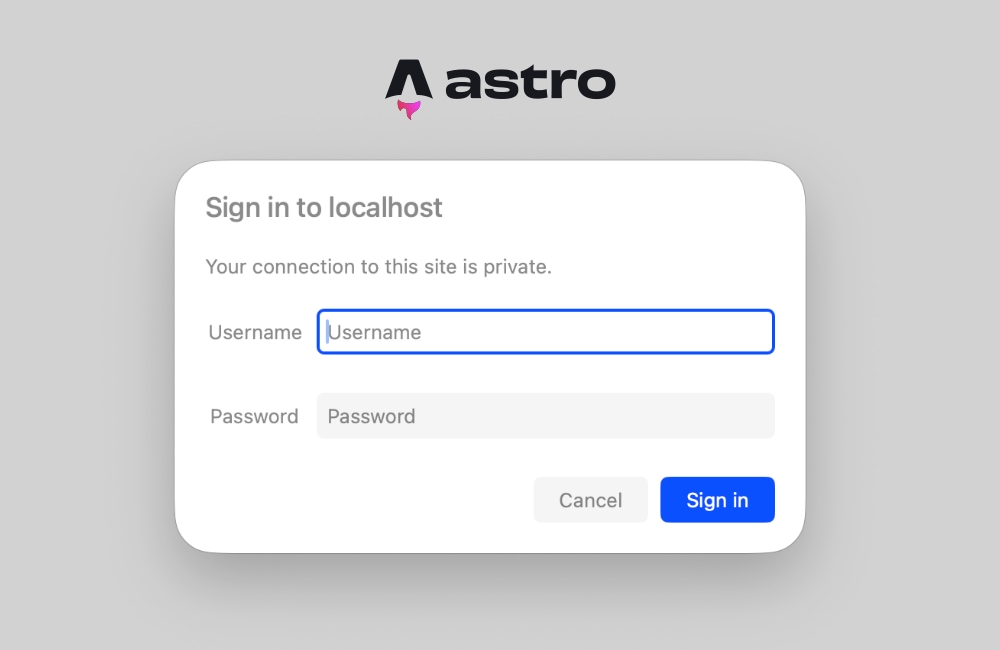
When the validation function returns a negative result, the middleware halts the request pipeline and returns a standardized HTTP 401 response. This response must include the critical WWW-Authenticate header, instructing the client browser to display its native authentication prompt.
export const onRequest = defineMiddleware(async (context, next) =>
  if (!isAuthenticated(context.request))
    return new Response('Unauthorized',
      status: 401,
      headers:
        'WWW-Authenticate': 'Basic realm="Staging Area", charset="UTF-8"',
      ,
    );


  return next();
);
The realm parameter serves as a descriptive label presented directly within the browser’s native login dialog box. Developers can customize this string to accurately reflect the environment—such as "Staging", "Client Preview", or "Internal Tool"—providing clear context to authorized personnel attempting to access the restricted web property.
Configuring Environment Variables Across Development and Production
Security credentials must never be hardcoded directly into source code repositories. Instead, Astro applications manage these sensitive values through environment variables accessed securely via import.meta.env during server-side execution. For local development workflows, developers populate a .env file located in the root directory of the project.
BASIC_AUTH_USER=staging-administrator
BASIC_AUTH_PASS=secure-staging-password-2026
When deploying the application to production hosting providers—such as Cloudflare Pages, Vercel, Netlify, or self-hosted Node.js servers—engineers must mirror these variable names within the platform’s specific environment configuration dashboard, typically located under site settings or project build parameters. Ensuring these variables remain synchronized across deployment pipelines guarantees continuous protection without requiring code modifications.
Troubleshooting Common Pitfalls: Prerendering Versus Server-Side Rendering
A frequent hurdle encountered by developers integrating authentication middleware into Astro projects involves static prerendering conflicts. By default, Astro prioritizes static site generation, building pages into pure HTML documents at compile time. When a page is designated for prerendering, live HTTP requests are absent during the build phase, meaning incoming request headers—such as the Authorization header—cannot be evaluated.
Attempting to access request headers on a prerendered route triggers explicit runtime exceptions indicating that request headers are unavailable on static pages. Resolving this issue requires adjusting the project’s rendering configuration strategy. Developers can resolve this by explicitly opting individual pages out of static generation by declaring frontmatter directives within specific Astro components:
---
export const prerender = false;
---
Alternatively, if an entire web property requires strict password protection across all routes, developers can configure the global output mode within the primary configuration file to enforce server-side rendering by default.
// astro.config.mjs
import  defineConfig  from 'astro/config';
import node from '@astrojs/node';

export default defineConfig(
  output: 'server',
  adapter: node(
    mode: 'standalone'
  )
);
By setting the output mode to server, every page within the application is rendered dynamically on demand, ensuring that incoming request headers and middleware validation checks execute reliably across all routes.
Broader Implications and Industry Best Practices for Web Security
Implementing lightweight authentication mechanisms at the middleware level provides significant advantages for development teams managing rapid iteration cycles. Traditional security appliances and VPN configurations often introduce friction, requiring stakeholders, clients, and QA testers to install specialized software or configure network profiles merely to review work-in-progress deliverables. Utilizing native HTTP Basic Authentication removes these barriers, offering a frictionless, universally compatible security gateway that functions seamlessly across desktop browsers, mobile devices, and automated testing tools.
Furthermore, this native approach aligns with modern architectural philosophies emphasizing minimal dependency trees. By eliminating the necessity for third-party authentication packages, engineering teams reduce potential software supply chain vulnerabilities, lower maintenance overhead, and optimize build performance. While HTTP Basic Authentication is not intended to replace robust user management systems, enterprise identity providers, or OAuth protocols for production consumer-facing applications, it remains an optimal, standards-compliant solution for protecting staging environments, preview deployments, and internal corporate tooling.