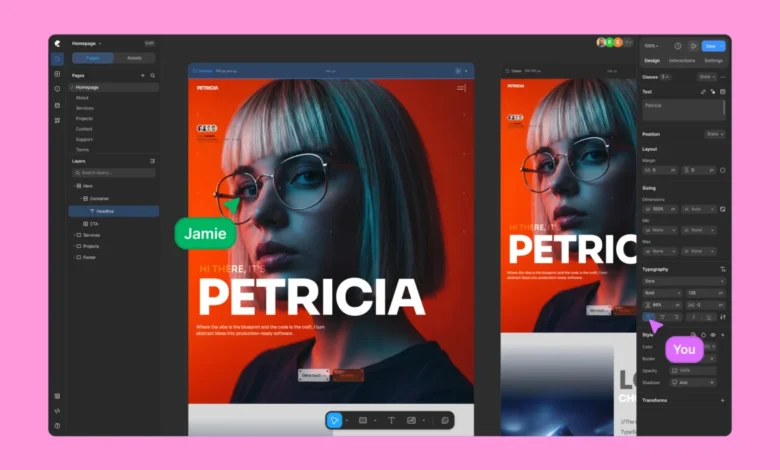
For years, the landscape of WordPress website development has been dominated by page builders, tools designed to democratize web design by enabling users to create visually without touching code. However, this accessibility often came with inherent trade-offs: rigid layout structures, a reliance on a multitude of third-party plugins, bloated codebases, and a noticeable impact on website performance. These compromises have long been accepted as the cost of using visual builders within the WordPress ecosystem. Enter Kirki, a platform that boldly challenges these conventions, positioning itself as the first freeform visual builder with an infinite canvas, promising cleaner performance, unfettered design freedom, and a decisive departure from plugin dependency.
Kirki’s core philosophy is a radical reimagining of the website creation experience. Instead of building upon the established, and often restrictive, frameworks of existing page builders, Kirki introduces an integrated CMS and a comprehensive suite of built-in features. This holistic approach aims to streamline the workflow, empower users with unprecedented creative control, and ultimately deliver websites that are not only visually stunning but also performant and efficient. Whether the user is a seasoned designer striving for pixel-perfect precision, a developer prioritizing clean and optimized code, or a business owner seeking a professional online presence without unnecessary technical complexity, Kirki is engineered to dismantle the long-standing limitations associated with traditional WordPress page builders.
This comprehensive review will delve into Kirki’s capabilities, contrasting it with established WordPress builders across key metrics that are paramount for any website creation tool. We will examine its performance benchmarks, design flexibility, feature set, and overall user experience, aiming to provide a clear understanding of Kirki’s position in the market and its potential as a solution for future WordPress projects.
A Closer Look at Kirki
Kirki emerges as a no-code visual website builder for WordPress, specifically engineered to address the shortcomings of its predecessors. It positions itself as an all-in-one solution, designed to consolidate the functionalities that often require multiple disparate plugins in the traditional WordPress environment. This integrated approach is a significant differentiator, promising a more stable and cohesive building experience.

The platform’s commitment to comprehensiveness is further underscored by its pricing model. Kirki offers a remarkably robust free version, directly available for download from WordPress.org. This free tier is not a limited trial but a genuinely powerful builder, allowing users to design modern websites on its signature infinite canvas without any financial commitment. For users requiring advanced features and expanded capabilities, Kirki’s Pro plans are presented as highly affordable, offering exceptional value. The Starter plan, for instance, is priced at $59 per year for a single site and includes all premium features. This is particularly noteworthy when compared to competitors like Elementor Pro, where essential functionalities might still be compartmentalized across different plans. Kirki’s pricing structure emphasizes transparency and inclusivity, with all features, including dynamic content capabilities, a pop-up builder, form builder, submission manager, and an expanding template library, available from the outset across all plans.
For those seeking a perpetual solution, Kirki offers a Lifetime plan for a one-time payment of $499, granting unlimited use indefinitely. This approach eliminates recurring costs and unforeseen price hikes, offering a predictable investment for users.
Website Performance Comparison

In the digital realm, website performance is a critical determinant of user experience, search engine optimization (SEO), and conversion rates. To objectively assess Kirki’s impact on these crucial factors, a comparative performance analysis was conducted against Elementor, a widely adopted WordPress page builder. The testing environment was meticulously controlled: a clean WordPress installation utilizing the default Twenty Twenty-Five theme ensured a level playing field. Identical layouts, featuring comparable design elements, were constructed using both Kirki and Elementor. Performance audits were then executed using Google Lighthouse, a tool renowned for its ability to measure load times, responsiveness, and adherence to Core Web Vitals.
The sample layout used for the benchmark was designed to represent a moderately complex web page, incorporating various design elements and content types.
Under identical test conditions, Kirki demonstrated a marked advantage in performance metrics. The Lighthouse audits revealed significantly faster load times and superior scores across all measured indicators when compared to Elementor. A key factor contributing to Kirki’s superior performance is its code output. Kirki generates a remarkably clean and semantic HTML structure, characterized by a substantially reduced number of nested <div> elements and the absence of unnecessary wrapper divs. This streamlined code translates directly into faster rendering and improved efficiency.

Conversely, Elementor, even on this relatively simple layout, introduced heavily nested markup and an accumulation of extra scripts. This added bloat invariably impacted its performance, leading to slower load times and lower overall scores. For users prioritizing technical efficiency, clean code, and optimal website speed, Kirki clearly emerges as the more advantageous choice.
Exploring The Features
Kirki’s performance advantages are complemented by a rich feature set that aims to provide a comprehensive website building solution.

H2: Freeform Infinite Canvas for True Design Freedom
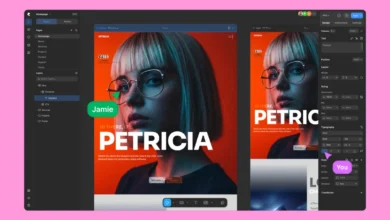
Perhaps Kirki’s most defining feature is its infinite canvas. This revolutionary approach liberates designers from the constraints of rigid, predefined layouts. Users can pan freely across an expansive canvas, zoom in and out to manage detail, and position elements with pixel-perfect accuracy. The ability to overlap sections, layer backgrounds, and construct intricate interactions visually sets Kirki apart. Every element’s layout behavior is fully editable directly on the canvas, offering granular control without necessitating code intervention. The editor also supports both light and dark modes, catering to user preference and promoting a more focused design environment. For those familiar with design tools like Figma or Webflow, Kirki’s interface will feel intuitively natural. For newcomers, it represents a highly accessible and fluid method for website design.
H3: Concurrent Editing Across All Responsive Views

Kirki’s infinite canvas extends its flexibility to responsive design. All responsive views – Desktop, Tablet, Landscape, and Mobile – are visible simultaneously and concurrently editable. Users are not required to switch between different modes; instead, they can work across all screen sizes in real time on the same canvas. This allows for immediate identification and correction of layout issues across devices without interrupting the design flow. Furthermore, Kirki employs a cascading system where changes made at larger breakpoints automatically propagate to smaller ones. Users only need to intervene where specific adjustments are required, allowing the system to manage cascading styles efficiently.
H3: Instant Figma to Kirki Handoff
For designers utilizing Figma, Kirki offers a seamless integration. Figma designs can be imported directly into Kirki, transforming static designs into functional, responsive websites with minimal manual effort. The imported designs are fully responsive by default, adapting to all screen sizes, including any custom breakpoints defined by the user. Kirki supports an unlimited number of breakpoints, allowing for precise control over layout behavior and intelligent style cascading across screens.

H3: No Third-Party Plugins Needed for Dynamic Content
The management of dynamic content, a crucial aspect of modern web development, traditionally necessitates the use of third-party plugins like ACF in WordPress. Kirki integrates this functionality natively through its powerful Dynamic Content Manager. This built-in system allows users to:
- Connect content from any post type, custom field, or taxonomy.
- Dynamically populate text, images, buttons, and other elements.
- Create advanced layouts that pull and display data from your WordPress database.
This native integration eliminates the need for external plugins, thereby reducing potential conflicts and simplifying site maintenance.

H3: Reusable Styling with Class-Based Editing
Kirki enhances design scalability through a class-based styling system. When an element is styled, these styles are automatically saved as reusable CSS classes. This means that:
- Styling an element once creates a class that can be applied to any other element.
- Updates to a class are reflected across all elements using that class, ensuring design consistency.
- This significantly reduces repetitive styling tasks and streamlines the design process for complex projects.
While Kirki offers a visual interface, it also caters to advanced users by allowing custom CSS to be applied to any class or element, and even the injection of JavaScript at page or element levels.

H3: CSS Variables for Global Styling
Taking global styling a step further, Kirki incorporates Global Variables, enabling the definition of design tokens such as colors, fonts, spacing, and sizing. These variables can be consistently applied across the entire website, facilitating brand uniformity and simplifying global style updates. These variables can be paired with the class-based structure to:
- Maintain a consistent brand identity.
- Easily update design elements site-wide.
- Create sophisticated design systems.
H3: Build Complex Interactions and Animations Visually

Kirki empowers users to create dynamic and interactive website experiences through its visual interaction builder. This tool allows for the creation of scroll-based animations, hover and click effects, and interactive sections that respond across different devices. Users can control element visibility, motion, and behavior within an intuitive visual interface. For advanced users, a timeline-based editor is available, enabling precise control over animation sequences. Text animations can be applied at character, word, or full element levels, with customizable triggers and transition styles.
H3: Seamless Integration Management with Kirki Apps
Kirki simplifies the integration of third-party tools through its Kirki Apps system. This feature allows users to install and manage essential integrations, including analytics platforms, CRMs, email marketing services, and support widgets, directly from within the Kirki editor. This centralized approach streamlines setup and configuration, making it accessible even for users without extensive technical expertise.

H3: First Real Multi-User Co-Editing Experience in WordPress
Kirki introduces a groundbreaking real-time co-editing experience for WordPress. Multiple team members can simultaneously work on the same page, with changes visible live on the canvas. Team members’ cursors are displayed in real time, and edits are color-coded and attributed, enhancing collaboration and orientation. The platform also supports commenting directly on the canvas, facilitating communication and feedback for teams and clients.
H3: Built-in Quality Control

Before publishing, Kirki’s integrated Page Audit tool assists in ensuring the technical quality of a website. It automatically scans layouts for essential elements like missing alt text, broken links, and other SEO and accessibility concerns, empowering users to launch technically sound and optimized websites.
Theme & Layout Options
Kirki offers a growing library of high-quality templates and modular layout options, ensuring users have a rich selection of design starting points.

H3: Template Kits: Full Website Packs
These kits provide complete, multi-page website designs tailored for various industries. Users can select a template, update the content, and launch their site efficiently. New template kits are regularly added, keeping users abreast of the latest design trends, all included without additional cost.
H3: Pre-Designed Pages

For users needing specific page types, Kirki offers standalone pre-designed pages, such as landing pages or pricing pages, that can be easily integrated and customized.
H3: Pre-Made Sections
To facilitate building from scratch without starting with a blank canvas, Kirki provides ready-made sections like hero banners, testimonials, and FAQ blocks, enabling rapid visual assembly of layouts.

How Easy Is Kirki To Use?
Kirki has undergone significant refinement to enhance its accessibility and user-friendliness. The interface is intuitive, and the workflow is streamlined. The extensive library of pre-made blocks, sections, pages, and full templates means users are rarely forced to begin with a completely blank slate unless they choose to. While simpler tools exist for basic five-page sites, they often sacrifice power, performance, and design control. Kirki is designed for users who demand a higher level of control and capability. It rewards the time invested in learning its features with the ability to create high-quality, scalable, and visually sophisticated websites. To facilitate user onboarding, Kirki provides comprehensive documentation, video tutorials, and a supportive community.
What Users Are Saying

Feedback from users indicates that Kirki is perceived as a transformative tool for WordPress, often hailed as the future of the platform and a strong competitor to modern design tools like Framer and Webflow. Testimonials frequently highlight its power, performance, and the extensive design freedom it offers.
Why Kirki Outshines Traditional Website Builders
Kirki distinguishes itself from traditional WordPress page builders through several key advancements:

- Modern Freeform Visual Builder: Unrestricted by rigid structures, Kirki’s infinite canvas allows for complete creative freedom and pixel-perfect placement of elements.
- Real-Time Responsive Editing: Simultaneous editing across desktop, tablet, and mobile views streamlines the responsive design process, ensuring consistency and immediate feedback.
- All-in-One Solution: Kirki integrates essential tools and features, eliminating the need for multiple third-party plugins, thereby enhancing reliability and simplifying maintenance.
- Performance-Optimized Code Output: The generation of clean, lightweight code contributes to faster page load times, improved user experience, and better SEO performance.
- Seamless Figma to WordPress Workflow: Direct import of Figma designs accelerates the development process and ensures design fidelity.
- Advanced Design Capabilities Built In: Native support for dynamic content, sophisticated animations, and global styling controls provides powerful tools for creating engaging websites.
- Powerful Free Version: A robust free version allows users to experience the core functionalities before committing to a paid plan.
Overall Verdict: Is Kirki Really Better Than Alternatives?
Based on an in-depth evaluation, Kirki emerges as a superior alternative to many traditional WordPress page builders. It not only matches established tools in essential areas but significantly surpasses them in crucial aspects such as code quality, performance, and design flexibility. Kirki’s integrated, all-in-one approach addresses common user pain points, such as plugin dependency and performance compromises, offering a more efficient, cost-effective, and powerful solution for building high-quality, scalable, and visually compelling websites. For those serious about modern web development within the WordPress ecosystem, Kirki represents a significant step forward, offering a glimpse into the future of WordPress site building.
(yk)