Microsoft Edge Update Triggers Functional Regression Disabling Right-Click Paste in Microsoft Teams Desktop Client

Microsoft has officially acknowledged a widespread technical issue affecting the Microsoft Teams desktop application, where a recent update to the Microsoft Edge web browser has inadvertently disabled the right-click "Paste" functionality within chat interfaces. The glitch, which surfaced following a browser engine update, has left millions of corporate and individual users unable to utilize standard context menus to insert URLs, text, or images into their conversations. While keyboard shortcuts remain functional as a temporary workaround, the disruption highlights the deep architectural dependencies between Microsoft’s productivity suite and its underlying browser technologies.
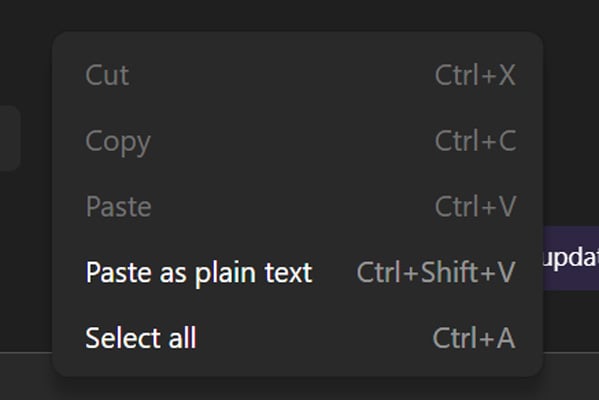
The issue was first detailed in a formal advisory published by Microsoft on April 14, following a surge in user reports across various support channels. According to the advisory, the bug manifests as a "greyed-out" Paste option when a user attempts to right-click within the message input field of the Microsoft Teams desktop client. This behavior effectively severs a primary workflow for users who rely on mouse-driven navigation, causing significant friction in fast-paced professional environments.
The Technical Intersection: Edge WebView2 and Teams Architecture
To understand how a browser update can break a standalone desktop application, it is necessary to examine the modern architecture of Microsoft Teams. In recent years, Microsoft transitioned Teams from its original Electron-based framework to a more streamlined architecture known internally as "Teams 2.0." This newer version relies heavily on Microsoft Edge WebView2, a developer control used to embed web technologies (HTML, CSS, and JavaScript) into native applications.
WebView2 uses Microsoft Edge as its rendering engine. Consequently, when the Edge browser receives an update containing a code regression—a term used to describe a bug that causes a previously functioning feature to stop working—it can directly impact any application that utilizes WebView2 for its user interface. In this instance, the regression specifically targeted the handling of context menus and clipboard interactions within the embedded web environment of the Teams chat window.
Microsoft confirmed this link in their technical analysis, stating that the bug was caused by a recent browser update that introduced a code regression in Microsoft Edge. Because Teams uses this engine for certain core functionalities, the browser-level error cascaded into the desktop client, rendering the right-click paste command unresponsive.

Chronology of the Incident and Microsoft’s Response
The timeline of the disruption began in mid-April, as IT administrators and end-users started noticing the UI failure. By April 14, the volume of reports reached a threshold that prompted Microsoft to issue a service health advisory.
- Initial Discovery (April 12-13): Reports began surfacing on community hubs such as Reddit and the Microsoft Learn forums. Users noted that while they could copy content, the "Paste" option in the right-click menu was permanently disabled or appeared in a translucent, unclickable state.
- Official Advisory (April 14): Microsoft published an alert confirming the impact. The company identified that the issue was not localized to a specific region but was affecting the global user base of the Microsoft Teams desktop client on both Windows and macOS.
- Root Cause Identification (April 15): Engineering teams traced the source of the failure to a specific code change within the Microsoft Edge rendering engine. They determined that the regression affected the way the "on-paste" event was triggered via the context menu.
- Mitigation Rollout (April 16): Microsoft announced that a fix had been developed and was being deployed in stages. The company stated it was monitoring telemetry data—real-time diagnostic information from user systems—to ensure that the fix was successfully restoring functionality without introducing secondary issues.
As of the latest update, Microsoft has not provided a definitive global completion time for the rollout, as the deployment of browser engine patches often occurs in waves to prevent widespread system instability if further errors are detected.
Impact on Corporate and Individual Productivity
The scale of the disruption is significant, given that Microsoft Teams currently boasts over 320 million monthly active users. In corporate environments, where Teams serves as the primary hub for collaboration, the inability to quickly paste links or screenshots via the mouse can lead to a cumulative loss of productivity.
Administrators on Reddit’s r/MicrosoftTeams community highlighted the frustration of troubleshooting the issue before the official advisory was released. Many IT departments initially attempted standard troubleshooting steps, such as clearing the Teams cache or reinstalling the application. However, because the bug resided within the shared Edge/WebView2 components rather than the Teams application files themselves, these traditional fixes proved ineffective.
One administrator on the Microsoft Forums reported: "I have multiple users on version 26072.519.4556.7438 experiencing this issue, including myself. Cannot right-click Paste, but CTRL+V and ‘paste as text’ are allowed. It’s creating a massive ticket volume for our helpdesk because users assume their hardware or local software install is corrupted."
The "Paste as plain text" option, which sometimes remains available when the standard "Paste" is greyed out, suggests that the regression specifically affected the default clipboard handler in the context menu rather than the entire clipboard subsystem.

Recommended Workarounds and User Guidance
While Microsoft works to finalize the fix, the company has urged users to adopt keyboard-based shortcuts to bypass the broken UI element. These shortcuts interact with the operating system’s clipboard directly, circumventing the faulty context menu logic in the Edge-based rendering layer.
- For Windows Users: Utilize Ctrl + C to copy and Ctrl + V to paste.
- For macOS Users: Utilize Cmd + C to copy and Cmd + V to paste.
Microsoft also noted that the web-based version of Teams (accessed via a browser at teams.microsoft.com) may not be affected in the same way as the desktop client, depending on the specific browser version being used. Users who find the keyboard shortcuts disruptive to their workflow may temporarily switch to the web interface as an alternative.
Analysis of Software Regressions in Modern Ecosystems
This incident serves as a case study in the complexities of modern software development, specifically the risks associated with "shared component" architectures. As software moves toward more modular designs—where a single engine like Edge WebView2 powers dozens of different apps—a single error in the foundation can have a massive blast radius.
A "regression" typically occurs when a new feature or security patch unintentionally breaks an existing piece of code. In the high-velocity world of "Evergreen" software, where updates are pushed automatically to millions of devices every week, the window for testing every possible UI interaction across every dependent application is narrow. This bug suggests that the automated testing suite for the Edge update may not have sufficiently covered the specific interaction between WebView2 context menus and the Teams chat input field.
Furthermore, the fact that reinstalling Teams did not resolve the issue underscores the "invisible" nature of modern software dependencies. Most users perceive Teams as a self-contained program. In reality, it is a sophisticated web wrapper that is deeply integrated with the OS’s browser components. When those components fail, the application fails, regardless of how many times the application itself is refreshed.
Looking Ahead: The Road to Resolution
Microsoft’s reliance on telemetry to monitor the recovery indicates a cautious approach to the fix rollout. By analyzing error logs and success signals from systems that have received the patch, Microsoft can ensure that the fix for the "Paste" bug does not interfere with other critical functions, such as screen sharing or video rendering.
For IT managers, this event reinforces the importance of monitoring official Microsoft 365 Service Health Dashboards. It also highlights the need for user education regarding keyboard shortcuts, which often serve as a reliable "plan B" when graphical user interfaces (GUIs) fail.
As of April 16, the fix is migrating through Microsoft’s global data centers. Users are advised to keep their Microsoft Edge browser and Teams client updated to the latest available versions. In most cases, the update will be applied automatically upon restarting the browser or the Teams application, though some enterprise environments with managed update policies may experience a slight delay.
While this bug is a minor inconvenience compared to a full service outage, it serves as a reminder of the delicate balance required to maintain a massive, interconnected software ecosystem. Microsoft has promised further updates once the rollout is 100% complete and the "Paste" functionality is fully restored for all users across all platforms.