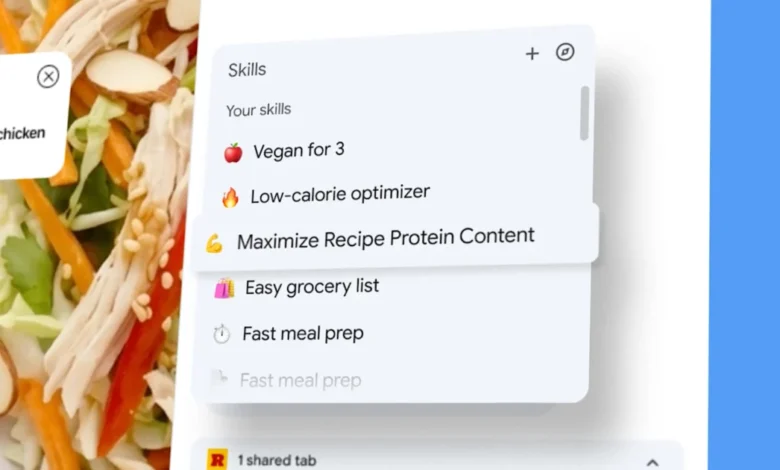
Google is ushering in a new era of browser-based artificial intelligence with the introduction of "Skills" within Gemini for Chrome on desktop. This innovative feature empowers users to transform their frequently used Gemini prompts into easily accessible, one-click tools. These "Skills" can then be deployed across selected tabs, streamlining complex tasks and enhancing productivity for a wide range of users. The rollout signifies a significant step in Google’s ongoing effort to integrate AI more deeply and functionally into its core browser experience, moving beyond simple conversational queries to actionable, repeatable workflows.
The Genesis of Gemini Skills: A Leap in Browser AI Functionality
The announcement of Skills in Chrome, detailed in a recent Google blog post, marks a pivotal moment in the evolution of AI-powered web browsing. Gemini, Google’s advanced AI model, has been progressively integrated into Chrome, offering capabilities such as understanding page content, analyzing multiple tabs, and even connecting with other Google applications like Gmail and Calendar. However, the introduction of Skills represents a critical advancement by adding a layer of reusability and automation to these existing functionalities. Previously, users might have to re-enter similar prompts multiple times or manually copy and paste information between tabs. Skills change this paradigm by allowing a single, saved prompt to execute a predefined set of actions across the user’s browsing session.
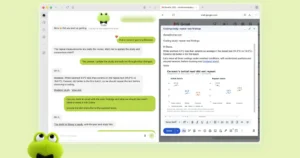
This new feature allows users to convert a prompt they’ve already formulated and run within Gemini’s Chrome side panel into a permanent "Skill." Once saved from the chat history, these Skills become readily available. A simple forward slash or a click on the plus icon within the Gemini interface in Chrome will bring up a list of saved Skills. Selecting a Skill then triggers its execution on the currently viewed page. The true power of Skills, however, lies in their ability to operate across multiple open tabs. Users can designate additional tabs when running a Skill, enabling a single prompt to gather and process information from various sources simultaneously.
A Growing Library of Pre-built Skills and Customization
Google is not only enabling users to create their own Skills but is also launching with a curated library of pre-built options. These ready-to-use Skills are designed to address common user needs and showcase the potential of the feature. Examples include workflows for meticulously breaking down product ingredients, efficiently comparing specifications across different web pages, and intelligently cross-referencing gift budgets with a recipient’s stated interests. Users can add any of these library Skills to their personal collection and, crucially, edit the underlying prompt to tailor it precisely to their individual requirements. This blend of pre-built convenience and deep customization ensures that Skills can cater to a broad spectrum of user needs, from casual shoppers to more sophisticated power users.
Transforming Browser Interaction: From Chatbot to Automated Assistant
The introduction of Skills fundamentally alters the way users interact with AI within their browsers. Over the past year, Google has steadily enhanced Chrome’s AI capabilities. Features like page-aware prompts, multi-tab context analysis, and seamless integration with applications such as Gmail and Calendar have laid the groundwork for more sophisticated AI applications. Skills build upon this foundation by adding a crucial element of reusability.
Consider a scenario where a user needs to research a product. They might use Gemini to summarize a product page, then switch to another tab to compare prices, and finally to a third tab to check reviews. With Skills, this entire process could potentially be condensed into a single action. A saved Skill could be designed to: 1) extract product details from the current page, 2) visit two other specified tabs to gather price and review information, and 3) then, through integration with Gmail, draft a summary email containing all this aggregated data. This moves beyond a simple chatbot conversation towards a lightweight, automated workflow, significantly reducing the manual effort required for complex research and analysis.
Implications for SEO, Marketing, and Productivity
The multi-tab functionality of Gemini Skills opens up a wealth of possibilities, particularly for professionals in search engine optimization (SEO) and digital marketing. Imagine saving a Skill that automatically compares key metrics of competitor web pages against a client’s own site. This could involve analyzing title tags, meta descriptions, heading structures, and even keyword density across multiple pages simultaneously. Such a Skill would drastically reduce the time spent on routine website audits and competitive analysis.
Furthermore, for e-commerce businesses, a Skill could be developed to extract structured data from product pages – such as pricing, availability, customer ratings, and shipping information – from a list of open tabs. This data could then be compiled into a spreadsheet for further analysis or for use in product listing optimization. The ability to create repeatable prompts that automate these data-gathering and comparison tasks represents a significant efficiency gain.
The initial launch categories for Skills – shopping, productivity, and wellness – suggest that Google’s primary target audience for this feature is the general consumer. While the underlying technology has the potential for more complex enterprise applications, the current focus indicates that Skills are being positioned as a consumer-centric productivity tool. This approach aims to make advanced AI capabilities accessible and beneficial to a broad user base, rather than exclusively to developers or IT professionals.
A Timeline of AI Integration in Chrome
Google’s journey to integrate AI into Chrome has been a progressive one, with Skills representing a significant milestone. This evolution can be broadly understood through a chronological lens:
-
Early Stages (Pre-2023): Chrome’s AI capabilities were primarily limited to features like predictive text in search bars, basic spell-checking, and rudimentary page translation. These were functional but lacked deep contextual understanding or automation.
-
The Gemini Integration Begins (Late 2023 – Early 2024): Google began a more concerted effort to embed its advanced AI models, particularly Gemini, into Chrome. This initial phase focused on bringing AI into the browser’s side panel, enabling users to ask questions about the content of the current page. Features like "Help me write" and basic summarization began to appear.
-
Expanding Contextual Understanding (Early 2024): Google introduced features that allowed Gemini to understand context across multiple tabs and even connect with other Google services. This meant Gemini could not only analyze a single page but also consider information from other open pages or data from linked applications like Calendar or Gmail. This was a crucial step towards enabling more complex AI tasks.
-
The Introduction of Skills (Mid-2024): The unveiling of Gemini Skills in Chrome represents the culmination of these efforts. By allowing users to save and reuse prompts as functional "Skills," Google has transformed the browser’s AI from a reactive assistant into a proactive workflow tool. This feature builds directly upon the multi-tab context and app connectivity previously established.
Broader Impact and Future Trajectory
The introduction of Skills signifies a broader trend: Chrome is evolving into a more persistent and integrated AI assistant. Instead of being a standalone tool accessed only when needed, the AI features within Chrome are becoming an intrinsic part of the browsing experience. This suggests a future where the browser actively anticipates user needs and automates routine tasks without explicit instruction.
The implications of this shift are far-reaching. For individuals, it promises a more efficient and less tedious online experience. Tasks that once required multiple manual steps could be reduced to a single click or a simple voice command. For businesses, especially those heavily reliant on web research and data analysis, the potential for productivity gains is substantial. As mentioned, SEO professionals, marketers, and researchers can leverage Skills to automate time-consuming tasks, freeing up valuable time for more strategic work.
Looking ahead, it is plausible that Google will continue to expand the capabilities of Gemini Skills. We might see more sophisticated conditional logic within Skills, allowing for more dynamic and adaptive workflows. Integration with a wider array of third-party applications is also a likely development, further embedding Chrome’s AI capabilities into users’ broader digital ecosystems. The focus on consumer productivity in the initial launch also hints at potential future expansions into more specialized professional or developer-oriented Skill sets.
In essence, Gemini Skills in Chrome are not just a new feature; they represent a fundamental reimagining of how we interact with the internet. By transforming AI prompts into reusable workflows, Google is making powerful automation accessible to everyone, paving the way for a more intelligent and efficient digital future. The browser is no longer just a window to the web; it is becoming an intelligent co-pilot, ready to streamline our online lives with a click.
Featured Image: Google, 2026.