Digital marketing professionals and business owners frequently encounter a frustrating scenario: logging into the Meta Ads Manager only to discover that active ad campaigns are failing to deliver impressions, reach target audiences, or generate tangible results. Within the digital advertising ecosystem, "ads not delivering" indicates that a campaign is technically active within the platform’s user interface, but the algorithm is failing to serve the creative assets to the designated audience. This phenomenon can impact brand-new campaigns as well as established ad sets that have historically performed well.
Diagnosing delivery issues requires navigating the Meta Ads Manager and examining the "Delivery" column. If technical impediments or policy roadblocks prevent dissemination, the platform typically flags the status with sub-statuses such as "Update required," "In Review," "Not Approved," or simply leaves the metric static with zero impressions. Understanding the root causes of these delivery bottlenecks is essential for maintaining marketing momentum, protecting advertising budgets, and ensuring optimal return on investment (ROI).
Background Context and Platform Mechanics
Meta’s advertising network operates via a complex, automated auction system designed to balance user experience with advertiser objectives. Every day, millions of businesses compete for limited ad inventory across Facebook, Instagram, Messenger, and the Audience Network. To govern this massive marketplace, Meta relies on a combination of machine learning algorithms, automated content moderation systems, and human review teams.
The platform’s primary objective is to display relevant, high-quality, and policy-compliant content to its billions of active monthly users. When an ad fails to deliver, it usually means that a parameter within the campaign setup, budget configuration, audience definition, or creative asset has tripped a safety mechanism or violated an optimization threshold within Meta’s ecosystem. Marketing analysts emphasize that systemic changes in privacy regulations, iOS data tracking limitations, and automated enforcement policies have made ad delivery hurdles more frequent over recent years, requiring marketers to adopt rigorous troubleshooting protocols.
The Top 10 Reasons for Ad Delivery Failures and Their Resolutions
-
The Associated Post or Creative Asset is Unavailable
A common technical glitch occurs when the organic post, image, video, or page element linked to an ad campaign becomes deleted, private, or restricted. If the underlying asset ceases to exist or permissions are altered, the ad system cannot display it, triggering an "Update required" notification.- The Fix: Advertisers must verify that the linked post, page, or Instagram account remains public and fully accessible. Navigating to the creative asset, resolving permission issues, or selecting an alternative post within Ads Manager resolves the issue. Once updated, toggling the ad set back to active removes the error status.
-
The Ad Remains Under Automated or Manual Review
Meta subjects every new or significantly edited advertisement to a review process to ensure compliance with its comprehensive Advertising Standards. This process typically utilizes automated algorithms, but complex campaigns, sensitive topics, or high-volume periods (such as holiday shopping seasons) may trigger manual reviews by human support personnel. According to Meta’s Business Help Centre, standard reviews are completed within 24 hours, though delays frequently occur.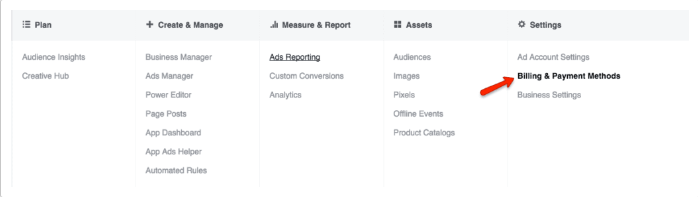
- The Fix: Proactive scheduling is vital. Advertisers should submit campaigns several days in advance of their intended launch date. Furthermore, marketers must refrain from editing ongoing or scheduled ads—such as altering creative copy, budgets, or targeting—while they are in the review queue, as any modification restarts the entire review timeline.
-
The Advertisement Has Been Rejected for Policy Violations
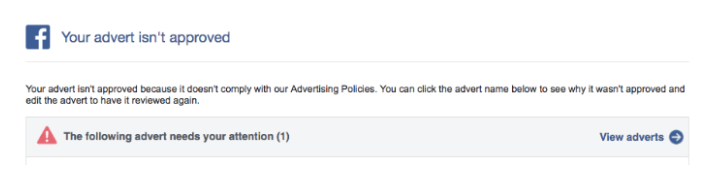
If an ad violates Meta’s terms of service or advertising guidelines, it is officially rejected, halting all delivery. Rejections are common across industries and can be triggered by prohibited content, misleading claims, restricted products (such as adult items, financial services, or healthcare products), or issues with the destination landing page. Meta typically notifies administrators via email and marks the status as "Not Approved" in Ads Manager.- The Fix: Review the specific policy violation cited in the notification, edit the ad copy or visuals to remove the offending element, and resubmit. If an advertiser believes the rejection was an automated error, a formal appeal can be submitted directly through the Account Quality dashboard. Additionally, marketing teams must ensure that landing pages match the ad’s promises and remain functional.
-
Account Spending Limits Have Been Reached
Many organizations establish account spending limits at the business manager level to maintain strict financial control over their marketing expenditures. Once cumulative spending across all active campaigns reaches this predetermined threshold, Meta immediately ceases all ad delivery across the account.- The Fix: Navigate to Ads Manager, access the "Billing and Payment Methods" settings, and review the account spending limit metrics. If the threshold has been met, administrators can increase, reset, or completely remove the spending cap to immediately resume ad delivery.
-
Budgets or Bid Caps Are Set Too Restrictive
Meta’s delivery algorithm requires sufficient financial runway to test, learn, and optimize. When daily budgets are set too low (e.g., $3 per day) or tight bid caps are enforced alongside large budgets, the system lacks the financial leverage to successfully win auctions and gather statistically significant performance data. Consequently, the algorithm pauses delivery to prevent wasting capital on an underfunded campaign.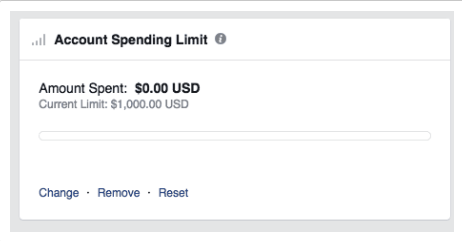
- The Fix: Establish realistic daily or lifetime budgets that allow the algorithm breathing room to find conversions. Utilizing automated bidding strategies, such as "Lowest Cost," permits the algorithm to secure optimal results at competitive market rates without prematurely choking off delivery.
-
Target Audiences Are Excessively Narrow
While hyper-targeting is a popular strategy for niche marketing, overly restrictive parameters can catastrophically hinder delivery. Meta’s algorithms generally require a minimum audience pool to effectively test and serve advertisements. If custom audience lists are too small or geographical and interest-based filters reduce the target demographic below functional thresholds, delivery stalls.- The Fix: Broaden audience definitions by expanding geographic radiuses, incorporating lookalike audiences, removing overly restrictive interest exclusions, or enabling Advantage+ Audience expansion features to allow Meta’s system to find additional qualified prospects.
-
High Auction Overlap Causes Internal Competition
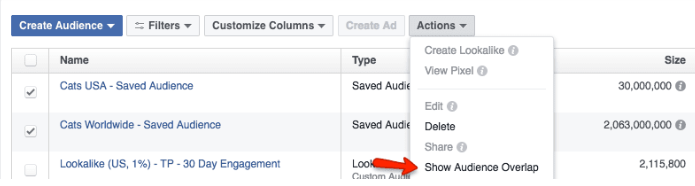
When an advertiser runs multiple ad campaigns or ad sets targeting identical or highly overlapping audiences, the campaigns effectively compete against one another within Meta’s ad auction. To prevent advertisers from bidding against themselves and artificially inflating their own costs, Meta’s system automatically pauses the lower-value ad sets while prioritizing the highest-performing asset.- The Fix: Utilize the native "Audience Overlap" tool located within the Audiences tab of Ads Manager. By analyzing audience intersection percentages, marketers can identify cannibalized campaigns, merge overlapping ad sets, or refine distinct targeting criteria to ensure each campaign serves a unique segment of the market.
-
Low Ad Engagement and Poor Relevance Diagnostics
Meta prioritizes user experience by rewarding ads that generate positive engagement and penalizing those that do not. The platform evaluates ads using relevance diagnostics, including Quality Ranking, Engagement Rate Ranking, and Conversion Rate Ranking. If users consistently scroll past, hide, or report an ad, the system drops its distribution priority in favor of more engaging competitor content.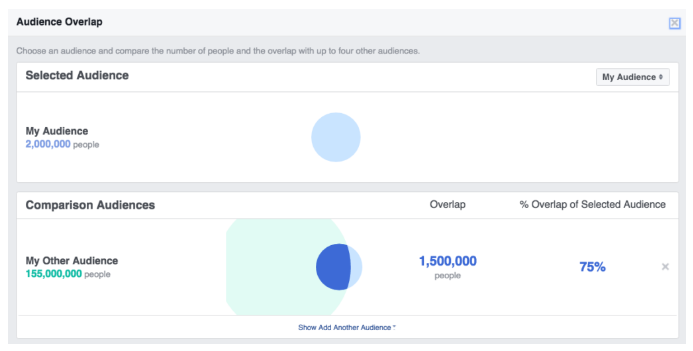
- The Fix: Revitalize underperforming campaigns by testing fresh creative variations, updating ad copy, improving visual hooks, and refining the post-click landing page experience. Industry benchmarks indicate that moving an ad’s ranking from "Low" to "Average" yields significant performance gains in delivery volume.
-
Campaign Scheduling and Timing Errors
Simple administrative oversight regarding campaign start and end dates frequently accounts for stalled delivery. Campaigns configured with expired end dates, future start dates, or manual pauses will not serve impressions regardless of budget or creative quality.- The Fix: Audit the campaign settings within Ads Manager to verify active status, update elapsed end dates, and ensure that scheduling parameters align with current marketing objectives.
-
Optimization Goals Fail to Secure Conversions
The optimization goal assigned to an ad set tells Meta’s algorithm the exact consumer action to pursue. If an advertiser optimizes for a high-friction conversion event—such as completing a high-value purchase or filling out an extensive application—on a brand-new pixel with limited historical data, the system may struggle to find converting users. Without sufficient conversion signals, the algorithm halts delivery entirely.- The Fix: Adjust the optimization goal to a higher-frequency, lower-friction funnel event, such as "Add to Cart" or "Link Clicks." This allows the algorithm to accumulate necessary user behavior data and deliver impressions efficiently. Once the campaign demonstrates consistent performance, marketers can transition the optimization goal back down the sales funnel toward final conversions.
Implications and Strategic Outlook for Advertisers
The increasing automation of digital advertising platforms like Meta represents a double-edged sword for modern marketers. While machine learning algorithms streamline campaign management and target consumers with unprecedented precision, they also demand strict adherence to technical parameters, creative best practices, and platform policies.
Failing to monitor ad delivery indicators can result in wasted labor hours, missed sales targets, and distorted marketing analytics. Industry experts recommend establishing automated daily monitoring protocols within Ads Manager, maintaining close alignment between creative messaging and landing page experiences, and keeping abreast of evolving privacy regulations and policy updates. By understanding the multifaceted reasons behind delivery failures and systematically applying proven technical fixes, organizations can safeguard their digital marketing investments and ensure uninterrupted campaign performance across Meta’s global advertising network.