The evolution of artificial intelligence, particularly in the realm of agentic AI, presents a significant challenge for user interface (UI) design. Traditional loading indicators, such as spinners and progress bars, which have long served to signal system latency, are proving inadequate for the complex, multi-faceted processes undertaken by AI agents. This article delves into why these legacy patterns fail and proposes new interface paradigms that prioritize transparency by revealing the system’s decision-making, status, and ongoing processes, thereby fostering user trust and understanding.
The core issue lies in the fundamental difference between traditional software waiting times and the "thinking" time of AI agents. For decades, users have associated spinners with data retrieval – waiting for a server response, a file download, or a database query. The underlying assumption is that the delay is a function of network speed or data volume. However, when an AI agent pauses for an extended period, it is not merely fetching information. It is actively engaged in a sophisticated cognitive process: analyzing complex data, weighing probabilities, formulating strategies, and generating content. This distinction is critical. A generic spinner, in this context, becomes a source of confusion and anxiety. Users are left to wonder if the system is stalled, has crashed, or is grappling with an exceptionally difficult task, or if it has simply failed. This ambiguity erodes user confidence, a detrimental outcome for any interactive system, especially one designed to assist or automate complex tasks.
The first part of this series highlighted the "Decision Node Audit," a methodology for mapping the internal workings of an AI system to identify precise moments of decision-making based on probabilistic outcomes. This audit is crucial for determining when transparency is necessary. The subsequent challenge, and the focus of this discussion, is how to effectively communicate this internal activity to the user. The "Transparency Matrix," derived from the audit, specifies which behind-the-scenes API calls and internal processes require visible status updates. While technical implementation is essential, the design of the visual and textual containers for these updates is paramount for user adoption and trust.

The limitations of the spinner pattern become apparent when considering the new generation of AI. For instance, an AI assistant tasked with organizing team calendars and scheduling recurring meetings might require significant processing time. If this AI simply displays a "Checking availability…" message with a spinning icon, users are left in the dark. They understand a calendar is being consulted, but they lack crucial context: whose calendars are being checked, what other parameters are being considered (e.g., meeting purpose, participant availability across time zones), and whether the AI has fully grasped the nuances of the request. This lack of information transforms a potentially helpful interaction into an unnerving waiting game, akin to anticipating a surprise that might not be welcome.
Perplexity AI offers a compelling example of effective real-time status updates. When a user poses a question, the interface dynamically displays the specific steps the AI is undertaking, such as "Searching the web," "Analyzing documents," or "Synthesizing information." This granular visibility allows users to follow the AI’s progress, understand the underlying processes, and build confidence in the accuracy and thoroughness of the response. This approach moves beyond a passive "something is happening" to an active "here is exactly how I am working to solve your problem."
Writing Clear Status Updates: The Power of Microcopy
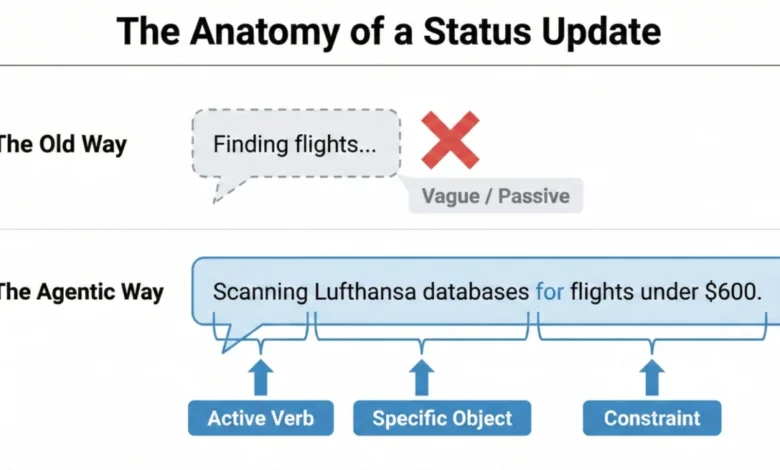
Transparency in AI interfaces is not merely a visual design challenge; it is fundamentally rooted in the language used. The microcopy – the concise, explanatory text accompanying system actions – is the primary driver of user trust. Generic placeholders like "Loading" or "Working" are vestiges of a bygone era of static software and are insufficient for agentic AI. Instead, status updates must be constructed using a specific formula that mirrors the AI’s agency and articulates its specific actions.

The "Agentic Update Formula" provides a framework for crafting these informative messages. It comprises three key elements: an Action Word, the Specific Item being worked on, and any governing Limits or rules. For example, consider an AI assisting with travel arrangements. A weak, unhelpful update might simply read: "Searching for flights…". A superior update, adhering to the formula, would be: "Searching for flights within a $500-$700 budget for the specified dates." This enhanced message clearly communicates that the AI has understood the user’s constraints and is actively working within those parameters.
This formulaic approach ensures that status updates are not only informative but also grounded in the user’s specific needs and expectations. By breaking down complex processes into digestible steps, users gain a clearer understanding of the AI’s capabilities and limitations.
Matching Tone to Risk: The Impact/Risk Matrix
The appropriate tone for AI-generated status updates is intrinsically linked to the perceived risk and importance of the task. The "Impact/Risk Matrix," derived from the "Decision Node Audit," serves as a guide for calibrating this tone. For low-risk, routine tasks, a friendly, conversational tone can enhance user experience. For instance, a scheduling assistant can state, "Checking your calendar for the best time," fostering a relaxed and approachable interaction.

Conversely, high-stakes operations demand precision and clarity. If an AI is handling a significant financial transaction or a complex data migration, a playful or overly casual tone would be inappropriate and potentially alarming. In such scenarios, the interface should adopt a straightforward, mechanical tone, stating, "Verifying account routing numbers," rather than, "I’m thinking hard about your money." This adaptive tone ensures that the AI’s persona aligns with the user’s emotional state and the criticality of the task at hand.
However, the Impact/Risk Matrix is a starting point, not an absolute rule. Rigorous user research is essential to validate the chosen tone and language. Different user demographics and cultural contexts may have varying expectations. Conducting usability tests, gathering feedback through surveys, and observing user interactions are crucial steps to ensure the AI’s communication style resonates effectively and avoids unintended anxiety or distrust.
Interface Patterns: A Library for Agents
Beyond the wording of status updates, the design of the interface patterns that deliver these messages is critical. The goal is to match the visibility and prominence of the update to the weight and importance of the task. A subtle background process, like an AI organizing files, requires a less obtrusive notification than a complex, multi-step financial operation.

A library of carefully designed interface patterns can ensure the right level of transparency is delivered at the right moment, transforming potential anxiety into informed confidence.
The Living Breadcrumb: Subtle Background Assurance
For low-stakes tasks performed in the background, the "Living Breadcrumb" pattern offers a solution. This pattern provides a subtle, dynamic indicator that shows the AI is active without being distracting. Imagine an email client where an AI is drafting a reply. Instead of an intrusive pop-up, a small status indicator, perhaps within the application’s border or menu, smoothly transitions between text updates like "Reading email," "Drafting reply," and "Checking tone." This provides quiet assurance that the task is progressing, accessible for users who wish to check, but not demanding constant attention.
Dynamic Checklists: Clarity for High-Stakes Processes

For critical, high-stakes tasks, such as processing complex financial transactions or migrating large datasets, the "Dynamic Checklist" pattern is highly recommended. This pattern lays out every planned step the AI agent will take, clearly indicating the current stage, marking completed steps, and listing pending actions. For example, a travel booking AI might display:
- Gathering Destination Preferences (Complete)
- Searching for Flights (In Progress)
- Checking Hotel Availability (Pending)
- Booking Transportation (Pending)
This approach offers significant advantages over a traditional progress bar. If a specific step, like currency conversion, takes longer than anticipated, the user sees precisely where the delay is occurring and understands it within the context of a potentially complex action. This visibility fosters patience and trust, mitigating anxiety associated with unpredictable wait times. The implementation of dynamic checklists requires robust front-end state management and backend webhook structures to ensure real-time synchronization between the AI’s progress and the UI.
The Thinking Toggle: Deep Transparency on Demand
For users requiring a higher degree of insight, the "Thinking Toggle" provides progressive disclosure. This UI element, such as a "View Logs" button, allows users to expand a friendly status update into a raw, albeit sanitized, terminal view of the AI’s logic logs. This caters to expert users who may want to scrutinize the AI’s decision-making process. While many users may never access this detailed view, its very presence signals a commitment to transparency and reassures users that the system is not concealing information. It is imperative to sanitize these logs to prevent the exposure of proprietary information or security vulnerabilities.

Designing for Partial Success: Navigating Ambiguity
AI agents often operate in shades of grey, achieving partial success rather than outright completion or failure. Traditional binary error messages ("Request Failed") can be misleading and erode trust when an AI has completed most of a task but encountered an issue with a specific component. A more effective approach is to clearly delineate what worked and what didn’t. For instance, an AI planning a trip might successfully book flights and hotels but fail to secure a reservation at a specific restaurant. The interface should clearly indicate:
- Flights Booked (Success)
- Hotel Reserved (Success)
- Restaurant Reservation (Failed – requires manual intervention)
This granular reporting allows users to address only the failed components, leveraging the AI’s completed work and fostering confidence in its overall capabilities.
Disentangling the Tool: Attributing Failures Accurately

When AI systems rely on external services, it is crucial to accurately attribute failures. If an AI assistant cannot access a user’s calendar due to an API outage, the error message should reflect this. A message stating, "I cannot access your calendar because the Google Calendar API is unavailable," is far more informative and less damaging to user trust than, "I failed to access your calendar." This distinction prevents users from incorrectly perceiving the AI itself as flawed, maintaining faith in its core functionality.
The Audit Trail: Building Trust After the Fact
Real-time transparency is invaluable, but its fleeting nature means users may miss critical updates. For this reason, a persistent "Audit Trail" is essential for agentic workflows. This feature allows users to review the AI’s decision logic and actions after a task is completed. A "Show Work" option on the final result screen, linking to a detailed log or replay of the AI’s process, provides a robust mechanism for verification. Even if users don’t actively engage with the audit trail, its presence signals that the system stands behind its work and is open to scrutiny. This addresses issues seen with early iterations of ChatGPT, where memory and data usage influencing outputs were not easily auditable, leading to user confusion. The audit trail provides the necessary transparency to demystify AI’s "memory" and decision-making.
The Audit Trail pattern is particularly relevant in addressing the opaque nature of AI memory systems. Without a clear record of what information the AI has retained and how it influences its outputs, users can experience unexpected and unexplained behaviors. The audit trail provides this crucial layer of accountability, allowing users to understand the provenance of the AI’s actions.

Interface Patterns Summary:
| Pattern | Best Use Case | User’s Anxiety | Trust Signal |
|---|---|---|---|
| The Living Breadcrumb | Low-stakes, background tasks (e.g., drafting emails, sorting files). | Did the system stall or freeze? | I am active, but I won’t disturb you. |
| The Dynamic Checklist | High-stakes workflows with variable time (e.g., financial transfers, booking travel). | Is it stuck? What step is taking so long? | I have a plan, and I am currently executing Step 2. |
| The Thinking Toggle | Expert tools or complex data analysis (e.g., code generation, market research). | Is this hallucinating or using real data? | I have nothing to hide; here are my raw logs. |
| The Audit Trail | Post-task review for any outcome (e.g., final reports, completed bookings). | How do I know this result is accurate? | Here is the receipt of my work for you to verify. |
The Reality of Attention: When Users Ignore the Interface
It is crucial to acknowledge that even the most sophisticated interface patterns may be overlooked by busy users. Professionals, in particular, often engage with AI tools by initiating a task and then returning to other work, judging the system solely by its final output. If an AI-generated result aligns with their expectations, trust is established. However, if the output deviates significantly without clear explanation, users may not revisit the real-time status updates. This is where the persistent Audit Trail becomes invaluable, offering a way to retroactively understand discrepancies and rebuild trust. For enterprise-grade AI tools, a single instance of a misaligned outcome that requires extensive manual investigation can lead to abandonment of the tool.
Predictability, Reliability, and Understanding Are the Product

The ultimate goal in designing for agentic AI is not to create magic tricks, but to build reliable colleagues. Transparency, achieved through clear status updates, dynamic checklists, acknowledgments of partial success, and robust audit trails, transforms AI from a mysterious black box into a manageable team member. This approach fosters trust, enhances predictability, and ensures users understand the AI’s processes and limitations. Transparency, in this context, means providing users with a clear view of the AI’s process, performance, current status, limitations, and decision history. This empowers users to actively engage with the AI, understand the rationale behind its outputs, and guide it toward optimal outcomes. By prioritizing these principles, we can create AI experiences that are not only functional but also trustworthy and empowering.