Mastering Your Digital Presence: A Comprehensive Guide to Creating and Optimizing a Facebook Business Page

Facebook, with its staggering 1.96 billion daily active users, stands as an unparalleled digital arena for businesses aiming to connect with their target demographic. This vast ecosystem is not merely a social network but a vital commercial hub, evidenced by the fact that over 200 million businesses leverage Facebook’s free services, predominantly through Facebook Business Pages. A meticulously crafted and well-optimized Business Page serves as a cornerstone of modern digital strategy, enabling companies to cultivate brand awareness, foster community engagement, and drive effective marketing initiatives.
The Evolution of Facebook as a Business Powerhouse
Initially conceived as a collegiate social network, Facebook’s trajectory has dramatically shifted over the past two decades, evolving into a multifaceted platform indispensable for global commerce. The introduction of Facebook Pages in the mid-2000s marked a pivotal moment, providing brands, organizations, public figures, and artists with a dedicated space distinct from personal profiles. This innovation laid the groundwork for a robust suite of business tools, including the sophisticated Facebook Ads Manager, which revolutionized targeted advertising, and more recently, Facebook Shops, facilitating integrated e-commerce directly within the platform. This continuous development underscores Facebook’s commitment to empowering businesses, large and small, with the tools needed to thrive in the digital age. The sheer scale of its user base, coupled with the granular targeting capabilities of its advertising engine, ensures its enduring relevance despite the rise of new social media competitors. For many enterprises, a Facebook Business Page is not just a digital brochure; it’s a dynamic storefront, a customer service portal, and a community forum all rolled into one.
Establishing Your Digital Identity: Creating a Facebook Business Page
The journey to leveraging Facebook’s business potential begins with creating a dedicated Business Page. While straightforward, understanding the nuances of each step ensures optimal setup and future success. It is crucial to note that every Facebook Page is administered by one or more individuals connected via their personal Facebook accounts. This linkage provides accountability and security, ensuring that business operations remain tied to verifiable identities, though personal profile information is never publicly displayed on the Business Page itself.
Step 1: Initiating Your Page – The Foundation
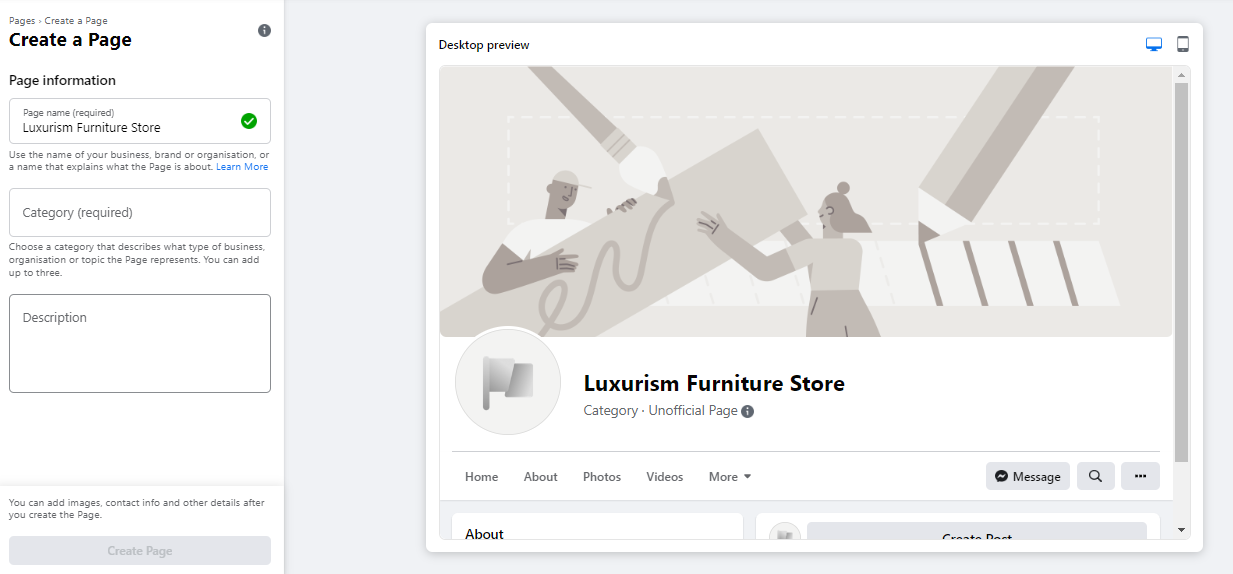
The first practical step involves navigating to facebook.com/pages/create. Here, businesses are prompted to input fundamental information that will define their page.
- Page Name: This field is paramount. It should ideally be the official business name or a commonly recognized variant that users would naturally search for. Consistency with branding across all platforms is key for recognition and search engine optimization (SEO).
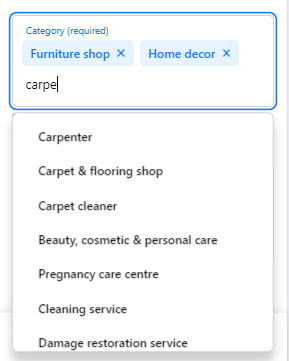
- Category: Facebook allows for up to three categories. These descriptors are vital for discoverability, helping Facebook’s algorithm connect your page with relevant users and searches. Choosing accurate and specific categories enhances visibility and ensures your page appears in appropriate contexts.
- Description: A concise yet compelling description (maximum 255 characters) should articulate the essence of your business. This snippet often appears in search results and acts as an immediate introduction, so it should be informative and engaging. Upon completion of these details, clicking "Create Page" brings your digital entity into existence.
Step 2: Visual Storytelling – Profile and Cover Images
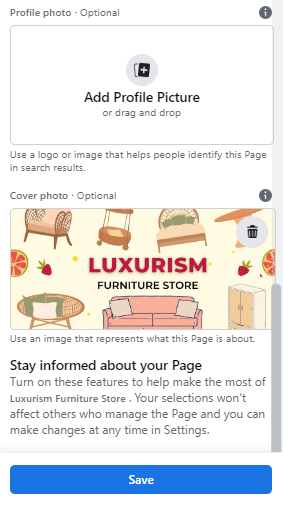
Visuals are the immediate impression makers on any social platform. High-quality, brand-aligned imagery is non-negotiable for a professional Facebook Business Page.
- Profile Picture: This image serves as your digital avatar, appearing alongside your page name in search results and all interactions. For established brands, a logo is standard. Public figures benefit from a clear headshot, while small businesses might showcase a signature product or service. The recommended size is 180 x 180 pixels, though it’s displayed as a circle, necessitating careful placement of key details away from corners.
- Cover Photo: The cover image is the most prominent visual element on your page, a prime piece of real estate to convey brand personality, promotions, or core offerings. Facebook recommends dimensions of 1640 x 856 pixels. This large banner should be visually impactful and strategically designed to draw visitors further into your page. After uploading both images, it’s advisable to preview them in both desktop and mobile views to ensure optimal display across devices before saving.
Step 3: Enhancing Connectivity – Optional WhatsApp Integration
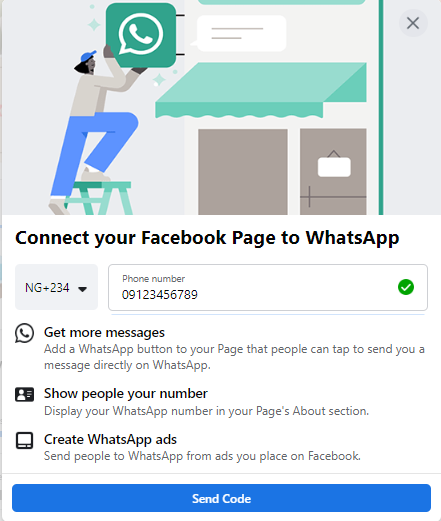
Following the initial setup, Facebook often prompts an optional integration with WhatsApp. This feature offers a direct communication channel, allowing businesses to add a WhatsApp button to their page and redirect prospects from Facebook ads directly to a WhatsApp chat. In an era of increasing demand for instant communication and conversational commerce, this integration can significantly streamline customer service, sales inquiries, and appointment bookings, fostering a more immediate and personal connection with the audience.
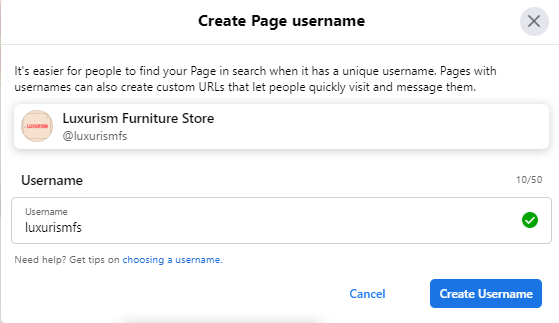
Step 4: Defining Your Digital Address – Creating a Username
A Facebook username, also known as a vanity URL, provides a clean, memorable link for your page (e.g., facebook.com/yourbusinessname). While up to 50 characters, brevity and relevance are key for ease of recall and sharing. Aligning it closely with your business name or a recognizable variant is a best practice. This custom URL enhances brand recognition and simplifies directing people to your page through various marketing channels.
Step 5: Comprehensive Information – Filling Out Business Details

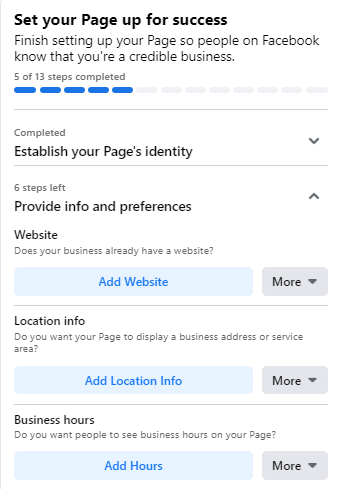
The "About" section of your Facebook Page is a crucial resource for potential customers seeking more information. Neglecting to complete these details can lead to missed opportunities, as users often rely on this section for practical information.
- Contact Information: This includes your business website, physical address (if applicable), operational hours, and phone number. Providing accurate and complete details builds trust and facilitates direct contact.
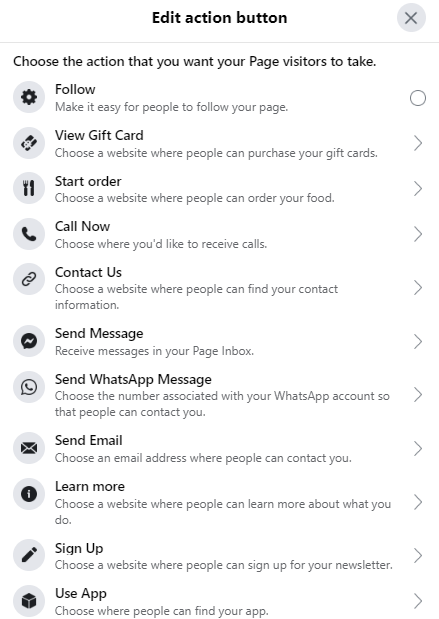
- Call-to-Action (CTA) Button: Facebook’s customizable CTA button is a powerful tool to guide visitor action. Options range from "Shop Now" and "Book Now" to "Send Message" or "Learn More." The choice should align with your primary business objective for the page, funneling users toward a desired conversion.
For businesses that require more time to gather all details, Facebook allows pages to be temporarily unpublished. This feature, accessible via "Page Visibility" in the "Settings" menu, ensures that an incomplete page isn’t publicly visible, allowing for thorough preparation before launch.
Step 6: Making a Grand Entrance – Crafting Your First Posts
Before actively inviting an audience, a newly created page should feature some initial content. These foundational posts provide context and demonstrate the value proposition of your business. A mix of informative, engaging, and relevant content is ideal. This could include:
- Welcome Message: A friendly introduction to your business and what visitors can expect from your page.
- Key Products/Services: Highlighting your core offerings with compelling visuals.
- Industry Insights: Sharing valuable tips or news relevant to your niche.
- Behind-the-Scenes: Offering a glimpse into your operations to build authenticity.
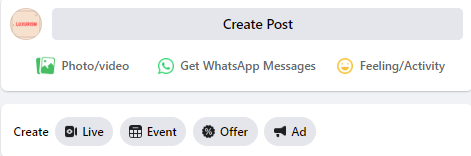
Facebook provides various post formats, including text, images, videos, events, and job postings, allowing for diverse content strategies. The goal is to ensure that when potential followers arrive, they find a vibrant and valuable space, encouraging them to stay and engage.
Step 7: Cultivating Your Community – Inviting an Audience
With a fully furnished page, the next step is to attract followers. Starting with your existing network is an effective initial strategy. Facebook allows you to invite your personal friends to like your new Business Page, providing an immediate boost to your follower count. Beyond this, cross-promotion is vital:
- Website Integration: Embed "follow us" buttons on your website and blog.
- Email Signatures: Include a link to your Facebook Page in all professional correspondence.
- Other Social Media: Announce your new Facebook presence on platforms like Twitter, LinkedIn, or Instagram.
- Offline Marketing: Incorporate your Facebook handle on business cards, flyers, and in-store signage.
- Customer Reviews: Actively encourage satisfied customers to leave reviews on your page, enhancing credibility and discoverability.
Optimizing for Impact: Maximizing Your Facebook Business Page’s Potential
Creating a Facebook Business Page is merely the first step; continuous optimization is essential to meet evolving social media marketing goals and ensure sustained engagement. This involves a strategic approach to data analysis, content presentation, and community interaction.
1. Data-Driven Decisions: Harnessing Facebook Page Insights
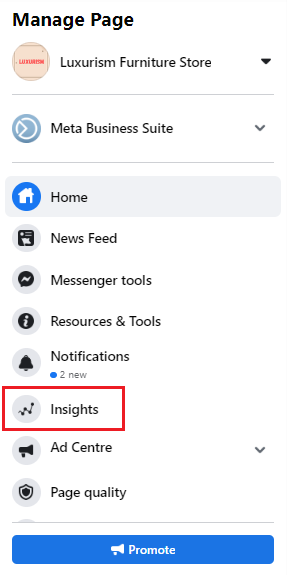
Facebook Page Insights is an invaluable analytical tool, offering a treasure trove of data on audience demographics, engagement patterns, and content performance. Accessible from the "Manage Page" menu, Insights provides metrics such as:
- Reach: The number of unique users who saw your content.
- Engagement: Total interactions (likes, comments, shares) with your posts.
- Audience Demographics: Age, gender, location, and language of your followers.
- Actions on Page: Clicks on your website, CTA button, address, or phone number.
Analyzing this data allows businesses to refine their content strategy, tailor messaging to specific audience segments, identify peak engagement times, and ultimately optimize their social media content calendar for maximum relevance and impact. Understanding what resonates with your audience is critical for continuous growth.
2. Strategic Content Placement: The Pinned Post
A pinned post is a powerful feature that allows you to highlight critical information at the top of your page, directly beneath the cover photo. This ensures that any visitor immediately sees your most important announcement, promotion, or evergreen content. Effective pinned posts might include:
- A new product launch announcement.
- A limited-time offer or discount.
- An upcoming event.
- A frequently asked questions (FAQ) post.
- A link to a flagship blog post or resource.
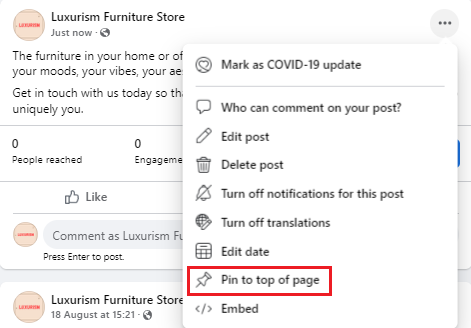
To pin a post, simply click the three dots in the top right corner of the desired post and select "Pin to Top of Page." This strategic placement can significantly increase visibility and drive specific actions.

3. Community Building: Interacting with Other Pages
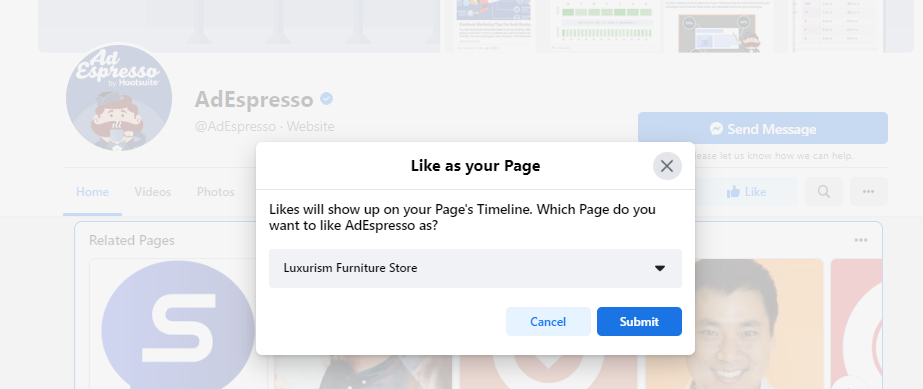
Facebook is inherently a social platform, and businesses can leverage this by actively engaging with other pages. Liking and following non-competing but related businesses within your industry or local community can foster networking opportunities and increase your page’s visibility. For example, a local bakery might follow a coffee shop or a complementary retail store. When you like a page as your business, the page owner receives a notification, potentially prompting them to explore and reciprocate the follow. This strategy helps build a digital community, exposes your brand to new audiences, and allows you to stay abreast of industry trends from a dedicated newsfeed for your business profile.
4. Expanding Your Digital Footprint: Linking from Other Platforms
Backlinks remain a cornerstone of digital marketing, enhancing credibility and driving traffic. Integrating links to your Facebook Business Page across all your digital assets is crucial:
- Website: prominently display Facebook icons and links.
- Blog Posts: Include a call-to-action to follow your page.
- Email Newsletters: Feature your Facebook link in your email footer.
- Other Social Media Profiles: Ensure consistent cross-promotion.
When collaborating with partners or influencers, request that they also link to your Facebook Page. These backlinks not only guide potential followers to your page but also contribute positively to your overall search engine ranking.
5. Tailoring the User Experience: Templates and Tabs
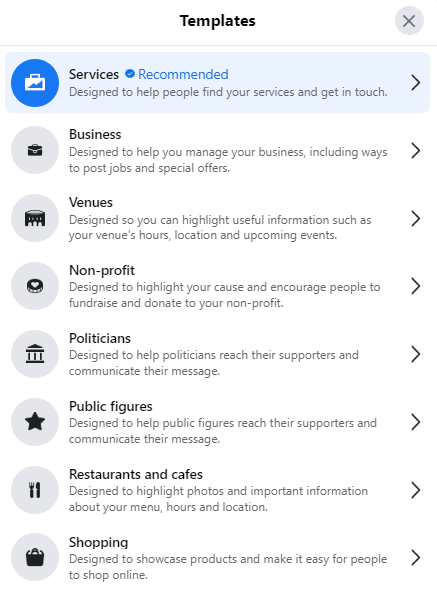
Facebook offers various page templates, each designed with a specific business type in mind (e.g., "Business," "Nonprofit," "Restaurants & Cafes"). These templates come with a default set of tabs (e.g., About, Posts, Reviews, Shop) and buttons optimized for that industry. Businesses can customize these tabs, rearranging their order or adding/removing them, to present information in the most logical and user-friendly manner. This customization, found under "Settings" > "Templates and Tabs," allows you to prioritize content that is most relevant to your audience and business objectives, enhancing navigation and overall user experience.
6. Maintaining Control and Security: Comprehensive Settings Review
The "Settings" tab is the control center for your Facebook Business Page. It governs everything from page visibility and messaging options to role assignments for administrators and moderators. Regularly reviewing and updating these settings is paramount as your business grows and its needs evolve. Key aspects to manage include:
- Page Roles: Assigning appropriate roles (admin, editor, moderator, advertiser, analyst) to team members, freelancers, or agencies to manage access and responsibilities securely.
- Messaging Settings: Configuring automated responses, instant replies, and away messages to maintain prompt customer communication.
- General Settings: Controlling post visibility, comment moderation, and content restrictions.
For more complex organizations or those managing multiple pages, setting up Facebook Business Manager provides an elevated level of control, security, and consolidated management across all Facebook assets, including Instagram accounts and ad accounts.
7. Niche Engagement: Joining Groups as Your Page
Facebook Groups offer a unique opportunity for businesses to engage with highly targeted communities organically. By joining relevant groups as your Business Page (rather than your personal profile), you can:
- Establish Authority: Share expert insights and valuable content, positioning your brand as a thought leader.
- Direct Engagement: Participate in discussions, answer questions, and build relationships with potential customers.
- Niche Targeting: Reach individuals already interested in your industry, products, or services.
While joining groups as a page can be slightly nuanced, this strategy provides a powerful avenue for genuine community building and expanding reach beyond your immediate followers.
Broader Implications and Future Outlook
The landscape of digital marketing is in constant flux, and Facebook continues to innovate its business offerings. The interplay between organic reach and paid advertising is increasingly complex, requiring businesses to adopt integrated strategies. The growing prominence of video content, live streaming, and interactive formats like polls and quizzes on Facebook underscores the need for diverse content creation. Furthermore, the integration of artificial intelligence and automation, such as Messenger bots for customer service, points to a future where immediate, personalized interactions will be paramount.
In conclusion, establishing and meticulously optimizing a Facebook Business Page is no longer optional but a fundamental pillar of a comprehensive digital strategy. By leveraging Facebook’s vast reach, sophisticated tools, and robust analytics, businesses can effectively build brand loyalty, drive customer engagement, and achieve measurable marketing success in an increasingly interconnected world. The platform’s ongoing evolution ensures that businesses must remain agile, continually adapting their strategies to harness new features and maintain a competitive edge.
Related posts: