How to Secure Your Astro Web Application Using Native HTTP Basic Authentication and Middleware


Securing modern web applications during development, staging, or internal deployment phases remains a fundamental requirement for software engineering teams worldwide. As organizations increasingly adopt component-driven meta-frameworks like Astro for high-performance web development, the necessity for lightweight, efficient access-control mechanisms has grown proportionally. Traditionally, developers implement site-level security by deploying complex external solutions such as virtual private networks (VPNs), web server configurations like Nginx authentication modules, or third-party Node.js authorization packages. While effective, these methods introduce architectural complexity, additional configuration files, and potential points of failure that can complicate continuous integration and deployment pipelines.
Addressing this industry-wide challenge, Astro provides a powerful, built-in middleware architecture capable of intercepting requests whenever a page or endpoint is rendered. Combined with the universal support for HTTP Basic Authentication found in every modern web browser, developers can establish robust access controls without installing external dependencies. This approach leverages native web standards, relying exclusively on server-side runtime checks, environment variables, and lightweight middleware logic. By utilizing this method, engineering teams can protect sensitive work-in-progress client sites, internal dashboards, and pre-production staging environments with minimal configuration overhead and zero impact on production runtime performance.
Background Context and Architecture of Astro Rendering Modes
To understand the implementation of middleware-based authentication, it is essential to examine the architectural evolution of Astro as a web framework. Initially recognized for its pioneering "Islands Architecture" and zero-JavaScript static site generation (SSG), Astro has steadily expanded its capabilities to support robust on-demand server-side rendering (SSR). Modern web applications frequently require dynamic server capabilities, prompting the integration of adapters for various deployment runtimes such as Node.js, Vercel, Netlify, Cloudflare Pages, and Deno.
In a purely static site generation workflow, pages are compiled into static HTML files at build time. Consequently, no live HTTP server processes incoming requests for those pages, rendering server-side logic like session validation, cookie parsing, and header inspection impossible during the static build phase. However, when an application utilizes server-side rendering or on-demand rendering adapters, every incoming HTTP request passes through the server runtime. This execution model enables developers to intercept traffic before content delivery, making it the ideal environment for global authentication checks, security header injections, and route-based access control.
Step-by-Step Implementation: Creating the Middleware Layer
Implementing HTTP Basic Authentication within an Astro project begins with establishing the middleware file. In accordance with the framework’s file-based routing and configuration conventions, middleware must reside in the designated source directory as src/middleware.ts (or src/middleware.js for projects not utilizing TypeScript). This file exports an asynchronous function named onRequest, wrapped by Astro’s native defineMiddleware utility.
The defineMiddleware wrapper provides developers with two primary parameters: the request context, which encapsulates request headers, cookies, locals, and runtime properties; and the next function, which continues the execution pipeline if authentication succeeds. Below is the structural foundation of the middleware file:
import  defineMiddleware  from 'astro:middleware';

export const onRequest = defineMiddleware(async (context, next) =>
  // Authentication logic executes here
  return next();
);
This foundational structure allows incoming traffic to pass through uninterrupted unless specific security constraints trigger an interception. The execution speed of this middleware operates at the edge or server runtime level, ensuring negligible latency overhead for authenticated users.
Writing and Enforcing the Authentication Logic
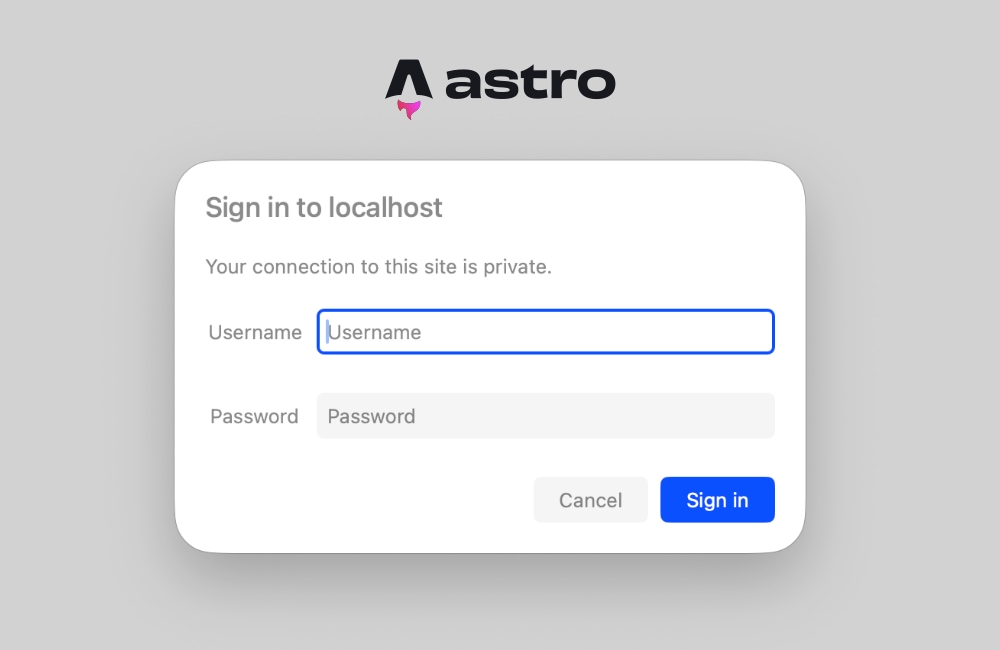
HTTP Basic Authentication operates on a standardized request-response challenge mechanism. When a client requests a protected resource without valid credentials, the server responds with a 401 Unauthorized status code accompanied by a WWW-Authenticate header. Upon receiving this response, compliant web browsers automatically display a native graphical login dialog box, prompting the user for a username and password. Once the user submits their credentials, the browser encodes them in Base64 format and transmits them within the Authorization header on all subsequent requests.
To validate these credentials within Astro middleware, developers implement a checking function that interacts with runtime environment variables. The system verifies whether the Authorization header exists, validates its schema against the Basic authentication scheme, decodes the Base64 payload, and compares the resulting username and password against securely stored environment variables.
function isAuthenticated(request: Request): boolean
  const user = import.meta.env.BASIC_AUTH_USER;
  const pass = import.meta.env.BASIC_AUTH_PASS;

  if (!user
In scenarios where environment variables for the username and password are intentionally omitted—such as in certain local development workflows where security is temporarily unnecessary—the function safely defaults to allowing traffic. For production and staging environments, however, strict validation ensures that only authorized personnel can access the application.
Handling the Unauthorized Response and Browser Prompt Integration
When the credential validation function returns false, the middleware must immediately halt the request lifecycle and issue a 401 response. This response must include the precise WWW-Authenticate header to instruct the browser to render its native authentication prompt.
export const onRequest = defineMiddleware(async (context, next) =>
  if (!isAuthenticated(context.request))
    return new Response('Unauthorized',
      status: 401,
      headers:
        'WWW-Authenticate': 'Basic realm="Staging Environment", charset="UTF-8"',
      ,
    );


  return next();
);
The realm parameter specified within the WWW-Authenticate header serves as a descriptive label displayed directly inside the browser’s native login dialog box. Engineering teams can customize this string to accurately identify the specific protected environment, such as "Staging Server," "Client Preview," or "Internal Tools." Because this mechanism relies entirely on standard browser behaviors, no custom frontend login forms, JavaScript UI libraries, or state-management systems are required.
Configuring Environment Variables Across Development and Production
Maintaining security best practices requires storing credentials securely outside of the source code repository. Astro provides built-in support for runtime environment variables through the import.meta.env object, which accesses system-level variables configured in the hosting environment or local .env files.
For local development, developers define the authentication credentials in a .env file located at the project root directory:
BASIC_AUTH_USER=staging-administrator
BASIC_AUTH_PASS=secure-staging-password-2026
When deploying the application to production or staging platforms—such as Vercel, Netlify, AWS Amplify, or Cloudflare Pages—these exact environment variables must be registered within the platform’s dashboard settings under environment variables, site settings, or secret management sections. The deployment runtime then injects these variables securely into the server environment, where the Astro middleware accesses them upon receiving each request.
Troubleshooting Common Pitfalls: Prerendering and Server-Side Conflicts
A frequent challenge developers encounter when implementing authentication middleware in Astro involves static page generation conflicts. If a project contains pages configured for static prerendering, attempting to access request headers or runtime context can trigger build-time or runtime errors. Specifically, developers may encounter error logs indicating that Astro.request.headers is unavailable because the target route was prerendered.
This occurs because Astro prerenders static HTML files during the build phase, completely bypassing live HTTP request cycles and rendering headers inaccessible. Even if the middleware correctly identifies and blocks unauthorized traffic, individual page components attempting to read request data during static generation will fail.
To resolve this issue, engineering teams have two primary architectural options:
-
Selective Server-Side Rendering: Developers can explicitly opt specific pages out of static generation by exporting a configuration variable within the page frontmatter:
---
export const prerender = false;
---
This directive instructs Astro to render the specific page on demand for every request, granting it full access to runtime request headers, cookies, and middleware context.
-
Global Server Configuration: If the entire web application requires strict password protection, developers can configure the entire project for server-side rendering by modifying the main configuration file:
// astro.config.mjs
import  defineConfig  from 'astro/config';
import node from '@astrojs/node';

export default defineConfig(
 output: 'server',
 adapter: node(
   mode: 'standalone'
 )
);
Setting the
outputmode to'server'ensures that every route within the application is rendered on demand by default. Individual pages that do not require authentication or dynamic data can still be selectively returned to static generation by settingexport const prerender = truewithin their respective frontmatter blocks.
Broader Implications and Industry Best Practices for Staging Security
Implementing native HTTP Basic Authentication via middleware offers significant advantages for modern web development workflows. By eliminating external dependencies, bloated npm packages, and complicated infrastructure setups, engineering teams reduce their software supply chain risk and minimize potential vulnerabilities. Furthermore, because the implementation consists of concise, standards-compliant JavaScript executed at the server or edge runtime level, performance impacts remain virtually undetectable.
Industry analysts and DevOps specialists emphasize that while HTTP Basic Authentication provides adequate security for protecting pre-production staging sites, client previews, and internal administrative tools from casual discovery and web scrapers, it should not be considered a substitute for robust, token-based identity and access management (IAM) systems in enterprise production environments. Basic authentication transmits credentials encoded in Base64 rather than encrypted, making the use of HTTPS mandatory to intercept and protect traffic in transit.
For teams managing rapid deployment cycles, client feedback loops, and internal staging environments, native Astro middleware authentication represents an optimal balance between security, simplicity, and performance. By leveraging built-in framework capabilities, developers can secure complex web applications in minutes, maintaining strict privacy controls without compromising the developer experience or architectural integrity of their projects.