Binky Brings Order to macOS Chaos: A Comprehensive Look at the Native File-Sorting Utility Designed to Eliminate Digital Clutter

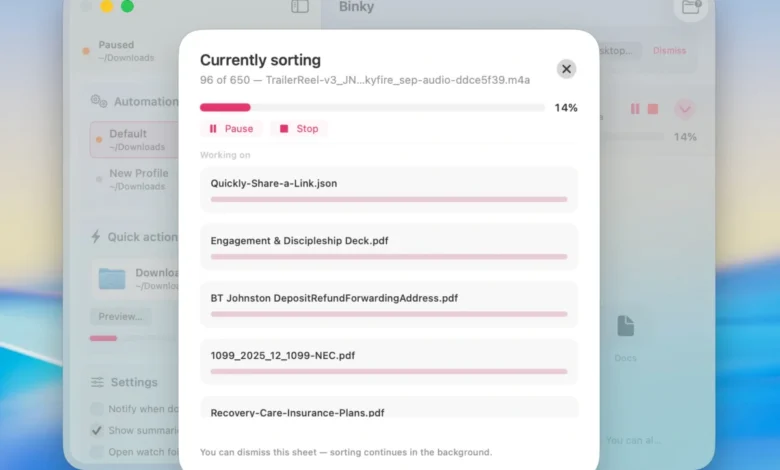
Digital clutter is an insidious productivity drain that plagues virtually every modern computer user, with the macOS ecosystem being no exception. Whether it is the default Downloads folder quietly accumulating hundreds of forgotten software installers, a chaotic Desktop strewn with unorganized PDFs, a shared Dropbox inbox, or a dedicated screenshots repository overflowing with high-resolution captures, the modern computer desktop often resembles a digital junkyard. Manual file management—the tedious, repetitive process of dragging, dropping, renaming, and categorizing files—remains a low-yield chore that most professionals put off until it becomes unmanageable. To address this persistent friction point, independent developers have introduced a variety of automation tools over the years, ranging from complex shell scripts to resource-heavy third-party applications. Enter Binky, a newly released, open-source native macOS application engineered specifically to bring predictable, automated order to the chaotic digital receptacles scattered across Apple computers.
Built from the ground up utilizing native Apple frameworks such as SwiftUI and AppKit, Binky distinguishes itself in a crowded utility market by offering deep operating system integration without the performance penalties typically associated with cross-platform or web-wrapper applications. Rather than attempting to reinvent the wheel of file management through radical, unpredictable artificial intelligence algorithms, Binky focuses strictly on reliable, deterministic execution. The application provides users with a dual-pronged approach to digital organization: a manual one-off clean-up utility known as Quick Sort, and a continuous background monitoring system called Routines. By combining granular rule-making capabilities, intelligent file-settling detection, and collision-safe routing, Binky aims to transform routine file management from a passive annoyance into a frictionless, background operation.
The Evolution of macOS File Management and the Need for Automation
To understand the utility of an application like Binky, one must examine the evolution of the desktop computing paradigm. Since the inception of the graphical user interface, the Desktop and the Downloads directory have served as the primary landing zones for incoming data. However, as internet bandwidth has expanded, file sizes have ballooned, and remote collaboration tools have multiplied, the volume of data hitting these landing zones has increased exponentially. Studies in digital ergonomics suggest that visual clutter on a computer screen directly correlates with cognitive fatigue and diminished productivity. When users are forced to navigate through hundreds of stray files to locate a critical document, valuable time is lost, and operational efficiency suffers.
Historically, macOS users have relied on built-in tools like Folder Actions, Automator workflows, or third-party applications such as Hazel to automate file organization. While powerful, traditional automation utilities often feature steep learning curves, requiring users to construct intricate logical loops or write custom scripts. Furthermore, many legacy utilities suffer from performance bloat or lack modern interface design standards. Binky was conceived to bridge this gap, offering the robust power of advanced rule-based sorting wrapped in a modern, streamlined interface that aligns with the aesthetic and functional expectations of macOS 14 Sonoma and later releases.
Core Architecture and Dual-Mode Operation: Quick Sort and Routines
Binky’s operational framework is divided into two primary operational modes: Quick Sort for immediate, targeted interventions, and Routines for ongoing, automated surveillance of designated watch folders.
Quick Sort is designed for the immediate remediation of a single, chaotic folder. Users can select any repository—be it the ubiquitous Downloads folder, a cluttered Desktop, a messy client upload directory, or a shared network drop box—and initiate a manual sort. In a single pass, Binky analyzes the contents of the target directory and routes files into predefined categories such as Images, PDFs, Media, Documents, Archives, Apps, Screenshots, and Miscellaneous items. Crucially, Quick Sort incorporates intelligent safety mechanisms. It actively monitors file transfer states, waiting until a download or copy operation is entirely finished before attempting to move the file, thereby preventing the corruption or partial relocation of active data. Additionally, the application employs collision-safe moving protocols, ensuring that if two distinct files share the exact same name, neither will accidentally overwrite the other.
For files that defy categorization or present ambiguous signatures, Binky introduces a dedicated "Review" staging area. Rather than forcing uncertain files into arbitrary folders or risking data misplacement, the application routes questionable items to a review queue, allowing the user to make a deliberate final decision. This conservative approach eliminates the anxiety commonly associated with blunt, extension-based automated sorters that frequently misfile vital documents.
While Quick Sort handles manual interventions, Routines automate the process entirely. A Routine functions as a persistent, named background watcher assigned to a specific source folder, complete with its own tailored rule sets and optional Finder tags. Users can establish distinct Routines for different workflows—such as monitoring the Downloads directory for software installers, watching a Dropbox inbox for incoming client briefs, or capturing a dedicated screenshots folder the moment an image is saved. Because each Routine operates independently, Binky adapts fluidly to complex, multi-stream professional environments without requiring constant user supervision.
Granular Rule Customization and Advanced Routing Logic
Beyond default categorical sorting, Binky’s true power lies in its advanced rule engine. The application moves far beyond simple file-extension matching, allowing users to construct highly specific automation parameters based on a wide array of metadata. Rules can evaluate file names, exact extensions, generalized file kinds, file sizes, creation or modification dates, file origins, optical character recognition (OCR) data, receipt indicators, and existing Finder tag conditions.
When a rule is triggered, Binky can execute a multifaceted array of actions. Beyond merely relocating a file, the utility can automatically rename items according to standardized naming conventions, apply specific Finder tags, extract compressed archives upon arrival, execute silent installations for application disk images (.dmg files), instantly trash matching junk files, or fan files out across multiple directories based on tag parameters.
Importantly, these custom rules take operational precedence over default categorical sorting. For example, if a user establishes a specific rule to catch incoming financial receipts and route them to an accounting directory, Binky intercepts those documents before they can be swept into a generic PDF folder. This hierarchical rule processing ensures that specialized workflows are preserved and prioritized over broad organizational sweeps.
Native Integration, Scripting, and Command-Line Capabilities
A common criticism of modern desktop utilities is their reliance on resource-intensive web technologies or closed ecosystems. Binky is deliberately constructed using native Apple development frameworks—SwiftUI and AppKit—ensuring that it operates with the speed, responsiveness, and low memory footprint expected of a first-party macOS utility.
Integration with the broader macOS ecosystem is a cornerstone of the application’s design. Binky supports native Finder Quick Actions and Services. This integration means users can highlight a selection of disorganized files directly within a Finder window, right-click, and execute a "Sort with Binky" command on the fly, bypassing the need to open the main application window. Furthermore, the application includes robust support for Apple Shortcuts through a dedicated "Sort Files" action. This enables advanced users to incorporate Binky’s sorting logic into larger, highly customized system-wide automations, linking file management with application launching, window positioning, and other daily routines.
For power users, systems administrators, and developers who prefer working within terminal environments, Binky provides a companion command-line interface (CLI) tool accessible via the binky command. The CLI allows users to preview sorting actions, execute established Routines directly from the Terminal, or integrate Binky’s powerful routing rules into custom shell scripts and continuous integration pipelines. Because the graphical application, the CLI tool, and background Routines all draw from the exact same preference files and underlying routing logic, users maintain absolute consistency across all interfaces without the need to manage disparate configuration systems.
Transparency, Security, and Operational Boundaries
In an era where data privacy is paramount, Binky’s architectural stance on cloud services and data handling is notably transparent. The application operates entirely locally on the user’s Mac. There are no proprietary cloud accounts to register, no telemetry data harvested regarding file contents, and absolutely no uploading of user files to external servers. All sorting, OCR analysis, and rule evaluation occur strictly on-device.
Furthermore, Binky maintains comprehensive operational logs, offering batch summaries and clear history tracking. Users can review precisely what files were successfully relocated, which items were skipped, and which ambiguous files were routed to the Review queue for manual inspection. Where permitted by the macOS environment, native undo functionality is supported, providing an additional safety net against misconfigured rules.
To maintain realistic expectations regarding its scope, Binky’s developers have clearly outlined the functional boundaries of the software. Binky strictly moves files rather than copying them; once a file is processed, it is removed from the source directory and deposited into its designated destination. Additionally, the application’s background monitoring routines rely on the application actively running in the background. If Binky is completely closed, incoming files remain in their respective source folders until the application is either relaunched or subjected to a manual Quick Sort, at which point the backlog is systematically cleared.
Accessibility, Open-Source Licensing, and System Requirements
Binky is distributed as an open-source project under the permissive MIT license, ensuring long-term community transparency, code audibility, and collaborative development. The entire 1.x software line is made available to the public free of charge. Users can acquire the application package as a standard disk image (.dmg) directly from the official project website, binkyfiles.com, and install it with the drag-and-drop simplicity characteristic of macOS applications.
In terms of technical prerequisites, Binky requires macOS 14 Sonoma or any later iteration of Apple’s desktop operating system, ensuring compatibility with modern Apple Silicon architectures as well as supported Intel-based Macs. By leveraging modern system APIs and maintaining a laser-focused objective—eliminating digital desktop chaos through predictable, deterministic automation—Binky has quickly established itself as an essential utility for macOS power users seeking to reclaim control over their digital environments.