How to Secure Your Astro Web Application Using Built-In HTTP Basic Authentication and Middleware


Securing modern web applications during development, staging, or internal deployment phases remains a fundamental requirement for web developers and IT administrators globally. As agile development practices and server-side rendering frameworks like Astro gain widespread adoption across enterprise environments, the need for lightweight, zero-dependency access control has intensified. Traditionally, securing a web property under development involved deploying complex infrastructure such as Virtual Private Networks (VPNs), configuring cumbersome Nginx authentication modules, or integrating third-party Node.js packages that introduce potential software vulnerabilities and maintenance overhead. However, recent advancements in web framework architectures allow development teams to leverage native runtime capabilities, drastically simplifying security workflows without sacrificing performance or maintainability.
Astro, an increasingly popular frontend framework designed for content-driven websites, features a powerful, built-in middleware execution pipeline. By combining this routing architecture with HTTP Basic Authentication—a globally standardized security protocol universally supported by modern web browsers—developers can establish robust access barriers using only native runtime features and environment variables. This approach eliminates the dependency on external authentication packages, streamlines deployment pipelines, and provides a seamless user experience for authorized personnel attempting to access protected environments such as client staging sites, internal documentation portals, or proprietary software tools.
Background Context and Technological Evolution
The evolution of frontend web development has shifted heavily toward static site generators and hybrid rendering engines designed to optimize core web vitals and search engine optimization metrics. While this architecture offers exceptional performance advantages for public-facing web pages, it introduces distinct challenges when projects require confidentiality prior to official launch dates. Historically, developers relied on perimeter network security, such as restricting server IP addresses or forcing team members to connect via corporate VPN tunnels. Although effective, these methods frequently create administrative bottlenecks, slow down client review processes, and require specialized IT infrastructure management.
Concurrently, the maturation of edge computing and serverless runtimes—such as Cloudflare Pages, Vercel, Netlify, and Node.js environments—has empowered frameworks like Astro to execute server-side logic dynamically at the network edge. This capability paved the way for Astro’s middleware system, introduced to handle incoming requests before rendering pages or API endpoints. By intercepting HTTP traffic at the application layer rather than relying on heavy network proxies, developers gain granular control over request validation, header manipulation, and security policy enforcement. Implementing HTTP Basic Authentication within this middleware layer represents a convergence of legacy web standards and modern serverless paradigms, offering a streamlined solution that operates uniformly across diverse hosting providers.
Step-by-Step Implementation Chronology
To deploy HTTP Basic Authentication on an Astro project, developers must follow a systematic configuration process that ensures proper request interception, credential validation, and runtime execution. The procedure requires an Astro adapter or runtime environment capable of supporting on-demand, server-side rendering.
Establishing the Middleware Architecture
The foundational step involves creating the middleware script within the project directory structure. Astro automatically recognizes middleware files located at the root of the source folder. Developers instantiate the execution pipeline by utilizing the framework’s native defineMiddleware utility function.
import  defineMiddleware  from 'astro:middleware';

export const onRequest = defineMiddleware(async (context, next) =>
  // Authentication logic execution pipeline
  return next();
);
This handler intercepts every incoming HTTP request, providing developers with a comprehensive request context object and a next function to seamlessly continue the data flow if validation succeeds.
Constructing the Authentication Validation Logic
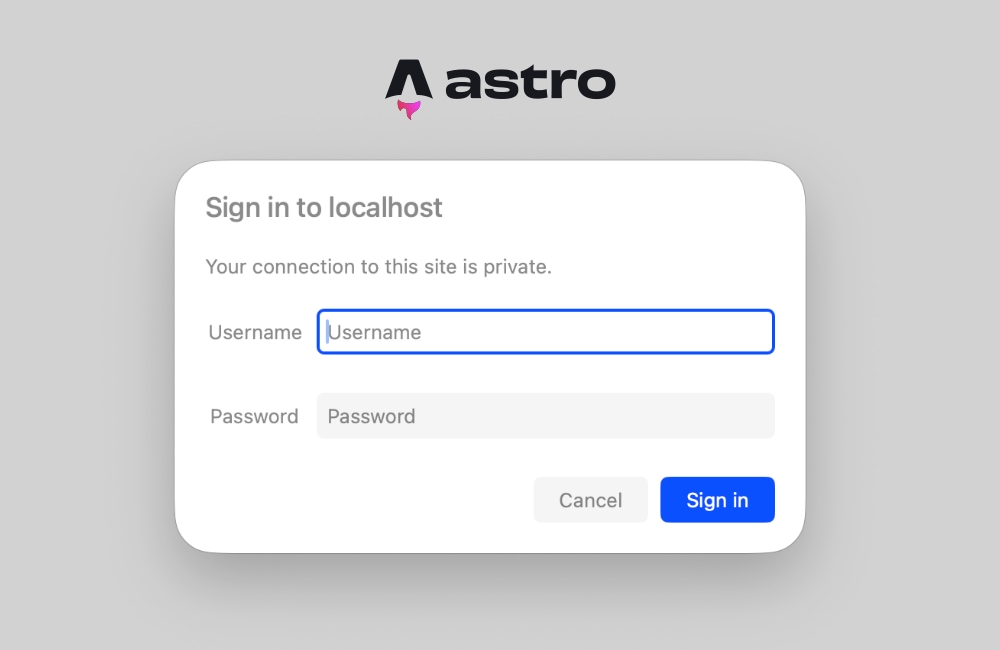
HTTP Basic Authentication operates on a straightforward challenge-response mechanism. The client browser transmits credentials via an Authorization HTTP header containing a Base64-encoded string of the username and password, separated by a colon. If the header is missing or incorrect, the server issues a 401 Unauthorized status response accompanied by a WWW-Authenticate header, prompting the browser to render a native authentication dialog box.
function isAuthenticated(request: Request): boolean This validation function evaluates system environment variables to retrieve administrative credentials. If these variables remain undefined, the system gracefully bypasses the check, preventing accidental lockouts in local development environments where security variables may not yet be defined. When credentials are provided, the system decodes the Base64 payload and performs a secure string comparison against authorized records.
Handling Unauthorized Requests and Browser Integration
When the credential validation function returns a negative result, the middleware intercepts the request lifecycle and generates an immediate HTTP response halting further page rendering.
export const onRequest = defineMiddleware(async (context, next) =>
  if (!isAuthenticated(context.request))
    return new Response('Unauthorized',
      status: 401,
      headers:
        'WWW-Authenticate': 'Basic realm="Secure Staging Area", charset="UTF-8"',
      ,
    );


  return next();
);
The WWW-Authenticate header instructs the browser to present a secure, native login prompt to the end user. The realm directive defines the descriptive text displayed within the dialog box, allowing administrators to brand or contextualize the restricted environment. Because browser clients handle the credential encoding and persistence natively for the duration of the session, no complex frontend JavaScript frameworks, modal forms, or state management libraries are required.
Environment Variable Configuration and Deployment Management
Security credentials must never be hardcoded into application source code repositories. Instead, administrators utilize environment variables accessed securely via Astro’s runtime configuration interface (import.meta.env). For local development, variables are declared within a .env configuration file located at the project root:
BASIC_AUTH_USER=staging-administrator
BASIC_AUTH_PASS=secure-enterprise-password-2024
When deploying the application to production or staging platforms—such as Cloudflare Pages, AWS Amplify, Vercel, or Netlify—engineers must configure identical environment keys within the platform’s administrative dashboard or continuous integration settings. This decoupling of credentials ensures that security policies remain flexible, easily rotatable, and compliant with enterprise security auditing standards.
Resolving Rendering Conflicts and Troubleshooting Prerendering Errors
A common technical hurdle encountered during the implementation of server-side middleware in Astro involves static site generation conflicts. By default, Astro prioritizes static generation, prerendering pages at build time to maximize delivery speeds. However, prerendered pages lack a live HTTP request context at runtime, meaning Astro.request.headers remains entirely inaccessible. Attempting to deploy authentication middleware while pages are configured for static prerendering triggers framework-level build or runtime exceptions.
To resolve this architectural conflict, development teams can adopt two primary remediation strategies:
- Page-Level Dynamic Rendering: Developers can explicitly configure individual pages to execute via server-side rendering by injecting a frontmatter directive into specific route files:
--- export const prerender = false; --- - Project-Wide Server Output Mode: Alternatively, for applications where the entire web property requires strict password protection, engineers can configure the global Astro configuration file (
astro.config.mjs) to render all routes dynamically on demand:import defineConfig from 'astro/config'; export default defineConfig( output: 'server', );
Adopting the global server output mode ensures that incoming request headers are consistently available across all application routes, enabling the middleware to execute security validations reliably prior to rendering any protected markup.
Industry Implications and Security Analysis
The adoption of zero-dependency, middleware-driven authentication methods reflects a broader industry trend toward minimalist software architecture and reduced attack surfaces. Historically, the inclusion of third-party authentication modules introduced supply chain risks, dependency bloat, and prolonged build times. By utilizing standardized HTTP protocol features natively supported by web runtimes, development organizations minimize third-party vulnerabilities while maintaining strict compliance with modern web security baselines.
From an operational perspective, implementing rapid access control via Astro middleware significantly accelerates client feedback loops and internal quality assurance testing phases. Stakeholders can review work-in-progress deployments securely without navigating corporate VPN configurations or managing complex identity provider federations. Furthermore, because the entire authentication layer consumes approximately twenty-five lines of clean, uncompiled JavaScript, memory footprints are kept negligible, ensuring that serverless function execution times and associated cloud hosting costs remain exceptionally low.
As web development frameworks continue to evolve toward edge-native execution models, leveraging built-in middleware primitives for access control provides a scalable, future-proof methodology. Organizations seeking to balance rapid development velocity with rigorous data confidentiality will find that utilizing Astro’s native runtime environment for HTTP Basic Authentication delivers an optimal equilibrium of simplicity, performance, and enterprise-grade security.