The burgeoning field of generative artificial intelligence, while rapidly advancing, has been plagued by a common user experience problem: fragmentation. Creators often find themselves navigating a complex ecosystem of disparate tools, each specializing in a narrow aspect of media generation. This necessitates constant switching between applications for image generation, video synthesis, and lip-syncing, leading to inefficient workflows and a cumbersome creative process. Addressing this challenge head-on, Open Generative AI has emerged as a promising open-source solution, aiming to consolidate these diverse functionalities into a single, cohesive interface.
This ambitious project seeks to revolutionize how individuals and businesses interact with generative AI by offering a unified studio capable of handling image generation, video creation, lip-syncing, and advanced cinema-style prompt controls. Available as a hosted web application, a downloadable desktop application, and self-hostable code, Open Generative AI provides access to an extensive library of over 200 AI models across these various creative workflows. This broad integration promises to significantly reduce the friction associated with using multiple specialized AI tools, offering a more streamlined and integrated experience for users.
However, it is crucial to understand a key caveat: while the interface itself can be self-hosted, the underlying AI generation processes still rely on the services of Muapi.ai. This means that users will require a Muapi API key, and the system is not designed for fully local, offline generation. This dependency, while a compromise, does not diminish the project’s potential for those seeking a powerful and consolidated AI media creation platform. For individuals and organizations willing to accept this integration, Open Generative AI represents one of the most compelling all-in-one open-source AI media projects currently available.
The Genesis and Architecture of Open Generative AI
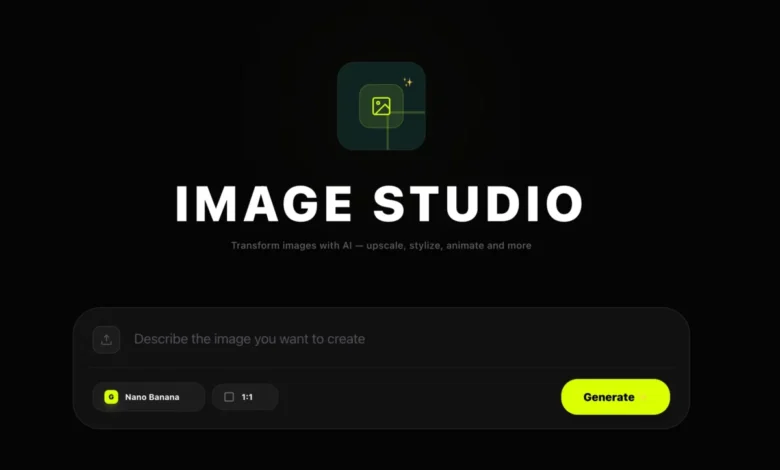
The development of Open Generative AI stems from a clear recognition of the inefficiencies inherent in the current AI tool landscape. The project’s core innovation lies in its modular design, breaking down the complex array of generative AI tasks into four distinct, yet interconnected, studios: Image Studio, Video Studio, Lip Sync Studio, and Cinema Studio. Each studio is meticulously crafted to handle specific generation tasks, with the overarching interface intelligently managing mode switching. For instance, if a user uploads a reference image within the Image Studio, the application seamlessly transitions from a text-to-image generation mode to an image-to-image workflow, adapting its controls and functionalities accordingly.
The platform’s impressive versatility is underscored by its expansive model support. Open Generative AI integrates a wide spectrum of cutting-edge AI models, transforming it into a powerful testing ground for various generative techniques. In the Image Studio, users can access models such as Flux, Nano Banana 2, Seedream 5.0, Ideogram, GPT-4o, Midjourney, and numerous SDXL variants. The Video Studio boasts an equally impressive lineup, featuring models like Kling, Sora, Veo, Wan, Seedance, Hailuo, and Runway. The Lip Sync Studio is equipped with specialized models tailored for voice-driven animation. This comprehensive model integration allows users to experiment with different AI architectures and styles without the need to manage separate accounts or interfaces for each.
Under the hood, the project is built upon a robust Next.js monorepo architecture, featuring a shared studio library. This design ensures consistency and efficiency, as the same model definitions and logic power both the readily available hosted version and the self-hostable builds. This architectural choice facilitates easier maintenance, updates, and the potential for future expansion.
Unpacking the Capabilities: What Open Generative AI Offers
Open Generative AI provides a rich suite of functionalities designed to cater to a wide range of creative needs. The platform’s integrated studios offer a powerful and intuitive way to leverage advanced AI capabilities:
1. Text-to-Image and Image-to-Image Generation
The Image Studio serves as a central hub for visual content creation. Users can generate images from textual prompts, drawing upon a diverse array of models like Flux, Nano Banana 2, Seedream 5.0, Ideogram, GPT-4o, Midjourney, and SDXL variants. This feature is particularly valuable for rapid prototyping, concept visualization, and artistic exploration. For a comparative understanding of free AI image generators, resources like a detailed comparison of free AI image generators can offer valuable context for users assessing different options.
Furthermore, the Image Studio excels in image editing and manipulation through its image-to-image capabilities. By uploading a reference image, users can guide the generation process, applying new styles, transforming existing elements, or generating variations. The platform’s support for one or multiple reference images is a significant advantage for tasks such as style transfer, maintaining visual consistency across a series of images, or complex compositing workflows. The multi-image flow is particularly well-executed, featuring intuitive batch selection, ordering, and a confirmation step, making it a highly practical feature for iterative image editing.
2. Advanced Video Generation
The Video Studio extends the generative power to the realm of moving images. Users can generate videos directly from text prompts, or by providing a still image as a starting point for image-to-video conversion. The available controls vary depending on the selected model, with some offering granular adjustments for duration, aspect ratio, and quality, while others provide a more streamlined interface. The extensive list of supported video models, including Kling, Sora, Veo, Wan, Seedance, Hailuo, and Runway, ensures access to state-of-the-art video synthesis technologies. While it may take some time to familiarize oneself with the specific controls of each model, the consistent workspace design across all video generation tasks simplifies the learning curve.
3. Seamless Lip-Synced Video Creation
Creating engaging talking-head videos or precise lip-synced content is made effortless with the Lip Sync Studio. This studio supports two primary scenarios: generating a talking video from a portrait image and an audio file, or producing a lip-synced video by combining an existing video with a new audio track. Supported models include Infinite Talk, Wan 2.2 Speech to Video, LTX Lipsync variants, LatentSync, and Veed. This functionality is particularly beneficial for the creation of explainer videos, virtual avatars, short narrative content, and product demonstrations, offering a more comprehensive lip-sync implementation than typically found in bundled tools.
4. Cinematic Visual Direction with Cinema Studio
The Cinema Studio introduces a novel approach to prompt engineering by incorporating cinematic controls. Instead of relying solely on textual descriptions, users can select camera angles, lens types, focal lengths, and aperture styles. The interface then translates these visual choices into specific prompt modifiers, enabling users to achieve more sophisticated and filmic outputs. This feature is especially valuable for users who think in terms of visual storytelling and cinematography, allowing for a more nuanced and deliberate approach to AI-generated visuals.
Installation and Accessibility: Multiple Pathways to Integration
Open Generative AI is designed for maximum accessibility, offering multiple deployment options to suit diverse user needs and technical proficiencies.
Hosted Web Application
The most straightforward method to experience Open Generative AI is through its hosted web application, accessible at dev.muapi.ai/open-generative-ai. This option requires no installation and provides immediate access to all four studios directly within a web browser. It serves as an excellent starting point for users who wish to explore the platform’s capabilities before committing to a local installation.
Desktop Application
For users seeking a more integrated and potentially performant experience, prebuilt desktop installers are available for macOS (Apple Silicon and Intel) and Windows. Linux users can build the desktop application from source using Electron.
- macOS Installation Note: Due to the application being unsigned, macOS Gatekeeper may initially block its execution. This is a standard security measure for unsigned applications. Users can resolve this by dragging the app to their Applications folder and then running the command
xattr -cr /Applications/Open Generative AI.appin Terminal, or by navigating to System Settings > Privacy & Security and selecting "Open Anyway" when prompted. - Windows Installation Note: Windows SmartScreen may also flag the installer as potentially unsafe due to the lack of a code signature, a common occurrence for smaller open-source projects. Users can proceed by clicking "More info" and then "Run anyway."
- Linux Installation Note: Linux users are encouraged to build from source using Electron, which generates either an AppImage file or a
.debpackage. In cases where AppImage launching fails due to Chromium sandbox restrictions on newer Ubuntu versions, the.debpackage is a reliable alternative.
Self-Hosting from Source
For developers and users who desire complete control over their environment, Open Generative AI can be self-hosted from its source code. This requires a local setup with Node.js 18+ and npm. The process involves cloning the repository, installing dependencies, and running the development server.
Prerequisites for Self-Hosting:
- Node.js 18+
- npm (Node Package Manager)
- A Muapi API key (essential for generation, even in self-hosted environments)
Setup Steps:
- Clone the repository:
git clone https://github.com/Anil-matcha/Open-Generative-AI.git - Navigate to the project directory:
cd Open-Generative-AI - Install dependencies:
npm install - Run the development server:
npm run dev
This will launch the application athttp://localhost:3000. Upon the initial launch, users will be prompted to enter their Muapi API key.
For a production-ready build, users can execute npm run build followed by npm run start.
Building the Desktop App from Source
Developers also have the option to build the desktop application themselves using the included Electron build scripts. This provides flexibility for customization and packaging.
- macOS Build:
npm run electron:build - Windows Build:
npm run electron:build:win - Linux Build:
npm run electron:build:linux - Build All Platforms:
npm run electron:build:all
The compiled desktop applications will be located in the release/ folder.
Navigating the Creative Workflow
Once inside Open Generative AI, the user experience is designed to be intuitive and consistent across all studios. The learning curve is significantly reduced due to a similar interaction pattern employed throughout the platform.
Image Studio Workflow
The Image Studio is ideal for generating new images from text or refining existing ones using image-to-image techniques. The typical workflow involves:
- Selecting either "Text to Image" or "Image to Image" as the primary mode.
- Inputting a textual prompt and optionally uploading one or more reference images.
- Choosing a specific AI model from the extensive list.
- Adjusting model-specific parameters and settings.
- Initiating the generation process.
The interface dynamically adapts its available controls based on the selected model, ensuring that users only see relevant options for their chosen generation task.
Video Studio Workflow
For video creation, the Video Studio offers a similar structured approach:
- Choosing between "Text to Video" or "Image to Video" generation.
- Providing a text prompt or a starting image/frame.
- Selecting a video generation model.
- Configuring model-specific parameters such as duration, resolution, and style.
- Commencing video generation.
Lip Sync Studio Workflow
The Lip Sync Studio streamlines the creation of animated speech:
- Selecting the desired scenario: "Portrait Image + Audio" or "Video + Audio."
- Uploading the relevant input files (portrait image/video and audio track).
- Choosing a lip-sync model.
- Adjusting any available parameters for fine-tuning the animation.
- Generating the lip-synced video.
Cinema Studio Workflow
The Cinema Studio enhances visual direction by allowing users to integrate cinematic elements:
- Engaging with the prompt input area.
- Utilizing the dedicated cinema controls to select camera angles, lenses, focal lengths, and aperture settings.
- The interface automatically translates these choices into prompt modifiers.
- Initiating the generation process, benefiting from the added layer of visual direction.
Strengths and Considerations: A Balanced Perspective
Open Generative AI presents several compelling advantages that position it as a significant player in the AI media creation landscape:
Unified Interface for Diverse Creative Workflows
The primary strength of Open Generative AI lies in its ability to consolidate multiple generative AI tasks into a single, user-friendly interface. This eliminates the need to juggle disparate tools for image, video, and lip-sync generation, leading to a more cohesive and efficient creative process. The consistent navigation and interaction patterns across all studios further enhance usability.
Superior Handling of Reference Media
The platform’s approach to managing reference media is a notable improvement over many other tools. The integrated upload history and the intuitive multi-image picker, complete with batch selection, ordering, and confirmation steps, make complex image editing and style transfer workflows more manageable and practical.
Bridging the Gap Between Users and Developers
Open Generative AI serves as a valuable bridge between non-technical users and developers. The hosted and desktop versions provide an accessible entry point for those who prefer a no-code experience, while the open-source nature of the project allows developers to inspect, modify, and extend the codebase to suit their specific needs. This broad appeal is a rare and valuable asset in the current AI tool market.
However, potential users should also be aware of certain limitations and considerations:
Dependency on Muapi.ai
The project’s reliance on Muapi.ai for generation processes is a significant factor. Any changes in Muapi’s pricing, access policies, or service reliability will directly impact Open Generative AI. This dependency means it is not a fully independent, offline solution.
"Self-Hosted" Does Not Mean Fully Local Generation
A crucial point of clarification is that while the interface can be self-hosted, the actual AI generation still occurs via Muapi’s servers. Users seeking a completely offline generative tool without external dependencies will need to explore alternative solutions.
Potential for Feature Overwhelm
The inclusion of over 200 models, while a powerful feature, can also present a challenge. The sheer volume of options, even with the interface’s improved navigation, can be overwhelming for users and may require time to master. The selection process itself can introduce friction if not managed carefully.
Desktop Trust Friction
For non-technical users, the trust friction associated with unsigned desktop applications on macOS and Windows SmartScreen warnings on Windows can be a barrier. While these are common for smaller open-source projects, they can lead to hesitation or outright rejection of the software.
Target Audience and Strategic Fit
Open Generative AI is particularly well-suited for:
- Independent Creators and Small Studios: Individuals and teams looking to streamline their content creation pipelines without investing in multiple expensive subscriptions.
- AI Enthusiasts and Researchers: Users eager to experiment with a wide array of AI models within a single, unified environment and explore the underlying code.
- Developers: Programmers seeking a robust open-source foundation to build upon, customize, or integrate into their own applications.
Conversely, the platform may be less ideal for:
- Users Requiring Strict Offline Operation: Individuals or organizations that absolutely need a fully local and offline AI generation solution.
- Beginners Seeking Simplicity Above All Else: Users who are new to AI and may find the extensive model options overwhelming without dedicated guidance.
Conclusion: A Promising Step Towards Workflow Consolidation
Open Generative AI represents a significant stride in addressing the fragmentation prevalent in the generative AI tool market. Its core value proposition lies in workflow consolidation, offering a unified front-end that brings image, video, and lip-sync generation into a single, cohesive workspace. While the project’s dependency on Muapi.ai means it does not offer complete offline independence, its strengths in interface unification, robust reference media handling, and its potential as a bridge between technical and non-technical users make it a compelling open-source initiative. For those seeking a versatile AI media toolbox with accessible source code and the flexibility to adapt to individual workflows, Open Generative AI stands out as one of the most serious and promising projects in the current landscape. Its continued development and community engagement will undoubtedly shape its impact on the future of AI-assisted creative production.