Binky: The Native macOS Utility Bringing Order to Digital Chaos and Transforming File Management

Every modern computer user is familiar with the digital accumulation that inevitably gathers in virtual staging grounds. Whether it is the default Downloads directory, an overflowing Desktop, a shared Dropbox inbox, a screenshots folder, or a dedicated workspace project directory, files accumulate faster than most users can manually organize them. This persistent friction point in personal and professional computing has long frustrated efficiency enthusiasts. Enter Binky, a newly released native macOS application designed specifically to eliminate digital clutter through predictable, automated, and rule-based file sorting.
Developed as a lightweight, performance-conscious solution for macOS, Binky addresses the tedious chore of manual file organization. Rather than relying on clumsy cloud-based operations or bloated software suites, Binky operates locally, providing users with absolute privacy, predictable routing algorithms, and deep integration with the macOS operating system. As digital workflows grow increasingly complex and the volume of generated documents, images, and media expands, tools that automate mundane organizational tasks have transformed from mere conveniences into essential productivity multipliers.
The Core Philosophy of Predictable File Management
The foundational design philosophy behind Binky is not rooted in flashy, unpredictable artificial intelligence or overly complex algorithmic guessing games. Instead, the application prioritizes predictable file management. Users do not want a file sorter that hides documents in obscure subdirectories based on opaque logic; they demand transparency, consistency, and absolute control over their digital environments.
Binky achieves this balance by offering a dual-pronged approach to digital tidiness: on-demand sorting for immediate one-off cleanups and continuous background monitoring for ongoing maintenance. When deployed, the software systematically analyzes incoming or existing files, waits patiently for active downloads or transfers to conclude to prevent corruption or incomplete file captures, and subsequently routes items into clearly defined categorical directories such as Images, PDFs, Media, Documents, Archives, Apps, Screenshots, and Miscellaneous folders. Furthermore, the application incorporates collision-safe file transfer mechanisms, ensuring that duplicate filenames never result in catastrophic data overwrites. For items that defy easy categorization or present ambiguous attributes, Binky routes them into a dedicated Review queue, safeguarding users against automated misplacement.
Quick Sort: Tackling Immediate Digital Clutter
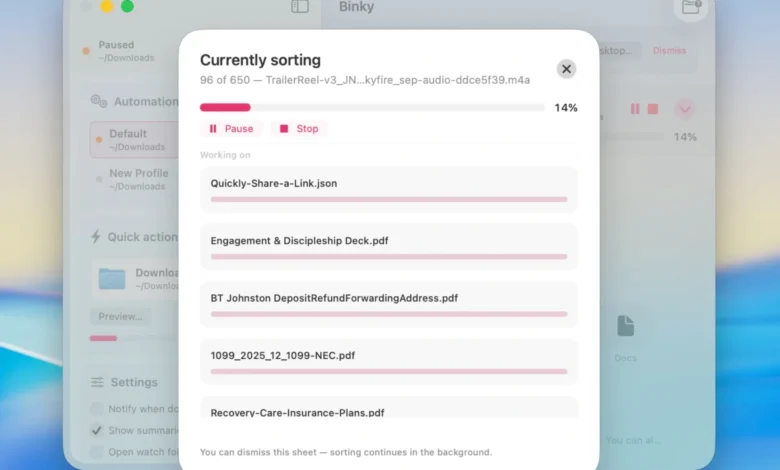
For immediate relief from accumulated digital debris, Binky features a function designated as Quick Sort. This tool is engineered explicitly for the folder that requires immediate intervention. While the Downloads directory serves as the default operational target, Quick Sort is entirely agnostic regarding source locations. Users can direct the utility toward any chaotic repository, including the Desktop, a chaotic client upload directory, a shared network volume, or a cluttered screenshots folder.
In operational terms, Quick Sort executes a comprehensive, single-pass sweep of the selected directory. Because the utility incorporates an intelligent throttling mechanism, it waits for files to fully settle before executing any move commands. This ensures that partially downloaded executables, unfinished video renders, or interrupted browser caches are left untouched until fully materialized. Additionally, any files possessing ambiguous extensions or unknown structures are safely diverted to the Review tab, preventing the software from burying vital documents in arbitrary locations. In the broader landscape of macOS productivity enhancements, Binky bridges a long-standing gap, complementing native Finder limitations and bridging the utility gap traditionally occupied by legacy Finder extensions and third-party navigation tools.
Automated Routines and Continuous Folder Monitoring
While Quick Sort handles manual interventions, Binky’s Routines feature provides automated, background-driven file management. A Routine functions as a persistent, named watcher assigned to a specific source directory, complete with individualized sorting rules and optional Finder tag applications.
This architecture allows power users to establish distinct operational parameters for different workflows. For instance, an individual can configure one Routine to continuously monitor the primary Downloads folder using standard multi-category rules, a second Routine to automatically archive screenshots as soon as they are captured on the Desktop, a third Routine to process incoming assets within a client-specific Dropbox inbox, and a fourth Routine to catalog scanned financial documents. By running continuously in the background while the application is active, Routines prevent digital environments from ever devolving into unmanageable junk drawers, effectively neutralizing clutter at its point of entry.
Granular Rules Engine and Advanced Filtering Capabilities
The true power of Binky lies in its robust and highly configurable rules engine. While basic file organizers rely exclusively on simple file extensions—such as routing all .pdf files to a single folder—Binky evaluates a vast array of metadata parameters.
Rules can be constructed using complex criteria matching file names, specific extensions, broad file kinds, exact file sizes, creation and modification dates, origin identifiers, OCR text recognition hints, receipt detection markers, and existing Finder tag conditions. Once a matching criterion is satisfied, Binky can execute a variety of actions: it can move the file to a designated directory, rename it according to a standardized template, apply specific Finder tags, automatically extract compressed archives, trigger installations from disk images (.dmg), instantly trash unwanted items, or fan out files based on customized tag parameters.
Practically speaking, this flexibility allows users to establish sophisticated automated workflows. For example, tax-related documents or digital receipts can be automatically intercepted and routed to accounting directories before ever encountering the generic PDF sorting rule. Because user-defined rules execute in a prioritized sequence ahead of default sorting behaviors, absolute administrative control is maintained at all times.
Native macOS Architecture and Integration
Unlike cross-platform productivity tools built on resource-heavy web technologies or wrapped browser frameworks, Binky is constructed natively using modern SwiftUI and AppKit. This architectural choice ensures that the application respects macOS resource boundaries, operating with minimal CPU and memory overhead while delivering the fluid, responsive user interface characteristic of first-party Apple software.
Furthermore, Binky integrates deeply into the broader macOS ecosystem. The utility provides native support for Finder Quick Actions and Services, enabling users to highlight a selection of disorganized files directly within the Finder interface, invoke the context menu, and instantly execute a manual sort command using the "Sort with Binky" action. For advanced users who prefer comprehensive workflow automation, Binky includes a dedicated Apple Shortcuts action titled Sort Files. This integration allows individuals to seamlessly pass file paths from custom system automations directly into the running Binky application.
For developers, systems administrators, and power users who prefer terminal-based environments, Binky also supplies a robust command-line interface (cli) tool. This utility enables users to preview impending sorts, execute established Routines directly from the Terminal application, or seamlessly embed Binky’s sophisticated routing logic into shell scripts and automated deployment pipelines. Crucially, the graphical application, the background Routines, and the command-line utility all share identical preference files and core routing logic, eliminating the friction of maintaining fragmented automation systems. Transparency is further maintained through comprehensive history logs and batch summaries, allowing users to review precisely which files were successfully moved, skipped, or directed to the Review queue, with standard macOS undo functionality supported where applicable.
Operational Boundaries and Security Considerations
To maintain absolute user trust and predictable performance, Binky maintains strict operational boundaries regarding what it does not do. First and foremost, Binky strictly executes file relocation operations; it moves files rather than duplicating them. Once a file is successfully sorted by a Routine or Quick Sort action, the original item is removed from its source directory and placed securely into its designated destination.
Additionally, Binky operates exclusively while the application is actively running. The background watchers do not persist as background daemons when the application is completely closed, meaning that incoming files will remain stationary until the application is relaunched or a manual sort is triggered. Most importantly, Binky places a premium on user data privacy. The software operates entirely locally on the host Mac machine, involving zero cloud accounts, external telemetry servers, or third-party data harvesting. Files processed by Binky never leave the physical device, ensuring complete confidentiality for sensitive personal documents, proprietary enterprise assets, and confidential client communications.
Broader Implications and Industry Impact
The release of Binky arrives at a time when digital clutter is increasingly recognized as a hidden contributor to cognitive fatigue and operational inefficiency in knowledge work. As remote and hybrid work models persist, the digital workspace has effectively replaced the physical office desk as the primary locus of professional activity. Just as physical clutter can impede productivity and focus, disorganized digital repositories create unnecessary friction, waste valuable time during file retrieval, and increase the likelihood of accidental data loss or mismanagement.
By offering a free, open-source utility under the permissive MIT license, the developers of Binky have lowered the barrier to entry for sophisticated personal workflow automation. Historically, robust file organization tools have been locked behind expensive commercial paywalls or burdened by complex configuration requirements that alienate non-technical users. Binky bridges this gap by providing an approachable, highly capable, and transparent utility that scales from casual users seeking to tame a chaotic Downloads folder to advanced systems administrators integrating file sorting into complex local scripts.
System Requirements and Availability
Binky is engineered to leverage modern macOS frameworks and optimization standards, requiring macOS 14 Sonoma or any later iteration of Apple’s desktop operating system. Distributed as an open-source project under the MIT license, the entire 1.x software product line is available to the public completely free of charge. Users can acquire the installation disk image (.dmg) directly from the official project website at binkyfiles.com, where it installs seamlessly as a standard native Mac application, ready to restore order to digital workflows across the macOS ecosystem.