The Comprehensive Guide to Troubleshooting Facebook Ads Not Delivering: 10 Common Causes and Immediate Solutions

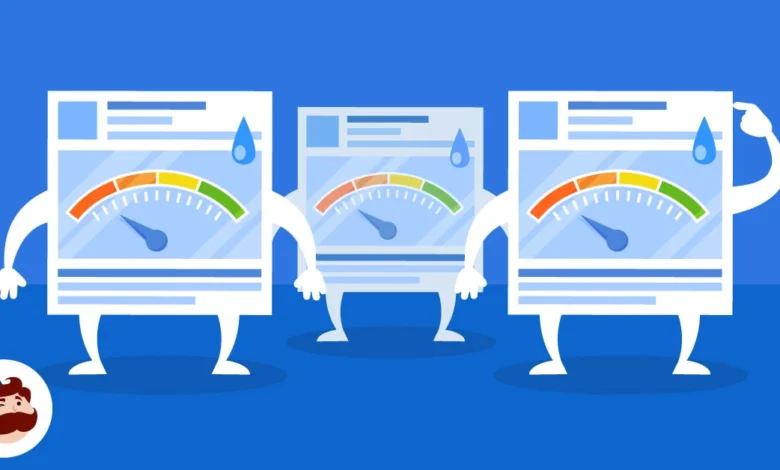
Digital marketing professionals and business owners investing in paid social media campaigns frequently encounter a perplexing operational hurdle: logging into the Meta Ads Manager only to discover that active advertisements have completely flatlined, showing zero impressions and no delivery to the intended target audience. This phenomenon, officially categorized by Meta as ads "not delivering," can paralyze marketing funnels, disrupt lead generation, and stall revenue streams for enterprises of all sizes. Understanding the underlying mechanics of Meta’s ad auction ecosystem is essential for modern marketers seeking to maintain optimal campaign performance and safeguard their return on ad spend (ROAS).
To diagnose this issue effectively, media buyers must first navigate to the Meta Ads Manager and examine the delivery column. A status denoting "Not delivering" indicates that an ad set or individual creative is failing to enter the auction or win impressions. In instances where technical discrepancies hinder distribution, the sub-status frequently appears as "Update required." While encountering these roadblocks can be exceptionally frustrating, nearly every delivery failure stems from specific, identifiable configuration errors, algorithmic constraints, or policy violations. Industry analysts emphasize that systematic troubleshooting can resolve the vast majority of delivery halts within minutes, restoring campaigns to full operational capacity.
Understanding the Mechanics of Ad Delivery Failures
The Meta advertising platform operates on a complex, automated auction system designed to maximize value for both users and advertisers. When an ad fails to deliver, it signifies a breakdown in one of several critical touchpoints: creative availability, policy compliance, budgetary thresholds, audience parameters, or algorithmic optimization loops. Historically, digital marketers relied purely on manual adjustments to resolve these issues. However, as Meta’s machine learning infrastructure has evolved, the algorithms themselves have become primary gatekeepers of ad delivery. If an ad violates internal quality thresholds or lacks sufficient historical data to prove its efficacy, the delivery system proactively throttles or suspends distribution to protect user experience.
Examining the Chronology and Lifecycle of a Facebook Ad Campaign
To fully grasp why ads stop delivering, it is helpful to examine the standard chronological lifecycle of a Facebook advertising campaign. The process begins at the creative development stage, followed by ad set configuration, budgeting, and audience definition. Once submitted, every advertisement undergoes an initial automated review, followed in some cases by a manual inspection by Meta support personnel. During the active phase, the ad continually competes in real-time auctions against millions of other digital assets worldwide. Disruptions can occur at any point along this timeline—whether an asset is pulled from its source page midway through a campaign, an account hits a pre-configured financial ceiling, or an algorithm pauses an ad due to audience fatigue and high auction overlap.
Detailed Analysis of the 10 Most Common Causes and Their Solutions
- The Post Associated with Your Ad is Not Available
A frequent catalyst for the dreaded "Update required" sub-status is the unavailability of the underlying organic post linked to the advertisement. If a marketer utilizes an existing Facebook post or Instagram media item for their ad, any modification to the original content—such as changing privacy settings to private, deleting the post, or losing administrative permissions to the publishing page—immediately severs the connection required for ad delivery.
The Fix: Advertisers must verify that the organic post remains published, public, and fully accessible within the respective page management tools. If the original post has been permanently altered or deleted, the campaign manager must disassociate the broken post within the ad setup and select a functioning creative asset or publish a new post, subsequently toggling the ad set back to the active state to clear the error.
- Your Ad is Still Under Review
Meta maintains strict advertising policies to protect its user base from malicious, deceptive, or inappropriate content. Consequently, every newly created ad or significantly edited campaign must undergo a rigorous review process. While Meta’s documentation indicates that the vast majority of ads are evaluated within 24 hours, external variables such as global retail holidays, political election cycles, or surges in platform usage can significantly extend review durations.
The Fix: Strategic planning is paramount. Media buyers should schedule campaigns several days in advance of their intended launch dates to accommodate potential manual reviews. Furthermore, marketers must refrain from editing core elements of pending or active ads—such as creative files, primary text, or destination URLs—as these modifications automatically trigger a complete restart of the review cycle.
- Your Ad Was Rejected for Policy Violations
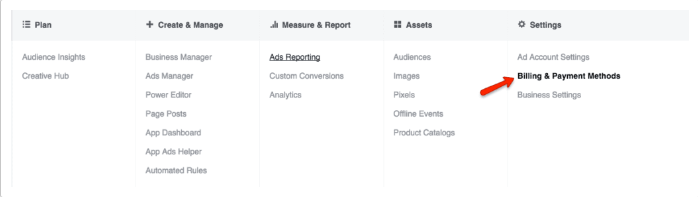
When an advertisement violates one or more of Meta’s comprehensive advertising standards, the platform immediately rejects the content, halting all delivery. Rejections are communicated via email notification and displayed prominently within the Ads Manager dashboard. Common violations include sensationalized claims, prohibited product categories, adult content, misleading before-and-after imagery, copyright infringements, or excessive profanity within the ad copy. Additionally, Meta evaluates the destination landing page; broken links, mismatched product offerings, or deceptive headlines on the external website will also trigger an ad disapproval.
The Fix: Marketing teams must carefully review the specific policy citation provided in the rejection notice. Adjustments should be made to rectify the offending text, imagery, or landing page elements before resubmitting the ad for approval. In scenarios where an ad has been wrongfully disapproved due to an automated false positive, advertisers possess the right to submit a formal appeal directly through the Account Quality dashboard for manual human inspection. Furthermore, campaigns falling into specialized sectors—such as housing, employment, or social issues—must select the appropriate special ad category during setup to prevent systemic delivery suppression caused by overly restrictive geographic or demographic targeting.
- Your Account Has Reached Its Spending Limit
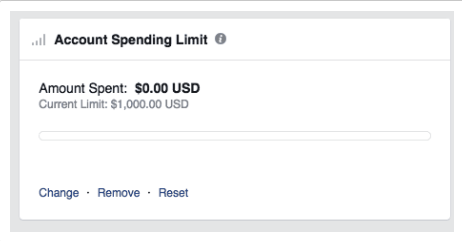
Many organizations implement account-level spending caps to maintain strict fiscal control over their digital marketing expenditures. However, a frequent operational oversight involves setting a lifetime account spending limit, forgetting about the restriction, and subsequently wondering why all active campaigns have simultaneously stopped delivering impressions. Once cumulative spending across the entire ad account reaches this pre-determined threshold, Meta automatically pauses all distribution.
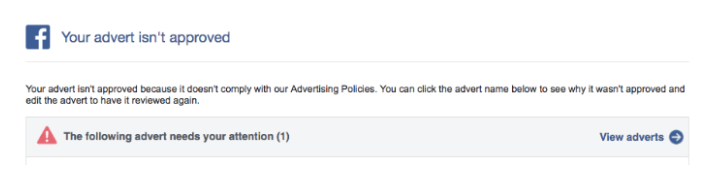
The Fix: Resolving this administrative roadblock requires navigating to the Ads Manager settings, accessing the Billing and Payment Methods section, and reviewing the account spending limit metrics. Administrators can effortlessly restore campaign delivery by increasing the spending limit threshold, resetting the current counter, or completely removing the restriction based on corporate budget authorizations.
- Your Budget or Bid is Restrictive
The efficiency of Meta’s machine learning algorithm relies heavily on data collection. When an ad set is configured with a severely restricted daily budget—such as an unviable allocation of $3 per day—the algorithm cannot secure enough impressions to gather statistically significant performance data. Similarly, utilizing manual bid caps that are set far below prevailing market rates prevents the ad from winning auctions, resulting in zero delivery.
The Fix: Digital marketing strategists recommend establishing realistic budgets that provide the algorithmic optimization phase sufficient financial fuel. Transitioning from restrictive daily budgets to a lifetime budget allows the platform to intelligently distribute capital across the entire campaign run-time. Additionally, starting new campaigns with the lowest-cost automated bidding strategy ensures maximum auction competitiveness before experimenting with manual bid caps.
- Your Target Audience is Excessively Narrow
While hyper-targeted marketing is often praised for precision, overly restrictive audience parameters can completely cripple an ad’s delivery. Meta’s delivery architecture requires a minimum baseline of potential users within a targeted segment to facilitate effective ad rotation and optimization. If custom audience lists, hyper-local geographic radiuses, or densely stacked detailed targeting criteria reduce the potential reach below viable thresholds, the system will halt delivery.
The Fix: Media buyers should systematically broaden their audience pools by expanding geographic boundaries, increasing age brackets, utilizing broader interest categories, or enabling Meta’s Advantage+ Audience expansion features. Incorporating lookalike audiences derived from high-value customer lists can also inject necessary scale into stagnant campaigns.
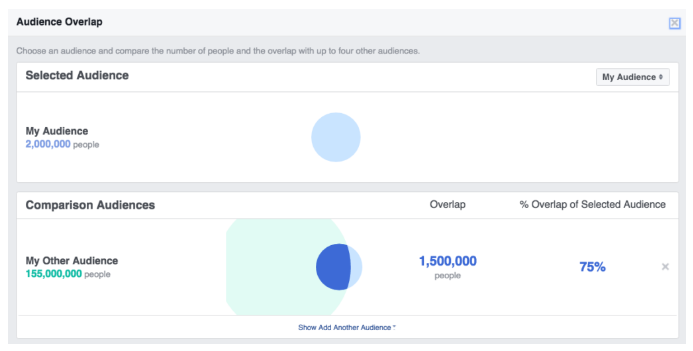
- High Auction Overlap Across Multiple Ad Sets
When an enterprise runs multiple ad campaigns or ad sets targeting identical or highly similar demographic segments, internal market competition occurs. Rather than allowing an advertiser to bid against themselves and artificially inflate costs, Meta’s auction system evaluates competing ad sets from the same account and prioritizes the asset with the highest total value, automatically pausing underperforming counterparts. While this safeguards budget efficiency, it often results in sudden delivery drop-offs for secondary ad sets.
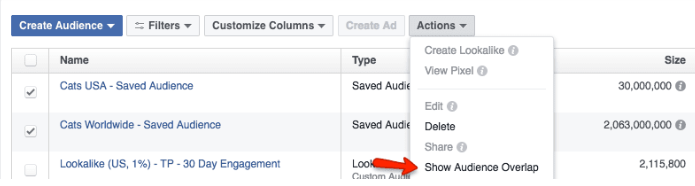
The Fix: Marketers can diagnose internal competition by utilizing the native Audience Overlap tool located within the Audiences tab of the Ads Manager. By analyzing overlap percentages, media buyers can merge competing ad sets into a single, consolidated campaign structure, refine separate audience definitions to ensure mutually exclusive targeting, or implement dynamic creative optimization to let the algorithm manage variations under one unified roof.
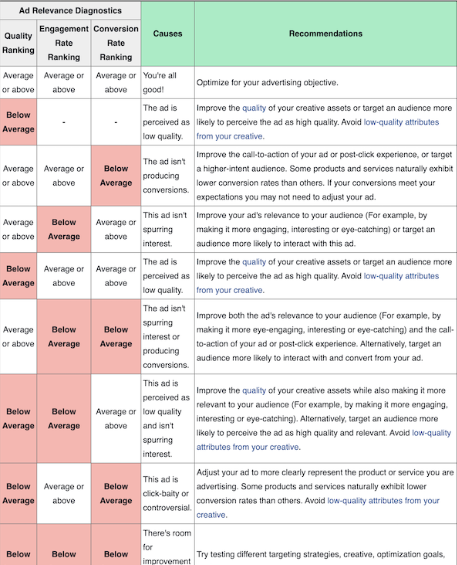
- Low Ad Engagement and Poor Relevance Diagnostics
Meta’s core business model depends on maintaining user engagement across its social platforms. Consequently, ads that generate negative user feedback, hidden posts, reports, or consistently low click-through rates are systematically deprioritized in favor of more relevant content. Metrics such as quality ranking, engagement rate ranking, and conversion rate ranking directly influence an ad’s total value score in the real-time auction.
The Fix: To revive underdelivering ads suffering from poor relevance diagnostics, creative teams must develop fresh visual assets and compelling ad copy designed to resonate deeply with the core target audience. Iterative testing of alternative value propositions, headlines, and calls-to-action can dramatically improve engagement metrics. Industry benchmarks suggest that elevating a ranking from "low" to "average" yields substantial performance gains within the ad delivery network.
- Scheduling and Chronological Discrepancies
Human error during campaign configuration frequently accounts for unexpected delivery halts. Setting incorrect campaign start or end dates, failing to update expired temporal parameters, or inadvertently leaving active ad sets in a paused state prevents Meta from initiating distribution. Furthermore, automated dayparting schedules that restrict ad delivery to specific hours of the day can sometimes lead marketers to believe an ad is broken when it is simply operating outside its designated window.
The Fix: A routine audit of campaign schedules within the Ads Manager can swiftly resolve these issues. Marketing professionals should verify that active campaign toggle switches are enabled, extend expired end dates, and ensure that custom scheduling parameters align perfectly with promotional timelines.
- Unrealistic Optimization Goals and Conversion Deficits
When configuring an ad set, the chosen optimization goal instructs Meta’s algorithm on the exact consumer action to pursue. If an advertiser selects a high-friction conversion goal—such as high-value product purchases—for a brand-new pixel with zero historical conversion data, the algorithm struggles to identify prospective buyers. Lacking early conversion signals, the system eventually ceases ad delivery entirely.
The Fix: To overcome this cold-start dilemma, media buyers should temporarily adjust their optimization goals toward higher-frequency, lower-friction milestones, such as "Add to Cart," "Initiate Checkout," or simple "Link Clicks." Once the pixel accumulates sufficient conversion data and establishes a reliable optimization loop, marketers can seamlessly transition the ad set back to a purchase-driven conversion objective without interrupting ongoing delivery.
Broader Industry Implications and Best Practices
The necessity for continuous campaign monitoring underscores the dynamic, automated nature of modern programmatic advertising. As platforms like Meta increasingly rely on artificial intelligence and machine learning to govern ad delivery, digital marketers must evolve from traditional media planners into data-driven algorithmic supervisors. Failing to address delivery bottlenecks promptly can lead to wasted ad spend opportunities, missed revenue targets, and skewed performance analytics.
Ultimately, maintaining a disciplined operational routine—comprising regular audits of ad accounts, strict adherence to platform policies, balanced budgeting, and proactive creative refreshes—empowers marketing teams to minimize downtime. By mastering the diagnostic procedures associated with ad delivery failures, enterprises can ensure their social media advertising investments consistently achieve maximum visibility, engagement, and conversion efficiency in an increasingly competitive digital marketplace.
Related posts: