Microsoft Releases Emergency Updates for Dell PCs Facing Performance Issues and Shutdowns Following July 2026 Windows 11 Updates

The technological landscape in mid-2026 has been marked by a significant software conflict involving two of the industry’s largest entities, Microsoft and Dell, necessitating the release of emergency "out-of-band" (OOB) updates to restore system stability. Microsoft officially issued these critical patches on Saturday, July 18, 2026, following a week of mounting reports from users and IT administrators regarding severe performance degradation, thermal mismanagement, and unexpected system shutdowns. The issue, which specifically targets a subset of Dell hardware running the latest versions of Windows 11, highlights the intricate and sometimes volatile relationship between operating system updates and hardware-specific drivers.
The emergency updates, identified as KB5121767 and KB5121768, were developed in rapid response to a compatibility flaw that surfaced after the rollout of the July 2026 mandatory security updates. While the security updates were intended to harden the OS against emerging threats, they inadvertently triggered a conflict within the system’s power management architecture. For Dell users, the consequences were immediate and disruptive, ranging from sluggish interface responsiveness to critical hardware failures where laptops would power down without warning to prevent heat-related damage.
The Technical Root Cause: A Conflict of Interfaces
The origin of this widespread technical failure can be traced back to the June 23, 2026, preview cumulative update (KB5095093). In this release, Microsoft introduced a revamped Windows USB-C Connection Manager interface. This new interface was designed to enhance the handling of high-speed data transfers and power delivery across the increasingly complex USB4 and Thunderbolt 5 ecosystems. However, this software modernization clashed with the Intel Innovation Platform Framework (IPF) Processor Participant driver—a cornerstone component of Dell’s hardware integration.
The Intel IPF Processor Participant driver serves as a critical bridge between the Windows operating system and the physical silicon. It is responsible for managing the "Intel Dynamic Tuning Technology" (DTT), which monitors system thermals, adjusts CPU clock speeds, and regulates power consumption based on real-time environmental factors. When the new Windows USB-C Connection Manager was introduced, it created an addressing conflict or a resource overlap that prevented the Intel driver from communicating effectively with the system BIOS.
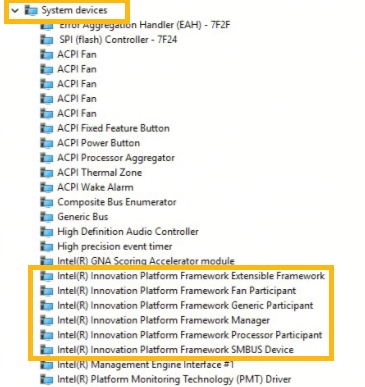
This breakdown in communication manifested visibly in the Windows Device Manager, where affected users observed a yellow exclamation mark icon next to the Intel Innovation Platform Framework Processor Participant entry. This "Code 10" or "Code 43" error signified that the driver could no longer initialize, effectively "blinding" the operating system to the thermal state of the processor. Without the ability to throttle performance or manage fans correctly, the systems defaulted to fail-safe protocols, resulting in throttled speeds (poor performance), excessive heat, rapid battery depletion, and eventually, emergency shutdowns to protect the hardware from permanent thermal degradation.
Chronology of the Crisis
The timeline of the July 2026 Dell-Windows conflict illustrates the speed at which modern software distribution can impact global productivity.
June 23, 2026: Microsoft releases the optional "C" week preview update, KB5095093. While not mandatory, early adopters and IT testing labs begin deploying the update. Initial reports of "driver warnings" begin to surface on technical forums, but they are largely overshadowed by the new features introduced in the update.
July 14, 2026 (Patch Tuesday): Microsoft releases the mandatory security update KB5101650 for Windows 11 25H2 and 24H2. This update incorporates the changes from the June preview. As millions of devices begin the automatic update process, the volume of reports regarding Dell laptop failures spikes.
July 15–16, 2026: Dell’s internal testing teams, working in coordination with Microsoft, identify the specific incompatibility between the Intel IPF driver and the Windows USB-C stack. Microsoft acknowledges the issue publicly, stating that a "limited number" of Dell devices are affected, primarily those in the Latitude, Precision, and XPS product lines which rely heavily on Intel’s latest power management frameworks.
July 17, 2026: To mitigate further damage, Microsoft implements a "Compatibility Hold." This prevents any Dell system identified as vulnerable from downloading or installing the July security updates. While this protects systems from crashing, it leaves them temporarily unpatched against the security vulnerabilities addressed in the July cycle.
July 18, 2026 (Saturday): Microsoft breaks its standard update schedule to release emergency OOB updates KB5121767 and KB5121768. These updates are specifically engineered to resolve the interface conflict, allowing the Intel IPF driver to function alongside the new USB-C Connection Manager.
Affected Systems and Software Versions
The scope of this issue is confined to specific versions of the Windows 11 operating system running on Dell hardware. According to Microsoft’s documentation, the following versions are impacted:
- Windows 11, version 25H2: The latest feature update for consumer and Pro editions.
- Windows 11, version 24H2: The previous year’s major release, still widely used in corporate environments.
- Windows 11 Enterprise LTSC 2024: The Long-Term Servicing Channel version, which is critical for industrial, medical, and high-stability environments.
The emergency patch KB5121767 addresses the 25H2 and 24H2 versions, while KB5121768 is dedicated to the Enterprise LTSC 2024 build. Microsoft has emphasized that these updates are highly targeted. Devices that do not exhibit the yellow exclamation mark in Device Manager or are not manufactured by Dell do not require these patches, and in most cases, the Windows Update service will not even offer them to unaffected hardware.

Deployment and Mitigation Strategies for IT Administrators
For enterprise environments, the sudden need for an emergency patch on a weekend presented a logistical challenge. Microsoft has provided several avenues for deployment to ensure that corporate fleets are restored to full functionality as quickly as possible.
Windows Autopatch and Hotpatching:
For organizations utilizing Windows Autopatch with "hotpatch" capabilities enabled, the emergency fix is designed to be applied without requiring a full system reboot in some instances. This feature, which Microsoft has been expanding throughout 2025 and 2026, allows for the "in-memory" patching of critical system components. However, Microsoft noted that because this specific fix involves deep-level hardware drivers, a restart is still highly recommended to ensure the Intel IPF driver reinitializes correctly.
Microsoft Intune and Expedited Updates:
IT administrators managing remote workforces via Microsoft Intune have been advised to use the "Expedite Windows Quality Updates" policy. This allows admins to override standard "deferral" periods, forcing the emergency KB to the top of the update queue. Given that the underlying issue causes battery drain and heat, the speed of deployment is considered a matter of hardware longevity, not just software stability.
Manual Installation:
For individual users or small businesses without centralized management, the updates are available via the standard Windows Update interface (Settings > Windows Update > Check for updates). Additionally, for systems that may be in a state of "reboot loop" or severe instability, the patches have been uploaded to the Microsoft Update Catalog for manual download and offline installation.
Broader Implications and Industry Reactions
The July 2026 incident has sparked a renewed debate within the tech industry regarding the "Windows as a Service" model and the complexity of the PC ecosystem. Unlike closed ecosystems, the Windows environment must account for thousands of combinations of drivers, firmware, and hardware components.
Industry analysts suggest that the conflict arose because of the rapid evolution of USB-C standards. As USB-C moves toward becoming a universal port for everything from 240W power delivery to 80Gbps data transfer, the software stack required to manage these ports has become as complex as the operating system kernel itself. When Microsoft updated the Connection Manager to support these new standards, the legacy or proprietary hooks used by Dell and Intel for thermal management were inadvertently severed.
While Dell has not issued a formal press release beyond technical support documentation, sources within the company indicate that Dell engineers worked around the clock with Microsoft’s Redmond-based kernel team to validate the fix. The speed of the resolution—three days from acknowledgment to a global patch—is being seen by some as a testament to the improved telemetry and collaboration between OEMs (Original Equipment Manufacturers) and Microsoft. However, critics argue that such a fundamental driver conflict should have been caught during the Windows Insider testing phase or through Dell’s own internal validation before the July Patch Tuesday rollout.
Analysis of the Impact on Enterprise Productivity
The timing of the shutdowns was particularly detrimental to the enterprise sector. With many businesses relying on Dell Latitude and Precision laptops for their mobile workforces, the "unexpected shutdown" symptom led to significant data loss for users who had not saved their work. Furthermore, the "poor performance" aspect of the bug meant that even when systems stayed powered on, they were often too slow for intensive tasks like video conferencing or data analysis.
The thermal issues also raised concerns regarding hardware lifespan. Lithium-ion batteries are notoriously sensitive to heat; prolonged exposure to the high temperatures caused by the driver failure could lead to premature battery degradation. Microsoft’s decision to label this an "emergency" update was likely influenced by the potential for hardware damage, elevating it above a standard software bug.
Conclusion and Recommendations
The release of KB5121767 and KB5121768 serves as a critical resolution to a volatile situation. For Dell users running Windows 11 24H2 or 25H2, the path forward is clear: immediate installation of the emergency update is necessary to ensure the safety and performance of their hardware.
As the PC ecosystem continues to integrate more sophisticated power and thermal management technologies, the July 2026 incident serves as a reminder of the delicate balance between software innovation and hardware stability. Users are encouraged to verify their system status in the Device Manager and ensure that the Intel Innovation Platform Framework Processor Participant driver is functioning without errors. For the broader tech community, this event will likely lead to more rigorous testing protocols for "out-of-the-box" driver interactions in future Windows 11 feature updates.
Related posts: