How to Audit Any Webpage in Three Minutes Using the SEOquake Extension

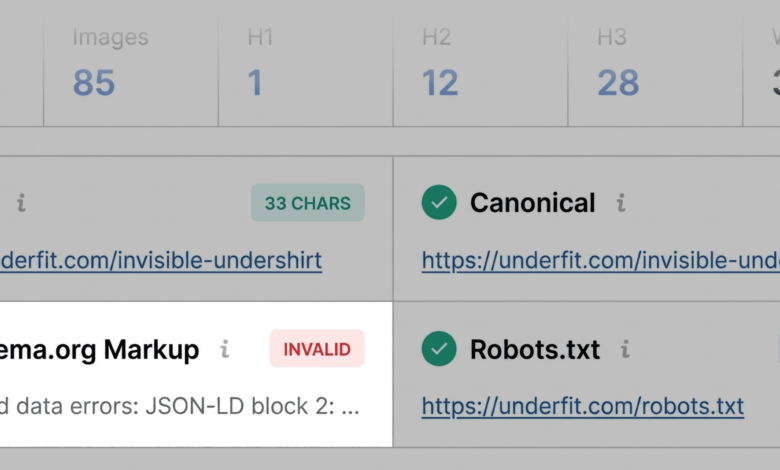
In the fast-paced world of digital marketing, waiting for a comprehensive site crawl to identify why a single page is underperforming is often a luxury that search engine optimization (SEO) professionals cannot afford. Whether a high-priority product page has suddenly plummeted in search rankings, a competitor has surged ahead for a target keyword, or a client landing page is failing to convert visitors, the need for rapid, actionable data is paramount. The SEOquake Chrome extension, developed by Semrush, provides a streamlined, browser-based solution that allows users to perform a full diagnostic audit without navigating away from the page in question.

The Mechanism of Rapid SEO Triage
The SEOquake workflow is designed to transform a chaotic set of performance variables into a clear, three-minute diagnostic process. By integrating directly into the Chrome browser, the tool offers a granular look at technical signals, on-page SEO factors, link architecture, and proprietary Semrush metrics.

The audit process is divided into two distinct phases: the Quick View for immediate triage and the Full Report for deeper technical diagnosis. The system utilizes a color-coded interface to guide users, where green indicates optimal performance, yellow signals warnings that require professional discretion, and red highlights critical issues that demand immediate remediation. This visual hierarchy allows SEOs to prioritize their workload based on the severity of the findings, focusing first on elements that prevent indexing or severely hinder user experience.

Phase One: Triage and the Quick View Pop-up
The first sixty seconds of the audit are dedicated to identifying glaring technical oversights. Upon clicking the SEOquake icon, the Quick View pop-up presents five specialized tabs. For most practitioners, the “Page Info,” “Audit,” and “Content” tabs provide the highest density of useful information.

In the Page Info tab, the audit focuses on the fundamental pillars of on-page optimization. Key elements such as the title tag length, meta description quality, canonical URL status, and indexability are assessed against current search engine standards. During a recent audit of an underperforming product page for the apparel brand UnderFit, this triage phase revealed critical failures in Schema.org markup. Specifically, the tool flagged JSON-LD errors in red. Because product-specific rich results—such as price, stock status, and star ratings—are essential for driving click-through rates from search engine results pages (SERPs), this finding immediately moved to the top of the technical fix list.

While minor issues, such as suboptimal meta description length, were also flagged, they were categorized as lower priority. This stage of the process is not about perfection; it is about identifying "blockers" that prevent a page from competing effectively.

Phase Two: Technical and Structural Diagnosis
Once the triage is complete, the second and third minutes are reserved for the Full Report. By selecting “View Full Report,” the user is taken to a centralized dashboard containing six panels: Page Info, Diagnosis, Internal Links, External Links, Density, and Semrush data.

The "Audit" panel is the engine room of the process. It systematically evaluates technical essentials such as crawlability, indexation, meta robots directives, mobile-friendliness, and XML sitemap presence. In the case of the UnderFit product page, the Full Audit panel confirmed that while a sitemap existed, it was not clearly linked or prioritized. Furthermore, the audit of the "Content" tab highlighted a problematic heading hierarchy, where the H1 tag was buried deep within the page structure, and subsequent headings jumped levels—from H1 to H4—violating accessibility and search engine interpretation best practices.

The discovery that 36 images lacked alt text also emerged during this phase. While alt text might seem like a secondary concern, for product pages, it is a primary driver for image search visibility and accessibility compliance. By identifying these gaps in seconds, the tool enables a more targeted approach to content optimization.

Data-Driven Insights and Link Architecture
A critical, often overlooked, component of page performance is the health of the link graph. Broken links create "dead ends" for crawlers, which can dilute the authority of a page and frustrate users. The Links panel in the Full Report serves as a comprehensive inventory of every internal and external link on the page, categorizing them by anchor text and HTTP status codes.

For many large-scale e-commerce sites, broken links often stem from outdated JavaScript or legacy code. During the diagnostic process, users can export these findings as a CSV file for distribution to development teams. This transition from "identifying the problem" to "delegating the fix" is what makes the three-minute audit model effective in professional environments.

Contextualizing Performance with Semrush Metrics
The final step in the audit involves using the Semrush panel to understand the broader context of the page’s performance. By default, this section provides domain-level and page-level metrics. However, for users with an active Semrush subscription, the data becomes significantly more powerful.

Connecting a professional account unlocks Traffic Analytics, which provides engagement metrics like bounce rate, average visit duration, and traffic source composition. This context is vital: a page with low traffic but high conversion rates requires a different strategy than a page with high traffic but a high bounce rate. If a page is technically sound but underperforming in traffic, the issue likely resides in the off-page authority or keyword strategy rather than the technical implementation.

The Broader Implications for SEO Strategy
The ability to perform a three-minute audit shifts the SEO paradigm from reactive firefighting to proactive maintenance. By standardizing the diagnostic process, teams can ensure that every page on a site meets a minimum baseline of technical quality.

Furthermore, this rapid assessment tool highlights the increasing convergence of technical SEO and user experience. As search engines like Google continue to refine their algorithms to prioritize "Helpful Content" and Core Web Vitals, the ability to rapidly identify and correct structural, content, and link-based issues becomes a competitive advantage.

The methodology outlined here—triage, diagnose, and decide—is applicable to any website, regardless of size or industry. It serves as a reminder that effective SEO is rarely about chasing algorithm updates; it is about maintaining a healthy, accessible, and structured digital footprint. By leveraging tools like SEOquake, marketers can ensure that their technical foundations remain robust, allowing them to focus on the creative and strategic elements of their campaigns. As the digital landscape becomes more crowded, the sites that win are not necessarily those with the most content, but those that offer the most seamless, error-free experience to both users and search crawlers.