Dangerous LastPass Authenticator GitHub Impersonation Campaign Deploys Malicious Kernel-Level Driver to Disable Security Software

A sophisticated malware campaign masquerading as a legitimate LastPass Authenticator download has been uncovered, utilizing a dangerous technique known as "Bring Your Own Vulnerable Driver" (BYOVD) to bypass Windows security measures. Security researchers from LastPass and Delphos Labs disclosed on September 17 that threat actors are leveraging high-ranking GitHub repositories to distribute a payload capable of terminating antivirus and endpoint detection and response (EDR) agents. By operating at the kernel level—a layer of the operating system that exists beneath standard security software—the attackers effectively blind the host system before executing a password-stealing trojan.
The incident highlights a growing trend in cyber-adversarial tactics, where attackers exploit trusted infrastructure and legitimate, digitally signed drivers to gain elevated privileges. Despite the severity of the compromise, neither the LastPass corporate environment nor its customer vaults have been affected. Instead, the attackers have utilized the brand’s reputation as a social engineering lure to target unsuspecting users.
Anatomy of the Attack: The GitHub Lure
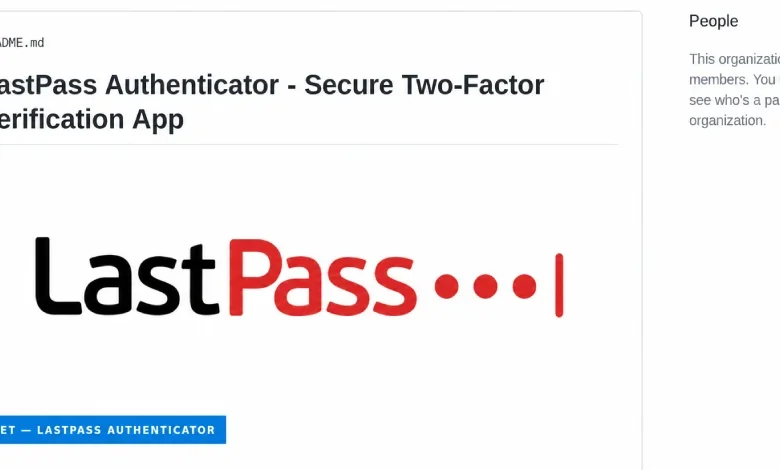
The campaign centers on a fraudulent GitHub page, hosted at github.com/LastPass-Authenticator. Through search engine optimization (SEO) manipulation, this malicious repository often appears in the top results for users searching for "LastPass Authenticator download." The page is professionally crafted to mimic an official product portal, lowering the barrier of suspicion for victims.
When a user clicks the download button, they are redirected through a series of intermediary GitHub pages, ultimately leading to an attacker-controlled server. This server delivers a compressed ZIP file, often exceeding 100 MB in size—a tactical choice designed to evade automated file scanners that skip files beyond certain size thresholds.
Inside these archives, victims find a seemingly benign executable. However, the installer utilizes a "DLL side-loading" technique. It pairs a renamed, legitimate Microsoft debugging tool (vsdbg.exe) with a malicious library (vsdbg.dll). Upon execution, the installer forces the application to load the malicious DLL, which subsequently initiates a privilege escalation process to attain SYSTEM-level access. Once this administrative threshold is reached, the malware deploys a malicious kernel driver, identified by researchers as Alinubx.sys.
The Role of BYOVD and Kernel-Level Dominance
The deployment of Alinubx.sys represents the most critical stage of the infection. A kernel driver operates in the most privileged layer of the Windows operating system. Because this driver loads before most security applications, it can systematically identify and terminate the processes of 145 different antivirus and security software suites.

The driver in question is a rebranded iteration of CcProtect.sys, a component originally developed for the Chinese disk-encryption product CnCrypt. While it was previously documented as a "process killer" on the LOLDrivers catalog—a repository that tracks vulnerable drivers—the attackers bypassed detection by simply renaming the file. Because the Microsoft blocklist for vulnerable drivers relies heavily on specific file hashes, the simple act of renaming the file rendered it invisible to standard protective measures.
Crucially, the driver carries a digital signature from the Microsoft Windows Hardware Compatibility Publisher. This signature, dated March 2023, provides the file with a veneer of legitimacy. As the researchers noted in their joint advisory, "Microsoft attestation proves a driver passed through a trust pipeline; it does not prove the driver is safe." This paradox remains one of the most difficult challenges for modern endpoint security, as the ecosystem continues to struggle with the abuse of legitimate, signed, yet vulnerable code.
The Stealer Payload: Rapuncel
With the system’s security defenses neutralized, the secondary payload—a stealer dubbed "Rapuncel" by LastPass researchers—is unleashed. The stealer is designed to exfiltrate a broad array of sensitive data. It targets saved credentials across more than two dozen web browsers, cryptocurrency wallet files, and session tokens for communication and gaming platforms such as Discord, Telegram, and Steam.
Furthermore, the malware parses the Windows Credential Manager and scans the local filesystem for documents containing keywords such as "password," "seed," or "recovery." To bypass Google’s App-Bound encryption—a security feature designed to prevent unauthorized access to stored browser credentials—the stealer injects code into the browser process, tricking the browser’s own internal service into decrypting the sensitive data. All gathered information is then compressed and transmitted to the attacker’s command-and-control server.
Chronology of the Discovery
The threat landscape for this specific campaign began to coalesce throughout the late summer of 2026. The timeline of the discovery and response is as follows:
- August 19, 2026: Delphos Labs researchers formally notified Microsoft regarding the malicious behavior of the driver and its potential for abuse.
- Late August 2026: Researchers performed extensive testing on the driver, confirming that it recorded zero detections on VirusTotal and was not included on the official Microsoft driver blocklist.
- September 17, 2026: LastPass and Delphos Labs published a joint report detailing the campaign, confirming that while the LastPass brand was used as a lure, the company’s internal infrastructure remained secure.
Throughout this period, Microsoft maintained that the driver did not meet its strict criteria for a "security vulnerability," as it was not a Microsoft-authored component. Consequently, the researchers were directed to the company’s secondary review process for inclusion in the driver blocklist, a process that highlights the bureaucratic friction often faced by security professionals when dealing with third-party driver abuse.
Broader Implications and Defensive Strategies
The use of the Cruciferra crypter—a paid tool used to pack and hide the malicious code—suggests that this campaign is not the work of amateur hobbyists but rather a sophisticated operation likely utilizing "malware-as-a-service" components. The fact that the attacker server hosted impersonation pages for at least 40 different brands indicates that the LastPass lure is merely one component of a massive, multi-faceted operation.

For organizations and individual users, the implications are severe. A machine compromised by this malware is effectively a "burned" asset. Because the malicious driver persists across reboots and actively suppresses security software, standard remediation via local antivirus tools is likely to fail.
Security professionals are advised to shift their focus from static file detection to behavioral analysis. Defenders should monitor for:
- Unexpected Driver Loading: Sudden attempts to load new kernel drivers, particularly those that do not align with known, verified hardware components.
- Process Termination Patterns: Monitoring for unauthorized attempts to stop security-related services.
- Anomalous GitHub Traffic: Investigating network requests originating from or directed toward GitHub repositories that mimic legitimate software download portals.
Recommendations for Victims
If a user suspects they have executed the fake installer, they must treat the affected machine as a total loss. Because the stealer accesses the Windows Credential Manager and browser-stored secrets, every password associated with that device should be considered compromised.
Remediation steps should include:
- Isolate the Device: Immediately disconnect the machine from the internet to prevent further exfiltration.
- Reset Credentials: Change all passwords for all accounts from a separate, clean, and trusted device.
- Perform a Clean Reinstall: Because the malware operates at the kernel level, a standard virus scan is insufficient. The most secure path forward is to wipe the storage drive and perform a clean installation of the operating system.
- Review Financial Accounts: Users should monitor bank statements and cryptocurrency wallets for unauthorized transactions, as session tokens and recovery phrases may have been compromised during the infection.
As the industry continues to grapple with the "BYOVD" problem, this incident serves as a stark reminder that even the most well-known brands are not immune to being used as pawns in a wider, more dangerous game of digital exploitation. The reliance on digital signatures as a primary indicator of trust is increasingly proving to be an inadequate defense in an era where legitimate code can be easily subverted to facilitate illicit activity.
Related posts: