How to Perform a Comprehensive Page-Level SEO Audit in Three Minutes Using SEOquake

In the fast-paced world of digital marketing, performance plateaus can be frustrating. When a high-priority product page experiences a sudden dip in search engine rankings, or a competitor’s content unexpectedly eclipses a well-optimized landing page, the need for immediate, actionable intelligence becomes critical. While full-scale site crawls are essential for long-term health, they are often time-intensive and technically demanding. For SEO professionals and site managers who need answers in minutes rather than hours, the SEOquake Chrome extension offers a streamlined, browser-based workflow to move from initial triage to surgical diagnosis.

Understanding the SEOquake utility requires recognizing its position as a diagnostic bridge. Developed by Semrush, the tool functions as a lightweight browser extension that provides instantaneous access to technical SEO signals, on-page performance metrics, link profiles, and core ranking data. By centralizing this information within the browser, users can evaluate any live webpage without the need to export data or navigate to external dashboards.

The core of the SEOquake workflow is built upon a color-coded diagnostic system. Green, orange, and red indicators provide an immediate visual hierarchy of health, allowing auditors to prioritize critical errors over minor technical warnings. By focusing on these cues, professionals can systematically strip away the noise and identify whether a performance issue is caused by a structural flaw, a content deficiency, or a technical hurdle.

The Three-Minute Audit Workflow: Triage to Diagnosis

The efficacy of an SEO audit is often dictated by the efficiency of the triage process. In the first 60 seconds, the goal is to isolate the "obvious" problems that prevent a page from ranking. Utilizing the Quick View pop-up, an auditor can examine the Page Info, Audit, and Content tabs to establish a baseline.

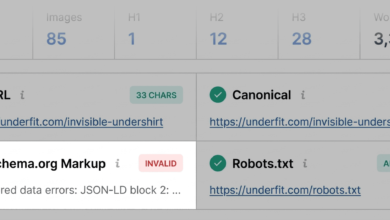
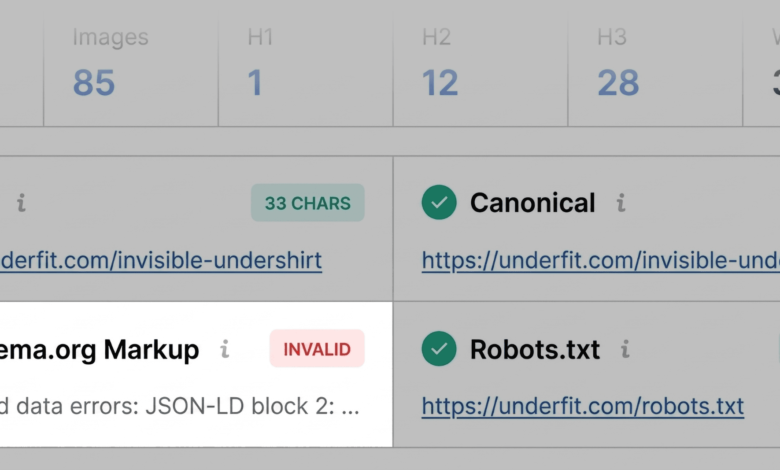
During the Page Info phase, the audit focuses on the fundamental pillars of on-page optimization: title tags, meta descriptions, URL structure, and canonical tags. A common pitfall in product pages is the presence of invalid Schema.org markup. For instance, if JSON-LD errors are detected—indicated by red flags in the SEOquake interface—the page may become ineligible for rich results, such as price, availability, or star ratings in Google search results. This directly impacts click-through rates (CTR) and can lead to a significant decline in organic traffic.

Following the Page Info scan, the Audit tab provides a high-level view of technical health. While green indicators suggest compliance with standard protocols, orange warnings often demand professional judgment. For example, issues surrounding hreflang tags—which signal to search engines which version of a page to show users in specific regions—can lead to duplicate content confusion or indexation errors. While these may not be "site-breaking," they are critical for international SEO performance.

The final stage of the quick scan involves the Content tab. This section is vital for understanding how search engine crawlers and, increasingly, AI-driven search systems interpret page structure. An illogical heading hierarchy—such as jumping from an H1 tag to an H4 without intervening H2s or H3s—can frustrate both users and search algorithms. Furthermore, the absence of alternative text on dozens of images is a common accessibility and SEO oversight. Because search engines rely on alt text to understand the context of visual assets, leaving these fields blank effectively blinds a page to image-based search traffic.

Deep Diagnosis: Investigating Technical and Content Anomalies

Once the initial triage has flagged potential issues, the next two minutes of the audit are dedicated to the Full Report. This transition from a quick overview to a granular investigation is where the most significant optimizations are identified.

By selecting the "View Full Report" function, users gain access to a comprehensive suite of data panels covering crawlability, indexation, and technical compliance. In the Audit panel, for instance, an auditor can drill down into specific schema issues. Connecting the extension to the Google Rich Results Test provides an automated validation of the code, confirming exactly which items are invalid and why. This level of precision transforms a vague suspicion into a clear, actionable fix for the development team.

The Keyword Density panel serves as a secondary diagnostic layer. While modern search algorithms prioritize semantic context over simple keyword repetition, analyzing the "Keyword Cloud" and phrase tables remains a useful way to identify topic coverage gaps. If a product page is failing to rank for its primary target keywords, an audit of the keyword density can reveal whether the page is inadvertently over-optimizing for secondary terms or failing to include the essential vocabulary expected by search engines.

The Importance of Link Health and Domain Context

Link health is the final component of a robust page-level audit. Broken internal and external links serve as a negative signal to search engines, suggesting that a site is poorly maintained and providing a sub-optimal experience for users. The Links panel in SEOquake allows for the bulk identification of these errors. By exporting the findings as a CSV file, auditors can systematically verify whether links are truly broken or if they are simply redirecting incorrectly due to legacy JavaScript implementations.

Finally, the Semrush panel provides the necessary context for the audit. It is important to distinguish between a page-level issue and a systemic site problem. If a page has low traffic despite being part of a domain with a high authority score and robust traffic metrics, the problem is likely isolated to that specific URL—perhaps due to poor content or technical errors. Conversely, if the XML sitemap is misconfigured or domain-wide canonicalization errors are present, the solution will require a full site crawl using an enterprise-grade tool like the Semrush Site Audit.

Implications and Broader Impact

The ability to conduct a rapid, data-backed audit has significant implications for digital strategy. In an era where search intent changes rapidly and technical updates (such as Google’s Core Web Vitals) can shift ranking landscapes overnight, the traditional, slow-moving audit is no longer sufficient.

By adopting a standardized, three-minute audit workflow, teams can ensure that their most important pages—such as high-converting product pages or primary lead-generation landing pages—are constantly monitored. This proactive approach to SEO reduces the risk of long-term ranking losses and ensures that technical debt is addressed as it accumulates rather than after a catastrophic loss in traffic.

Ultimately, SEOquake acts as an equalizer in the SEO space. It democratizes access to complex diagnostic data, allowing small business owners, freelance consultants, and in-house marketing teams to perform audits that were once the exclusive domain of enterprise-level agencies. As SEO continues to become more technical and reliant on structured data, tools that simplify the diagnostic process will remain essential for maintaining a competitive edge in the search engine results pages.

The technical landscape of the web is constantly shifting, and the tools used to navigate it must be equally agile. Whether addressing broken links, rectifying schema markup, or refining keyword usage, the goal of an SEO audit remains constant: to ensure that the content provided to users is as accessible and relevant as possible to the engines that index it. With the right tools and a disciplined approach, that clarity can be achieved in just three minutes.
Related posts: