There’s a prevailing mental model among React developers: forms are inherently UI components. This typically leads to a hierarchical structure where forms are built using libraries like React Hook Form (RHF) in conjunction with validation schemas such as Zod. For the vast majority of everyday forms – login screens, settings pages, and standard CRUD modals – this approach is highly effective. Each element performs its designated task, components compose seamlessly, and developers can efficiently move on to features that truly differentiate their product.
However, a common challenge arises when forms begin to incorporate increasingly complex logic. This can manifest as visibility rules that depend on previous user input, derived values that cascade across multiple fields, or even entire sections of a form that should be skipped or displayed based on a dynamically calculated total. Initially, these complexities might be managed with hooks like useWatch and simple conditional rendering within the component. As the form grows, developers might resort to more advanced validation techniques, such as Zod’s superRefine, to encode cross-field rules that the basic schema structure cannot express. Eventually, the navigation logic itself can start to entangle with business rules, leading to a realization that the form has evolved beyond a mere user interface into a sophisticated decision-making process, with the component tree merely serving as its storage location.
This evolution highlights a point where the conventional mental model for forms in React can falter. The RHF and Zod stack is exceptionally well-suited for its intended purpose. The core issue is the tendency to continue using these tools beyond the point where their abstractions accurately reflect the problem at hand. The alternative approach necessitates a fundamentally different way of conceptualizing forms.
This article will explore this alternative by constructing the exact same multi-step form using two distinct methodologies. The goal is to deconstruct what moves between the UI layer and a dedicated rule engine, and to provide a practical framework for choosing the most appropriate approach based on project requirements.
The Form Under Construction: A Multi-Step Order Process
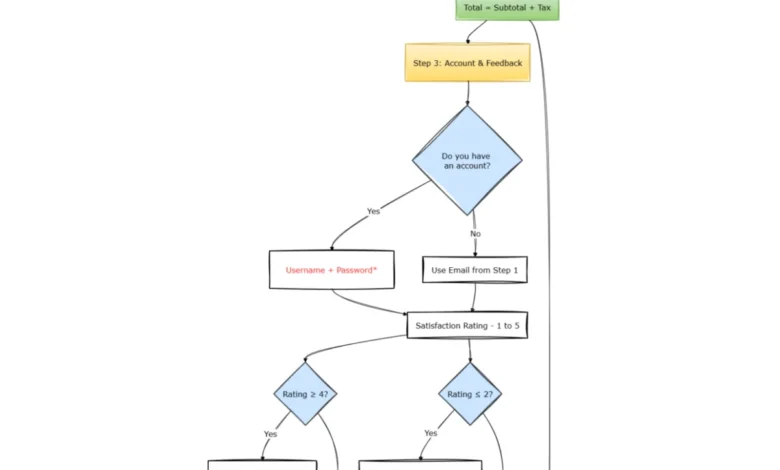
The form we will be building is a four-step process designed to capture customer details, order specifics, account information, and a final review before submission. While not extraordinarily complex, it is sufficiently intricate to expose architectural differences in handling dynamic behavior.
- Step 1: Details: Collects basic personal information, such as first name and email address.
- Step 2: Order: Gathers product details including price, quantity, and tax rate, and calculates subtotal, tax, and total.
- Step 3: Account & Feedback: Inquires about account creation, with conditional fields for username and password, and gathers user satisfaction feedback, with conditional text areas for positive comments or areas for improvement.
- Step 4: Review: A final confirmation step, the visibility of which is conditional.
Part 1: Component-Driven (React Hook Form + Zod)
The initial implementation leverages the popular React Hook Form (RHF) library, paired with Zod for schema validation. This approach places most of the form’s logic directly within React components.
Installation
To begin, the necessary packages are installed:
npm install react-hook-form zod @hookform/resolvers @tanstack/react-queryZod Schema
The Zod schema defines the shape and validation rules of the form data. For the initial steps, standard validation applies. The complexity emerges when attempting to express conditional requirements and cross-field logic.
import  z  from "zod";

export const formSchema = z.object(
  firstName: z.string().min(1, "Required"),
  email: z.string().email("Invalid email"),
  price: z.number().min(0),
  quantity: z.number().min(1),
  taxRate: z.number(),
  hasAccount: z.enum(["Yes", "No"]),
  username: z.string().optional(),
  password: z.string().optional(),
  satisfaction: z.number().min(1).max(5),
  positiveFeedback: z.string().optional(),
  improvementFeedback: z.string().optional(),
).superRefine((data, ctx) =>
  if (data.hasAccount === "Yes")

  if (data.satisfaction >= 4 && !data.positiveFeedback)
    ctx.addIssue( code: "custom", path: ["positiveFeedback"], message: "Please share what you liked" );


  if (data.satisfaction <= 2 && !data.improvementFeedback)
    ctx.addIssue( code: "custom", path: ["improvementFeedback"], message: "Please tell us what to improve" );

);

export type FormData = z.infer<typeof formSchema>;
It’s important to note that fields like username and password are typed as optional() because Zod’s schema primarily describes the data’s shape, not the dynamic rules for when fields become mandatory. The conditional requirements must be handled within superRefine, a function that executes after initial validation and has access to the entire data object. This separation is characteristic of Zod’s design, where superRefine serves as the designated location for cross-field logic that transcends the schema’s structural capabilities.
Crucially, this schema has no inherent understanding of pages, field visibility at specific times, or navigation flow. These aspects must be managed externally within the React component.
Form Component
The React component orchestrates the form’s steps, manages state, and renders the appropriate fields based on the current step.
import  useForm, useWatch  from "react-hook-form";
import  zodResolver  from "@hookform/resolvers/zod";
import  useMutation  from "@tanstack/react-query";
import  useState, useMemo  from "react";
import  formSchema, type FormData  from "./schema";

const STEPS = ["details", "order", "account", "review"];

type OrderPayload = FormData &  subtotal: number; tax: number; total: number ;

export function RHFMultiStepForm()  (step === 3 && total >= 100);

  return (
    <form onSubmit=handleSubmit(onSubmit)>
      step === 0 && (
        <>
          <input ...register("firstName") placeholder="First Name" />
          <input ...register("email") placeholder="Email" />
        </>
      )

      step === 1 && (
        <>
          <input type="number" ...register("price",  valueAsNumber: true ) />
          <input type="number" ...register("quantity",  valueAsNumber: true ) />
          <select ...register("taxRate",  valueAsNumber: true )>
            <option value="0.05">5%</option>
            <option value="0.1">10%</option>
            <option value="0.15">15%</option>
          </select>

          <div>Subtotal: subtotal</div>
          <div>Tax: tax</div>
          <div>Total: total</div>
        </>
      )

      step === 2 && (
        <>
          <select ...register("hasAccount")>
            <option value="Yes">Yes</option>
            <option value="No">No</option>
          </select>

          hasAccount === "Yes" && (
            <>
              <input ...register("username") placeholder="Username" />
              <input ...register("password") placeholder="Password" />
            </>
          )

          <input type="number" ...register("satisfaction",  valueAsNumber: true ) />

          satisfaction >= 4 && (
            <textarea ...register("positiveFeedback") />
          )

          satisfaction <= 2 && (
            <textarea ...register("improvementFeedback") />
          )
        </>
      )

      step === 3 && total >= 100 && <div>Review and submit</div>

      <div>
        step > 0 && <button type="button" onClick=() => setStep(step - 1)>Back</button>
        showSubmit ? (
          <button type="submit" disabled=mutation.isPending>
            mutation.isPending ? "Submitting..." : "Submit"
          </button>
        ) : step < STEPS.length - 1 ? (
          <button type="button" onClick=() => setStep(step + 1)>Next</button>
        ) : null
      </div>
      mutation.isError && <div>Error: mutation.error.message</div>
    </form>
  );
This component demonstrates a significant amount of logic embedded within the React code. Visibility rules for input fields, conditional rendering of entire sections, and the logic determining when the "Next" or "Submit" buttons appear are all managed through JavaScript conditions and state variables.
The implications of this approach are clear: while functional and often performant due to RHF’s optimized re-renders, the business logic becomes distributed. Explaining the conditions under which the review page appears, for instance, requires tracing through multiple conditional statements in the showSubmit logic and within the JSX itself. This makes the behavior less inspectable as a cohesive system and more dependent on mental execution. Furthermore, modifying these rules necessitates code changes, pull requests, and redeployments, even for minor adjustments.
Part 2: Schema-Driven (SurveyJS)
The alternative approach utilizes a schema-driven form library, SurveyJS, to manage form structure, validation, and dynamic behavior. This shifts the responsibility of complex logic from React components to a declarative JSON schema.
Installation
The required packages for SurveyJS are:
npm install survey-core survey-react-ui @tanstack/react-queryThese libraries provide a complete form runtime, enabling multi-page forms without extensive custom control flow in the React code.
The Same Form, As Data
The entire form’s definition – its structure, validation rules, visibility logic, calculations, and navigation – is encapsulated within a JSON object. This schema is then interpreted and rendered by the SurveyJS engine.
  "title": "Order Flow",
  "showProgressBar": "top",
  "pages": [

      "name": "details",
      "elements": [
         type: "text", name: "firstName", isRequired: true ,
         type: "text", name: "email", inputType: "email", isRequired: true, validators: [ type: "email", text: "Invalid email" ]
      ]
    ,

      "name": "order",
      "elements": [
         type: "text", name: "price", inputType: "number", defaultValue: 0 ,
         type: "text", name: "quantity", inputType: "number", defaultValue: 1 ,

          "type": "dropdown",
          "name": "taxRate",
          "defaultValue": 0.1,
          "choices": [
             "value": 0.05, "text": "5%" ,
             "value": 0.1, "text": "10%" ,
             "value": 0.15, "text": "15%"
          ]
        ,

          "type": "expression",
          "name": "subtotal",
          "expression": "price * quantity"
        ,

          "type": "expression",
          "name": "tax",
          "expression": "subtotal * taxRate"
        ,

          "type": "expression",
          "name": "total",
          "expression": "subtotal + tax"

      ]
    ,

      "name": "account",
      "elements": [

          "type": "radiogroup",
          "name": "hasAccount",
          "choices": ["Yes", "No"]
        ,

          "type": "text",
          "name": "username",
          "visibleIf": "hasAccount = 'Yes'",
          "isRequired": true
        ,

          "type": "text",
          "name": "password",
          "inputType": "password",
          "visibleIf": "hasAccount = 'Yes'",
          "isRequired": true,
          "validators": [ "type": "text", "minLength": 6, "text": "Min 6 characters" ]
        ,

          "type": "rating",
          "name": "satisfaction",
          "rateMin": 1,
          "rateMax": 5
        ,

          "type": "comment",
          "name": "positiveFeedback",
          "visibleIf": "satisfaction >= 4"
        ,

          "type": "comment",
          "name": "improvementFeedback",
          "visibleIf": "satisfaction <= 2"

      ]
    ,

      "name": "review",
      "visibleIf": "total >= 100",
      "elements": []

  ]
This schema declaratively defines all aspects of the form, including visibility rules using visibleIf and derived values using expression. This centralizes the logic, making it readily inspectable and maintainable. SurveyJS distinguishes between read-only expression types for calculated values and other input types for user data.
Rendering and Submission

The React component for the SurveyJS approach is remarkably simple. It primarily serves to instantiate the SurveyJS model and wire up the onComplete event to the API submission.
import  useState, useEffect, useRef  from "react";
import  useMutation  from "@tanstack/react-query";
import  Model  from "survey-core";
import  Survey  from "survey-react-ui";
import "survey-core/survey-core.css";

// Assume surveySchema is imported from the JSON definition above

export function SurveyForm()
  const [model] = useState(() => new Model(surveySchema));

  const mutation = useMutation(
    mutationFn: async (data) =>
      const res = await fetch("/api/orders",
        method: "POST",
        headers:  "Content-Type": "application/json" ,
        body: JSON.stringify(data),
      );
      if (!res.ok) throw new Error("Failed to submit");
      return res.json();
    ,
  );

  const mutationRef = useRef(mutation);
  mutationRef.current = mutation;
  useEffect(() =>
    const handler = (sender) => mutationRef.current.mutate(sender.data);
    model.onComplete.add(handler);
    return () => model.onComplete.remove(handler);
  , [model]); // ref avoids re-registering handler every render (mutation object identity changes)

  return (
    <>
      <Survey model=model />
      mutation.isError && <div>Error: mutation.error.message</div>
    </>
  );
In this schema-driven model, the React component is stripped of all business logic. There are no useWatch calls, no conditional JSX rendering, no step counters, and no complex state management for form flow. React’s role is reduced to rendering the SurveyJS component and handling the submission call to the API.
What Moved Out Of React?
The fundamental difference lies in where the form’s dynamic behavior is managed:
| Concern | RHF Stack | SurveyJS |
|---|---|---|
| Visibility | JSX branches | visibleIf |
| Derived values | useWatch / useMemo |
expression |
| Cross-field rules | superRefine |
Schema conditions |
| Navigation | step state |
Page visibleIf |
| Rule location | Distributed across files | Centralized in the schema |
With the schema-driven approach, concerns like visibility, derived values, cross-field validation, and navigation are all handled within the declarative JSON schema. This schema can be stored in a database, versioned independently of application code, or even edited through internal tooling without requiring a full application deploy. This represents a significant operational advantage, especially for teams where form behavior evolves frequently and might be driven by non-engineering stakeholders like product managers or legal teams. A product manager could, for instance, adjust the threshold for displaying the review page directly in the schema configuration, eliminating the need for an engineer to make code changes and redeploy.
When to Use Each Approach?
A practical guideline for choosing between these approaches is to consider what would be lost if the form were deleted entirely.
If the form’s primary function is to collect and validate user input, and its logic is relatively straightforward, the component-driven approach with RHF and Zod is often sufficient. Changes typically involve minor UI adjustments, label modifications, or adding/removing fields. In such cases, RHF excels at managing form state and validation efficiently within the React ecosystem.
However, if the form’s behavior is heavily dependent on complex conditional logic, derived calculations, and dynamic navigation, and if these rules are subject to frequent updates by non-technical teams, the schema-driven approach with a library like SurveyJS becomes a more appropriate and sustainable solution. This model is ideal when the form essentially acts as a rule engine or a business process orchestrator, rather than just a simple UI.
These two methodologies are not mutually exclusive competitors but rather tools designed for different classes of problems. The critical consideration is to avoid mismatches in abstraction. Using a full-fledged rule engine for a simple form, or conversely, trying to manage extensive business logic within component-level conditionals, can lead to code that is difficult to understand, maintain, and evolve.
The form example used in this article was deliberately chosen to sit near this boundary, complex enough to highlight the architectural differences without being an extreme edge case. Many unwieldy forms in existing codebases likely reside in a similar grey area, and the key is often identifying and naming their true nature.
Use React Hook Form + Zod when:
- The form’s primary purpose is data input and basic validation.
- Conditional logic is limited and primarily affects field visibility or simple validation rules.
- The majority of changes are UI-centric (labels, layout, styling).
- Developers are comfortable managing state and conditional rendering within React components.
- The team has a strong grasp of the RHF and Zod ecosystem.
Use SurveyJS when:
- The form involves significant dynamic behavior, including complex conditional visibility, derived values, and multi-step navigation driven by data.
- The form functions more as a rule engine or a business process flow than a simple UI.
- Business logic needs to be easily updatable by non-technical stakeholders or managed as configurable data.
- The schema itself can serve as a central source of truth for the form’s behavior.
- Decoupling complex logic from the UI framework is a priority for maintainability and scalability.
By understanding the strengths and weaknesses of each approach, development teams can make more informed decisions, leading to more robust, maintainable, and adaptable form implementations.