Understanding the .claude Folder: A Technical Analysis of Local State Management in AI-Driven Development Environments

The emergence of the .claude folder within software project directories marks a significant shift in how integrated development environments (IDEs) and command-line interface (CLI) tools manage the state of large language model (LLM) interactions. As developers increasingly adopt agentic workflows—autonomous or semi-autonomous AI systems that perform complex tasks—the need for local persistence has become paramount. This hidden directory, typically generated automatically upon the initialization of a Claude-powered tool, serves as the primary repository for configuration, session memory, and operational logs. While its appearance often prompts questions regarding security and necessity, the folder represents a critical infrastructure layer designed to bridge the gap between the stateless nature of cloud-based AI and the stateful requirements of modern software engineering.
The Architecture of Local AI State Management
The .claude folder is a hidden directory, denoted by the leading period in its name, which adheres to a long-standing convention in Unix-like operating systems for storing configuration files and local metadata. Similar to the .git folder for version control or the .vscode folder for editor settings, the .claude folder is designed to reside within the root directory of a specific project. Its primary function is to store "state"—the cumulative record of settings and historical data that allows an AI model to maintain continuity across multiple interactions.
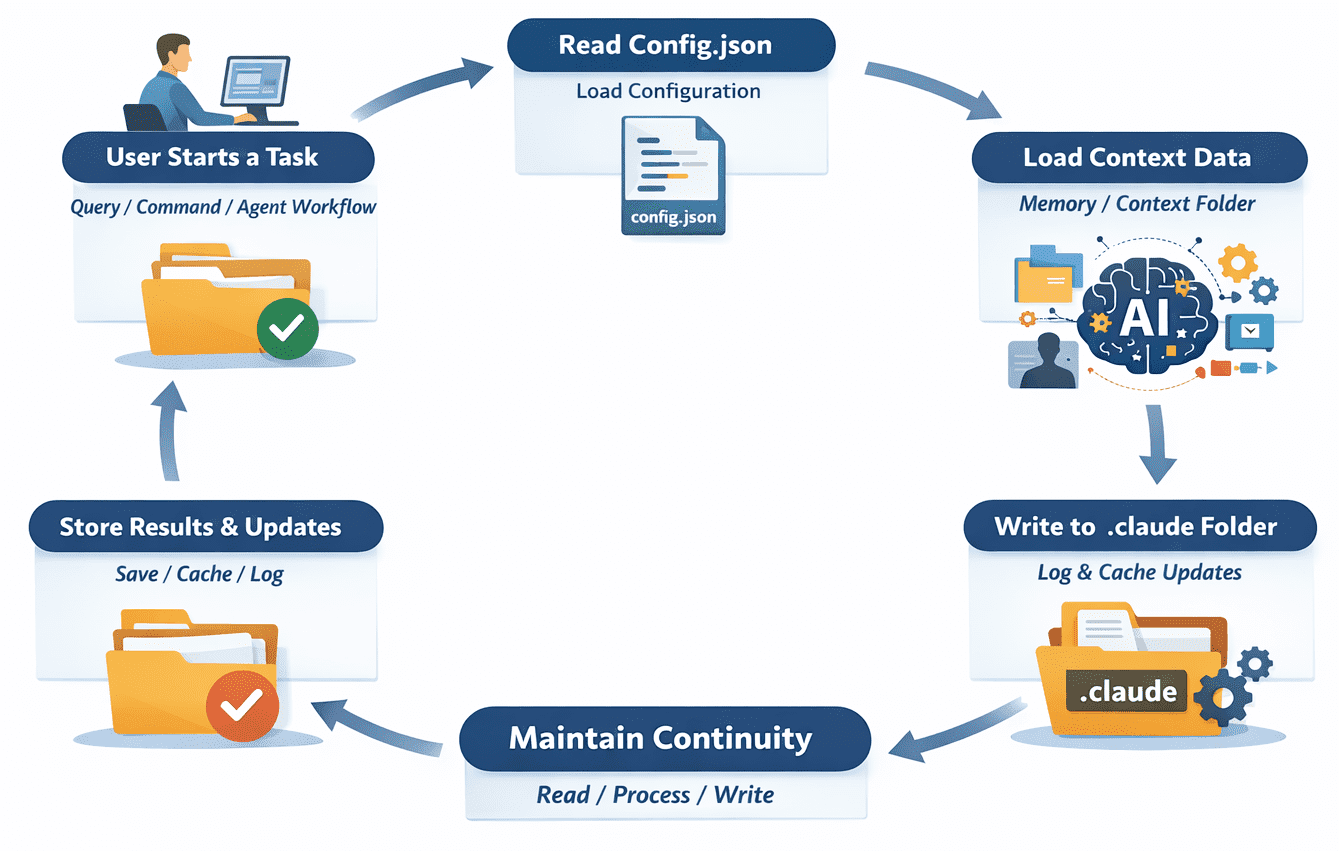
At its core, the folder addresses the inherent limitation of LLMs: their lack of long-term memory between discrete API calls. Without a local storage mechanism, every command issued to an AI agent would require the user to re-upload the entire project context, leading to increased latency and significantly higher token consumption. By persisting data locally, Claude-integrated tools can "remember" previous tasks, honor project-specific constraints, and optimize performance through caching.
Detailed Breakdown of Directory Components
The internal structure of the .claude folder is modular, allowing different tools to store specific types of data without interference. While the exact contents may vary depending on the specific implementation—such as a CLI tool, a VS Code extension, or an autonomous agent framework—several standard components have emerged:
1. Configuration Files (config.json)
The config.json file acts as the instructional blueprint for the AI’s behavior within the project. It typically contains parameters such as the specific model version being used (e.g., Claude 3.5 Sonnet), temperature settings for response variability, and project-level instructions. This file ensures that the AI adheres to the same coding standards and architectural constraints every time it is invoked, providing a level of consistency that is difficult to achieve through manual prompting alone.
2. The Memory and Context Repositories
One of the most vital components is the memory/ or context/ sub-directory. This area stores metadata about the project’s structure and the history of recent changes. In agentic workflows, this memory allows the model to understand the relationship between different files and modules. For instance, if a developer previously asked the AI to refactor a database schema, the memory folder might store a summary of that change so that subsequent requests to update the API layer are handled with the new schema in mind.
3. Operational Logs and Audit Trails
The logs/ directory provides a chronological record of every interaction between the developer and the AI. These logs are essential for debugging, as they allow developers to trace the logic used by an agent when it encounters an error or produces unexpected code. From a corporate compliance perspective, these logs also serve as an audit trail, documenting what changes were suggested by the AI and which were ultimately implemented.
4. Local Cache
To enhance efficiency, the cache/ directory stores temporary data and pre-computed embeddings. By caching frequently accessed project information, the system reduces the number of redundant API calls. This not only speeds up the response time but also serves as a cost-saving measure for developers operating under usage-based pricing models for AI tokens.
Chronology of Development: From Chatbots to Agents
The transition toward local state folders like .claude is a direct result of the evolution of AI integration. In 2023, most developers interacted with Claude via a web browser, a method that relied entirely on the service provider’s cloud storage for history. However, the release of the Claude API and the subsequent rise of "agentic" frameworks in early 2024 necessitated a more robust local solution.
As tools like "Claude Engineer" and various IDE plugins gained popularity, the industry saw a shift toward "context-aware" development. By mid-2024, the introduction of features like Anthropic’s "Computer Use" and improved tool-calling capabilities made it clear that for an AI to be truly effective, it needed to exist within the developer’s local file system. The .claude folder became the standard method for managing this localized presence, allowing tools to operate with a high degree of autonomy while remaining tethered to the project’s specific environment.
Security Implications and Best Practices
The presence of the .claude folder introduces several security considerations that developers must address to prevent data leakage. Because the folder contains logs and configuration data, it can inadvertently store sensitive information, including API keys, internal IP addresses, or proprietary logic.
Version Control Exclusion
Industry experts and security researchers emphasize that the .claude folder should almost always be included in a project’s .gitignore file. Committing this folder to a public repository like GitHub can expose session logs and local paths. According to data from cybersecurity firms monitoring public repositories, "leaked metadata" in hidden folders is a leading cause of credential exposure. By keeping the .claude folder local, developers ensure that the AI’s "working memory" does not become a permanent part of the public code record.
Handling Sensitive Data
While Anthropic and other AI providers implement rigorous data privacy standards for information processed in the cloud, the security of the local .claude folder is the responsibility of the user. Developers are advised to periodically audit their logs and clear the cache if they are working on highly sensitive projects. Most tools offer commands to "reset" or "clean" the .claude directory, which effectively wipes the local state without affecting the project’s source code.
Broader Industry Impact and Technical Analysis
The move toward local state management via folders like .claude reflects a broader trend in the "AI-Native" software development lifecycle (SDLC). We are moving away from a model where AI is an external consultant and toward a model where the AI is a persistent collaborator integrated into the project’s fabric.
The Rise of the "Shadow File System"
Technical analysts have noted the emergence of what some call a "shadow file system"—a layer of metadata that exists alongside source code to facilitate AI understanding. The .claude folder is the most prominent example of this, but it is unlikely to be the last. As other providers like OpenAI and Google DeepMind release more advanced local integration tools, we may see a proliferation of .openai or .gemini folders, each vying for space in the project root.
Impact on Developer Productivity
Preliminary data from developer surveys suggests that context-aware tools utilizing local state folders can improve task completion speeds by up to 40% for complex refactoring jobs. The ability of the AI to "load" the state from the .claude folder rather than re-indexing the entire project allows for a more fluid "flow state" for the human developer. However, the risk of "state drift"—where the local AI memory becomes out of sync with the actual code—remains a technical challenge that tool developers are actively working to solve.
Official Responses and Documentation
While Anthropic does not issue public statements for every directory created by its ecosystem’s tools, the company’s technical documentation for its SDKs and CLI tools highlights the importance of local context. Documentation emphasizes that the "persistence of state is key to the reliability of agentic workflows." Furthermore, the open-source community surrounding Claude has standardized the use of the .claude folder to ensure interoperability between different third-party tools. If a developer switches from one Claude-powered CLI to another, the presence of a standardized state folder allows for a smoother transition.
Conclusion: The Future of the .claude Folder
The .claude folder is more than a byproduct of AI integration; it is a foundational element of the modern developer’s toolkit. By providing a dedicated space for configuration, memory, and logs, it enables a level of sophistication in AI-assisted coding that was previously unattainable. As AI agents become more autonomous and their integration into the SDLC deepens, the management of this local state will become as routine as managing dependencies or version control branches.
For developers, the key takeaway is one of informed management. While the folder is safe to delete and will be recreated as needed, doing so results in a "lobotomized" AI experience for that specific project. By understanding the contents and purpose of the .claude folder, and by following security best practices such as utilizing .gitignore, developers can harness the full power of Claude while maintaining a clean and secure project environment. The hidden dot-folder, once a source of confusion, is now a clear signal of a project optimized for the era of artificial intelligence.
Related posts: