Building a Resilient Home AI Lab: Five Essential Docker Containers to Prevent Infrastructure Failure

The rapid decentralization of artificial intelligence has led to a massive surge in enthusiasts and professionals establishing local development environments. While the initial setup phase—typically involving the successful execution of a local large language model over a weekend—often sparks considerable enthusiasm, long-term maintenance frequently introduces severe friction. Industry statistics suggest that a significant majority of home-lab environments degrade within their first month of operation, not due to algorithmic or computational limitations, but because of poor infrastructure management, unindexed data repositories, ephemeral storage configurations, and opaque networking topologies.
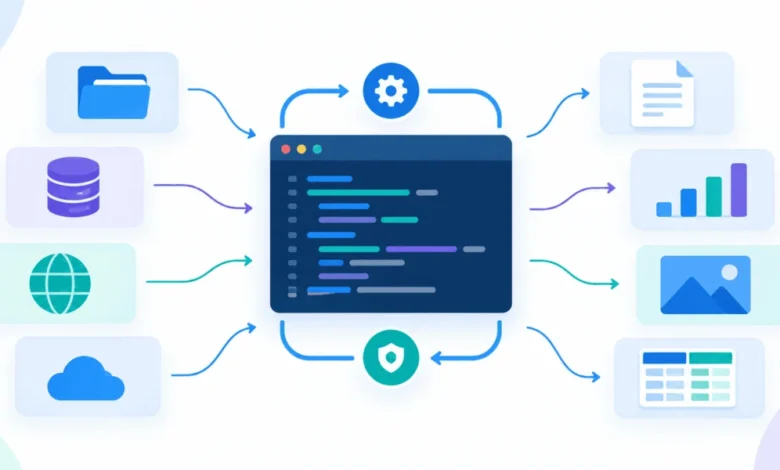
To transition from a temporary proof-of-concept to a sustainable, production-grade local AI stack, system administrators and developers must adopt a modular architecture. Rather than relying on monolithic virtual environments or tangled shell scripts, containerization offers a clean separation of concerns. By treating model serving, user interfaces, retrieval-augmented generation memory, automation pipelines, and container management as distinct, decoupled layers, operators can maintain systemic integrity. Analyzing the requirements of modern edge-AI development reveals five foundational Docker containers that effectively mitigate the common failure points of self-hosted infrastructure.
The Anatomy of Local AI Infrastructure Collapse
The lifecycle of a failing home AI lab typically follows a predictable trajectory. During the initial deployment phase, users prioritize immediate gratification—downloading model binaries directly into active containers, hardcoding IP addresses, and bypassing persistent volume configuration. When routine software updates occur, or when underlying host systems are rebooted, volatile container layers are routinely wiped, resulting in catastrophic data loss and configuration drift.
Furthermore, as workloads expand to include document indexing, API integrations, and multi-user environments, the lack of a centralized orchestration and monitoring strategy becomes glaringly apparent. Infrastructure engineers emphasize that local AI deployments must mirror enterprise architecture principles: stateless compute layers, persistent storage volumes, deterministic networking, and automated recovery mechanisms. Implementing these safeguards from inception eliminates the administrative overhead that typically causes self-hosted labs to collapse under their own weight.
Layer 1: Model Runtime and Execution via Ollama
At the foundational layer of any local AI stack lies the model runtime. Ollama has emerged as the industry standard for managing and executing large language models locally, providing a streamlined execution environment that exposes a standardized HTTP API on port 11434. By abstracting the complexities of model weight loading and hardware acceleration, Ollama ensures that peripheral applications interact with a uniform interface regardless of the underlying model architecture.
docker run -d --gpus=all -v ollama:/root/.ollama -p 11434:11434 --name ollama ollama/ollamaFrom an architectural standpoint, the critical vulnerability in standard Ollama deployments involves storage persistence. Because model weights routinely range from several gigabytes to tens of gigabytes, failing to mount a dedicated named volume (-v ollama:/root/.ollama) forces the system to re-download massive binaries upon container recreation. Moreover, upstream tag mutations can render previously utilized model versions inaccessible.
Hardware passthrough represents another critical deployment variable. While Linux and Windows environments utilizing Windows Subsystem for Linux 2 (WSL2) seamlessly support NVIDIA GPU acceleration via the NVIDIA Container Toolkit (--gpus=all), macOS host environments running Docker Desktop do not currently pass native GPU access to containers. Consequently, developers utilizing Apple Silicon hardware must carefully evaluate whether to run Ollama natively for optimal inference speeds or accept CPU-bound execution within a containerized boundary.
Layer 2: User Interaction and Session Management with Open WebUI
While command-line interfaces are adequate for initial diagnostic testing, productive daily interaction necessitates a robust graphical user interface. Open WebUI fulfills this requirement by establishing a feature-rich browser-based environment complete with multi-user authentication, chat history management, document ingestion capabilities, and native integrations with Ollama and alternative API providers.
Deploying Open WebUI via containerization requires strict attention to environment variables and persistent volume mapping to preserve user state across system updates:
docker run -d -p 3000:8080 --add-host=host.docker.internal:host-gateway -v open-webui:/app/backend/data -e WEBUI_SECRET_KEY=your-secret-key --name open-webui --restart always ghcr.io/open-webui/open-webui:mainThe primary operational risk associated with Open WebUI involves cryptographic session management. The WEBUI_SECRET_KEY environment variable is responsible for signing user session tokens. If this key is omitted or dynamically regenerated during container updates, all active user sessions are immediately invalidated, locking administrators and authorized users out of the platform. Best practices dictate generating a cryptographically secure key (e.g., using openssl rand -hex 32) and explicitly preserving it within the deployment configuration. Additionally, maintaining a clear separation between the interface container and the underlying model runtime allows administrators to upgrade or modify the user interface without interrupting backend model execution.
Layer 3: Contextual Memory and Retrieval via Qdrant
For basic conversational tasks, foundational language models rely solely on their pre-trained parametric memory. However, when a local AI lab is tasked with querying proprietary documentation, technical notes, or specialized codebases, the system requires an external retrieval mechanism. This requirement introduces the third essential component: a vector database.
Qdrant functions as the cognitive memory layer of the modern AI stack, ingesting unstructured data, converting text into high-dimensional vector embeddings, and performing rapid similarity searches. By decoupling memory from compute, Qdrant allows administrators to maintain persistent document collections that can be queried dynamically by local models through Retrieval-Augmented Generation (RAG) pipelines.
docker run -p 6333:6333 -p 6334:6334 -v qdrant_storage:/qdrant/storage qdrant/qdrantOperationally, Qdrant exposes two distinct ports: port 6333 for the REST API and administrative dashboard, and port 6334 for high-performance gRPC communication. While casual users may initially bypass vector databases, implementing Qdrant is the definitive architectural pivot that transforms an AI deployment from a conversational novelty into a functional productivity asset. Ensuring that the storage directory /qdrant/storage is persistently mapped guarantees that expensive embedding procedures do not need to be re-executed following infrastructure maintenance.
Layer 4: Workflow Automation and Integration with n8n
As local AI labs mature, manual interactions naturally give way to automated workflows. Whether it is automatically ingesting newly downloaded PDF whitepapers, executing scheduled model summaries, or routing AI-generated insights to external communication channels, self-hosted environments require an automation spine.
n8n provides a node-based, visual workflow automation platform designed for self-hosting. Deployed via Docker Compose alongside the broader AI stack, n8n acts as the connective tissue between disparate services, enabling webhooks, scheduled tasks, and programmatic API orchestration.
version: '3.8'
services:
  n8n:
    image: n8nio/n8n:latest
    ports:
      - "5678:5678"
    volumes:
      - n8n_data:/home/node/.n8n
    restart: always
Because n8n frequently stores sensitive authentication credentials, API keys, and proprietary workflow definitions, its associated data volume requires rigorous backup routines. Furthermore, security auditors strongly advise against exposing n8n’s administrative port to public networks. Access should be strictly restricted to internal subnets or securely tunneled via Virtual Private Networks (VPNs) to prevent unauthorized workflow manipulation.
Layer 5: Infrastructure Governance and Control via Portainer CE
The accumulation of multiple containers inevitably introduces administrative friction. Tracking container health, inspecting real-time logs, managing persistent volumes, and pruning dangling image layers can quickly overwhelm operators who rely solely on command-line utilities. Portainer CE addresses this operational overhead by providing a comprehensive, browser-based management console for Docker environments.
docker run -d -p 9000:9000 -p 9443:9443 --name portainer --restart=always -v /var/run/docker.sock:/var/run/docker.sock -v portainer_data:/data portainer/portainer-ce:latestThe defining architectural characteristic of Portainer is its direct integration with the Docker daemon socket (/var/run/docker.sock). While this deep integration grants Portainer the authority to monitor, start, stop, and configure every container on the host machine, it simultaneously represents a significant security vector. Any compromise of the Portainer interface translates to complete host-level container control. Consequently, Portainer must be deployed exclusively within trusted administrative networks and protected with robust multi-factor authentication protocols.
Strategic Implementation and Architectural Synthesis
Successfully deploying a sustainable home AI lab requires a disciplined, incremental implementation strategy. System administrators are advised to construct their infrastructure using a unified Docker Compose manifest from day one. Utilizing Compose enables internal service discovery, allowing containers to communicate securely via user-defined hostnames (e.g., routing Open WebUI requests directly to http://ollama:11434) rather than fragile, dynamic IP addresses.
Recommended Deployment Roadmap
- Phase One (Foundational Compute & UI): Deploy Ollama and Open WebUI to establish basic local inference and conversational capabilities.
- Phase Two (Contextual Integration): Introduce Qdrant when document retrieval and RAG functionalities become necessary for daily workflows.
- Phase Three (Automation & Governance): Integrate n8n for workflow automation, followed immediately by Portainer CE to ensure long-term visibility and container lifecycle management.
By enforcing strict version pinning—avoiding volatile tags like :latest or :main for mission-critical components—and prioritizing persistent volume mapping across all five layers, developers can construct a robust, highly maintainable local AI environment. Ultimately, prioritizing disciplined infrastructure design over ad-hoc experimentation ensures that a home AI lab remains a productive, resilient asset rather than a temporary technical experiment.