In the fast-paced digital economy, website performance is often the difference between market leadership and obscurity. When a high-priority product page experiences a sudden dip in search engine rankings, or a competitor’s content begins to outperform a client’s landing page, speed of diagnosis is critical. Traditional SEO workflows often require full-site crawls that can take hours or even days to process. However, for immediate triage and granular diagnostics, browser-based auditing tools have become an essential component of the modern SEO stack. SEOquake, a free Chrome extension developed by Semrush, provides a streamlined, three-minute workflow that enables digital marketers and webmasters to identify critical technical flaws and on-page optimization gaps without ever leaving the browser.

The utility of such a tool lies in its ability to bridge the gap between high-level performance metrics and the granular technical realities of individual URLs. By shifting the focus from broad site health to immediate page-level analysis, SEO professionals can prioritize fixes that directly impact conversion rates and visibility.

Understanding the SEOquake Ecosystem

SEOquake functions as a diagnostic layer over the standard web browsing experience. Upon installation, the extension serves as a bridge to the Semrush database, offering real-time insights into technical signals, on-page SEO factors, linking strategies, and core performance metrics. The tool is designed to provide immediate feedback, utilizing a color-coded interface to differentiate between healthy elements (green), warnings that require attention (orange), and critical issues that demand immediate remediation (red).

This visual hierarchy allows users to conduct a rapid triage of any page. The process is divided into two distinct phases: the Quick View, which facilitates immediate identification of obvious errors, and the Full Report, which provides the depth required to understand the underlying causes of those flags.

Triage and Rapid Diagnosis: The First Sixty Seconds

The "Quick View" interface is the primary tool for initial assessment. Within a minute, a user can evaluate the overall health of a page across five specific tabs: Page Info, Diagnosis, Internal Links, External Links, and Density.

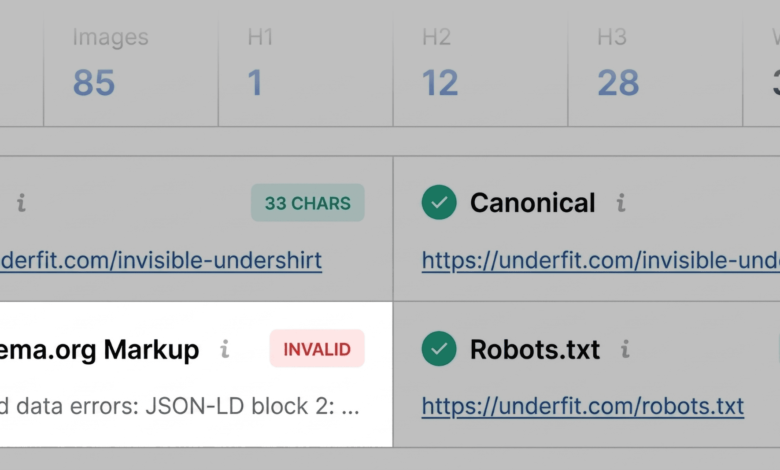
The Page Info tab serves as the primary gateway, providing a summary of fundamental SEO components. Experienced auditors focus on five core areas here: the presence and length of the title tag, the meta description, the canonical URL status, the meta robots tag, and the implementation of Schema.org markup. For an e-commerce page, for example, the absence of valid product schema can be a catastrophic issue, as it renders the page ineligible for rich results such as price, availability, and user ratings in Google search results.

Following the initial scan, the Audit tab offers a deeper dive into technical requirements. This section systematically evaluates crawlability and indexation, mobile compliance, and sitemap accessibility. If a page triggers an orange warning—often related to hreflang tags or missing alt attributes on images—the auditor must perform a judgment call based on the specific context of the site. For instance, while a single missing alt tag is unlikely to collapse a page’s ranking, a systemic failure to label 30 or 40 images can significantly impede accessibility and search engine image interpretation, necessitating a broader content update.

Deep-Dive Analysis: The Full Report (Minutes Two and Three)

Once the initial triage is complete, the "View Full Report" feature becomes the primary diagnostic instrument. This report expands the data available in the Quick View into six distinct panels, each offering a granular view of the page’s architecture.

In the Audit panel, users can move beyond simple alerts to understand the mechanics of the failure. For example, if the system flags an XML sitemap issue, the report will clarify whether the file is missing, unreachable, or simply not referenced correctly in the site’s robots.txt file. This specificity eliminates the guesswork that typically accompanies SEO troubleshooting.

The Keyword Density panel serves as an additional layer of content analysis. By analyzing the frequency of terms in visible content, the tool helps auditors ensure that the page remains relevant to its intended target keywords. A "Keyword Cloud" provides a bird’s-eye view of the page’s thematic focus, while detailed tables break down the prominence of one-word and multi-word phrases. When discrepancies appear—such as unexpected terms appearing in the keyword density tables—it often points to issues in the underlying HTML, such as hidden text in interactive widgets or redundant image labels, which can dilute the topical authority of the page.

Evaluating Link Health and Structural Integrity

Link health is another critical pillar of the Full Report. Broken internal or external links do more than just frustrate users; they create "dead ends" for search engine crawlers, potentially wasting the crawl budget and preventing the flow of authority throughout the site. The Links panel generates a comprehensive list of all hyperlinks on the page, including their status codes (e.g., 200, 404), their relationship (dofollow or nofollow), and their anchor text. By exporting this data as a CSV, auditors can systematically verify broken links and implement redirects or corrections.

The significance of these findings often hinges on the domain’s overall health. This is where the Semrush panel provides vital context. By connecting a Semrush account, users can pull in domain-level data, including backlink profiles and traffic trends. A page that shows poor performance but sits on a domain with a high-authority backlink profile is often a victim of on-page content issues, whereas a weak page on a low-authority domain may indicate a deeper, site-wide structural problem.

Implications and Strategic Implementation

The three-minute SEOquake workflow is not intended to replace comprehensive site audits, but rather to serve as a tactical tool for agile decision-making. The ability to identify, diagnose, and categorize issues at the page level allows for a more efficient allocation of development resources.

When issues are confined to a single URL, the fix is straightforward: update the metadata, correct the Schema markup, or swap out the broken link. However, when the Full Report reveals recurring patterns—such as widespread JSON-LD errors across all product templates or a missing site-wide sitemap—the auditor can quickly pivot to a more robust, site-wide strategy. This transition from page-level triage to site-level audit is the hallmark of effective SEO management.

As search engine algorithms continue to evolve, the reliance on automated diagnostics will only increase. Tools like SEOquake provide a standardized, objective framework for evaluation, ensuring that when performance fluctuates, the response is grounded in empirical data rather than speculation. For modern digital teams, this capability is essential for maintaining a competitive edge in an increasingly crowded and technically demanding online landscape. By systematizing the diagnostic process, businesses can ensure that their technical foundations remain robust, allowing them to focus their creative energy on content quality and user experience.