Unlocking the Full Potential of 1Password: Beyond Password Management to Comprehensive Digital Security

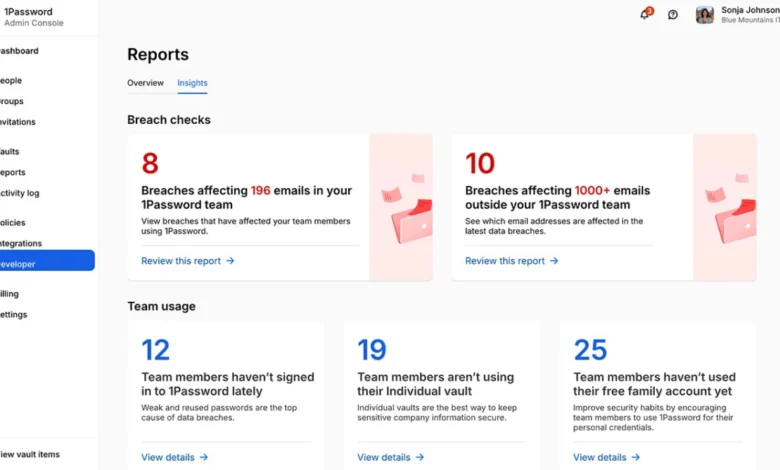
Most users interact with 1Password primarily for its core function: securely storing and automatically filling login credentials. While this fundamental utility offers significant convenience and a baseline level of digital security, it represents only a fraction of the platform’s capabilities. For individuals seeking to maximize their online safety and streamline various aspects of their digital lives, a deeper exploration of 1Password’s advanced features is not just beneficial, but increasingly essential in today’s complex threat landscape. This comprehensive guide delves into the underutilized functionalities of 1Password, transforming it from a mere digital vault into a powerful, integrated security and organizational tool.
The evolution of digital security threats necessitates a proactive approach, moving beyond the basic protection of passwords. Cybercriminals continuously refine their tactics, employing sophisticated methods to breach personal accounts and sensitive data. According to recent cybersecurity reports, the average individual has dozens of online accounts, each a potential entry point for malicious actors. Password managers like 1Password offer a robust defense against common vulnerabilities such as weak, reused, or compromised passwords. However, their true value is unlocked when users leverage their full suite of features to address a wider range of security and organizational challenges.
Proactive Security Measures for Travelers: The Power of Travel Mode
One of 1Password’s most distinctive and arguably underappreciated features is Travel Mode. This functionality is specifically designed to mitigate risks associated with crossing international borders, a scenario where device security can become a paramount concern. When activated, Travel Mode allows users to selectively hide specific vaults from their devices. This means that only the data explicitly designated as safe for travel remains accessible, while all other sensitive information – including financial accounts, personal documents, and less critical login credentials – is temporarily removed from view on devices that might be subject to inspection.
The activation process is straightforward. Users log into their 1Password account via the 1Password.com web interface. Within the account management section, the Travel Mode option can be enabled. Crucially, prior to enabling Travel Mode, users are advised to create a dedicated vault for any information they anticipate needing during their journey. This vault is then explicitly marked as "safe for travel." Once Travel Mode is active, any vaults not designated as safe are automatically removed from the user’s 1Password applications on their devices. Upon returning from travel and deactivating Travel Mode, these vaults are seamlessly restored. This feature, requiring only a few minutes to configure, can significantly alleviate the stress and potential security anxieties associated with international travel, ensuring that only necessary and pre-approved data is present on devices.
Fortifying Online Transactions with Virtual Payment Cards
In an era of ubiquitous online commerce, the security of payment information is a growing concern. 1Password integrates with services like Privacy.com to offer a robust solution through virtual payment cards. This integration allows users to generate unique, temporary credit or debit card numbers for online purchases. Instead of exposing their primary financial details to potentially less secure websites, users can employ these virtual cards.
The benefits extend beyond simply masking a real card number. Users can create virtual cards tied to specific merchants, ensuring that the card number is only valid for that particular retailer. Furthermore, spending limits can be imposed on these virtual cards, providing an additional layer of financial control and protection against unauthorized charges. Once the integration is established through the 1Password browser extension, the platform can intelligently suggest the appropriate virtual card when a user is proceeding to checkout on a merchant’s site. This feature aligns with best practices for secure online transactions, particularly when engaging with new or less trusted online entities. It’s an especially valuable tool for managing recurring subscriptions, shopping at unfamiliar online stores, or when encountering checkout pages that raise any concerns about data security. It is important to note that this feature may have geographical limitations, with Privacy.com’s services currently primarily available to U.S. users.
Proactive Management of Critical Dates: Expiry Alerts for Documents and Licenses
1Password’s utility extends far beyond the realm of website logins. The platform is capable of securely storing a wide array of sensitive information, including passport details, driver’s licenses, software licenses, credit card expiry dates, membership details, and other records that possess expiration dates. By incorporating these dates into the stored information, 1Password’s Watchtower feature can be leveraged to provide timely alerts.
For instance, storing a passport within 1Password and including its expiry date allows Watchtower to flag the document well in advance of its expiration. This proactive approach can be applied to driver’s licenses, credit cards, software licenses, and any other item where an unnoticed expiration could lead to significant inconvenience or operational disruption. This transforms 1Password into an effective, albeit lightweight, renewal tracking system. The consequence of an expired passport, for example, can be severe, potentially derailing travel plans. By integrating such critical dates into 1Password, users can avoid these last-minute crises.
Streamlining Shared Access with One-Time Passwords
Multi-factor authentication (MFA) is a cornerstone of modern cybersecurity, significantly enhancing account security. However, when it comes to shared accounts, MFA can sometimes introduce complexities. A common scenario involves shared logins for family accounts or collaborative tools, where one individual’s authenticator app generates the one-time password (OTP). Without a streamlined solution, sharing these time-sensitive codes can devolve into an inefficient process of sending codes via text messages, often with a ticking clock before they expire.
1Password offers a solution by enabling users to store OTPs directly within their login entries. When a login is accessed, 1Password can automatically present the OTP after the username and password have been entered. For shared accounts, storing the login credentials and their corresponding OTP in a shared vault ensures that all authorized users can access the account seamlessly without relying on manual code sharing. This is particularly beneficial for shared family streaming services, utility portals, or collaborative work tools. While careful consideration of access permissions is always crucial for shared accounts, this feature significantly improves the user experience and security workflow for legitimate shared access needs.
Granting Limited Access with Guest Vaults
For users of 1Password Families, the Guest Vault feature provides a sophisticated method for granting temporary and restricted access to specific information. This is ideal for situations where individuals outside the immediate family require access to certain details without gaining visibility into the broader family vaults. Examples include providing a babysitter with Wi-Fi credentials and house instructions, or giving a visiting relative access to a streaming service login.
By creating a guest vault and populating it with the necessary information, users can then grant access to specific individuals. These guests will only be able to view and use the contents of the designated guest vault, ensuring that other sensitive family data remains private. Furthermore, access can be revoked at any time. This method is considerably more secure and organized than distributing sensitive information through chat applications, where it can become lost or difficult to track.
Simplifying Wi-Fi Sharing with QR Codes
A seemingly minor, yet incredibly practical, feature of 1Password is its ability to generate a QR code for wireless network credentials. By creating a "Wireless Router" item within 1Password and entering the network name (SSID) and password, the application can then display a QR code. Guests can simply scan this code with their device to connect to the Wi-Fi network, eliminating the need to verbally relay complex passwords. This small convenience can be a significant time-saver and a more secure alternative to spelling out long, intricate passwords. For those who prefer to keep such information discreet, the app’s security settings often allow for the concealment of QR codes by default.
Contextual Access with Location-Based Item Display
1Password’s mobile application offers a feature that allows users to associate specific items with particular geographical locations. This means that when a user is physically near a designated location, 1Password can proactively surface relevant stored items. For instance, a gym membership could be linked to the user’s gym, a loyalty card to a specific store, or health insurance information to a clinic. Similarly, travel documents could be associated with an airport.
This contextual display eliminates the need for users to manually search through their vaults when they are in a specific place where that information is needed. The relevant item can appear automatically on their mobile device, streamlining access to information precisely when and where it is most pertinent. This organizational trick reflects how individuals naturally use information, with certain details only becoming relevant in specific physical contexts.
Enhancing Organization with Linked Items
In a digital vault containing a vast array of sensitive information, maintaining organization is paramount. 1Password allows users to link related items together, creating interconnected records. For example, a bank login might be linked to its associated debit card, credit card, secure notes, and scanned bank statements. Similarly, a domain registrar login could be connected to DNS notes, recovery codes, and billing information.
By establishing these links, users can ensure that all relevant data pertaining to a single entity or service is easily accessible from a single point. When one item is opened, the linked records are displayed alongside it, providing a holistic view of related information. This feature moves beyond simple naming conventions, offering a more robust method for keeping interconnected data together and making the vault more navigable.
Preserving Data with Archiving Functionality
While deleting old or inactive items might seem like a straightforward way to declutter a digital vault, archiving offers a more prudent approach. Not all old logins or documents are entirely obsolete. Some accounts may be inactive but still hold valuable historical records, while certain documents, though outdated, might be required for future reference. Deleting such items can feel too permanent.
Archiving allows users to remove items from regular search results and autofill suggestions without permanently deleting them. Archived items remain accessible within 1Password and can be restored if needed. This is akin to tidying a physical workspace by filing away documents rather than discarding them, ensuring they are still available when necessary, such as during tax season.
Comprehensive Digital Estate Planning: Emergency Access
Beyond passwords and financial details, 1Password can securely store a wide range of critical documents, including scans of important papers, secure notes, licenses, certificates, recovery codes, and asset details. This makes it an invaluable component of a comprehensive digital estate plan. However, a crucial consideration is ensuring that a designated individual can access this information if the primary user becomes incapacitated or passes away.
1Password does not operate as an automated dead-man switch. Instead, users must proactively plan for this handoff. This typically involves creating and securely storing an "Emergency Kit," which contains essential information, including the account password. This kit should be stored in a secure, offline location, with access granted through a trusted method. Generating recovery codes and establishing a clear protocol for how a trusted person can access them in an emergency are also vital steps. While this planning is not a pleasant task, it is an essential one, ensuring that critical digital assets are accessible when they are most needed.
Conclusion: Cultivating a More Effective and Secure Digital Life
A well-configured 1Password setup transcends its basic password management function, evolving into a sophisticated system for organizing and securing an individual’s digital life. Features like Travel Mode offer peace of mind during international journeys. Virtual cards provide a robust layer of protection for online transactions. Expiry alerts prevent unexpected disruptions due to lapsed credentials.
Furthermore, functionalities such as shared vaults, guest access, location-based item display, linked items, and archiving contribute to a more organized and user-friendly vault. By leveraging these advanced capabilities, users can transform 1Password from a simple repository of secrets into an indispensable tool that proactively supports their security, privacy, and organizational needs in an increasingly complex digital world. The true value of 1Password lies not just in remembering passwords, but in its capacity to securely manage and provide access to the private details that underpin modern life.