While many users adopt DuckDuckGo primarily for its robust privacy features, the search engine offers a suite of practical tools and customizable settings that can significantly enhance everyday web navigation, making it faster, cleaner, and more efficient. Beyond its commitment to not tracking user data, DuckDuckGo provides functionalities that streamline searches, manage online interactions, and offer a more focused browsing experience. This exploration delves into the underutilized features and settings that transform DuckDuckGo from a privacy-conscious alternative into a powerful web utility.
The digital landscape is increasingly dominated by concerns over data privacy. In this environment, search engines that prioritize user anonymity have gained significant traction. DuckDuckGo has emerged as a leading contender in this space, attracting users who are wary of the data collection practices employed by many of its competitors. However, a deeper examination of DuckDuckGo’s capabilities reveals that its appeal extends far beyond privacy alone. The platform has evolved to incorporate a range of features designed to improve the user’s interaction with the web, offering solutions for common frustrations and empowering users with greater control over their online experience.
For users who have already made the switch or are considering it, understanding these advanced features can unlock the full potential of the search engine. These functionalities range from advanced search shortcuts to tools for managing online clutter and even leveraging AI capabilities in a privacy-preserving manner. By optimizing settings and utilizing these integrated tools, individuals can cultivate a more productive and less intrusive online journey.
Enhancing Search Efficiency with DuckDuckGo’s Built-in Tools
DuckDuckGo’s utility is amplified by its array of integrated features that address common web browsing pain points. These tools, often overlooked in favor of the engine’s privacy reputation, contribute significantly to a more efficient and user-friendly online experience.
Navigating the AI Landscape: Opting In or Out of AI Features
In recent years, artificial intelligence has become increasingly integrated into search engines, offering new ways to interact with information. DuckDuckGo has embraced this trend with features like Search Assist and prompts for its AI chatbot, Duck.ai. For users who prefer a more traditional search experience, devoid of AI-generated summaries or conversational interfaces, these features can be easily disabled. Accessing the DuckDuckGo settings page and navigating to the "AI Features" section allows users to deactivate "Search Assist" and "Duck.ai." This simple adjustment removes AI-generated answers and chatbot interfaces from the primary search results, rendering the search page lighter and more focused on direct search results. This is particularly beneficial for users who prioritize speed and clarity, seeking straightforward links and information without the added layers of AI interpretation.
Conversely, for those who wish to explore the capabilities of AI, DuckDuckGo offers a private gateway through Duck.ai. By visiting duck.ai, users can engage with supported AI models without the need to create separate accounts or compromise their privacy. The interface allows users to select their preferred AI model before submitting a query. While the free service has usage limitations, it serves as an excellent tool for quick questions and exploratory AI interactions, particularly when users wish to avoid creating yet another logged-in chatbot session tied to their digital identity. Duck.ai also extends to image generation and basic photo editing, including background removal, providing a convenient, albeit not comprehensive, creative toolset for quick tasks. This dual approach caters to both privacy-conscious users seeking a clean search and those interested in exploring AI tools without extensive data commitment.
The Power of Bangs: Directing Searches Across the Web
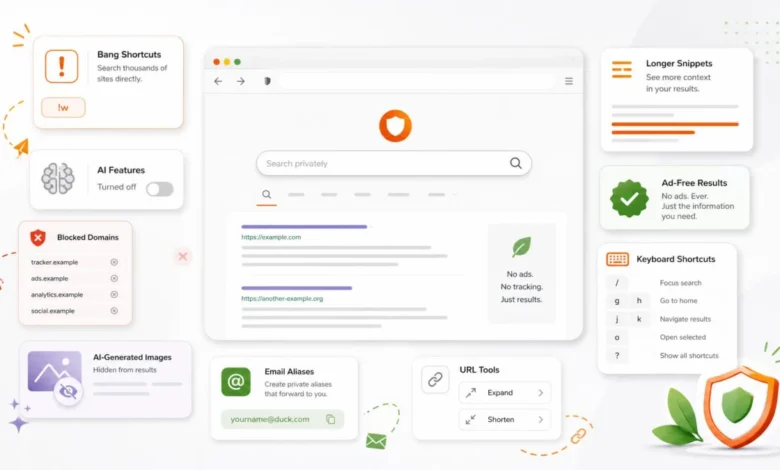
One of DuckDuckGo’s most powerful and distinctive features is its "bangs" system. These are shorthand commands that allow users to send their search queries directly to thousands of other websites without leaving the DuckDuckGo interface. By simply prefixing a search term with a specific shortcut, users can instantly search within platforms like Google (!g), Wikipedia (!w), Reddit (!r), YouTube (!yt), Amazon (!a), and many more. For example, searching !w quantum physics will directly take you to the Wikipedia page for "quantum physics." This feature is invaluable for users who have DuckDuckGo as their default search engine but still require rapid access to specific external sites. The full list of available bangs, which numbers in the thousands, can be accessed at duckduckgo.com/bangs. Mastering these shortcuts can significantly accelerate research and information retrieval, making manual navigation to individual sites feel comparatively slow. The efficiency gained from using bangs, especially for frequently visited platforms, represents a substantial improvement in search workflow.
Curating Image Search: Filtering Out AI-Generated Content
The proliferation of AI-generated imagery has introduced a new layer of complexity to online searches, particularly in image-based queries. For professionals and individuals seeking authentic visual content—whether for product research, design inspiration, or tutorial purposes—AI-generated images can often clutter results and detract from genuine representations. DuckDuckGo addresses this by offering a setting to filter out these synthetic images. By navigating to Settings > AI Features and enabling "Hide AI-Generated Images," users can significantly reduce the presence of AI-generated content in their image search results. While the filter is not infallible and may occasionally misclassify images, it serves as a valuable tool for users who desire a cleaner and more reliable visual search experience. This proactive filtering mechanism helps to maintain the integrity of search results, ensuring that users are more likely to encounter real-world images.
Precision Search: Blocking Undesirable Domains
DuckDuckGo provides users with a granular level of control over their search results by allowing them to block specific websites from appearing in future searches. This feature is particularly useful for eliminating content farms, low-quality aggregated articles, thin AI-generated pages, or any site that consistently ranks highly despite offering little value. When encountering a result from a site the user wishes to exclude, clicking the three dots next to the result and selecting "Block this site from all results" will permanently remove that domain from future search outcomes. Users can manage their blocked domains within the Settings > General section. The ability to curate search results in this manner can dramatically improve the quality and relevance of the information retrieved, creating a more efficient and less frustrating search experience over time. This feature empowers users to actively shape their information environment.
Streamlining the Interface: Disabling Ads and Prompts
While DuckDuckGo asserts that its advertisements are not based on user tracking, some users may still prefer an interface completely free of commercial content. The search engine offers an option to disable advertisements entirely. By visiting Settings > General and toggling off "Advertisements," users can achieve a cleaner results page. Furthermore, within the same settings menu, users can disable various homepage prompts that they may find intrusive or unnecessary. This includes options to turn off reminders about protected searches in Settings > Appearance. These adjustments do not alter the search results themselves but contribute to a quieter, less distracting user interface, allowing for greater focus on the core search task.
Enhancing Context: Adjusting Snippet Length
By default, DuckDuckGo presents relatively concise descriptions, or snippets, beneath each search result. For users who prefer to assess the relevance of a link before clicking, increasing the snippet length can be highly beneficial. Under Settings > Appearance > Max Snippet Length, users can adjust this setting to "5 lines" (or a longer option if available). This provides more detailed context for each result, potentially saving users from unnecessary clicks and wasted time. This is particularly useful for technical searches, comparative product research, in-depth documentation, or navigating older forum threads where the title alone may not convey sufficient information. A longer snippet allows for a more informed decision-making process regarding which link to explore.
Advanced Utilities for the Savvy User
Beyond the fundamental settings, DuckDuckGo offers a suite of advanced utilities that can further refine the user’s web interaction and enhance security.
URL Manipulation: Shortening and Expanding Links
DuckDuckGo integrates direct URL shortening and expansion capabilities into its search box. To shorten a URL, users can simply type shorten followed by the full URL, and DuckDuckGo will provide a shortened version using the is.gd service. For example, shorten https://www.example.com/a/very/long/web/address.
The reverse function, expand, is particularly valuable for security. By typing expand followed by a shortened URL, users can reveal the full, original destination before clicking. This is a crucial security measure when encountering unfamiliar shortened links, allowing users to verify the destination and avoid potentially malicious websites. For instance, expand https://is.gd/example_link will display the complete URL. This functionality aligns with broader security practices of verifying shortened links to mitigate risks associated with phishing and malware.
Privacy Protection: Leveraging DuckDuckGo Email Protection
In an era where unique passwords for every online account are standard practice, the concept of using unique email aliases for each service is a logical extension of this privacy-conscious approach. DuckDuckGo Email Protection allows users to create a private @duck.com email address. This service enables the generation of unique email aliases for various websites. Emails sent to these aliases are forwarded to the user’s primary inbox, with trackers stripped away where possible. The primary benefit of this system is enhanced control. If a website’s email address is compromised, sold, or begins to generate spam, the user can simply disable that specific alias without affecting their main email account. This also aids in tracing spam, as an alias tied to a single service can help pinpoint the source of unwanted communications. Users can initiate this service at duckduckgo.com/email.
Quick Reference: Accessing App Cheatsheets
For users who frequently work with complex software, DuckDuckGo offers a convenient way to access keyboard shortcut cheatsheets. By searching for an application’s name followed by the term cheatsheet, users can retrieve a list of common keyboard shortcuts directly within the search results. For example, cheatsheet Excel will display a selection of shortcuts for Microsoft Excel. This feature is particularly useful for popular applications like Photoshop, Lightroom, and Chrome. While it may not cover every application or the most up-to-date shortcuts, it serves as a rapid reference for quickly finding forgotten commands without needing to navigate through extensive help documents or official websites. This can significantly boost productivity for individuals who rely on keyboard shortcuts for their daily tasks.
A Refined Digital Experience
In conclusion, DuckDuckGo offers a compelling value proposition that extends far beyond its renowned privacy features. By strategically configuring its settings and leveraging its integrated tools, users can transform their web browsing experience into a more efficient, cleaner, and controlled environment. The ability to customize the interface by disabling AI features or advertisements, coupled with powerful search utilities like bangs and site blocking, empowers users to tailor their online journey to their specific needs. Furthermore, features like URL expansion and email protection provide tangible benefits for online security and privacy management. DuckDuckGo, when utilized to its full potential, evolves from a simple search engine into a comprehensive digital toolkit, offering a more focused and productive gateway to the vast resources of the internet. The five-minute setup can yield significant, long-term improvements in how individuals interact with the web, making it a smarter choice for both privacy-conscious and efficiency-driven users.