Binky Brings Order to the Mac Desktop with Intelligent, Localized File Organization and Automated Workflows

Every Apple computer user is familiar with the digital accumulation that inevitably occurs over months or years of daily productivity. Whether it is a sprawling Downloads folder overflowing with software installers, PDFs, and uncompressed archives, a cluttered Desktop strewn with screenshots, or a neglected Dropbox inbox, managing digital clutter remains a tedious chore for many. While macOS offers basic organizational tools such as Stacks and Smart Folders, these native features often fall short of providing deep, automated file sorting without manual intervention. Enter Binky, a newly released native macOS utility designed to transform chaotic directories into predictable, structured workspaces through customizable rules, background routines, and intelligent sorting algorithms.
Developed as a native application utilizing SwiftUI and AppKit, Binky bridges the gap between rudimentary file-renaming scripts and heavy, resource-intensive enterprise automation software. Rather than acting as a generic, blunt-instrument extension sorter, the application prioritizes safety, predictability, and local execution, running entirely on-device without reliance on cloud infrastructure. As the modern workforce increasingly generates unstructured data at a rapid pace, utilities that streamline digital hygiene are finding a vital place in productivity ecosystems.
The Mechanics of Predictable File Management
At its core, Binky is engineered to eliminate the friction associated with manual file organization. The utility approaches file management from a deterministic standpoint: the goal is not necessarily to showcase clever automation, but to deliver reliable, predictable results.
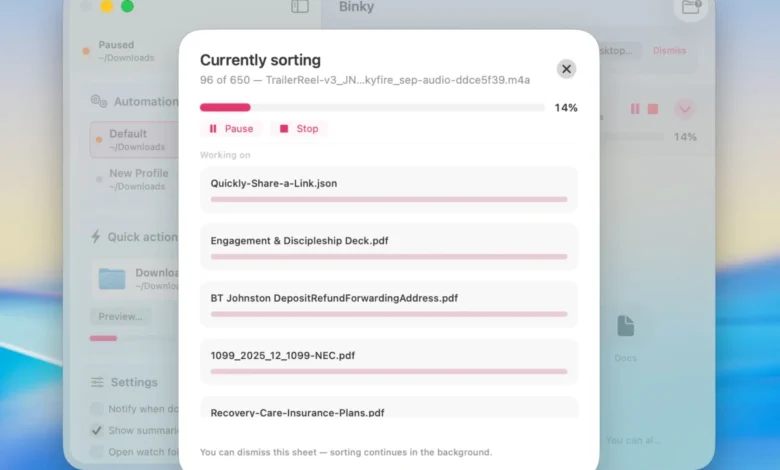
The application features two primary operational modes: Quick Sort and Routines. Quick Sort is designed for immediate, one-off housekeeping. Users can select any folder that has devolved into a digital dumping ground—be it the default Downloads directory, a cluttered Desktop, a shared office folder, or a client upload repository—and execute a single-pass sweep.
Crucially, Binky incorporates a built-in safety buffer. Instead of aggressively grabbing files the moment they land in a directory, the application waits for file transfers and downloads to fully settle before initiating a move. This prevents corrupted moves or incomplete file reads. Furthermore, Binky employs collision-safe routing, ensuring that if two distinct files share identical names, the system resolves the conflict autonomously without overwriting critical data.
Files that do not neatly fit predefined categories or possess ambiguous naming conventions are routed to a dedicated "Review" queue rather than being relegated to arbitrary folders. This fail-safe mechanism distinguishes Binky from older, extension-based sorting utilities that frequently misplace critical documents inside obscure subdirectories. By default, successfully sorted items are categorized into standardized, easily navigable directories such as Images, PDFs, Media, Documents, Archives, Apps, Screenshots, and Miscellaneous.
Background Routines and Granular Rule Configuration
While Quick Sort serves manual interventions, Routines introduce continuous, background automation. A Routine functions as an independent, named monitor assigned to a specific source folder, paired with its own custom rules and optional Finder tag conditions. Users can configure multiple concurrent routines—one monitoring the primary Downloads directory, another managing a design assets folder, a third overseeing a cloud storage inbox, and a fourth capturing system screenshots.
The sophistication of Binky lies within its robust rule engine. Users are not restricted to sorting strictly by file extension. Rules can be constructed to evaluate files based on a multitude of parameters, including:
- Exact file name matches and regular expressions
- File kind and uniform type identifiers
- File size thresholds and creation or modification dates
- Origin metadata (such as quarantine attributes indicating downloaded sources)
- Optical Character Recognition (OCR) or receipt parsing hints
- Pre-existing or dynamically applied Finder tag conditions
Depending on the parameters met, a matched rule can trigger several distinct actions: moving the file, renaming it according to a structured template, applying specific Finder tags, automatically expanding compressed archives, silently executing software installations from Disk Image (DMG) files, or instantly trashing unwanted clutter. Additionally, specialized rules execute prior to default sorting passes, allowing users to siphon off specific assets—such as incoming financial receipts—before they mix into generic PDF or document repositories.
System Integration and Developer Accessibility
Built natively from the ground up using Apple’s modern SwiftUI framework and high-performance AppKit, Binky integrates seamlessly into the macOS operating system environment. Unlike resource-heavy web applications wrapped in desktop containers, Binky maintains a minimal memory footprint and operates with the native fluidity expected of contemporary Mac software.
The utility extends its functionality directly into the macOS Finder via Quick Actions and system services. Users can highlight a cluster of disorganized files within any Finder window, right-click, and instantly execute a "Sort with Binky" command. For power users and automation enthusiasts, the application includes a dedicated Apple Shortcuts action titled "Sort Files," enabling custom automated workflows to pass file paths dynamically to the running application.
Furthermore, Binky provides a companion command-line interface (CLI) tool named binky. This addition appeals directly to developers, system administrators, and terminal power users who wish to preview sorting behaviors, execute complex Routines directly from the Terminal, or integrate the application’s core routing logic into broader shell scripts. Because the graphical application, CLI tool, and background routines all share identical preference files and routing logic, users do not need to maintain fragmented automation pipelines.
Privacy, Limitations, and System Requirements
In an era where software utilities frequently rely on cloud connectivity, telemetry tracking, and remote server processing, Binky adopts a strict local-first philosophy. The application operates entirely offline. No user data, file contents, or personal documents are uploaded to external servers, mitigating privacy concerns for professionals handling sensitive legal, financial, or proprietary corporate data.
Transparency is further maintained through comprehensive batch summaries and a detailed historical log. Users can review precisely which files were successfully relocated, which were skipped due to active locks or missing permissions, and which were flagged for manual review. Standard macOS undo functionality is supported where permitted by the operating system architecture.
However, users must remain mindful of the application’s operational boundaries. Binky executes file moves rather than copies; once a file is processed, it is permanently relocated from its original source directory to its new destination. Additionally, the application’s continuous background monitoring is strictly tied to the application’s running state. If Binky is fully closed, incoming files remain unmonitored until the application is relaunched or a manual Quick Sort is executed.
Binky requires macOS 14 (Sonoma) or any later operating system iteration. Distributed under an open-source MIT license, the 1.x software line is available entirely free of charge. Interested users can acquire the installation package directly from the official project website.
Implications for Productivity and Digital Hygiene
The release of open-source, locally processed utilities like Binky highlights a broader shift in personal computing productivity. As operating systems accumulate more native features, the demand for lightweight, highly customizable micro-utilities continues to grow. Rather than forcing users to adapt to rigid, corporate-backed automation suites, tools designed with modular rules and developer-friendly hooks empower individuals to tailor their digital environments precisely to their psychological and professional workflows.
By converting the chore of file management from an intermittent, dreaded cleanup operation into an invisible, background process, Binky addresses a universal point of friction in modern digital life. For Mac users seeking to reclaim order from digital chaos without compromising system performance or data privacy, this native utility offers a refined, highly adaptable solution.