OpenAI Introduces Codex Pets: Desktop Overlays Designed to Keep Developers in the Flow State

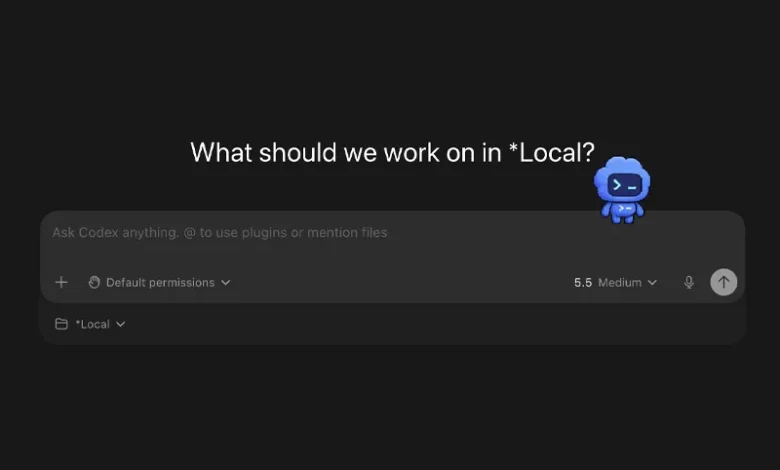
The intersection of artificial intelligence tooling and human-computer interaction has long been defined by utility, efficiency, and relentless minimalism. However, OpenAI has introduced a surprisingly whimsical departure from traditional software design within its Codex application: desktop pets. While initially appearing to be a lighthearted novelty reminiscent of 1990s digital companions, these optional animated floating overlays serve a tangible functional purpose. By providing ambient visual cues regarding the operational state of autonomous coding agents, Codex Pets address a subtle yet persistent friction point in modern software engineering: maintaining developer focus without requiring constant context-switching.
The Mechanics of Ambient UI in Modern Coding Assistants
Software development using modern autonomous agents often involves significant waiting periods. Whether an agent is parsing a massive repository, executing complex refactoring operations, or pausing to request explicit permission before modifying critical system files, developers frequently find themselves alternating between their primary integrated development environment (IDE) and the agent interface. Traditional notification mechanisms, such as system tray badges, audio alerts, or full-window focus shifts, can disrupt a programmer’s "flow state"—a deeply focused psychological condition essential for complex problem-solving.
Codex Pets bridge this gap by transforming raw status telemetry into a recognizable visual character. Positioned discreetly as a floating desktop overlay, the animated companion directly reflects the current thread of the active Codex session. Through subtle visual shifts and brief progress prompts, the pet indicates whether the agent is actively compiling, stalled, awaiting user input, or ready for code review. This ambient peripheral awareness allows engineers to monitor their automated tools without dragging their primary attention away from the primary code editor or documentation window.
Activation and Integration Within the Codex Ecosystem
Enabling a built-in companion within the Codex application is designed to be frictionless, accommodating both graphical user interface (GUI) preferences and command-line workflows. Users can activate the feature directly from the application’s configuration menu by navigating to Settings, Appearance, and Pets. Alternatively, power users can invoke the functionality inline by typing the /pet command directly into the application composer, or by launching the integrated command menu using the standard keyboard shortcuts of Command + K on macOS or Control + K on Windows.
Once initiated, the overlay functions independently while remaining tethered to the underlying thread logic of the Codex session. Beyond simply displaying a static icon, the interface pairs the animated sprite with contextual updates, ensuring that critical junctures—such as a prompt requiring human verification—are immediately noticeable without being aggressively intrusive. Users retain full control over the visibility of the overlay, with options to temporarily tuck the companion away or refresh local assets directly from the application’s appearance settings.
Expanding Customization Through the Hatch-Pet Skill
Recognizing that pre-designed templates have limited appeal among software engineers who value deep customization, OpenAI has extended the feature set by introducing a dedicated toolchain for custom asset generation. Known as the hatch-pet skill, this developer-focused utility allows users to create bespoke animated sprites derived entirely from textual concepts, reference imagery, or a hybrid of both inputs.
To utilize this capability, developers first install the skill into their local environment by executing a package installation command within the Codex interface:
$skill-installer hatch-pet
Following installation, the user refreshes the local skill registry through the command menu by executing the Force Reload Skills directive. Once loaded, the generative pipeline can be prompted using natural language descriptions. For example, developers have successfully generated assets using commands such as:
$hatch-pet create a tiny desk goblin
$hatch-pet turn my dog into a Codex pet
$hatch-pet create a new pet inspired by my recent projects
Behind the scenes, the hatch-pet skill orchestrates a complex sequence of tasks. It manages conceptual planning, determines the necessary animation rows, assembles standardized sprite sheets, validates the resulting graphic assets for performance and dimensional constraints, generates local previews, and packages the final product into a format natively recognized by the Codex application. The resulting custom pet is saved locally, enabling users to select, refresh, and swap their personalized companions through the standard settings interface.
For developers seeking inspiration before initiating their own generative workflows, the broader community has established repositories such as the Codex Pets gallery. These external platforms serve as decentralized hubs where engineers share prompt engineering strategies, visual styles, and thematic concepts optimized for small-scale sprite rendering.
Design Principles for Effective Sprite Prompts
Creating a functional desktop pet requires adherence to specific graphic design constraints imposed by the small scale of the overlay. Because these sprites occupy minimal screen real estate and must remain legible against varying desktop wallpapers and application windows, simplicity is paramount. Detailed visual analyses of successful community creations highlight several core principles for effective pet prompt engineering:
- Silhouette Clarity: A distinct and recognizable silhouette is vastly superior to intricate internal detail. When scaled down to sprite dimensions, complex geometries tend to blur into indistinguishable blocks of color.
- Minimalist Composition: Prompts should avoid requesting excessive props, tiny textual labels, complex multi-layered backgrounds, or hyper-realistic textures. The asset must read clearly as an animated icon rather than a detailed digital illustration.
- Targeted Reference Mapping: When utilizing a reference photograph—such as a pet dog or a favorite fictional character—prompts must explicitly specify which elements should be prioritized, such as primary color palettes, distinct head shapes, characteristic accessories, or overall emotional expression. Relying on automated tools to interpret every nuance of a complex source image often yields inconsistent results.
Contextual Industry Trends: Codex Versus Competing Agents
The introduction of Codex Pets occurs against a backdrop of intense competition within the AI-assisted software development market. Platforms such as Anthropic’s Claude Code and various autonomous coding agents are locked in a feature race focused heavily on workflow integration, terminal efficiency, and developer ergonomics.
While much of the industry discourse centers on algorithmic benchmarks, code completion accuracy, and context window capacities, user experience research increasingly emphasizes the psychological dimensions of tool adoption. As coding agents transition from passive autocomplete tools to autonomous collaborators that execute multi-step tasks independently, managing the human-agent feedback loop becomes a critical product differentiator.
OpenAI’s foray into ambient UI elements suggests a growing recognition that developer tools must account for cognitive load and attention management. By humanizing the agent’s operational state through playful visualization, the platform attempts to mitigate the fatigue associated with constant status-checking and window management.
Analysis of Broader Implications and Enterprise Reception
From an enterprise perspective, features like Codex Pets occupy a curious space between corporate productivity software and developer-centric leisure. While corporate IT departments traditionally view gamification and desktop overlays with skepticism regarding screen clutter and system resource consumption, the lightweight architecture of these local overlays ensures negligible performance impact.
Furthermore, industry analysts note that such features contribute to higher user engagement and emotional investment in specific software ecosystems. By allowing developers to personalize their workspace with custom creations—such as digitizing household pets or injecting personal aesthetic preferences into their development environments—platforms foster a sense of ownership and loyalty.
However, critics and usability experts caution that novelty features must not overshadow core functional reliability. Software engineers ultimately judge productivity tools based on execution speed, accuracy, and security compliance. A well-designed desktop pet may ease the monotony of long debugging sessions, but it cannot compensate for architectural inefficiencies or inaccurate code generation.
Looking Forward: The Evolution of Ambient Developer Tools
As generative artificial intelligence continues to reshape the software engineering lifecycle, the boundary between functional utility and interface design will likely continue to blur. The successful deployment of Codex Pets demonstrates that users are receptive to creative, human-centric design choices within traditionally austere technical environments. Whether this trend inspires competing coding assistants to adopt similar ambient monitoring solutions remains to be seen. For now, developers utilizing the Codex application have access to a uniquely customizable method for tracking their automated workflows—proving that even the most rigorous technical tasks can accommodate a small touch of desktop companionship.