How to Implement Secure HTTP Basic Authentication in Astro Sites Using Built-In Middleware


Web developers deploying staging environments, client work-in-progress builds, or internal corporate tooling frequently require reliable methods to restrict public access without introducing cumbersome third-party dependencies. Modern web architecture emphasizes lean, modular codebases where unnecessary plugins or external packages can introduce technical debt, security vulnerabilities, and deployment complications. Within the Astro ecosystem, developers have historically relied on external npm packages, infrastructure-level configurations such as Nginx authentication blocks, or complex virtual private network (VPN) setups to lock down restricted deployments. However, these traditional workarounds add maintenance overhead and fragment configuration management across multiple layers of the application stack.
By leveraging Astro’s native middleware architecture alongside standard HTTP Basic Authentication protocols, developers can establish a robust, zero-dependency access control layer using approximately twenty-five lines of custom logic. This approach utilizes native browser capabilities and server-side runtime checks, ensuring that restricted assets remain entirely hidden from search engine indexers and unauthorized visitors without sacrificing deployment speed or operational simplicity.
Understanding the Mechanics of Astro Middleware and HTTP Basic Authentication
The implementation relies on two core pillars: Astro’s on-demand rendering middleware pipeline and the standardized HTTP Basic Authentication specification. Introduced to provide developers with interception capabilities for incoming requests, Astro middleware executes code globally or on matched routes prior to rendering pages or API endpoints. This execution model mirrors server-side interceptors found in enterprise web frameworks across Node.js, Deno, Bun, and various edge computing environments.
HTTP Basic Authentication, defined under internet engineering standards, requires the client to supply a Base64-encoded username and password combination inside the HTTP Authorization request header. When a server receives a request lacking valid credentials, it responds with a 401 Unauthorized status code accompanied by a WWW-Authenticate header. Modern web browsers intercept this specific header and automatically render a native, secure login dialog box, prompting the user for credentials. Upon submission, the browser automatically attaches the encoded authorization header to subsequent requests, completely eliminating the need for custom frontend login forms, state management scripts, or client-side JavaScript bundles.
Prerequisites and Environment Configuration
Before deploying authentication logic, developers must verify that their Astro project is configured for server-side rendering (SSR). Because static site generation (SSG) compiles HTML at build time without active HTTP requests, headers and request-level contexts are fundamentally unavailable during pre-rendering. Consequently, implementing request-based security requires an adapter compatible with the chosen hosting provider—such as Cloudflare Pages, Vercel, Netlify, Node.js, or AWS Lambda—and an active server runtime environment.
Configuration begins by establishing secure environment variables to store administrative credentials. Hardcoding sensitive access data directly into source code violates fundamental security protocols. Instead, credentials must be designated via runtime environment variables. Within the project root directory, developers initialize a local .env file containing designated keys:
BASIC_AUTH_USER=staging-user
BASIC_AUTH_PASS=staging-password
In production environments, these identical variables must be assigned through the hosting provider’s dashboard configuration panel, typically located within site settings or environment variable management sections. Astro accesses these values securely via import.meta.env, ensuring that sensitive operational passwords never leak into client-side build artifacts.
Developing the Middleware Handler
To activate the interception layer, developers create a designated middleware file located at src/middleware.ts (or src/middleware.js for JavaScript environments). The file imports the defineMiddleware utility provided by Astro, which wraps the asynchronous request handler and grants access to both the request context and the next() pipeline function.
import  defineMiddleware  from 'astro:middleware';

export const onRequest = defineMiddleware(async (context, next) =>
  // Authentication logic interception point
  return next();
);
Within this middleware structure, an authentication validation function inspects incoming requests. The verification sequence checks whether environment variables are properly defined; if credentials are omitted, traffic passes unrestricted to prevent accidental lockouts during local development initialization. If environment variables are present, the function evaluates the incoming Authorization header.
function isAuthenticated(request: Request): boolean  !pass)
    return true;


  const authHeader = request.headers.get('Authorization');

  if (!authHeader?.startsWith('Basic '))
    return false;


  const encoded = authHeader.slice(6);
  const decoded = atob(encoded);
  const [providedUser, providedPass] = decoded.split(':');

  return providedUser === user && providedPass === pass;
The validation sequence strips the Basic prefix from the authorization header, decodes the Base64 string utilizing the global atob utility (or Buffer.from for legacy Node.js runtimes), and splits the resulting credential string at the colon separator. A strict cryptographic comparison confirms whether the provided username and password match the runtime environment variables.
Managing 401 Unauthorized Responses and Browser Integration
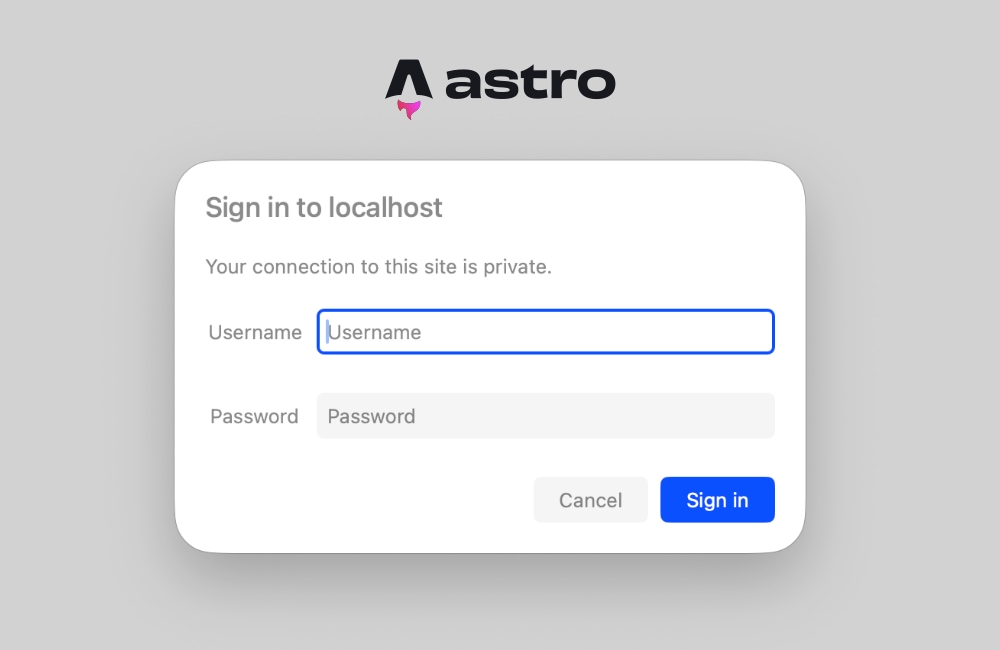
When authentication validation fails, the middleware halts the request pipeline and returns a standardized HTTP response carrying a 401 status code. This response includes the mandatory WWW-Authenticate header, instructing the client browser to trigger its native authentication modal.
export const onRequest = defineMiddleware(async (context, next) =>
  if (!isAuthenticated(context.request))
    return new Response('Unauthorized',
      status: 401,
      headers:
        'WWW-Authenticate': 'Basic realm="Staging Environment", charset="UTF-8"',
      ,
    );


  return next();
);
The realm parameter acts as a descriptive label presented inside the browser’s login dialog window, informing users which domain or environment they are attempting to access. Upon entering valid credentials, the browser automatically caches the authorization state for the active session, communicating securely with the Astro server on subsequent page navigations without requiring additional user interaction.
Resolving Common Troubleshooting and Prendering Conflicts
Developers frequently encounter configuration hurdles when introducing server-side logic into projects initially structured for static export. Attempting to access request headers or cookies within prerendered components triggers runtime exceptions during the build or execution phase:
Astro.request.headers was used when rendering the route `src/pages/index.astro'. Astro.request.headers is not available on prerendered pages.This error manifests because Astro defaults to static pre-rendering for pages unless explicitly configured otherwise. When a route is prerendered, no live HTTP request exists, rendering header inspection impossible. Developers can resolve this architectural conflict through two distinct approaches depending on project scope.
The first method involves opting individual pages out of static generation by injecting frontmatter directives into specific component files:
---
export const prerender = false;
---
This instruction commands the Astro compiler to defer rendering of the specified page until an active client request occurs, granting the runtime full access to request headers and middleware validation.
The second, more comprehensive approach involves transitioning the entire application to server-side rendering mode by updating the primary configuration file:
// astro.config.mjs
import  defineConfig  from 'astro/config';
import node from '@astrojs/node';

export default defineConfig(
  output: 'server',
  adapter: node(
    mode: 'standalone'
  )
);
Configuring output: 'server' ensures that every route within the application renders on-demand by default. Projects requiring a mixture of static and dynamic pages can selectively override this behavior by adding export const prerender = true to individual static pages. For staging sites, internal dashboards, and client preview deployments, maintaining full server-side rendering guarantees that every asset remains consistently protected behind the authentication middleware layer.
Broader Implications and Security Analysis
Implementing HTTP Basic Authentication via middleware offers a compelling balance of simplicity, performance, and security for non-public web deployments. Traditional security measures often require complex infrastructure configurations, proxy servers, or proprietary platform-as-a-service (PaaS) password protection add-ons that may incur recurring financial costs or lock teams into specific hosting vendors. By embedding authentication directly into the application runtime layer via standard web APIs, development teams retain total portability across cloud providers—ranging from serverless edge functions to containerized Node.js deployments.
While HTTP Basic Authentication transmits credentials in Base64 encoding rather than through advanced zero-knowledge proofs or multi-factor authentication systems, its inherent security profile remains entirely adequate for staging, testing, and internal development environments when paired with mandatory Transport Layer Security (TLS/HTTPS). Because credentials are encrypted in transit via SSL/TLS certificates, intercepting raw passwords via network packet sniffing is effectively prevented in production-grade deployments.
Furthermore, this native middleware pattern serves as an extensible foundation for more advanced authorization workflows. Engineering teams requiring granular access controls can seamlessly transition from static environment variables to dynamic database lookups, JSON Web Token (JWT) validation, or session-cookie verification without altering the underlying framework architecture. Because Astro middleware executes standard JavaScript or TypeScript code on every incoming request, developers possess infinite extensibility to adapt access control policies as project requirements mature.
Adopting this native approach eliminates superfluous dependencies, streamlines continuous integration and deployment (CI/CD) pipelines, and provides an immediate, zero-cost security barrier that protects intellectual property and unfinished client deliverables from premature public exposure.