5 Useful Python Automation Scripts for Beginners to Streamline Everyday Workflows

In the modern digital landscape, the acquisition of programming skills has transitioned from a specialized engineering pursuit to a fundamental literacy for professionals across diverse industries. While comprehensive software development often requires mastering extensive frameworks and managing complex databases, the immediate, tangible benefits of coding are frequently realized through the deployment of lightweight, focused automation scripts. For individuals embarking on their programming journey, identifying repetitive manual tasks—such as batch processing digital imagery, managing chaotic file directories, analyzing text metrics, or parsing extensive system logs—offers an ideal entry point. Rather than wrestling with sprawling architectures or overly ambitious web-scraping pipelines, beginners achieve rapid proficiency and confidence by constructing concise utilities tailored to solve immediate operational bottlenecks.
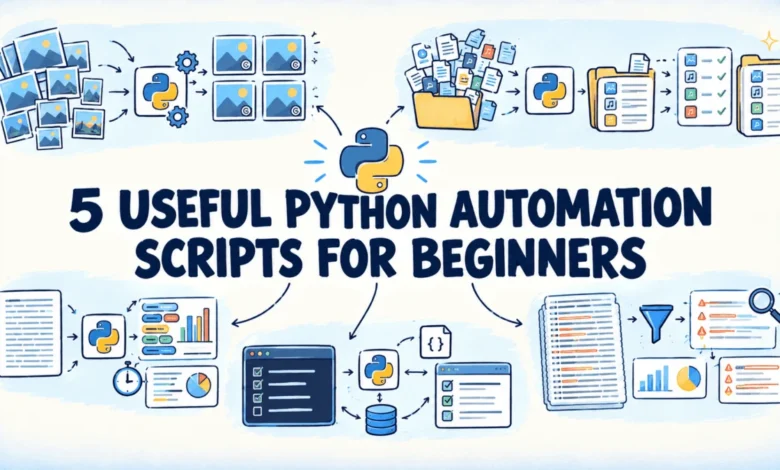
This pragmatic philosophy underpins a newly released collection of open-source automation utilities developed by technical educator and writer Bala Priya. Hosted publicly on GitHub, the repository compiles five distinct, beginner-friendly Python scripts engineered to address specific friction points in daily computing tasks. Encompassing four foundational programming domains—image processing, file management, text manipulation, and command-line system utilities—the collection provides practical solutions designed for immediate application and straightforward code comprehension.
The Pedagogical Shift in Early Programming Education
For decades, introductory computer science curricula have prioritized theoretical computations, abstract algorithmic problem-solving, or large-scale application development. While these academic foundations remain essential for computer science degrees, they frequently present a steep learning curve that discourages self-taught learners and professionals seeking rapid productivity gains. Industry observers note a distinct pedagogical shift toward task-oriented programming, where learners are encouraged to automate micro-workflows within their existing daily routines.
By targeting repetitive friction points—such as manually renaming dozens of downloaded documents or resizing photographs one by one through graphical interfaces—new programmers immediately grasp the core concepts of loops, conditional logic, variable manipulation, and library integration. This utilitarian approach bridges the gap between abstract syntax and concrete utility, reinforcing the value of automation through measurable time savings.
The newly published GitHub repository directly addresses this educational gap by offering modular, well-documented scripts that serve both as immediate productivity tools and as readable blueprints for foundational Python development.
Practical Automation Utilities for Modern Workflows
The curated collection targets five ubiquitous computing challenges encountered by office workers, content creators, system administrators, and students alike. Each utility is constructed using standard Python libraries or widely adopted third-party packages, ensuring ease of installation and execution.
1. Batch Image Resizer and Watermarker
In digital media production and web administration, preparing photographic assets for publication frequently involves tedious, repetitive modifications. Manually adjusting dimensions and applying branding marks to dozens or hundreds of image files using traditional desktop graphics software consumes valuable hours.
The batch image resizer script leverages the Pillow library—the de facto standard image processing package in Python—to automate this workflow. Users specify a target maximum width or height, and the script systematically resizes all supported images within a designated directory while preserving original aspect ratios. Furthermore, it applies a configurable text watermark onto a semi-transparent foundational layer positioned at a user-selected corner of the frame. To safeguard original assets against accidental data loss, processed files are automatically routed to a separate output folder, while unsupported formats are bypassed with non-fatal warning logs.
2. Bulk File Renaming Engine
Disorganized file directories containing inconsistent naming conventions—such as default camera timestamps or haphazardly exported data sheets—plague digital organization. Manually rectifying file nomenclature through standard operating system file browsers does not scale efficiently beyond a handful of items.
Addressing this structural inefficiency, the bulk file renamer utilizes Python’s built-in pathlib module to apply systematic renaming rules across entire directories. Operators can choose to prepend prefixes, append suffixes, execute sequential renumbering, or perform targeted find-and-replace string operations. To mitigate the risks inherent in mass file manipulation, the script incorporates a mandatory dry-run mode that previews proposed modifications in the terminal. Additionally, it executes pre-flight checks for potential naming collisions, aborting the operation automatically if an overwrite hazard is detected.
3. Textual Readability and Word Frequency Analyzer
Writers, editors, researchers, and content strategists frequently require quantitative insights into textual documents—ranging from essay drafts and interview transcripts to long-form journalistic articles. Assessing word counts, identifying overused vocabulary, and estimating reading durations manually is both imprecise and labor-intensive.
The text analyzer script ingests plain text documents, normalizes character casing, strips punctuation via regular expressions, and performs comprehensive statistical evaluations. Employing Python’s collections.Counter module alongside a built-in stop-word filtration list, the utility highlights the most prevalent substantive terms while excluding common linguistic filler words. It further calculates sentence-level metrics, average sentence lengths, and projected reading durations based on standardized adult reading speeds, outputting a clean analytical summary directly to the command line.
4. Command-Line To-Do List Manager
Task management tools span a wide spectrum, from physical adhesive notes prone to misplacement to feature-heavy proprietary software applications that often introduce unnecessary cognitive overhead and context switching. For developers and technical professionals already operating within terminal environments, launching separate GUI applications disrupts operational flow.
The command-line to-do list manager provides a lightweight, distraction-free task tracking mechanism accessible entirely via terminal subcommands. Utilizing Python’s native argparse module, the script supports intuitive operations to add, list, complete, and purge tasks. Data persistence is maintained through a local JSON file, ensuring that user tasks remain synchronized between terminal sessions without requiring external database dependencies or cloud service subscriptions.
5. Advanced Log File Parsing Utility
System administration and software debugging frequently require sifting through extensive server or application logs containing tens of thousands of lines. Locating specific anomalies, error classifications, or chronological events under operational pressure often necessitates complex, hastily constructed grep queries.
The log file analyzer streamlines this investigative process by reading large log files line-by-line to optimize memory consumption. It parses timestamps and severity levels—such as errors or warnings—using regular expressions, allowing operators to filter records independently or concurrently by keyword, severity classification, or date range. The utility concludes its execution by printing a structured statistical breakdown of matched events by severity level, followed by the specific log entries required for rapid troubleshooting.
Industry Implications and the Broader Impact of Micro-Automation
The release of these foundational scripts arrives at a time when enterprise automation is increasingly prioritized across commercial and technological sectors. While organizations heavily invest in enterprise-grade robotic process automation (RPA) platforms and artificial intelligence agents, software developers emphasize that grassroots automation remains an invaluable competency for individual productivity.
From an economic perspective, cumulative time losses resulting from manual file management, image processing, and text auditing represent a substantial, albeit hidden, operational drag across knowledge-working industries. By democratizing access to simple, readable automation scripts, educational resources like Bala Priya’s GitHub repository empower non-specialist professionals to reclaim hours of productive time each week.
Furthermore, experts highlight the psychological benefits of early coding successes. When beginners transition from passive consumers of technology to active creators of custom solutions, their confidence in handling more complex computational challenges grows exponentially. Mastery over basic file input/output operations, regular expressions, and command-line parsing lays a rock-solid foundation for advanced pursuits in data science, machine learning engineering, and enterprise systems architecture.
As programming literacy continues to intertwine with professional competency across modern economies, the availability of accessible, transparent, and immediately applicable open-source utilities serves as a vital bridge, transforming novice learners into capable, efficient technological problem-solvers.
Related posts: