OpenAI Introduces Codex Pets: A Novel Approach to Ambient Developer Interfaces and Agentic Workflow Monitoring

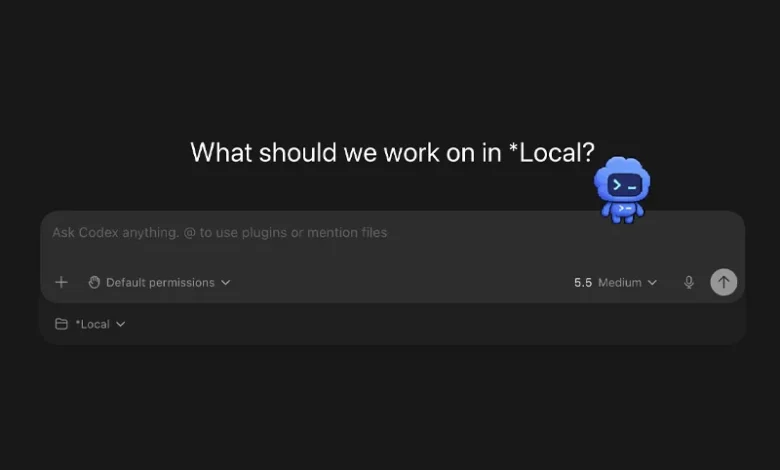
The boundary between utilitarian developer tooling and ambient computing has shifted following the official rollout of Codex Pets by OpenAI. Designed as optional, animated desktop overlays within the Codex ecosystem, these virtual companions serve a dual purpose: introducing a layer of playful personalization while functioning as real-time, peripheral status indicators for automated software engineering tasks. While the concept initially presents as a lighthearted novelty, industry analysts and developers testing the feature have noted its practical utility in tracking asynchronous programming threads without requiring constant context-switching. As coding agents become more autonomous, tools like Codex Pets highlight a growing focus on human-agent interaction design, specifically how to maintain developer "flow" while long-running background tasks execute.
Evolution of Agentic Workflows and the Need for Ambient Awareness
The rapid adoption of AI-driven software development agents—such as Codex and competing systems like Claude Code—has fundamentally altered the daily routine of engineers. Developers are no longer merely writing code line by line; they are orchestrating complex, multi-step asynchronous processes where an AI agent plans architecture, writes scripts, executes terminal commands, and runs automated testing suites.
However, this paradigm shift has introduced a distinct cognitive friction known as context-switching fatigue. When an automated agent is tasked with a complex refactoring job that takes several minutes, developers typically switch to a different window, monitor a static terminal log, or wait for an intrusive system notification. Each transition breaks concentration and degrades deep-work momentum.
OpenAI’s introduction of Codex Pets addresses this micro-ergonomic challenge. By translating the internal state of a Codex thread into a persistent, animated visual avatar floating on the desktop, the interface provides ambient awareness. Without moving the cursor or bringing the primary application window to the foreground, a developer can discern at a glance whether Codex is actively compiling, paused, waiting for permission, or presenting completed code blocks for human review.
Architecture and Activation of Codex Pets
Integrating a companion into the daily workflow has been streamlined across multiple entry points within the Codex application architecture. Users can initiate the feature directly from the application’s configuration hierarchy by navigating to Settings, selecting Appearance, and toggling the Pets submenu. Alternatively, power users can invoke the overlay via the command-line interface within the composer by typing the dedicated command /pet, or by utilizing the global command palette shortcut—employing Cmd + K on macOS environments or Ctrl + K on Windows systems.
Once activated, the floating sprite renders as a hardware-accelerated overlay capable of tracking the lifecycle of the active thread. The pet’s visual animations synchronize with the backend state machine of the Codex runtime, pairing its physical movements with brief, contextual progress prompts that outline the current operational phase.
Hatch-Your-Own: Customization and the Hatch-Pet Skill
Beyond the standard roster of built-in companions provided by OpenAI out of the box, the ecosystem supports programmatic customization through a specialized developer utility known as the hatch-pet skill. Hosted within OpenAI’s official developer skills repository, this feature allows engineers to generate bespoke animated sprites derived from text prompts, reference imagery, or a combination of both.
To deploy a custom creation, developers install the skill directly into their local environment using the terminal command $skill-installer hatch-pet. Following a manual reload of active skills via the command palette (Force Reload Skills), users can prompt the agent to synthesize a personalized companion. Commands range from specific character concepts—such as a "tiny desk goblin"—to sentimental requests like transforming a personal pet into a desktop assistant, or generating abstract avatars inspired by recent project themes.
The underlying hatch-pet skill automates the complex design pipeline required for retro-style sprites. It handles conceptual planning, animation row generation, sprite sheet assembly, visual validation, and local packaging. The resulting assets are saved directly to the user’s local Codex directory, making them immediately selectable within the primary settings panel. To assist users who may experience creative block, OpenAI and the broader developer community have established reference hubs, such as the Codex Pets community gallery, which curates effective prompt styles, color palettes, and thematic archetypes optimized for small-scale desktop rendering.
Design Constraints and Best Practices for Sprite Prompting
Designing an effective custom Codex Pet requires an understanding of UI constraints. Because the overlay is intentionally compact to avoid obscuring primary code editors, documentation, or terminal windows, elaborate detail and complex backgrounds are counterproductive.
User interface engineers and early testers emphasize that clean, high-contrast silhouettes outperform intricate designs. Effective prompts focus on distinct color schemes, exaggerated facial expressions, recognizable accessories, and simple character archetypes. Conversely, complex textual prompts that request multiple foreground props, tiny typography, or hyper-realistic shading often fail to translate effectively when scaled down to a small animated sprite. When utilizing reference photographs, developers are advised to explicitly isolate key attributes—such as specific fur patterns, distinctive markings, or primary color palettes—rather than expecting the generation pipeline to replicate complex source images in their entirety.
Industry Implications: Human-Computer Interaction in the Age of AI Agents
The introduction of Codex Pets has sparked broader discussions within the software engineering community regarding the psychology of human-computer interaction (HCI) in AI-assisted environments. Anthropomorphic UI elements have a long, polarized history in computing, ranging from universally recognized productivity assistants of the past to modern minimalist status indicators.
Proponents argue that gentle anthropomorphism helps humanize asynchronous systems, making prolonged interactions with autonomous agents feel more collaborative and less mechanical. By assigning visual states to an engaging character, developers may experience reduced cognitive fatigue during monotonous build cycles or extensive automated code reviews.
Critics, however, raise valid questions about software bloat and enterprise seriousness. In corporate or high-security environments, extraneous graphical overlays can be viewed as unnecessary distractions or potential security compliance concerns, prompting administrators to disable such features entirely via enterprise policy controls. Nevertheless, OpenAI’s implementation remains strictly optional, ensuring that traditionalists can maintain a pristine, unadorned interface while opting-in users enjoy the ambient benefits.
Outlook and Future Trajectory
Codex Pets will not fundamentally rewrite business logic, debug complex memory leaks independently, or replace rigorous code review protocols. However, as coding assistants evolve from simple autocomplete tools into autonomous, long-running background agents, the user experience surrounding them must adapt.
By solving the micro-problem of status visibility without disrupting developer flow, OpenAI has highlighted a crucial frontier in AI tooling: the design of the peripheral workspace. As the developer ecosystem continues to compare agent capabilities across platforms, the ultimate winner may not simply be the model that writes the cleanest code, but the one that integrates most seamlessly into the human developer’s cognitive rhythm. Whether through a default companion or a custom-hatched desk goblin, ambient UI features point toward a future where interacting with artificial intelligence feels less like monitoring a machine and more like collaborating with a persistent digital workspace partner.