Session Timeouts: An Accessibility Barrier Demanding Thoughtful Design and Ethical Consideration

Poorly managed session timeouts on websites are far more than a mere technical inconvenience; they represent significant accessibility barriers that can disrupt crucial online tasks, particularly for individuals with disabilities. The way a website handles session management can profoundly impact user experience, cybersecurity, and resource allocation, but for a substantial portion of the global population, it translates directly into the ability to engage with digital services – from purchasing tickets and managing social media to applying for loans. Ensuring robust session timeout accessibility is not just a matter of good design; it is a critical component of creating a more inclusive, usable, and respectful web.
Globally, an estimated 1.3 billion people live with some form of significant disability. This vast demographic encompasses individuals with cognitive, motor, and vision impairments, all of whom can experience disproportionate challenges when interacting with technology. For them, session timeouts can transform a routine online activity into a frustrating and insurmountable obstacle. The common scenario of being abruptly logged out after making substantial progress on a form, forcing a restart of the entire process, can lead to exasperation, abandonment of the website, and a sense of exclusion. With thoughtful backend development and user-centric design principles, web professionals can mitigate this frustration and ensure that online platforms are accessible to all.
The Disproportionate Impact of Session Timeouts on Users with Disabilities
The design and implementation of session timeouts often overlook the diverse needs of users, leading to an inequitable digital experience. For individuals with motor impairments, the physical act of interacting with a website can be inherently slower and more deliberate. For instance, someone with cerebral palsy might require more time to navigate forms and input data due to coordination difficulties or muscle stiffness. A typical session timeout, often set around 20-30 minutes of inactivity, can easily expire before they can complete a critical step, such as entering payment details. This not only erases their progress but also necessitates starting over, a process that can be physically and mentally taxing.
Matthew Kayne, a disability rights advocate, has spoken extensively about these challenges. He recounts experiences where poorly designed user interfaces and adaptive device compatibility issues, coupled with strict session timeouts, lead to the loss of hours of work. For individuals like Kayne, the inability to complete an online task due to a session expiring can have tangible consequences, such as missing critical appointments or delaying essential support services. The DWP Accessibility Manual in the UK highlights that adaptive technologies can sometimes take multiple attempts to register input, further slowing down users and making it difficult to respond to even a brief timeout warning. This underscores that what might seem like a minor technical setting can have profound real-world implications.
Cognitive impairments present another significant area where session timeouts create accessibility barriers. An estimated 20% of the population is neurodivergent, a group that includes individuals with autism, ADHD, dyslexia, and other developmental or learning disabilities. These individuals often process information differently and may require more time to read, think, and respond. Strict session timeouts can create undue pressure, falsely equating a slower processing pace with inactivity. Users might appear inactive not because they are disengaged, but because they are carefully reading instructions, contemplating a response, or managing distractions.
Kate Carruthers, a neurodivergent technology leader, has shared her experiences with "time blindness" – a common symptom of ADHD where an individual has a distorted perception of time. For such users, the concept of estimating remaining time before a session expires is inherently challenging, making countdown timers or vague warnings unhelpful. This lack of precise temporal awareness means that websites relying on users to self-monitor their session duration can effectively exclude a significant portion of their audience.
Furthermore, individuals with vision impairments, including blindness and low vision, face unique challenges with session timeouts. Their reliance on screen readers to navigate web content means that processing information is a more time-consuming endeavor. They must listen to every link, heading, and form field, which significantly extends the time required to complete tasks. For these users, sessions can expire even when they are actively engaged with the content, as the time taken to process information auditorily exceeds the arbitrary inactivity threshold. Standard countdown timers, often presented visually, may not be adequately announced by screen readers, or they can flood the audio output with constant status updates, hindering navigation rather than aiding it. Bogdan Cerovac, a web developer passionate about accessibility, experienced this firsthand, describing how a second-by-second countdown timer delivered via screen reader created an overwhelming auditory experience that prevented him from interacting with the page.
Common Timeout Patterns That Fail Accessibility Requirements
Despite the clear need for accessible session management, many websites employ patterns that fall short of modern accessibility standards. These common pitfalls often stem from a lack of awareness or a prioritization of security and resource management over user experience for all.
One of the most prevalent issues is the implementation of silent timeouts and insufficient warnings. Many websites log users out without any prior notification, or they provide a brief, often last-minute, pop-up that is too short to be actionable. For users relying on screen readers, these warnings may not be announced promptly or clearly. For individuals with motor impairments, a 30-second countdown is often insufficient to navigate the interface and confirm continued activity. The Consular Electronic Application Center’s DS-260 page, used for U.S. nonimmigrant visa applications, exemplifies this problem. If left idle for approximately 20 minutes, users are logged out without warning, potentially losing significant progress as their work is only saved upon page completion. This lack of explicit and timely communication creates a significant barrier.
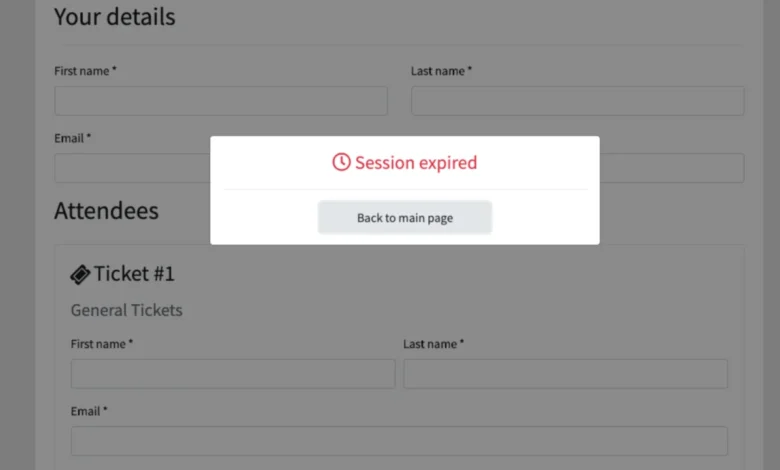
Another problematic pattern is the use of nonextendable sessions. An abrupt "session expired" message, devoid of any option to continue or refresh, is universally frustrating. For users with disabilities, this is not merely an annoyance; it is a complete roadblock that forces them to re-initiate a potentially complex and time-consuming process. The requirement to log back in and restart work expends valuable time and cognitive load.
Perhaps the most damaging pattern is form data loss on expiration. Unless a website automatically saves user progress at frequent intervals, the expiration of a session can result in the complete erasure of all entered data. For individuals who have invested significant time and effort into filling out lengthy forms, such as job applications, service requests, or purchase orders, losing hours of work can be devastating. This is especially true for those with disabilities who may already be navigating a more challenging digital landscape.

Design Patterns That Balance Security and Accessibility
The challenge lies in finding a balance between necessary security measures and the imperative for universal accessibility. Fortunately, several design patterns can effectively achieve this equilibrium. The United Kingdom’s application for Pension Credit serves as a positive example, providing users with a warning at least two minutes before their session expires and offering the option to extend it. This approach aligns with WCAG 2.2 Level AA success criteria, demonstrating that robust security and accessibility can coexist.
A cornerstone of accessible session management is the implementation of advance warning systems and extend functionality. Websites should clearly communicate the existence and duration of session time limits before a user begins a task. For instance, a financial institution’s online banking portal could dedicate its initial login screen to inform users about the 60-minute session limit. A visible, regularly updating counter can help users track their remaining time. Crucially, users should be informed if they have the ability to extend their session and provided with a clear mechanism to do so. This empowers users to manage their time effectively and prevents unexpected disconnections.
Distinguishing between activity-based and absolute timeouts is also essential. An activity-based timeout logs users out after a period of inactivity, which is generally more user-friendly and accessible, provided adequate warnings and extension options are present. An absolute timeout, which logs users out after a fixed period regardless of activity, can be acceptable in specific contexts, such as shared public computers where security is paramount. However, even in these cases, clear communication about the absolute expiration time is vital. For most online services, activity-based timeouts with robust warning systems are the preferred and more accessible approach.
The implementation of auto-save and progress preservation is another powerful strategy. By leveraging client-side storage mechanisms like cookies, localStorage, or sessionStorage, web applications can automatically save user progress at frequent intervals. This ensures that even if a session expires unexpectedly, users can reauthenticate and seamlessly resume their work from where they left off. This is particularly beneficial for long and complex forms, mitigating the frustration and loss of effort associated with data erasure.
Testing and WCAG Compliance Considerations
Adherence to the Web Content Accessibility Guidelines (WCAG) is crucial for ensuring that session timeout mechanisms are accessible. WCAG provides a comprehensive framework for creating inclusive digital experiences, with specific attention to Guideline 2.9.2: Adequate Time. This guideline emphasizes that users should be provided with sufficient time to perceive and operate interface elements.
The timeout adjustable mechanism is a key component of WCAG compliance. This mechanism should allow users to extend the time limit before their session expires, or ideally, offer the option to turn off timeouts altogether where security permits. When a timeout is imminent, a dialog box should appear, prompting the user with a clear question about whether they need more time. A simple click should then be sufficient to extend the session.

However, WCAG also acknowledges that exceptions exist. For example, in scenarios like live ticket sales, holding tickets in a cart for an extended period could negatively impact other users’ ability to purchase limited inventory. In such cases, shorter, clearly communicated timeouts might be necessary. Similarly, on shared public computers, automatic sign-outs are essential for security. In these specific instances, the focus shifts to clear communication and user education about the timeout policies.
It is also important to recognize that some online activities do not necessitate session timeouts at all. Browsing social media, reading news articles, or shopping on e-commerce sites typically do not involve sensitive information that requires strict time limits. Arbitrary session expirations for these activities serve no practical purpose and only create unnecessary barriers. Conversely, for timed online exams, timeouts may be unavoidable. In these situations, however, it is imperative to provide extended time options for students with disabilities, as mandated by accessibility regulations.
The digital divide is shrinking. Pew Research Center data indicates that 62% of adults with disabilities in the U.S. own a computer and 72% have high-speed home internet, figures that are not statistically different from those of non-disabled adults. This underscores that the issue is not a lack of access but a lack of inclusive design that caters to diverse needs.
Overcoming the Session Timeout Accessibility Barrier
Implementing accessible session management is not merely an industry best practice; it is an ethical imperative in web development. By prioritizing thoughtful session handling, web professionals can not only appeal to a broader audience but also significantly improve usability, reduce user frustration, and foster greater engagement with their platforms.
The core message is clear: websites with inaccessible session timeouts inadvertently communicate a disregard for the user’s time and effort, creating significant hurdles for people with disabilities. Fortunately, this is a solvable problem. By adopting strategies such as providing clear advance warnings for session extensions, implementing automatic progress saving, and ensuring that timeout mechanisms are adjustable or can be bypassed where appropriate, web developers can contribute to building a more considerate, accessible, and respectful internet for everyone. This commitment to inclusive design ultimately benefits all users, creating a more seamless and equitable digital experience.
Related posts: