How to Conduct a Rapid Three-Minute SEO Audit Using the SEOquake Chrome Extension

In the highly competitive landscape of digital search, the ability to diagnose performance issues on a webpage without undergoing a comprehensive, time-consuming site crawl is an essential skill for SEO professionals and content managers. Whether a high-value product page has experienced a sudden decline in rankings, a competitor has overtaken a cornerstone post, or a client’s conversion rates are stagnating, the need for immediate, actionable intelligence is paramount. Semrush’s SEOquake, a free Chrome extension, has emerged as a critical tool for providing instantaneous insights into technical SEO signals, on-page architecture, linking strategies, and core performance metrics directly within the browser interface.
The utility of such a tool lies in its efficiency, allowing users to move from initial triage to a granular diagnosis in approximately three minutes. By leveraging the extension’s color-coded diagnostic system, SEO practitioners can rapidly identify which elements of a webpage are functioning correctly and which require immediate remediation.
Understanding the SEOquake Ecosystem

SEOquake functions as a comprehensive diagnostic suite that resides in the user’s browser, providing a bridge between raw website data and actionable SEO strategy. Upon installation, the extension serves as a persistent layer over any webpage, offering two primary audit formats: the Quick View pop-up for immediate, top-level analysis and the Full Report for a deep-dive investigation into technical and structural variables.
The extension’s color-coded reporting mechanism is fundamental to its design. Results are categorized into three distinct statuses: green, indicating elements that meet standard SEO best practices; orange, signaling potential issues that require human judgment and contextual evaluation; and red, marking critical errors that likely require immediate technical intervention. This visual hierarchy allows auditors to ignore non-essential data and focus their time on the areas with the highest impact on search engine performance.

Triage: The First Sixty Seconds
The first phase of the three-minute workflow is focused on triage. The objective is to determine if there is an obvious, glaring impediment to a page’s success. The Quick View pop-up is divided into five distinct tabs: Page Info, Diagnosis, Internal Links, External Links, and Density. A seasoned SEO auditor will typically focus on the Page Info, Diagnosis, and Content tabs to establish a baseline.

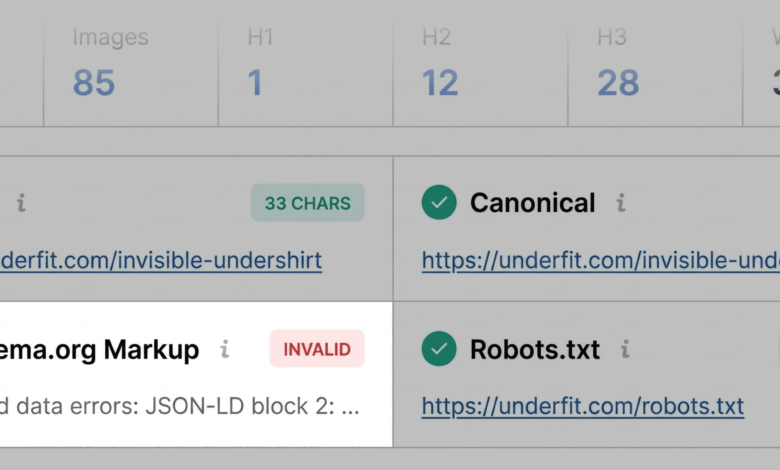
The Page Info tab provides an immediate snapshot of the most fundamental SEO elements: the meta title, meta description, canonical URL, and the presence of structured data. A common issue detected during this stage is the presence of invalid Schema.org markup. For an e-commerce product page, the stakes are high; invalid JSON-LD code can prevent search engines from parsing product-specific attributes, rendering the page ineligible for rich results such as price, availability, and user-rating stars. If a red flag appears here, it is flagged for a deeper investigation in the Full Report.
Technical Assessment: The Audit Tab

Some performance inhibitors are invisible to the basic Page Info scan. The Audit tab shifts the focus toward technical SEO essentials, including crawlability, indexing status, robots.txt directives, mobile responsiveness, and sitemap accessibility.
While a lack of red flags is a positive sign, the "orange" warnings in the Audit tab often provide the most valuable clues for optimization. For instance, if a page displays an orange warning regarding hreflang tags, it indicates that the site’s international targeting configuration may be inconsistent or incomplete. While not necessarily a "broken" feature, it represents a missed opportunity for proper indexation in multi-regional markets. Each warning must be weighed against the specific goals of the webpage and the site’s overall architecture.

Content Structure and Keyword Analysis
The Content tab serves as a diagnostic tool for page structure and semantic clarity. Modern search engine algorithms, as well as AI-powered search systems, rely heavily on clear hierarchical structure to interpret content. A common failure point identified by SEOquake is an irregular heading structure—such as jumping from an H1 to an H4 without intervening H2s or H3s, or the placement of the H1 tag deep within the body content.

Furthermore, this tab tracks the presence of alternative text for images. In many instances, product pages suffer from a high volume of images lacking descriptive alt text. While this may not cause a page to be de-indexed, it severely hampers accessibility and limits the site’s visibility in image-based search results. A page with 30 or more images missing alt text is a classic example of an "easy win" for SEO improvement.
Deep Diagnosis: The Full Report

Once the initial triage is complete, the user transitions to the Full Report for a more granular analysis. This panel, containing six distinct sections—Audit, Keywords, Links, Social, Domain, and Semrush—allows for a precise investigation of the previously flagged issues.
In the Audit panel, the user can navigate to the specific section where an error was flagged. For example, if the triage stage identified a sitemap issue, the Audit panel will explicitly confirm whether the sitemap is being crawled correctly or if it is merely present but not properly referenced. The "Test in Rich Results" feature, which integrates with Google Search Console, allows the auditor to verify their assumptions in real-time, providing an authoritative confirmation of any errors found in the page’s structured data.

Keyword Density and Topic Coverage
The Keyword Density panel is an essential resource for ensuring that the content is optimized for the correct search intent. By examining the keyword cloud and frequency tables, auditors can ensure that the core product or service terms are the most prominent.

It is important for auditors to maintain a critical eye while reviewing this data. Occasionally, the tool may flag terms as having "high density" that are actually derived from site-wide elements like footer navigation, image file names, or interactive JavaScript widgets. Distinguishing between core page copy and peripheral HTML content is a necessary skill when evaluating keyword density reports.
The Link Health Landscape

Broken links are a perennial issue in SEO, acting as a drain on link equity and a deterrent to user engagement. The Links panel in the Full Report categorizes both internal and external links, identifying those that return 404 or 5xx server errors.
When external links are flagged as broken, the diagnosis often leads to the discovery of deprecated JavaScript libraries or third-party widgets that are no longer supported. By exporting these results into a CSV format, an auditor can quickly create a checklist for the development team to either repair the links or remove the non-functional code entirely.

Strategic Implications: Page vs. Site-Level Issues
The final phase of the three-minute audit involves placing the findings into the context of the entire domain. The Semrush panel provides critical metrics such as domain authority, organic traffic volume, and backlink profile strength.

A critical distinction must be made between page-level issues and site-wide systemic problems. For example, a missing sitemap or a global template error in JSON-LD markup indicates a site-wide problem that requires a technical update to the Content Management System (CMS) or site template. Conversely, missing alt text or an unoptimized H1 tag is generally a page-level issue that can be rectified with a targeted update.
By using SEOquake as an initial diagnostic filter, SEO managers can avoid the trap of "analysis paralysis." Instead of conducting a full-scale, hours-long site crawl for every minor performance dip, they can isolate the root cause, determine the scope of the fix, and prioritize their workload effectively.

Conclusion: A Proactive SEO Workflow
The three-minute audit workflow represents a shift toward a more proactive, surgical approach to SEO management. By mastering the integration of SEOquake’s triage tools and the deeper diagnostic capabilities of the Full Report, practitioners can maintain a high standard of page performance with minimal overhead. As the search environment becomes increasingly reliant on structured data and technical performance metrics, the ability to rapidly assess and rectify these factors will continue to be a defining characteristic of successful digital marketing strategies. The transition from identifying a problem to planning its resolution in under three minutes is not merely a convenience; it is a fundamental requirement in the modern, fast-paced search landscape.