Critical Security Vulnerability in Elementor Plugin Exposes Millions of WordPress Websites to Administrator Takeover

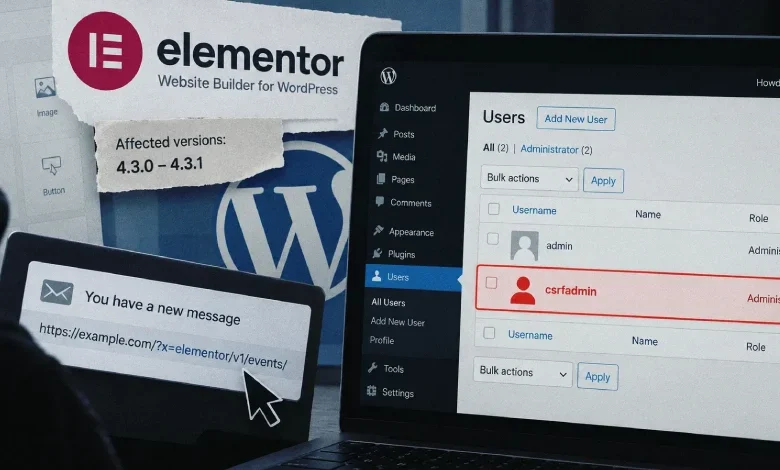
A high-severity security vulnerability discovered within the Elementor Website Builder, one of the most widely used plugins in the WordPress ecosystem, has placed over two million websites at risk of total compromise. The flaw, which functions as a Cross-Site Request Forgery (CSRF) exploit, allows unauthenticated attackers to perform unauthorized administrative actions, including the creation of new administrator accounts, by tricking a logged-in site administrator into clicking a malicious link.
The vulnerability affects versions 4.3.0 and 4.3.1 of the Elementor plugin. Given that Elementor boasts a total active installation base exceeding 10 million sites, the exposure of these specific versions represents a significant portion of the web infrastructure currently running on WordPress. The discovery was brought to light by security researcher "Saggre" and subsequently analyzed by the vulnerability intelligence platform Patchstack, which provided technical clarity on the mechanics of the exploit.
Anatomy of the Vulnerability
The core of the issue resides within the Editor Events module of the Elementor plugin. This module was designed to facilitate specific internal processes, but it contained a critical logic error: it inadvertently bypassed CSRF protection for any REST API request that included the string "elementor/v1/events/" within the request URI.
Under standard security protocols, WordPress utilizes nonces (number used once) to prevent CSRF attacks. These tokens ensure that requests originate from a legitimate, authenticated source. However, because the Elementor module incorrectly verified the presence of the "elementor/v1/events/" string, it effectively signaled to the server that the request was exempt from standard security checks.
Because query strings are malleable and can be appended to any URL, an attacker could craft a request that includes the necessary "bypass" string as a harmless-looking parameter. By doing so, they could force the REST API to execute actions on behalf of a logged-in administrator, effectively stripping away the security layers protecting the site’s most sensitive administrative functions.
The Mechanism of Attack
The attack vector is notably simple, requiring no sophisticated infrastructure or technical staging on the part of the threat actor. The exploit does not require the attacker to control a website or execute complex JavaScript; it is purely link-based.
A malicious link could be embedded in an email, a forum post, or a direct message. When a user with administrative privileges on a WordPress site clicks this link while they are logged into their dashboard, the browser automatically transmits their authentication cookies along with the malicious request. Because the request is authenticated by the administrator’s session, the WordPress site executes the command as if it were a legitimate administrative action.
In a common scenario, an attacker could force the creation of a new, rogue administrator account. With full access to the site’s backend, the attacker could then install malicious plugins, inject backdoors, redirect traffic to phishing sites, or exfiltrate sensitive customer data. The ease of execution—requiring only a single click—renders this a high-priority threat for site owners.
Chronology and Disclosure
The discovery and remediation process followed a standard responsible disclosure timeline, ensuring that the vulnerability was contained before widespread exploitation could occur:

- Discovery: Security researcher Saggre identified the flaw in the Editor Events module, noting the bypass in CSRF protection.
- Responsible Disclosure: The findings were reported to the Elementor development team, allowing them to assess the risk and prepare a fix.
- Release of Version 4.3.2: Earlier this week, Elementor released version 4.3.2, which officially addresses the logic error in the Editor Events module by enforcing proper CSRF validation across all API routes.
- Public Advisory: Following the release of the patch, Patchstack published an analysis to inform the community of the severity of the flaw and the urgent need for updates.
Implications for the WordPress Ecosystem
The incident highlights the precarious nature of supply chain security in the WordPress plugin ecosystem. With over 60,000 plugins available in the official repository, site administrators often rely on automated updates to maintain their security posture. However, this incident serves as a reminder that even widely trusted, enterprise-grade tools are susceptible to human error during development.
The "elementor/v1/events/" bypass is particularly concerning because it is not limited to Elementor’s own functions. The vulnerability effectively opens the entire REST API surface of a site. This means that if a site has other plugins installed that utilize the REST API, those plugins’ functions could also be exploited through the same CSRF loophole. This "cross-plugin" potential expands the attack surface from a single tool to the entire site configuration.
Data and Risk Assessment
With a CVSS score of 8.8, the vulnerability is classified as "High." While it does not allow for remote code execution (RCE) without some form of interaction, the ability to create an administrator account is functionally equivalent to a total system takeover.
Data from WordPress.org indicates that while Elementor as a whole is used on 10 million+ sites, the specific versions 4.3.0 and 4.3.1 are active on over 2 million installations. While this number is a subset, it represents millions of potential targets. For organizations running e-commerce stores, news portals, or high-traffic corporate websites, a compromised administrator account can lead to catastrophic reputational damage and financial loss.
Defensive Best Practices
Security experts and WordPress maintainers strongly advise the following steps to mitigate the risk posed by this and similar vulnerabilities:
- Immediate Updates: Site administrators must verify their Elementor version immediately. If the site is running 4.3.0 or 4.3.1, it must be updated to 4.3.2 or the latest available version without delay.
- Principle of Least Privilege: Ensure that users have only the minimum access necessary for their roles. If an account does not need administrative privileges, it should be downgraded to "Editor" or "Contributor."
- Monitor User Activity: Use activity logs to track account creations or modifications. Any unexpected appearance of a new administrator should be treated as an immediate security incident.
- Security Auditing: Implement security plugins that provide real-time monitoring and firewall protection. Tools like Patchstack, Wordfence, or Sucuri can often detect and block malicious requests that attempt to exploit known vulnerabilities.
- Exercise Caution with Links: Even for experienced administrators, the threat of CSRF is real. Never click suspicious links while logged into the administrative dashboard of a critical website.
Broader Industry Impact
The Elementor case is symptomatic of the challenges facing the "No-Code" and "Low-Code" movement. As website builders simplify the process of creating complex layouts and functionalities, they integrate deeper into the core of the CMS. When these builders contain vulnerabilities, the impact is magnified compared to smaller, single-purpose plugins.
As the industry moves toward more integrated web development environments, the focus on security auditing must increase. Developers are under constant pressure to push new features, but this case demonstrates that security logic must be a primary concern during the development of API proxies and request handlers.
The Elementor development team has responded to the discovery with transparency, and the rapid release of version 4.3.2 is a positive sign of the plugin’s maturity. However, the onus remains on the end-user to maintain a regular update schedule. For the millions of site owners who may not be checking their plugin changelogs daily, this incident serves as a critical wake-up call to the necessity of automated security management.
As of this writing, there have been no confirmed reports of widespread malicious exploitation of this vulnerability in the wild. However, given the public disclosure of the exploit’s mechanics, it is highly probable that automated scanners and threat actors are currently probing for vulnerable sites. Site administrators are encouraged to treat this as an urgent priority.
Related posts: