AWS Enhances Management Console Efficiency with Expanded User Experience Customization Capabilities for Regions and Services

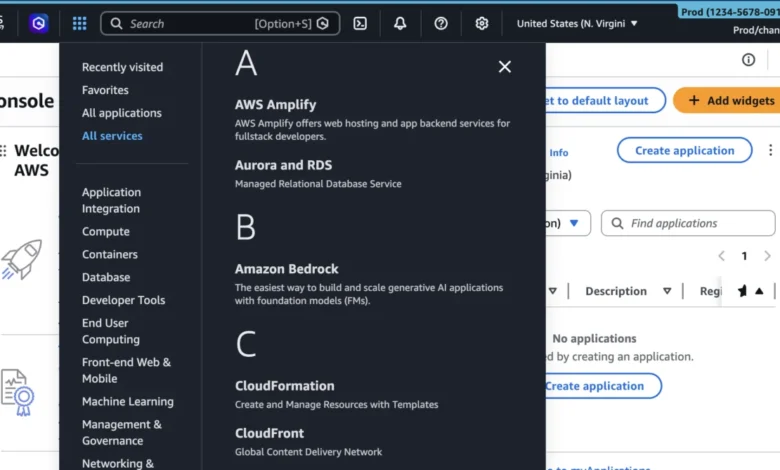
Amazon Web Services (AWS) has officially announced a significant expansion to its User Experience Customization (UXC) framework, introducing new capabilities that allow account administrators to selectively display relevant AWS Regions and services within the AWS Management Console. This update, which builds upon the foundational customization features introduced in mid-2025, is designed to streamline the cloud management experience, reduce cognitive load for developers and system administrators, and minimize the risk of operational errors caused by navigating an increasingly complex global infrastructure. By providing tools to hide unused services and geographic regions, AWS aims to create a more focused and efficient workspace tailored to the specific operational needs of individual teams and organizations.
The Evolution of AWS User Experience Customization
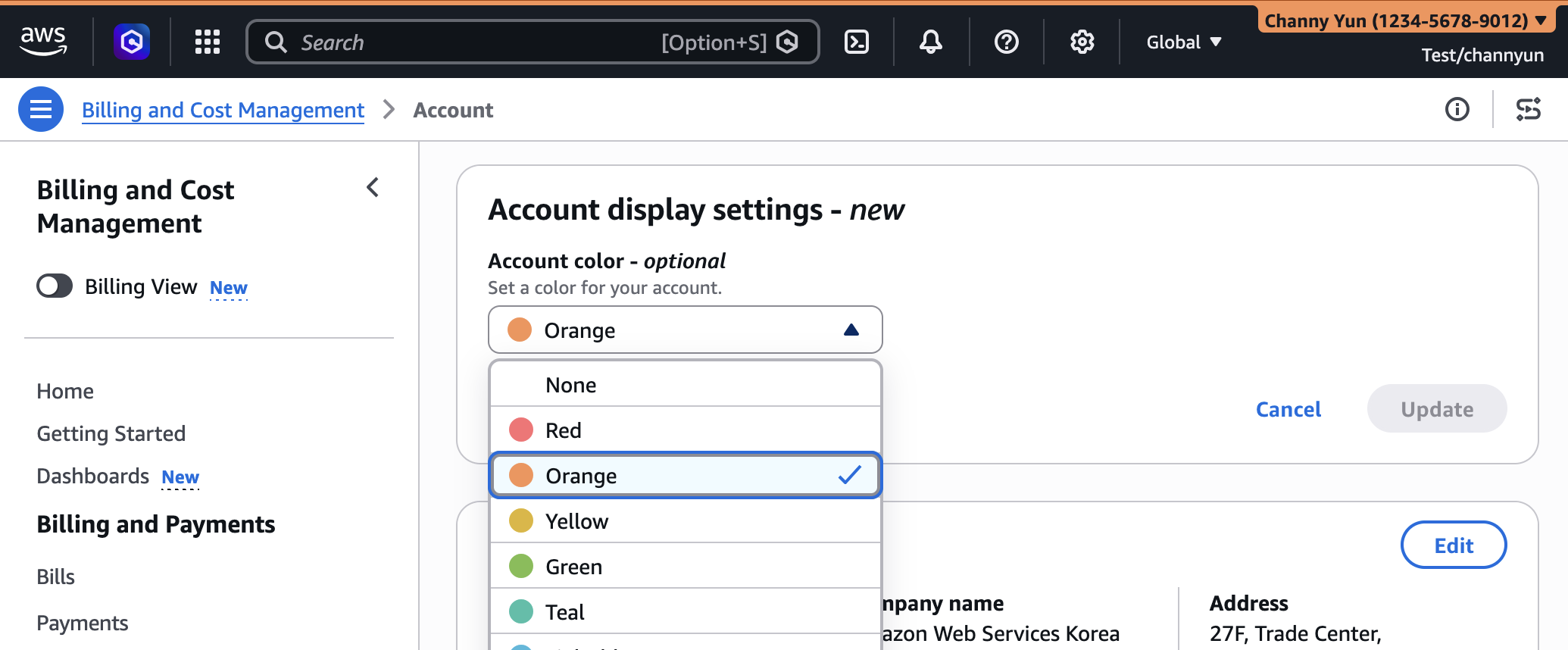
The journey toward a more customizable AWS Management Console reached a major milestone in August 2025 with the initial introduction of the AWS User Experience Customization (UXC) capability. At that time, the primary focus was on visual identification through account color-coding. This allowed administrators to assign specific colors to different AWS accounts—such as orange for development environments, light blue for testing, and red for production—providing an immediate visual cue to users and helping to prevent "cross-account confusion," a common source of accidental deployments or deletions in multi-account environments.
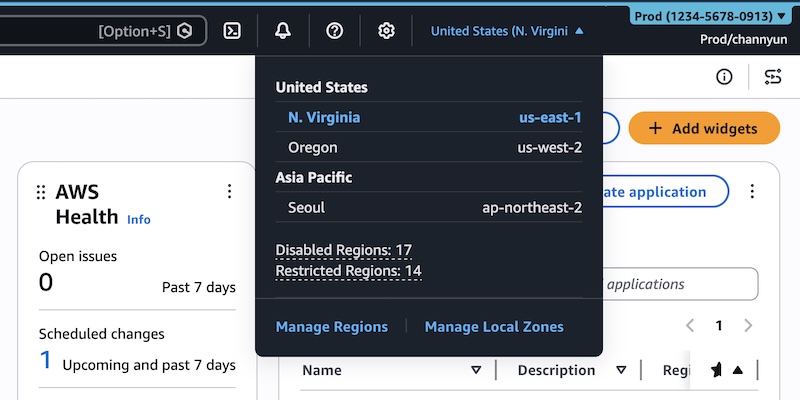
The latest announcement represents a strategic evolution of this framework. While the 2025 update addressed visual context, the March 2026 update addresses functional density. As the AWS ecosystem has grown to encompass over 200 fully featured services and dozens of geographic regions worldwide, the "all-access" view of the console has become increasingly cluttered. For a team that only operates within two regions and utilizes a dozen core services, the presence of the entire global AWS catalog in their navigation menus can lead to unnecessary scrolling, accidental clicks, and a phenomenon known as "choice paralysis."
Addressing Cognitive Load in Cloud Operations
The primary driver behind the new UXC features is the reduction of cognitive load. In the context of user interface design, cognitive load refers to the amount of mental effort required to process information and complete a task. When an engineer opens the AWS Management Console, they are often met with a vast array of options, many of which are irrelevant to their current project or the organization’s authorized service list.
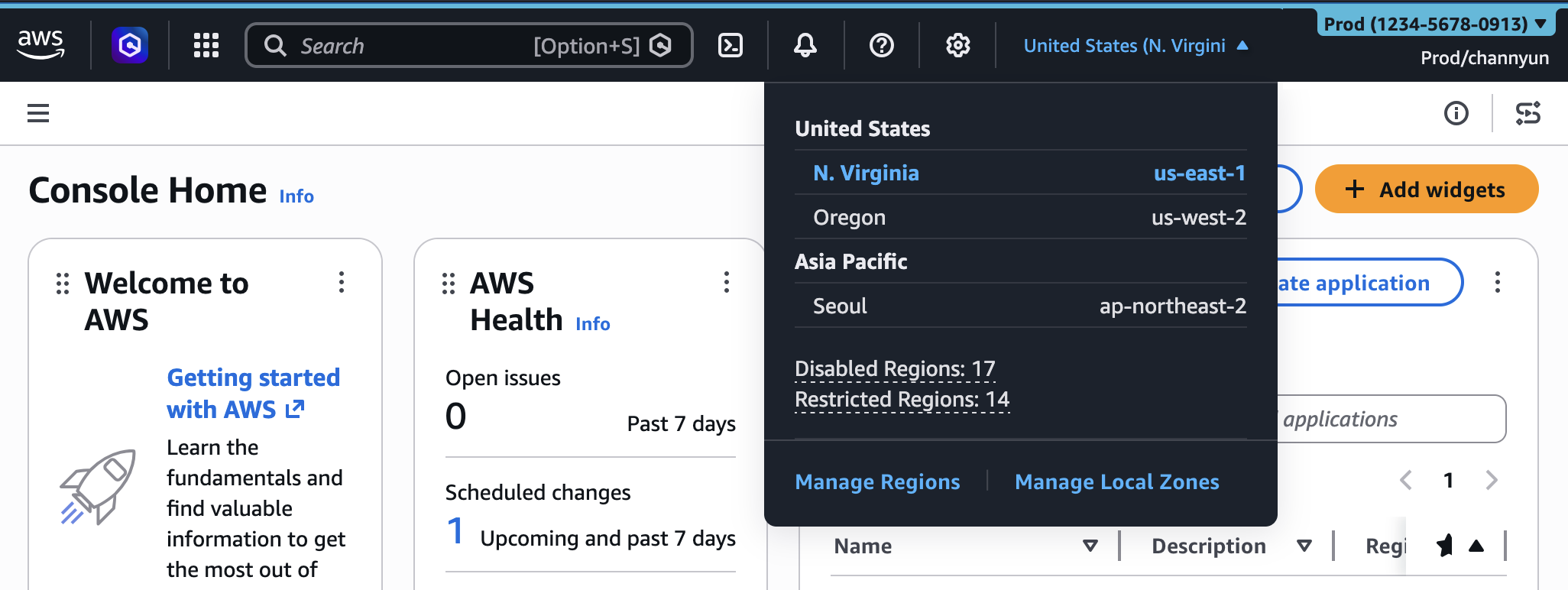
By enabling administrators to curate the visibility of Regions and services, AWS is effectively allowing organizations to create a "clean room" environment for their cloud operations. When unused Regions are hidden, the Region selector on the navigation bar becomes a concise list of active deployment zones. Similarly, when services are filtered, the "All Services" menu and the console’s global search bar only return results that are relevant to the team’s workflow. This simplification not only speeds up navigation but also helps onboard new team members more quickly by shielding them from the overwhelming breadth of the entire AWS portfolio.

Technical Implementation and Workflow
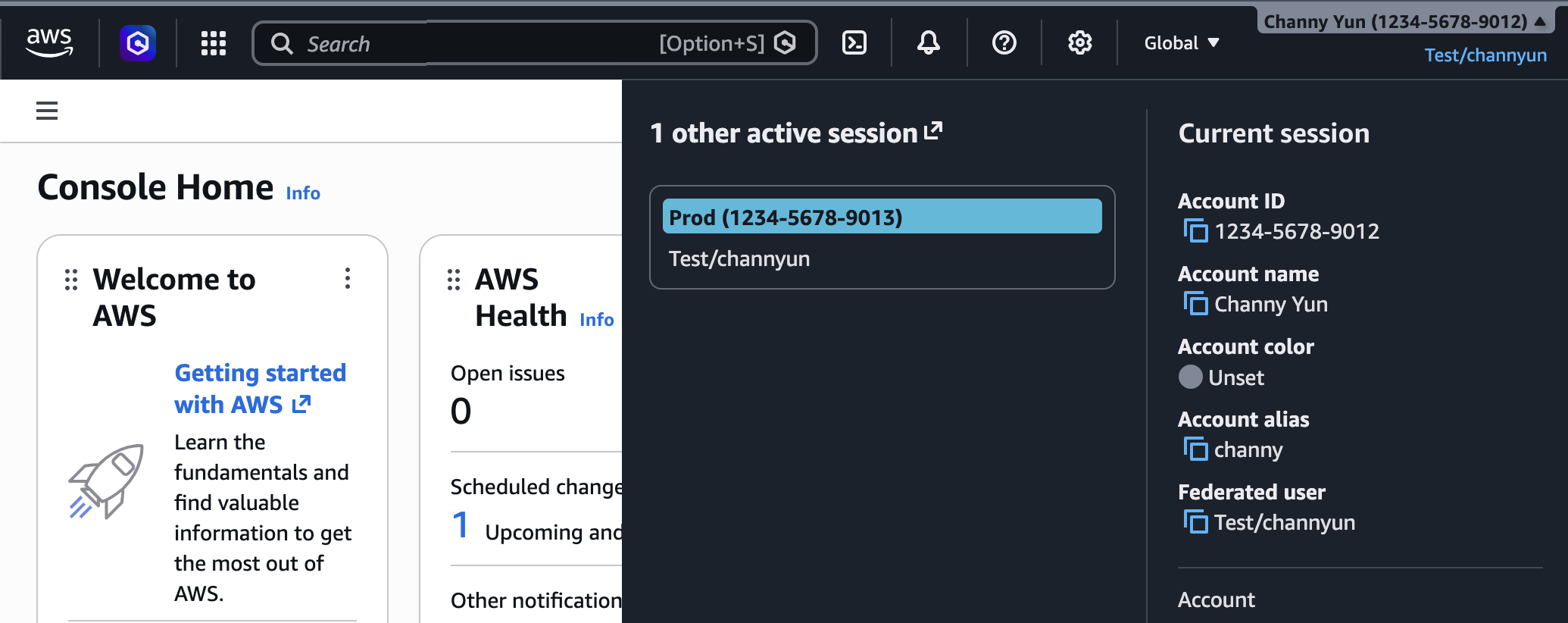
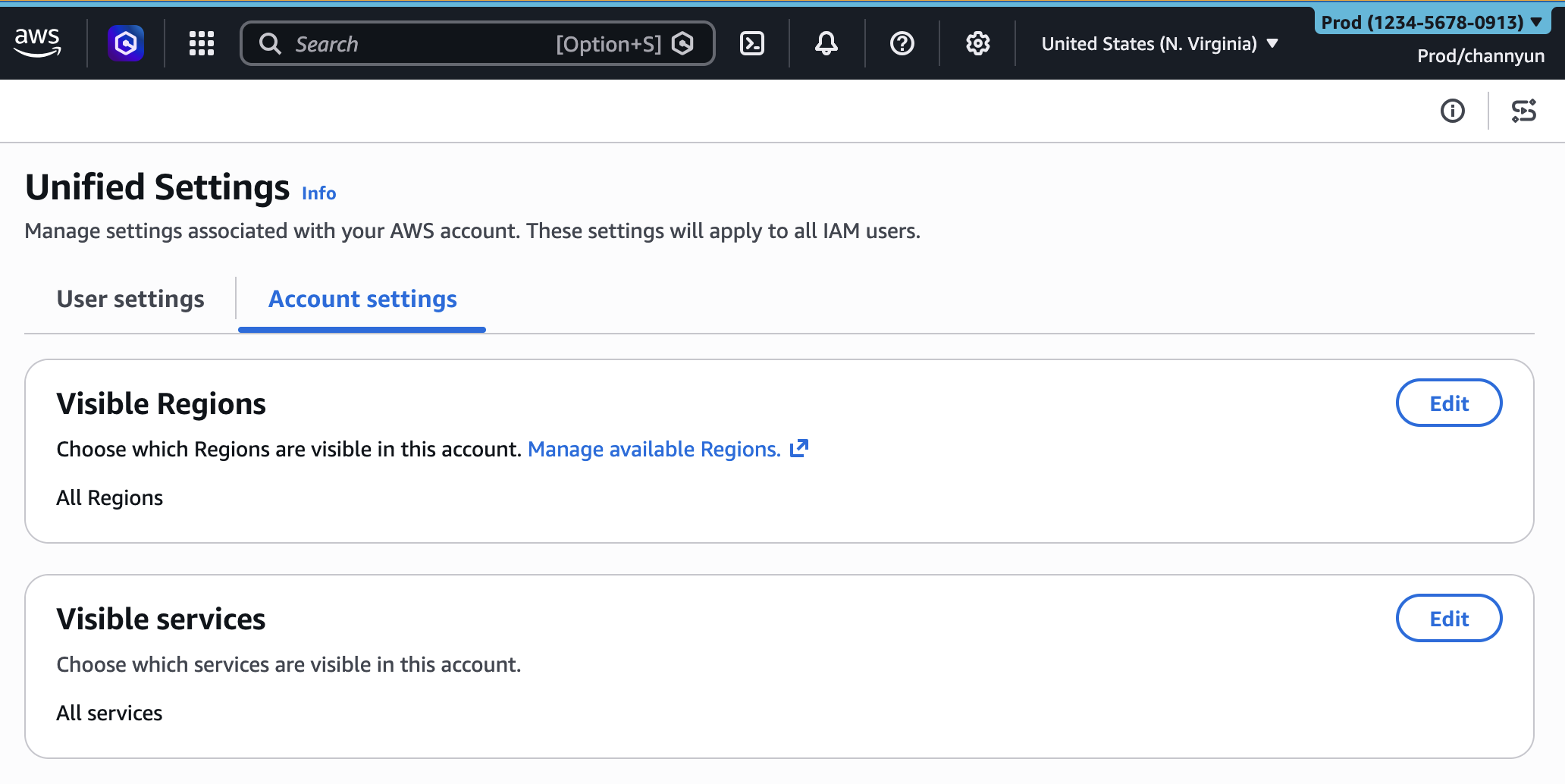
The implementation of these new customization features has been integrated into the existing unified settings of the AWS Management Console. Account administrators can access these settings by navigating to the "Account display settings" and the newly introduced "Account settings" tab within the user settings menu.
Account Color Categorization
The color-coding feature remains a central pillar of the UXC experience. Administrators can select from a predefined palette to highlight the navigation bar of the console. This serves as a persistent "guardrail," reminding users of the sensitivity of the environment they are currently accessing. In large-scale enterprises where developers may switch between dozens of accounts daily, this visual differentiation is a critical component of operational safety.
Region and Service Visibility
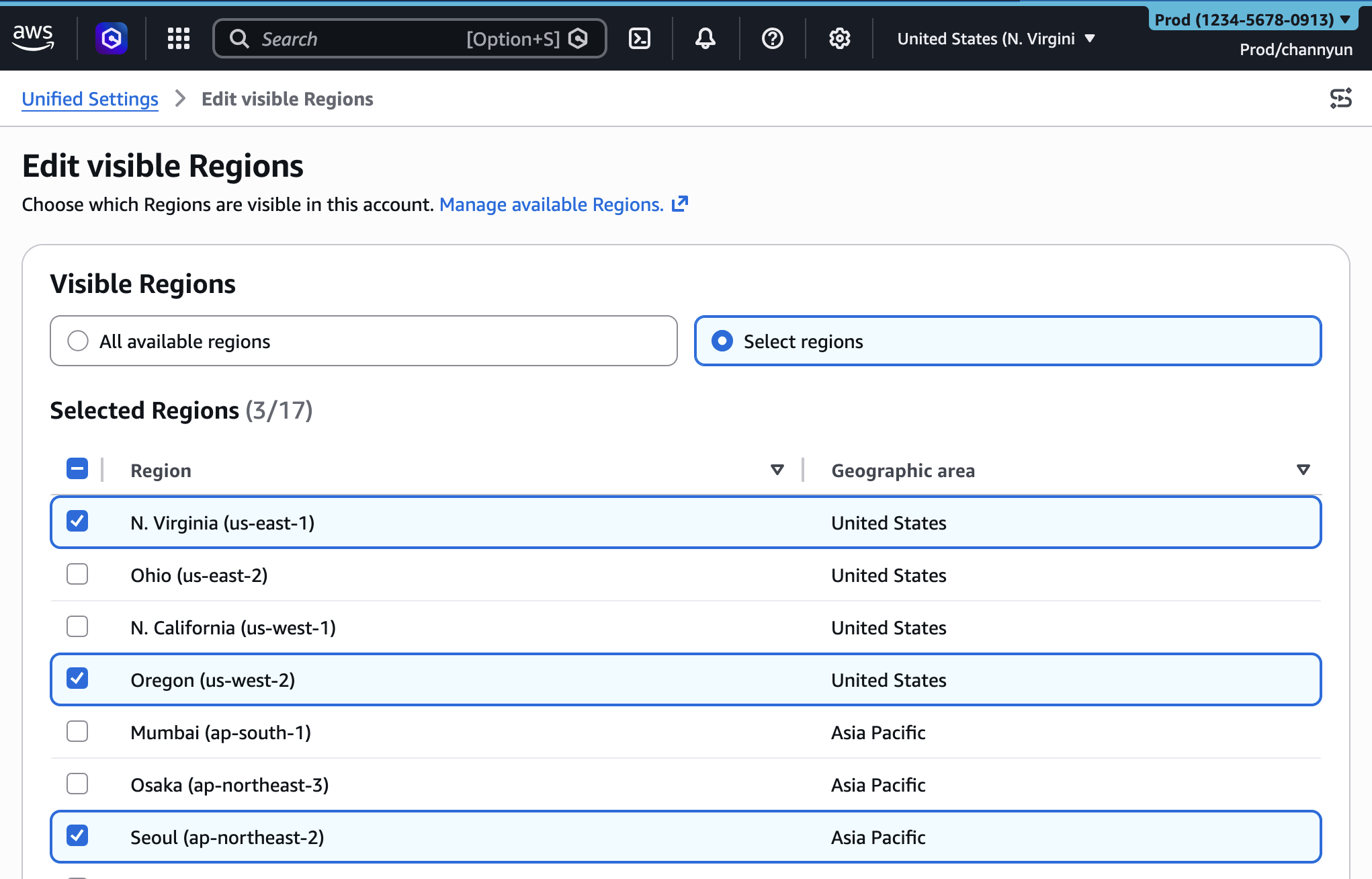
The new visibility controls are managed through a straightforward selection interface. Administrators can choose to show "All available Regions" or transition to "Select Regions," where they can check off only the specific geographic locations where their company has a presence or regulatory clearance to operate.
The service visibility control follows a similar logic. Administrators can search through categories—such as "Popular services," "Compute," or "Storage"—and select only the tools that their team uses. Once these changes are saved, the console dynamically updates for all users within that account. Notably, if a user attempts to search for a hidden service in the global search bar, the service will not appear, further reinforcing the focused nature of the customized UI.
Programmatic Management via Infrastructure as Code
Recognizing that many modern organizations manage their cloud environments through automation, AWS has ensured that UXC settings are fully supported through programmatic interfaces. New parameters, visibleServices and visibleRegions, have been added to the AWS User Experience Customization API.
This support extends to AWS CloudFormation, allowing administrators to define their console’s appearance as code. By including an AWS::UXC::AccountCustomization resource in their templates, teams can ensure that every new account provisioned within their AWS Organization automatically inherits the correct color scheme and visibility filters. This ensures consistency across the enterprise and eliminates the need for manual configuration during account setup. For example, a standard CloudFormation snippet can now define an account as "red" for production while limiting visibility to only the us-east-1 and us-west-2 regions and core services like Amazon S3, EC2, and AWS Lambda.
The Distinction Between UI Visibility and Access Control
A critical point emphasized by AWS in this announcement is the distinction between user interface customization and security permissions. The UXC settings control the appearance of services and Regions in the console, but they do not function as a security boundary or an alternative to Identity and Access Management (IAM) policies.
If a service is hidden in the console via UXC, a user with the appropriate IAM permissions can still interact with that service through other channels, such as:
- AWS Command Line Interface (CLI): Command-line operations remain unaffected by UI visibility settings.
- AWS SDKs: Programmatic access via languages like Python (Boto3), Java, or Go continues to function based on IAM roles.
- Amazon Q Developer: The AI-powered assistant can still provide information and perform actions on hidden services if the user has permission.
- Direct API Calls: Underlying REST APIs remain accessible.
This separation ensures that UXC remains a tool for productivity and ergonomics rather than a tool for restrictive governance, which should continue to be handled via Service Control Policies (SCPs) and IAM.
Industry Implications and Operational Impact
The introduction of these features reflects a broader trend in the technology industry toward "developer experience" (DevEx). As cloud platforms become more powerful, the challenge shifts from "what can we do" to "how can we do it more efficiently." By allowing for a bespoke console experience, AWS is acknowledging that a one-size-fits-all UI is no longer sufficient for its diverse customer base, which ranges from solo startups to global conglomerates.
Industry analysts suggest that this update will be particularly beneficial for regulated industries, such as finance and healthcare. In these sectors, internal policies often restrict data to specific regions for compliance reasons (e.g., GDPR in Europe or CCPA in California). While SCPs prevent data from being moved to unauthorized regions, hiding those regions in the console provides an additional layer of "soft" prevention, ensuring that employees are not even tempted to click on non-compliant geographic options.
Furthermore, the update is expected to reduce the "support burden" within large IT organizations. Internal help desks often deal with queries from junior staff who are confused by the sheer volume of services available to them. A curated console reduces the surface area for such confusion, leading to fewer internal support tickets and more autonomous development teams.
Chronology of AWS Console Customization
The path to the current UXC state has been marked by several key updates over the last year:
- August 2025: Launch of UXC with Account Color assignment. This was the first step in allowing persistent, admin-driven UI changes.
- Late 2025: Integration of UXC settings into AWS Organizations, allowing for broader inheritance of UI settings across multiple accounts.
- March 2026: Current update introducing selective Region and Service visibility, along with programmatic support via CloudFormation and expanded API sets.
Conclusion and Future Outlook
With this latest launch, AWS provides a comprehensive suite of tools for tailoring the Management Console to the specific needs of a workforce. By combining visual account identification with functional filtering of services and regions, the UXC capability addresses the dual challenges of operational safety and cognitive efficiency.
As AWS continues to expand its global footprint and service catalog, it is likely that the UXC framework will see further enhancements. Potential future updates could include role-based UI customization, where different IAM roles see different console layouts, or even more granular filtering at the feature level within specific services. For now, the ability to prune the console of irrelevant information stands as a major win for cloud professionals seeking a cleaner, faster, and more intuitive way to manage their digital infrastructure.
AWS has invited users to provide feedback on these new features through the "Feedback" link in the console, the AWS re:Post forum, or through dedicated AWS Support contacts. The new UXC capabilities are available immediately in all standard AWS Regions.