The Ultimate Guide to Troubleshooting Facebook Ads Not Delivering: 10 Common Reasons and Immediate Fixes


For digital marketers and business owners navigating the complex landscape of paid social media, few experiences are as exasperating as logging into Meta Ads Manager to find a campaign completely stalled. When active campaigns generate zero impressions, the immediate implications for lead generation, brand visibility, and return on ad investment can be severe. Understanding why an advertisement fails to serve requires a methodical investigation into platform mechanics, algorithmic constraints, and policy compliance.
Defining the "Not Delivering" Status in Meta Ads Manager
When a campaign is flagged as "Not delivering," it signifies that active advertisements are failing to reach the designated target audience, resulting in zero impressions. This phenomenon can affect newly minted creative assets as well as long-running campaigns that previously performed without interruption.
To diagnose this issue, administrators must navigate to Meta Ads Manager and examine the "Delivery" column. If a technical or structural impediment is blocking distribution, the platform often displays a sub-status reading "Update required." While encountering a stalled campaign can disrupt marketing schedules, the underlying causes are typically identifiable and correctable through systematic troubleshooting.
1. Unavailable Associated Posts
A frequently overlooked cause of delivery failure involves the underlying social media post linked to the advertisement. If a page administrator deletes the original organic post, modifies its privacy settings, or revokes third-party access permissions, the ad loses its structural foundation.
To resolve this issue, marketers should inspect the ad configuration within Ads Manager to verify the status of the associated post. If the content has been removed or restricted, the optimal solution is to select an alternative post, restore the original content’s visibility, or adjust account-level permissions. Once these corrections are implemented, toggling the ad set back to active will clear the "Update required" sub-status and resume distribution.
2. Ongoing Review Processes by Meta
Meta mandates that every submitted advertisement undergo a rigorous evaluation before public deployment. This screening process ensures compliance with comprehensive advertising policies and community standards. The evaluation combines automated algorithmic scans with manual reviews conducted by human support staff.
According to official platform guidelines, the vast majority of advertisements are processed within a 24-hour window, though high-volume periods—such as major retail holidays—frequently introduce delays. To mitigate operational downtime, media buyers are advised to schedule campaigns several days in advance, providing a buffer for manual approvals. Furthermore, making unauthorized edits to active or scheduled campaigns—such as altering creative elements, targeting parameters, or budgeting—will automatically trigger a fresh review cycle, halting delivery until re-approved.
3. Policy Rejections and Compliance Violations
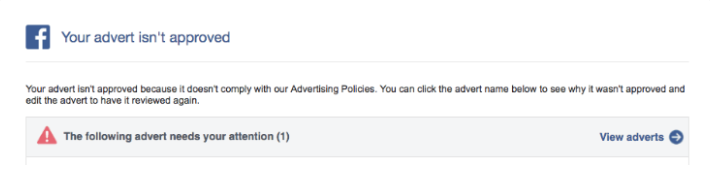
Advertisements that violate Meta’s strict advertising guidelines face immediate rejection, completely halting delivery. Rejections are typically communicated via email notification, though campaign managers can confirm the status directly within Ads Manager.
Common triggers for rejection include misleading landing page claims, prohibited content categories, restricted substances, sensationalized claims, or the use of profanity. To rectify a rejection, advertisers can either modify the creative copy and visual assets to align with platform policies or submit a formal appeal through Account Quality if the disapproval is believed to be erroneous. Additionally, campaigns falling into special ad categories—such as housing, employment, or social issues—must be explicitly designated to prevent restricted reach or automated flagging.
4. Reaching Account-Level Spending Limits
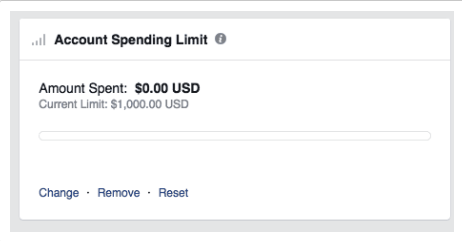
Account spending limits represent a hard financial ceiling established by the advertiser to control total expenditures across all campaigns tied to a specific billing profile. When cumulative spending reaches this predetermined threshold, Meta immediately suspends ad delivery across the entire account.
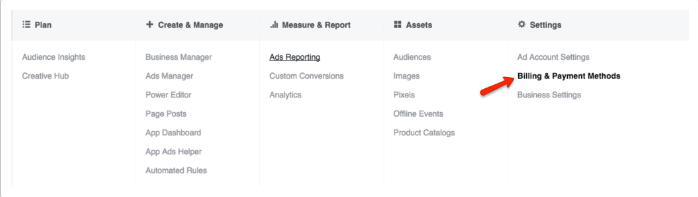
This restriction frequently occurs when marketers establish temporary spending caps and subsequently forget to adjust or remove them as campaigns scale. Resolving this constraint requires navigating to Ads Manager, accessing Settings, and proceeding to Billing and Payment Methods. By increasing, resetting, or completely removing the account spending limit, normal ad delivery resumes almost instantaneously.
5. Inadequate Budgeting and Bid Constraints
The Meta ad algorithm relies on financial parameters to determine how frequently and widely an ad should be distributed. When daily budgets or bid caps are set artificially low, the system struggles to gather sufficient optimization data.
For example, assigning a nominal daily budget of three dollars prevents the algorithm from testing the creative effectively, often causing delivery to cease entirely. Similarly, pairing a high daily budget with an overly restrictive bid cap limits auction competitiveness. Industry experts recommend utilizing lifetime budgets to give the algorithm flexibility or adopting lowest-cost automated bidding strategies during initial campaign phases to establish a reliable baseline of performance before applying manual caps.
6. Overly Restrictive Audience Targeting
While precise audience segmentation enhances conversion relevance, hyper-narrow targeting can paralyze ad delivery. Meta’s delivery system generally requires a minimum viable audience size—typically at least 1,000 active users—to effectively optimize and distribute an ad set.
When parameters such as geographic radiuses, hyper-specific interests, or small custom customer lists restrict the potential pool below this threshold, delivery halts. Marketers can resolve this by broadening geographic boundaries, expanding interest categories, enabling Advantage+ audience expansion, or uploading larger, more comprehensive customer match lists.
7. Internal Auction Overlap
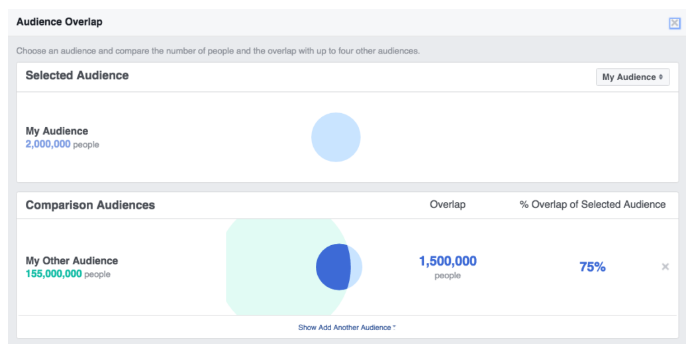
Auction overlap occurs when multiple ad sets from the same advertiser target overlapping audience segments, forcing campaigns to compete against one another within the ad auction. To prevent self-competition and inefficient budget utilization, Meta’s delivery system automatically pauses underperforming ad sets while prioritizing the highest-value asset in the auction.
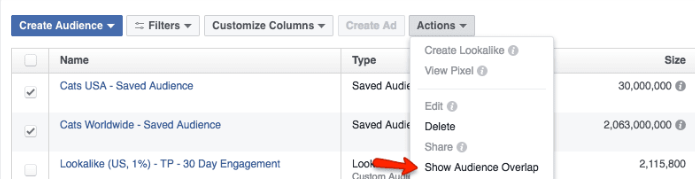
While this mechanism protects marketing budgets, it can inadvertently silence valuable ad sets. Advertisers can diagnose this utilizing the built-in Audience Overlap tool within the Audiences tab of Ads Manager. If significant overlap is detected, remedies include consolidating competing ad sets, refining exclusion rules, or broadening unique value propositions across different campaigns.
8. Suboptimal Ad Engagement and Relevance Diagnostics
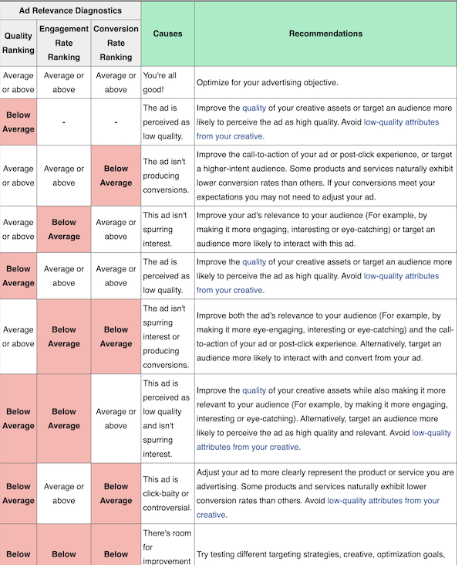
Meta prioritizes user experience by favoring advertisements that generate positive engagement and relevance. When an ad receives consistently low engagement or negative feedback, the system reduces its distribution in favor of higher-performing content from competing advertisers.
Platform metrics known as ad relevance diagnostics evaluate expected quality, engagement rate conversion, and ranking against competing ads. To correct low engagement scores, marketers must refresh creative assets with more compelling visual designs, refine copywriting, optimize post-click landing page experiences, and retarget high-intent audience segments. Industry data indicates that elevating a ranking from low to average yields significantly better delivery improvements than striving to move from average to above average.
9. Scheduling Conflicts and Temporal Errors
Because Meta exclusively serves advertisements during explicitly authorized operational windows, scheduling oversights frequently account for stalled campaigns. Common scheduling errors include expired campaign end dates, paused ad sets, or misconfigured time zones that prevent ads from serving at peak hours.
Rectifying scheduling issues requires reviewing the campaign configuration pane within Ads Manager. Adjusting expired end dates, restarting paused ad sets, or updating deployment windows will immediately re-engage the distribution cycle.
10. Unrealistic Conversion Optimization Goals
Optimization goals instruct the Meta algorithm on the exact consumer behavior the campaign intends to drive, shaping how the platform identifies prospective targets. Selecting an overly ambitious optimization goal—such as direct product purchases on a newly launched pixel with zero historical conversion data—can starve the campaign of necessary optimization signals.
When the algorithm cannot identify enough conversions to validate user interest, it stops delivering the ad. To overcome this hurdle, marketers should temporarily shift optimization goals to higher-frequency actions, such as "Add to Cart" or "Link Clicks." Once the campaign accumulates consistent engagement and conversion data, administrators can safely transition the optimization goal back to high-value purchase conversions, ensuring sustained and efficient ad delivery moving forward.