Llmfit Emerges as a Crucial Tool for Optimizing Local Large Language Model Deployment

The burgeoning field of local Large Language Model (LLM) deployment, while offering unprecedented control and privacy, is fraught with significant challenges that consume both financial resources and valuable user time. The process of identifying, downloading, and testing models can quickly become a costly and time-consuming endeavor. Users often encounter LLMs that, upon closer inspection, prove to be too resource-intensive, too slow, or simply incompatible with their specific hardware configurations. This trial-and-error approach leads to wasted bandwidth, depleted storage, and hours of unproductive effort. Addressing this pervasive issue, a new terminal tool named llmfit has been developed to streamline and optimize the selection and deployment of local LLMs.
Created by Alex Jones, llmfit acts as an intelligent advisor for users navigating the complex landscape of local LLM execution. The tool meticulously analyzes a user’s hardware specifications, comparing them against a vast repository of LLM models. Its primary function is to recommend models that are not only compatible but also practical and efficient for the user’s specific setup. Rather than relying on guesswork or incomplete information about a model’s RAM or VRAM requirements, llmfit provides a ranked list of options, prioritizing factors such as fit, projected speed, perceived quality, and context window capabilities. This allows users to make informed decisions before committing to any downloads, thereby mitigating the risks of wasted resources and time. For individuals frequently engaging with local LLMs, llmfit represents a sensible and immediately valuable addition to their toolkit.
What is llmfit?
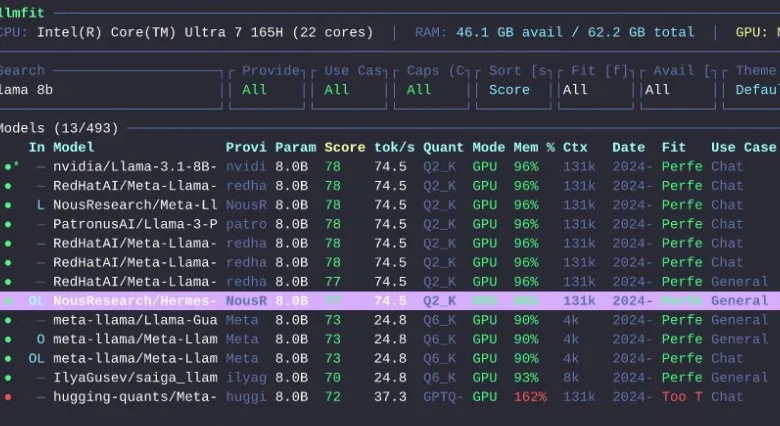
At its core, llmfit is a specialized recommendation engine designed for individuals who operate Large Language Models on their personal hardware. It automates the critical process of assessing machine capabilities, including RAM, CPU, and GPU performance, and then intelligently ranks available LLMs based on their realistic operational feasibility. The tool offers a dual interface, supporting both an interactive terminal user interface (TUI) for a visual browsing experience and a standard command-line interface (CLI) mode, which is ideal for scripting and integration into automated workflows.
The project’s documentation indicates robust compatibility with a wide array of popular local runtime providers. These include well-established platforms such as Ollama, llama.cpp, MLX, Docker Model Runner, and LM Studio. This broad support ensures that llmfit can seamlessly integrate with most existing local LLM setups, offering a unified solution for model selection across different environments. In essence, llmfit provides a direct and pragmatic answer to a fundamental question faced by many local AI enthusiasts: "Which LLM should I run on this machine?"
What Does llmfit Do?
llmfit fundamentally aims to eliminate the prevalent guesswork involved in selecting local LLMs. Its functionalities are geared towards providing actionable insights and preventing common pitfalls. The tool offers several key capabilities:
- Hardware Detection and Analysis: llmfit automatically identifies and analyzes the user’s system specifications, including available RAM, VRAM (if a compatible GPU is present), CPU type, and core count. This detailed hardware profile forms the basis for all subsequent recommendations.
- Model Compatibility Scoring: It compares the detected hardware against the known requirements of hundreds of LLMs. This comparison generates a compatibility score, indicating how well a specific model is likely to perform on the user’s system.
- Performance Estimation: Beyond mere compatibility, llmfit provides estimations of how quickly a model might run. This is crucial for user experience, as a model that technically fits but runs at a glacial pace offers little practical utility.
- Resource Utilization Projection: The tool forecasts the expected RAM and VRAM consumption of different models, helping users avoid over-allocating resources and ensuring sufficient headroom for other system processes or extended context windows.
- Context Window Suitability: llmfit considers the context window size of a model in relation to the user’s hardware, as larger context windows can significantly increase memory demands.
- Use-Case Specific Recommendations: The tool allows users to specify desired use cases (e.g., coding, general chat, summarization), enabling it to prioritize models that are best suited for those particular tasks, even if they are not the absolute largest or most general-purpose models.
The ability to assess the practical viability of a model, particularly concerning its performance and resource demands, is a critical differentiator. While many platforms provide lists of available models, llmfit focuses on delivering practical, system-aware recommendations, bridging the gap between what is theoretically possible and what is realistically achievable on a given machine.
Why llmfit Is Useful
The proliferation of LLM models has created an overwhelming landscape for users. While numerous repositories and leaderboards showcase available models, a significant piece of information has historically been missing: a clear indication of whether a model is a sensible choice for one’s specific hardware. A 7 billion parameter model, for instance, might technically run, but if its inference speed is agonizingly slow, its practical value diminishes significantly. Similarly, a quantized model might fit into available memory, but at the cost of a severely limited context window, hindering its usefulness for complex tasks.
llmfit addresses this crucial gap by integrating hardware detection, sophisticated model scoring, and an understanding of various runtime environments. This holistic approach ensures that users are presented with recommendations that balance performance, resource utilization, and functional utility.
For newcomers to the realm of local LLMs, familiarizing oneself with a local LLM launcher—such as LM Studio or Ollama—is often a beneficial first step. Once a foundational understanding of local deployment is established, llmfit becomes an invaluable tool for refining model selection. The utility of llmfit extends to several distinct user profiles:
- Newcomers to Local LLMs: For individuals just beginning to explore running LLMs on their own machines, llmfit demystifies the process by providing clear, actionable recommendations, saving them from the initial frustration of incompatible model choices.
- Enthusiasts and Researchers: Those who regularly experiment with different models can leverage llmfit to quickly identify promising candidates for testing, significantly accelerating their research and development cycles.
- Users with Limited Hardware: Individuals operating on machines with constrained resources can use llmfit to discover models that are optimized for their specific limitations, ensuring a satisfactory user experience without requiring hardware upgrades.
- Developers Integrating LLMs: For developers looking to embed LLMs into applications, llmfit can help in selecting models that meet performance targets and resource constraints, facilitating smoother integration and deployment.
The tool’s ability to quantify the practical fit of a model on a specific system transforms the selection process from a speculative endeavor into a data-driven decision.
How to Install llmfit
The developers of llmfit have prioritized accessibility, offering several straightforward installation methods to cater to a wide range of operating systems and user preferences.
Homebrew (macOS & Linux)
For users who manage their packages via Homebrew on macOS or Linux, installation is as simple as executing the following command in their terminal:
brew install llmfitMacPorts (macOS)
Users who prefer the MacPorts package manager on macOS can install llmfit with:
port install llmfitWindows with Scoop
On Windows, the Scoop package manager provides an easy installation route:
scoop install llmfitQuick Install Script (macOS & Linux)
A convenient installation script is available for macOS and Linux users, offering a rapid way to get llmfit up and running. This script downloads and installs the latest release:
curl -fsSL https://llmfit.axjns.dev/install.sh | shFor users who wish to perform a user-local installation without requiring administrative privileges (sudo), the script can be executed with the --local flag:
curl -fsSL https://llmfit.axjns.dev/install.sh | sh -s -- --localDocker
llmfit can also be run as a Docker container, which is beneficial for isolated environments or for users who prefer containerized applications:
docker run ghcr.io/alexsjones/llmfitBuild from Source
For developers or advanced users who wish to compile the tool themselves, the source code is publicly available on GitHub. The process involves cloning the repository and building the release binary:
git clone https://github.com/AlexsJones/llmfit.git
cd llmfit
cargo build --release
The compiled executable will then be located at target/release/llmfit.
How to Use llmfit
Getting started with llmfit is designed to be intuitive and user-friendly. The most direct method to begin is by simply invoking the tool in the terminal:
llmfitThis command launches the interactive terminal user interface (TUI). Upon launching, the TUI prominently displays the user’s detected hardware specifications at the top of the screen. Below this, a ranked list of compatible LLMs is presented. Within this interface, users have the flexibility to search for specific models, filter the list based on various criteria, compare the specifications of different models side-by-side, and sort the results without ever leaving the application.
Key interactive commands available within the TUI, as outlined in the project documentation, include:
?: Displays help information and available keybindings.↑/↓: Navigates through the list of models.Enter: Selects a model for detailed view or to initiate further actions.s: Enters simulation mode for hardware adjustments.p: Activates planning mode for estimating hardware needs of a specific model./: Initiates a search query to filter models.q: Quits the application.
For users who prefer a non-interactive experience or wish to integrate llmfit into automated scripts, the command-line interface (CLI) mode is available. This can be activated with the following command:
llmfit --cliSeveral essential CLI commands are particularly useful for quick checks and scripting:
- Show Your Detected System Specs: To view a detailed report of your machine’s hardware as detected by llmfit:
llmfit system - List All Known Models: To retrieve a comprehensive list of all models that llmfit has information on:
llmfit list - Search for a Model: To find specific models or models matching a particular query:
llmfit search "llama 8b" - Get Recommendations in JSON: To obtain a list of recommended models in JSON format, useful for programmatic processing. The
--limitflag controls the number of recommendations:llmfit recommend --json --limit 5 - Get Coding-Focused Recommendations: To tailor recommendations for specific use cases, such as coding assistance, using the
--use-caseflag:llmfit recommend --json --use-case coding --limit 3 - Estimate Hardware Needed for a Specific Model: To understand the resource requirements for a particular model, including a specified context length:
llmfit plan "Qwen/Qwen3-4B-MLX-4bit" --context 8192
Features Worth Calling Out
llmfit distinguishes itself through several advanced features that significantly enhance its utility for local LLM users.
Hardware Simulation
One of the most innovative aspects of llmfit is its hardware simulation mode. Accessible within the TUI by pressing the S key, this feature allows users to manually override their system’s detected RAM, VRAM, and CPU core count. This capability is incredibly powerful for scenario planning, enabling users to answer critical questions such as:
- "What models could I run if I upgraded my RAM to 64GB?"
- "How would performance change if I used my integrated GPU with 8GB of VRAM?"
- "Can I run this larger model if I allocate more CPU cores to it?"
This simulation functionality provides a practical and interactive method for exploring hardware upgrade scenarios or understanding the performance implications of different resource allocations without needing to physically alter hardware or perform complex manual calculations.
Planning Mode
Planning mode offers an inverse perspective to the standard recommendation feature. Instead of asking what models are suitable for the user’s current machine, it prompts the user to specify a particular LLM and then calculates the necessary hardware resources—RAM, VRAM, and CPU—required for that model to run effectively. This is particularly useful for users who have already identified a specific model they wish to utilize and need a quick assessment of whether their existing hardware is sufficient or what upgrades might be necessary for comfortable operation. This mode is accessed via the p key in the TUI or the plan command in the CLI.
Web Dashboard and API
Beyond its interactive terminal capabilities, llmfit is designed for broader integration. The tool can initiate a web-based dashboard, providing a more accessible interface for some users. Furthermore, it exposes a REST API through the llmfit serve command. This dual functionality makes llmfit a versatile tool for automation, enabling it to be scripted into larger local AI workflows, integrated into custom dashboards, or used as a backend service for model selection within other applications. This expands its utility from individual user interaction to system-level integration.
Who Should Use llmfit?
llmfit’s sophisticated features and problem-solving approach make it particularly beneficial for specific user demographics within the local LLM ecosystem.
- Hobbyists and Enthusiasts: Individuals who frequently experiment with different LLMs to explore their capabilities or for personal projects will find llmfit invaluable for quickly identifying suitable models without the usual trial-and-error.
- Researchers and Developers: For those working on AI projects, llmfit accelerates the model selection process, allowing them to spend more time on development and less on resource management and compatibility testing.
- Users with Diverse Hardware: Individuals who own multiple machines with varying hardware specifications can use llmfit to quickly determine the best LLM for each specific system.
- Those Seeking Optimization: Users who are conscious of resource utilization and seek to maximize performance on their existing hardware will benefit from llmfit’s detailed analysis and recommendations.
Conversely, individuals who primarily run only one or two LLMs and have already established what works well on their systems might find llmfit less critical. However, for anyone who frequently engages in model experimentation, compares different runtime performances, or routinely grapples with the question, "Will this model actually run well on my machine?", llmfit emerges as a genuinely indispensable tool.
Final Thoughts
llmfit is not merely another tool for launching or managing LLMs; it functions more as an intelligent "fit advisor" specifically tailored for the complexities of local LLM deployment. While this description might sound understated, it addresses a significant and pervasive problem within the local AI community. The current landscape is often characterized by extensive model lists, performance leaderboards, and straightforward download buttons. What many users truly need as a foundational step is a more efficient and reliable method to narrow down this vast array of options to models that are genuinely practical and performant on their specific hardware.
This is precisely the niche that llmfit effectively fills. By automating the analysis of hardware capabilities and cross-referencing them with model requirements and performance characteristics, llmfit empowers users to make informed decisions. The recommendation to install and utilize llmfit before committing to the download of a new model is sound advice. It offers a pathway to significantly reduce wasted time and resources, ensuring that users can engage with local LLMs more productively and with greater confidence in their chosen models’ performance. As the adoption of local LLMs continues to grow, tools like llmfit will become increasingly vital for democratizing access and optimizing the user experience.
Related posts: