Understanding and Troubleshooting Non-Delivering Facebook Ads: Key Factors and Expert Solutions

For digital marketers leveraging Meta’s vast advertising ecosystem, the sight of active campaigns failing to deliver impressions in Facebook Ads Manager can be profoundly frustrating, signaling a direct impediment to reaching target audiences and achieving marketing objectives. This critical issue, where active advertisements are not being served to their specified demographic, translates directly into a lack of impressions and, consequently, zero results. The "Not delivering" status, often accompanied by a sub-status like "Update required" in Ads Manager, indicates a fundamental breakdown in the campaign’s operational flow, demanding immediate attention and systematic diagnosis. Addressing this challenge is paramount for maintaining campaign efficacy, optimizing budget allocation, and ensuring consistent brand visibility across Facebook and Instagram.
The Criticality of Ad Delivery on Meta Platforms
Meta’s advertising platforms, encompassing Facebook, Instagram, Messenger, and Audience Network, represent one of the largest and most sophisticated digital advertising landscapes globally. With billions of active users, these platforms offer unparalleled reach and granular targeting capabilities, making them indispensable tools for businesses of all sizes, from nascent startups to multinational corporations. The successful delivery of an ad is the foundational step in any campaign, directly preceding impressions, clicks, engagement, and ultimately, conversions. When ads cease to deliver, the entire marketing funnel stalls, leading to wasted effort, delayed campaigns, and significant financial implications. Industry analyses frequently highlight that even short periods of non-delivery can translate into substantial revenue loss, especially for businesses heavily reliant on performance marketing. Meta itself processes billions of ad requests daily, employing advanced algorithms to match ads with the most receptive audiences, making any interruption in this process a critical operational concern.
Deep Dive into Common Causes and Solutions – Systemic and Policy-Related Issues
Several factors, ranging from policy infringements to technical misconfigurations, can prevent Facebook ads from delivering. Understanding these common pitfalls and their corresponding fixes is crucial for any ad marketer.
1. Ad Review Process and Policy Compliance
Every ad submitted to Meta platforms undergoes a rigorous review process designed to ensure compliance with its comprehensive advertising policies and terms of service. This process typically involves two stages: an initial automated system review, followed by a manual review by Meta’s support staff for certain ad types or when automated flags are triggered. Meta’s Business Help Centre explicitly states that "most ads are reviewed within 24 hours," though this timeline can extend, particularly during peak advertising seasons such as holidays or major sales events, where the volume of submissions surges.
-
Problem: Ad Still Under Review: One of the most common reasons for an ad not delivering is that it is simply awaiting approval. Marketers often launch campaigns with immediate start dates, only to find them stuck in a pending state. This can be exacerbated by minor edits made to an ad, even after initial submission, as certain changes (e.g., to the ad creative, text, target audience, or landing page URL) can trigger a new review cycle, effectively resetting the waiting period.
-
The Fix: Strategic Scheduling and Patience: To mitigate this, advertisers should plan and schedule campaigns well in advance, setting a start date that allows for several days of review time. Utilizing the "Budget and Schedule" section to define both start and end dates provides a buffer. Furthermore, it is critical to avoid making any edits to ads or ad sets once they are submitted for review until they are either approved or rejected. This prevents unnecessary delays caused by re-triggering the review process.
-
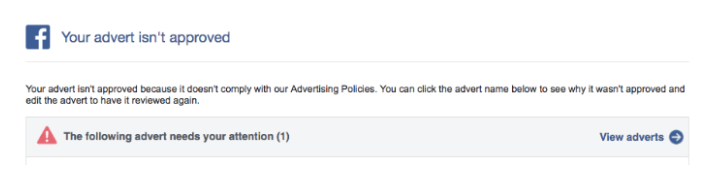
Problem: Ad Rejected Due to Policy Violations: If an ad fails to meet Meta’s advertising policies, it will be rejected, preventing any delivery. This is a common occurrence, with reports suggesting a significant percentage of initial ad submissions face some form of rejection. Meta provides advertisers with an email notification detailing the reason for rejection, and the status is also visible within Ads Manager. Common reasons for rejection include:
- Prohibited Content: Ads promoting illegal products/services, discriminatory practices, adult content, or dangerous goods.
- Restricted Content: Ads for alcohol, dating, gambling, pharmaceuticals, or financial services, which require specific targeting or disclaimers.
- Misleading or Deceptive Practices: Ads with exaggerated claims, clickbait headlines, or false promises.
- Personal Attributes: Ads implying knowledge of a user’s personal characteristics (e.g., "Are you struggling with debt?").
- Non-functional Landing Pages: The linked website is broken, irrelevant to the ad, or violates Meta’s standards.
- Trademark/Copyright Infringement: Unauthorized use of intellectual property.
- System Evasion: Attempts to circumvent Meta’s review processes.
-
The Fix: Policy Adherence and Appeals: The primary solution is to meticulously review and revise the ad content to align with Meta’s advertising policies. This may involve altering ad copy, visuals, or even the linked landing page. Once changes are made, the ad can be resubmitted for review. If an advertiser believes the rejection was erroneous, Meta provides an avenue to "submit an appeal in Account Quality." This process involves a manual review by Meta’s team, who will re-evaluate the ad against the policies. It is also crucial to ensure that any associated landing page functions correctly, accurately reflects the advertised product/service, and avoids misleading elements, as Meta also reviews the destination URL. Special categories of ads, such as those related to employment, housing, credit, or social issues, elections, or politics, have stricter targeting limitations (e.g., age, gender, location) and require specific disclosures. Choosing the correct category and adhering to these limitations is essential to prevent unnecessary reach reduction or rejection.
2. Ad Post Availability and Permissions
An ad campaign relies on an underlying creative asset, often a post. If this associated post becomes unavailable or its permissions are altered, the ad delivery will cease.
- Problem: Associated Post Unavailable: The post linked to the ad might be unavailable for several reasons, including:
- The post was accidentally deleted from the page.
- The post’s visibility settings were changed (e.g., restricted to specific age groups or geographies, or made private).
- The Facebook Page owning the post was unpublished or deleted.
- The ad creative was tied to a dark post (unpublished post) that was later removed.
- The Fix: Verify and Adjust Post Settings: The most straightforward solution is to ensure the associated post is active, publicly visible, and accessible to the target audience. Depending on the cause, this might involve:
- Restoring a deleted post (if possible).
- Adjusting the post’s audience restrictions or privacy settings.
- Selecting an alternative, readily available post for the ad creative.
- If the issue stems from a dark post, recreating the ad with a new creative or ensuring the dark post remains active.
After making the necessary changes, reactivating the ad set should resolve the "Update required" sub-status and resume delivery.
Financial and Technical Configuration Hurdles
Beyond content and policy, the financial settings and technical configurations of an ad account play a pivotal role in delivery.
3. Account Spending Limits
Meta allows advertisers to set an overarching spending limit for their ad account, acting as a hard cap on cumulative expenditure across all campaigns within that account.
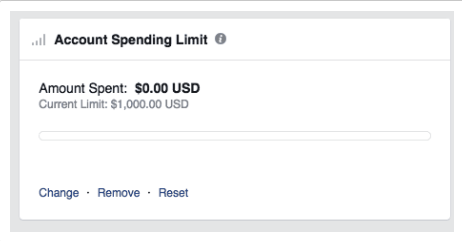
- Problem: Account Spending Limit Reached: If the total spend for all ad campaigns running through an account hits this predefined threshold, Meta will automatically pause all active ads. This is a common oversight, particularly for marketers managing multiple campaigns or accounts with historical limits set.
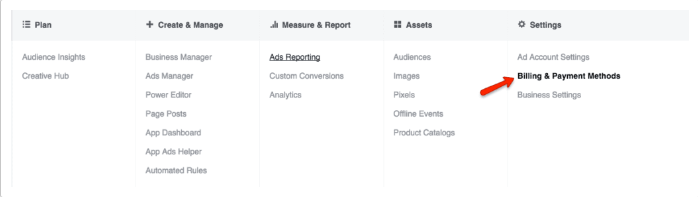
- The Fix: Adjusting Account Spending Limits: This issue is resolved by navigating to "Ads Manager" > "Settings" > "Billing and Payment Methods." Within this section, advertisers can view their current account spending limit and the amount already spent. The limit can then be increased, reset, or completely removed. Once adjusted, ads should resume delivery almost immediately. Regularly monitoring this limit is crucial, especially for agencies or businesses with dynamic advertising budgets.
4. Budget and Bid Strategy Optimization
Meta’s ad delivery algorithm requires sufficient data and budget to effectively optimize campaign performance. Restrictive budgets or low bids can starve the algorithm, leading to non-delivery.
- Problem: Budget or Bid Too Low: When advertisers set an extremely low daily budget (e.g., $3) or a tight bid cap (e.g., $2 with a $50 daily budget), the algorithm struggles to find enough opportunities to reach the specified target audience efficiently. Facebook’s system needs a certain volume of impressions and interactions to learn and optimize. If the budget is too small to generate this learning data, or if the bid cap is so low that it prevents ads from winning auctions against competitors, the algorithm may simply cease delivery, deeming the campaign unviable for optimization. This is particularly true during the "learning phase" of a campaign, where the algorithm is actively exploring audiences and placements.
- The Fix: Adequate Budget Allocation and Flexible Bidding: The optimal solution is to provide the algorithm with enough budget and flexibility to perform its job.
- Increase Budget: Allocate a daily budget that allows for meaningful audience reach and data collection. While specific figures vary by industry and audience size, a minimum of $20-$50 per day per ad set is often recommended for initial learning.
- Utilize Lifetime Budgets: Instead of daily limits, setting a lifetime budget allows Meta to dynamically distribute spending over the campaign’s entire duration, potentially optimizing for periods of higher engagement.
- Employ Lowest Cost Bid Strategy: Starting with Meta’s "Lowest Cost" (automatic bidding) strategy is often recommended. This approach allows the algorithm to bid optimally to get the most results for the budget, ensuring bids are never excessively low. Once the campaign has gathered sufficient data and is performing consistently, advertisers can then consider implementing bid caps if precise cost control is required, adjusting them based on initial performance metrics. This approach provides the algorithm with the necessary leeway to find conversion opportunities without artificial constraints.
5. Scheduling and Campaign Lifecycle Management
Ad campaigns are often set with specific start and end dates or can be manually paused. Overlooking these settings can lead to unexpected delivery halts.
- Problem: Scheduling Issues: Ads will only deliver within their defined operational window. Common scheduling errors include:
- Expired End Date: The campaign’s end date has passed.
- Campaign Paused: The campaign, ad set, or individual ad was manually paused and not reactivated.
- Future Start Date: The campaign is set to begin at a later date, and the current date is before the scheduled start.
- The Fix: Update and Monitor Schedules: Regularly reviewing and updating campaign schedules is essential.
- If an end date has passed, extend it to resume delivery.
- If a campaign is paused, manually restart it.
- If a campaign is scheduled for a future start but needs to run immediately, edit the start date.
Proactive monitoring of campaign status in Ads Manager is key to catching these issues promptly.
Audience Targeting and Engagement Dynamics
The effectiveness of ad delivery is heavily influenced by how audiences are defined and how they respond to ad content.
6. Overly Narrow Audience Definition
While precise targeting is a hallmark of Meta advertising, excessive narrowness can paradoxically limit delivery.
- Problem: Audience Too Narrow: Meta’s algorithm requires a minimum audience size to operate efficiently and gather enough data for optimization. If targeting parameters are too restrictive (e.g., a very specific demographic in a small geographic area with niche interests and exclusions), the potential audience pool might fall below Meta’s operational threshold, often cited as needing at least 1,000 active users. Similarly, if custom audience lists (e.g., customer email lists) are too small or have a low match rate with Facebook profiles, delivery can be hampered.
- The Fix: Expanding Target Audience: To resolve this, advertisers should strategically broaden their audience definition:
- Expand Demographics: Widen age ranges, include more genders, or expand geographic locations (e.g., from a single city to an entire state).
- Broaden Interests: Add related interests or broader categories to the targeting criteria.
- Utilize Lookalike Audiences: Create Lookalike Audiences based on existing high-value customer lists or website visitors. These audiences typically offer a good balance of relevance and scale.
- Leverage Custom Audiences Wisely: Ensure custom audience lists are sufficiently large and well-matched.
- Consider Automatic Placements: Allow Meta’s algorithm to determine the best placements across its network, rather than restricting to specific ones, which can increase reach.
7. High Auction Overlap
Advertisers running multiple campaigns simultaneously can inadvertently create internal competition.
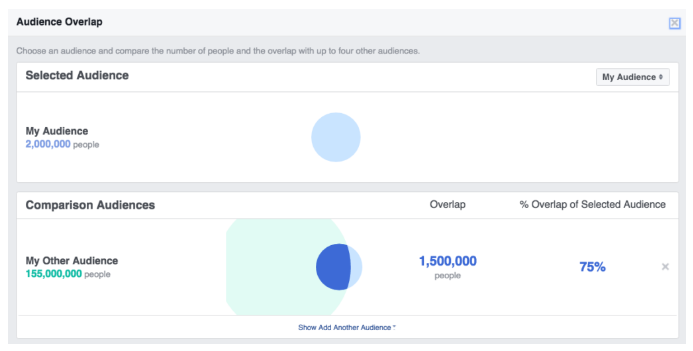
- Problem: High Auction Overlap: When an advertiser runs several ad sets that target substantially similar audiences, these ad sets begin to compete against each other in the auction. Meta’s system is designed to prevent advertisers from bidding against themselves, which would inflate costs and diminish efficiency. In such scenarios, the algorithm will prioritize the ad set with the highest perceived "total value" (a combination of bid, estimated action rates, and ad quality), pausing or significantly reducing delivery for the competing, lower-value ad sets. While this feature aims to optimize an advertiser’s overall budget, it can lead to individual ad sets underperforming or not delivering at all.
- The Fix: Identifying and Mitigating Overlap: Meta provides tools to diagnose this issue.
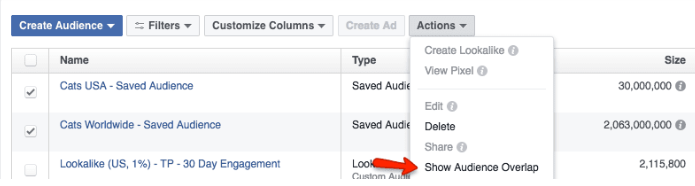
- Audience Overlap Tool: Navigate to "Ads Manager" > "Audiences" tab. Select the custom audiences suspected of overlapping and use the "Show Audience Overlap" feature under "Actions." This tool provides a percentage of overlap between selected audiences.
- Consolidate or Diversify: If high overlap is detected (e.g., above 20-30% for custom audiences), advertisers can either:
- Consolidate: Combine overlapping ad sets into a single, larger ad set, allowing Meta’s algorithm to optimize within that single pool more effectively.
- Diversify: Redefine the targeting for each ad set to ensure they are reaching distinctly different segments of the audience, minimizing direct competition. This could involve using different interest categories, custom audiences, or geographical targeting for each ad set.
8. Low Ad Engagement and Relevance
Meta’s primary goal is to provide a positive user experience, which includes showing relevant and engaging ads. Ads that consistently fail to resonate with their audience will be deprioritized.
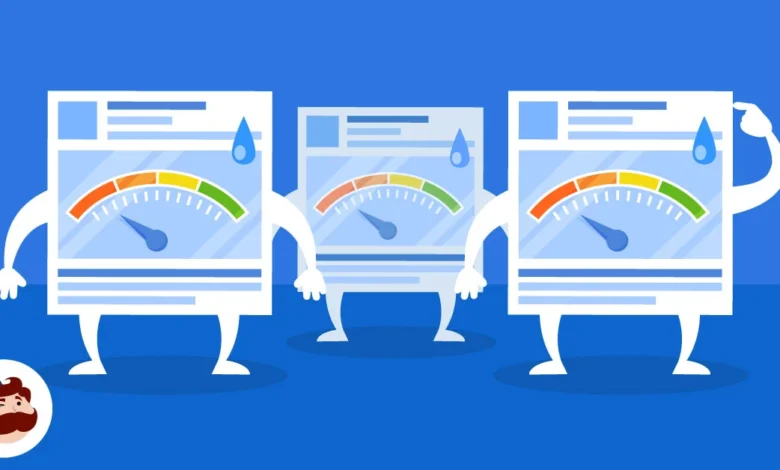
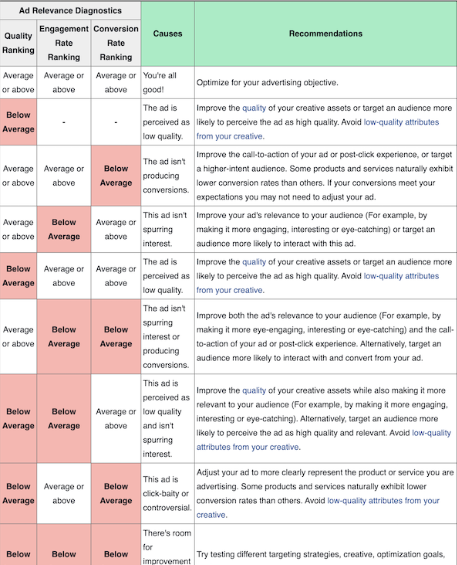
- Problem: Low Ad Engagement: If an ad receives low engagement (e.g., few clicks, likes, shares, or comments) or generates negative feedback (e.g., "hide ad," "report ad"), Meta’s algorithm will interpret this as a lack of relevance to the target audience. Consequently, the ad’s delivery will be throttled or stopped entirely. Meta uses "ad relevance diagnostics" to evaluate ad performance, including:
- Quality Ranking: How an ad’s perceived quality compares to other ads targeting the same audience.
- Engagement Rate Ranking: How an ad’s expected engagement rate compares to other ads targeting the same audience.
- Conversion Rate Ranking: How an ad’s expected conversion rate compares to other ads with the same optimization goal.
Low rankings in any of these metrics signal a problem.
- The Fix: Enhance Ad Creative, Messaging, and Targeting: Improving ad relevance requires a multi-faceted approach:
- Revamp Creative: Experiment with new visuals (images, videos), compelling ad copy, and stronger calls to action. A/B testing different creative elements is highly recommended.
- Refine Messaging: Ensure the ad message directly addresses the pain points or desires of the target audience.
- Optimize Landing Page: The post-click landing page must be relevant, user-friendly, and provide a seamless experience consistent with the ad’s promise.
- Target High-Intent Audiences: Re-evaluate audience segmentation to ensure the ad is reaching individuals most likely to be interested. This might involve creating more specific custom audiences or lookalike audiences.
- Focus on Low Rankings: Meta advises prioritizing improvements for metrics with "low" rankings, as moving from low to average typically yields more significant delivery improvements than moving from average to above average.
Conversion Optimization and Algorithmic Learning
The chosen optimization goal dictates how Meta’s algorithm learns and delivers ads. Misalignment or insufficient data for this goal can impede delivery.
9. Your Ads Are Not Converting (with Conversion Optimization)
When an advertiser selects a conversion-based optimization goal (e.g., "Purchases," "Leads," "App Installs"), they are instructing Meta to find users most likely to perform that specific action.
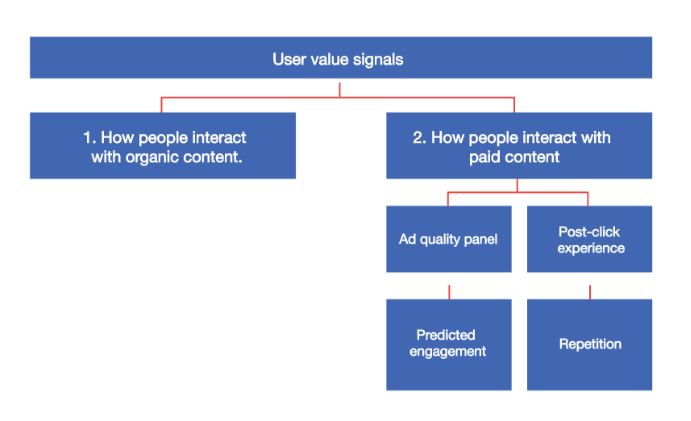
- Problem: Insufficient Conversion Data for Optimization: If an ad is optimized for a high-value, infrequent conversion event (like "Purchase") but fails to generate enough conversions within a given timeframe, Meta’s algorithm will struggle to gather sufficient "user value signals" (e.g., past purchase behavior, engagement with similar ads, demographic data) to identify a viable audience. Without enough conversion data, the algorithm cannot effectively learn and optimize delivery, leading to the ad being throttled or stopped entirely. This is particularly problematic during the campaign’s learning phase, which typically requires around 50 conversions per ad set per week to exit.
- The Fix: Adjust Optimization Goals and Allow Learning: The solution involves providing the algorithm with more accessible optimization events, allowing it to gather data and learn more efficiently:
- Shift to Mid-Funnel Conversions: Temporarily change the optimization goal to a more frequent, earlier-stage conversion event. For e-commerce, instead of "Purchase," optimize for "Add to Cart" or "Initiate Checkout." For lead generation, optimize for "Page View" of a lead magnet or "Contact Form View" rather than "Submission."
- Optimize for Link Clicks: As a more general solution, switching the optimization goal from conversions to "Link Clicks" instructs Meta to find users most likely to click on the ad, regardless of their likelihood to convert immediately. This allows the ad to gain impressions and clicks, providing the algorithm with data on user interest and engagement. Once the ad consistently generates clicks and initial conversions, the optimization goal can be gradually shifted back to the desired high-value conversion event.
To implement this, navigate to "Ads Manager," select the problematic ad set, and modify the optimization goal within its settings to "Link Clicks." This strategic adjustment allows the campaign to exit the learning phase and gain traction before re-focusing on higher-commitment actions.
Conclusion: Proactive Monitoring and Agile Adaptation
The myriad reasons for Facebook ads failing to deliver underscore the complex and dynamic nature of digital advertising on Meta platforms. From stringent policy adherence to meticulous budget management, precise audience targeting, and strategic optimization choices, each element plays a critical role in a campaign’s success. For marketers, proactive monitoring of Ads Manager, particularly the "Delivery" column and "Account Quality" section, is not merely good practice but a necessity. Regularly reviewing ad performance, staying abreast of Meta’s evolving policies, and adopting an agile approach to campaign adjustments are essential. By systematically diagnosing and rectifying these common delivery issues, advertisers can ensure their campaigns reach their intended audiences, maximize their return on investment, and maintain consistent brand presence in the highly competitive digital landscape. The ability to quickly identify and resolve these challenges distinguishes effective ad marketers and directly contributes to sustained business growth through Meta’s powerful advertising channels.