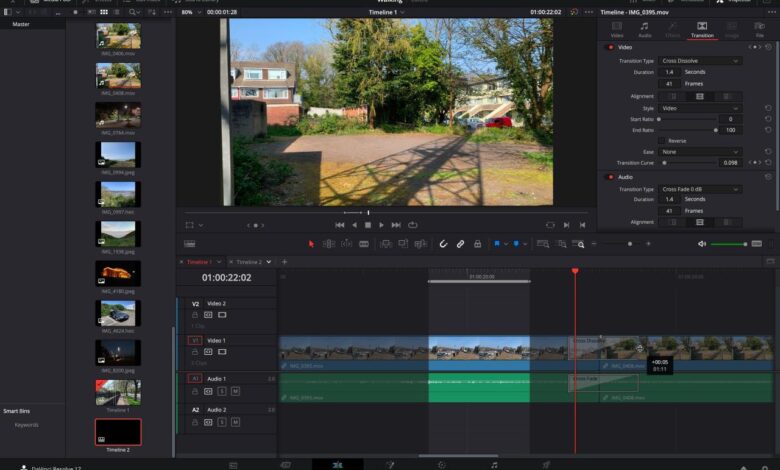
Video Editing Software A Comprehensive Guide
Video editing software sets the stage for creating captivating visual stories. From basic trims to complex special effects, this powerful tool empowers creators to transform raw footage into polished masterpieces. Understanding the different types of video editing software, their features, and their user interfaces is key to choosing the right one for your needs. This guide delves into the world of video editing, exploring everything from professional suites to mobile apps.
This exploration will cover the essential concepts behind video editing, including timelines, layers, and effects. We’ll examine the evolution of video editing software, comparing and contrasting various types, from amateur-friendly options to professional-grade tools. We’ll also dive into specific software examples, highlighting their strengths and weaknesses, and discuss hardware requirements, performance optimization, and the exciting future of video editing.
Introduction to Video Editing Software
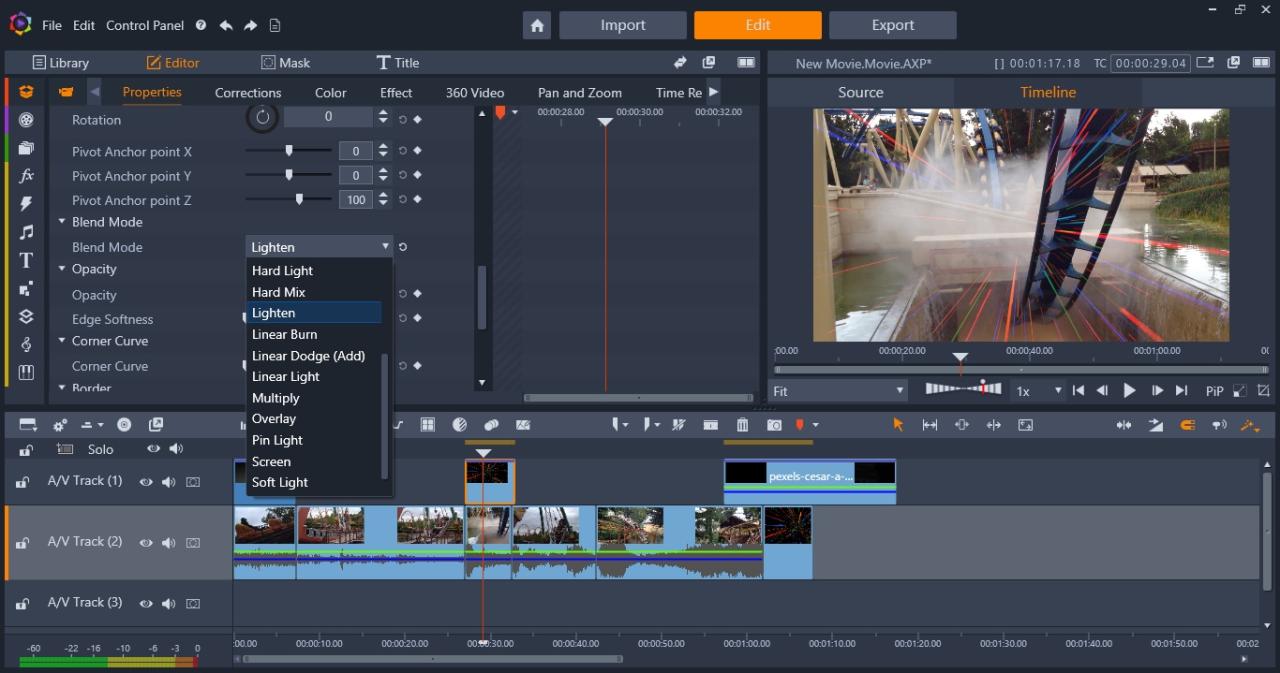
Video editing software is a powerful tool that allows users to manipulate and assemble video footage into compelling productions. It encompasses a wide range of functions, from basic trimming and transitions to complex effects and color grading. This software plays a crucial role in creating everything from short home videos to feature-length films.Understanding video editing software requires grasping fundamental concepts like the timeline, layers, and effects.
The timeline acts as the central workspace, where video clips, audio tracks, and graphics are arranged and sequenced. Layers allow for multiple elements to exist within the same space, offering a visual hierarchy and enabling intricate compositions. Effects enhance the visual appeal and add creative flair to the project.
Historical Overview of Video Editing Software
The evolution of video editing software mirrors the development of video technology itself. Early video editing was often a painstaking process, requiring specialized equipment and extensive manual labor. Analog systems like tape editing relied heavily on physical manipulation of videotapes, and editing techniques were quite limited. The advent of digital video and computers revolutionized the process, leading to the emergence of sophisticated software packages that automate many tasks and offer unprecedented creative control.
Early digital video editing software was relatively basic, but advancements in computing power and algorithms have progressively made video editing more accessible and powerful.
Different Types of Video Editing Software
Video editing software caters to a diverse range of users and project needs. Different types exist to accommodate varying levels of expertise and budgets. This includes professional, amateur, and mobile-based solutions. Each type offers a unique blend of features and functionalities, catering to different needs.
Comparison of Video Editing Software Types
| Feature | Professional | Amateur | Mobile |
|---|---|---|---|
| Cost | High (often hundreds or thousands of dollars) | Low to Moderate (typically dozens to hundreds of dollars) | Low (often free or very affordable) |
| Features | Extensive: advanced color correction, complex effects, advanced audio mixing, high-resolution output | Basic: trimming, transitions, basic effects, audio adjustments | Limited: basic trimming, transitions, limited effects, basic audio controls |
| Hardware Requirements | High-end computers with powerful processors and sufficient RAM | Mid-range computers, but often less demanding | Low: can run on smartphones or tablets |
| User Interface | Complex, with many features and options | Intuitive and user-friendly | Simple and streamlined, often touch-based |
This table illustrates the key differences between professional, amateur, and mobile video editing software. Professional software is designed for complex projects and advanced users, while amateur and mobile options are geared towards simpler tasks and ease of use.
Features and Capabilities
Video editing software has become an essential tool for anyone looking to create compelling visual content. Beyond basic video recording, these programs provide a suite of features to enhance, refine, and transform raw footage into polished productions. Understanding these capabilities is crucial for selecting the right software for your needs.Most video editing software shares a core set of features, making them versatile for various tasks.
These features include, but aren’t limited to, basic editing tools for trimming, splitting, and merging video clips. Advanced features like transitions, effects, and audio manipulation allow for intricate storytelling.
Key Features Common to Most Software
The fundamental features found in most video editing software facilitate the manipulation of video and audio elements. This includes importing and exporting files in various formats, managing media assets within the program, and the ability to work with multiple video and audio tracks. A comprehensive understanding of these common elements is essential for efficient video editing.
Editing Tools: Trimming, Splitting, and Merging
These basic yet powerful tools are essential for shaping your video. Trimming allows you to precisely cut away unwanted portions of a clip, enhancing the narrative flow. Splitting enables you to divide a single clip into multiple segments, offering flexibility for re-ordering and re-arranging scenes. Merging combines different clips, creating a continuous sequence. These fundamental operations form the foundation for assembling video content.
Transitions and Effects
Transitions and effects are critical elements for adding visual interest and creating smooth transitions between different scenes. Transitions, such as fades, wipes, and cross dissolves, can seamlessly connect scenes, whereas effects like color grading, filters, and text overlays add visual flair. Mastering these tools can transform a simple video into a more engaging and dynamic production.
Comparing Software Capabilities, Video editing software
Different video editing software options offer varying levels of capability. Some might excel in specific areas like animation or 3D effects, while others prioritize ease of use and affordability. Thorough research and comparison based on specific project requirements are vital in choosing the best software. Trial periods and demos can help determine which program aligns with your workflow and preferences.
Workflow and Basic Video Editing Tasks
A typical video editing workflow involves importing media files, organizing them into clips, trimming and editing individual clips, adding transitions and effects, and finally exporting the final product. This process can be tailored to specific tasks, from creating simple social media videos to producing complex film-quality productions. The more familiar you become with these steps, the more proficient you become in handling projects of increasing complexity.
Types of Transitions
The selection of transitions can dramatically impact the visual appeal of a video. Different software packages offer various transition options, enhancing the flow and pacing of the video. This table illustrates the availability of common transitions in three different video editing software packages.
| Transition Type | Software A | Software B | Software C |
|---|---|---|---|
| Fade | Yes | Yes | Yes |
| Wipe | Yes | No | Yes |
| Cross Dissolve | Yes | Yes | Yes |
User Interface and Workflow
Video editing software has become increasingly user-friendly, allowing even beginners to create professional-quality videos. Understanding the software’s interface and workflow is crucial for efficient and effective video production. This section dives into the typical user interface, navigation methods, and the steps involved in producing a short video. We’ll also explore the importance of intuitive design and discuss file import/export options.
Typical User Interface
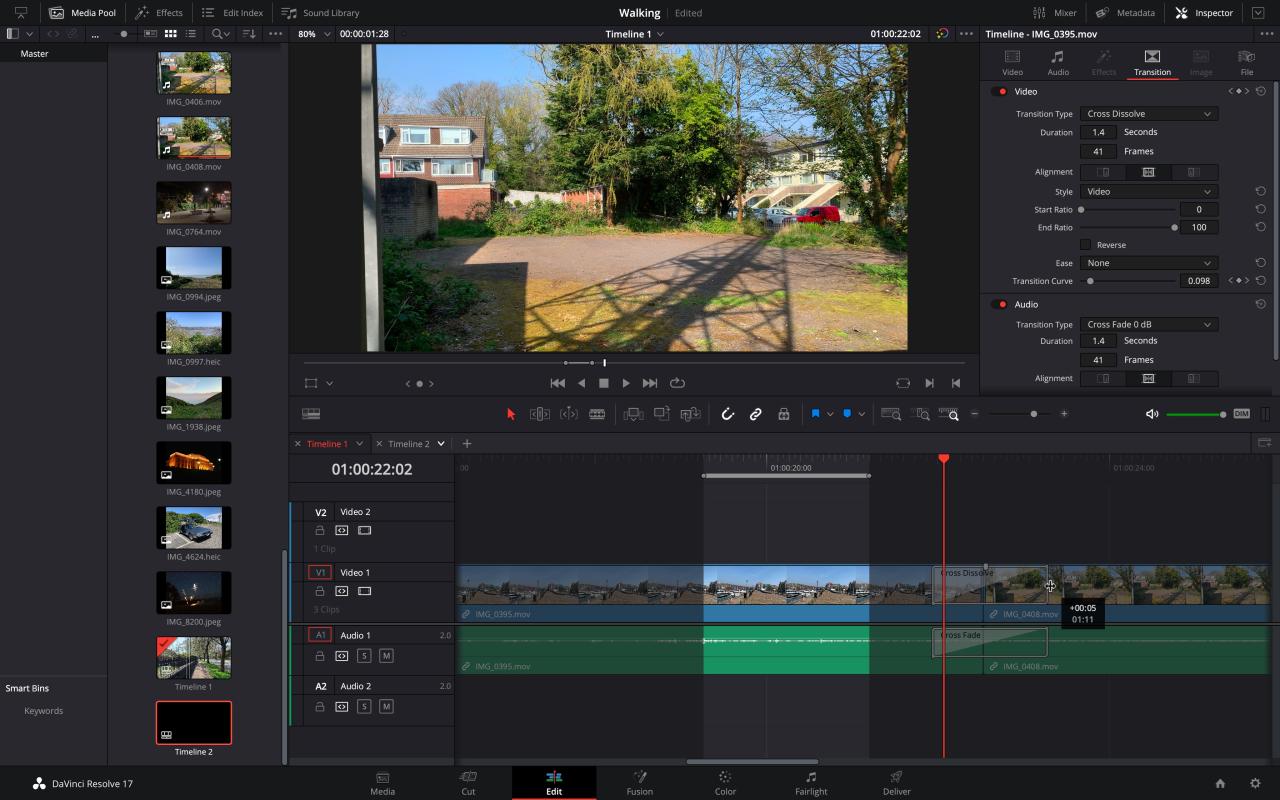
The user interface of video editing software is typically designed with a modular structure. Key elements include a timeline, video/audio tracks, editing tools (transitions, effects, etc.), and a media browser. The timeline displays the video and audio segments, allowing users to arrange, trim, and edit them. Video and audio tracks often appear as separate panels for precise control over each element.
Editing tools provide a range of effects and transitions. Finally, the media browser allows for easy location and selection of video files. Visual elements like color-coding and clear labels enhance user comprehension and reduce confusion.
Navigation Methods
Video editing software often incorporates various navigation tools to aid in workflow. Common navigation methods include using the mouse for precise selection and manipulation of video clips, keyboard shortcuts for faster actions, and dedicated navigation tools within the timeline (like scrubbers and markers). These tools streamline the editing process, enabling users to move through the project quickly and efficiently.
Creating a Short Video: Typical Workflow
A typical workflow for creating a short video involves several steps. First, users import the necessary video and audio files into the software. Next, they arrange the clips on the timeline, adjusting their duration and order. Then, they apply effects and transitions to enhance the video’s visual appeal. Finally, they export the completed video in the desired format.
This sequential approach is crucial for maintaining a clear and manageable workflow, enabling users to construct the video step-by-step.
Import and Export Options
Video editing software supports diverse file import and export formats. Import options commonly include formats like MP4, MOV, AVI, and others, depending on the specific software. This ensures compatibility with a wide variety of video files. Export options often provide control over resolution, frame rate, and codec, enabling users to choose the optimal settings for their needs and desired output.
Video editing software is essential for creating compelling content, and mastering these tools can significantly boost your impact. Recently, I was inspired by the insights of Ignite Marketer of the week, Lara Hood, Balazs CMO GM at Intuit, ignite marketer of the week lara hood balazs cmo gm at intuit. Her focus on innovative marketing strategies reminded me of the creative potential within video editing software, and how important it is to stay updated with the latest tools and trends.
This ensures that users can maintain quality and file size according to their preferences.
Intuitive Design and User Experience
A well-designed user interface and intuitive workflow are paramount for a positive user experience. This involves clear and easily accessible tools, logical organization of panels, and effective use of visual cues. An intuitive design significantly reduces the learning curve for new users and empowers them to focus on creative tasks. Well-designed software minimizes frustration and maximizes efficiency, allowing users to confidently approach complex tasks.
Specific Software Examples
Diving deeper into the world of video editing, we encounter a plethora of software options catering to diverse needs and skill levels. From professional-grade tools for cinematic masterpieces to user-friendly applications for casual editing, the choices can feel overwhelming. This section provides a practical overview of popular video editing software, categorized by type and highlighting their strengths and weaknesses.Understanding the strengths and weaknesses of different software is crucial for selecting the right tool for the job.
A professional editor might require extensive features for complex projects, while a beginner might prioritize simplicity and ease of use. Price is also a key consideration, with various options available to fit different budgets.
Professional Video Editing Software
Professional video editing software typically boasts extensive features, powerful tools, and complex interfaces designed for high-end projects. These suites are often favored by filmmakers, television production companies, and video professionals.
- Adobe Premiere Pro: Renowned for its robust features and extensive control over every aspect of video editing, Premiere Pro excels in complex projects. Its extensive color correction tools, advanced effects, and integration with other Adobe Creative Cloud applications are major strengths. However, its complexity can be a significant hurdle for beginners, and the high price tag is a substantial barrier for many.
Video editing software is awesome, right? But to really make your videos pop, you need to understand your audience. That’s where social media listening comes in handy – analyzing what people are saying about similar videos on platforms like Twitter and Instagram, social media listening helps you tailor your edits to resonate with your viewers.
Then, you can use that knowledge to craft even better video content with your editing software.
Its extensive features make it a powerhouse for professionals, but the steep learning curve can deter those new to video editing. A good example of this would be a post-production team needing to seamlessly integrate audio, video, and graphics for a documentary.
- Final Cut Pro: Known for its intuitive interface and powerful features, Final Cut Pro is a popular choice for professional video editors. Its user-friendly design makes it relatively accessible, especially for those familiar with Apple products. Its strong performance and extensive features are attractive to professional editors. While its price is comparable to Premiere Pro, the user experience is generally praised for its accessibility and ease of use.
An example of this would be a filmmaker wanting to quickly edit and refine footage from a film shoot.
- DaVinci Resolve: DaVinci Resolve stands out as a versatile and powerful option, often favored for its comprehensive suite of tools. It provides exceptional color grading capabilities and is particularly well-regarded for its affordability compared to other professional software. Its ability to handle multiple projects simultaneously is a significant advantage for those working on diverse video productions. However, the extensive nature of the software might make it overwhelming for less experienced users, requiring a certain level of comfort with editing software.
Amateur Video Editing Software
Amateur video editing software is designed for those with less technical experience, focusing on simplicity and ease of use. These options are suitable for personal projects, social media content, and educational videos.
- Kapwing: Kapwing is a web-based video editor that is very accessible, making it a popular choice for beginners and those working on quick edits. Its strengths lie in its simplicity and ease of use, as well as its straightforward approach to video editing. The price point makes it highly attractive, and its basic features make it a great tool for beginners and those who need simple editing tools.
An example of this would be a student who needs to create a quick video presentation for class.
Mobile Video Editing Software
Mobile video editing apps are designed for on-the-go editing, often prioritizing portability and accessibility. These apps are well-suited for social media content creators and individuals who need to quickly edit videos on their smartphones.
- iMovie (iOS): iMovie is a well-known, free mobile video editing app for iOS. It offers a user-friendly interface and a range of tools for basic video editing, making it a popular choice for mobile users. Its simplicity is a key strength, enabling quick edits and the ability to easily share content. Its free nature makes it particularly attractive, and its interface is straightforward, making it a popular choice for mobile editing.
Software Comparison
The following table provides a concise comparison of the discussed software options.
| Software | Features | Ease of Use | Price |
|---|---|---|---|
| Adobe Premiere Pro | Extensive | Complex | High |
| Final Cut Pro | Powerful | Intuitive | High |
| DaVinci Resolve | Versatile | Moderate | Low |
| Kapwing | Basic | Simple | Low |
| iMovie | Basic | Simple | Free |
Hardware Requirements and Performance: Video Editing Software
Choosing the right hardware is crucial for a smooth and efficient video editing experience. Different software programs have varying demands, and understanding these requirements ensures your workflow isn’t hampered by sluggish performance. Knowing the impact of processing power, RAM, and storage on editing speed allows you to invest wisely and avoid frustrating bottlenecks.High-performance hardware translates to a faster, more enjoyable video editing process.
This is especially true for complex projects involving high-resolution footage, intricate special effects, and multiple layers of editing. The right setup can significantly impact your productivity and overall satisfaction with the editing process.
Typical Hardware Requirements
Different video editing software programs have varying hardware requirements. These requirements depend on the complexity of the software and the types of projects you’ll be handling. For instance, software designed for basic edits of standard-definition video may have less demanding specifications than software intended for high-resolution 4K video editing with extensive special effects. This is crucial to consider when purchasing or upgrading your equipment.
Impact of Processing Power
Central processing unit (CPU) speed plays a significant role in video editing performance. A powerful CPU can handle complex tasks like encoding and rendering video more efficiently. This results in faster turnaround times for projects, reducing overall editing time. For example, projects involving complex color grading and extensive motion graphics benefit from a high-performance CPU.
Impact of RAM
Random access memory (RAM) is essential for storing the active parts of your project. The more RAM available, the more data the system can hold in memory, enabling smoother transitions and faster rendering times. Sufficient RAM is critical for projects with numerous layers, complex effects, and large video files. Insufficient RAM can lead to frequent freezing and crashing.
Impact of Storage Space
Storage space is essential for storing video files, project files, and temporary data. The larger your projects, the more storage space you’ll need. Sufficient storage prevents delays during file loading and processing, ensuring a more fluid workflow.
Importance of Stable Internet Connection (Online Editing)
For online video editing tools, a stable internet connection is paramount. Lagging internet connections can cause significant delays during the uploading, downloading, and processing of files. Reliable internet speed and stability are vital to ensure seamless performance.
Optimization Methods
Several methods can optimize performance and improve workflow. These include choosing high-performance hardware, optimizing project settings, and ensuring a stable internet connection (for online tools). Using optimized codecs for your projects can also significantly improve rendering speed. Regular maintenance of your computer, including defragmenting hard drives and updating drivers, can also enhance performance.
Video editing software is crucial for content creators, especially when crafting engaging videos for social media. A key part of that is understanding how to leverage micro influencer marketing to connect with a targeted audience. Learning how to effectively use tools like Adobe Premiere Pro or Final Cut Pro can help you create high-quality videos to showcase products or services to a specific demographic, which is exactly what micro influencer marketing can help you achieve.
Mastering video editing software is ultimately essential for successful social media campaigns.
Hardware Requirements Summary
| Software | CPU | RAM | Storage |
|---|---|---|---|
| Adobe Premiere Pro | High-end | High | High |
| DaVinci Resolve | Moderate | Moderate | Moderate |
Integration and Collaboration
Video editing software is no longer a solitary endeavor. Modern applications are designed to seamlessly integrate with other tools, enabling collaborative workflows and streamlined project management. This interconnectedness allows users to leverage their existing skills and expertise in various creative fields, resulting in more dynamic and polished final products. From audio mixing to graphic design, the ability to integrate diverse elements within a single platform is a significant advantage.The integration capabilities extend beyond simple file sharing, offering real-time collaboration features for distributed teams.
This means individuals working remotely can contribute to the project, track changes, and maintain a shared vision. Such functionality has become essential in today’s globally connected world of filmmaking, advertising, and multimedia production.
Integration with Other Tools
Video editing software often includes built-in integrations with audio editing applications. This allows users to import audio files, apply effects, and make adjustments directly within the video editing environment without needing to switch between programs. This streamlined workflow saves time and maintains consistency in the overall project. Similarly, integration with graphic design tools is common. Users can import vector graphics, create animated elements, or manipulate images directly within the video editing software.
This integration minimizes the need for repetitive steps, allowing for greater creativity and efficiency.
Methods for Sharing and Collaborating on Video Projects
Various methods facilitate project sharing and collaboration. Cloud-based storage is a common feature that enables team members to access and modify files from different locations. Version control systems track changes to projects, allowing for easy rollback and conflict resolution. Real-time collaboration features, often found in professional-grade software, allow multiple users to work on the same project simultaneously, viewing changes and commenting in real-time.
Examples of Integration
A common example of integration is using an audio editing tool within the video editing software. If a user is editing a documentary, they can import audio recordings, apply effects like noise reduction or equalization, and then seamlessly incorporate this edited audio into the video timeline. Another example is using a graphic design program. A user editing a promotional video can import logos or animations created in a graphic design program and easily integrate them into the video.
Remote Collaboration
Remote collaboration is now a crucial aspect of video editing workflows. Video editing software often includes features such as shared project folders, real-time video conferencing during editing sessions, and collaborative commenting tools. This allows geographically dispersed teams to work together effectively. These tools facilitate communication and ensure everyone is on the same page throughout the editing process.
Collaboration Features in Different Video Editing Software
| Software | Collaboration Features |
|---|---|
| Adobe Premiere Pro | Cloud-based storage, shared projects, real-time collaboration, version control, commenting features |
| Final Cut Pro | Shared projects, version history, real-time collaboration (with compatible versions), collaborative commenting |
| DaVinci Resolve | Shared projects, version control, collaborative editing features (limited), cloud-based collaboration options |
| Filmora | Basic project sharing, limited collaboration tools (primarily for cloud-based projects), collaborative commenting |
Emerging Trends and Future of Video Editing
Video editing software is constantly evolving, driven by technological advancements and shifting user needs. This dynamic landscape sees the integration of cutting-edge technologies like AI and machine learning, impacting every aspect of the creative process, from initial capture to final output. The future of video editing is increasingly cloud-centric, accessible, and efficient, enabling collaborative workflows and democratizing the craft.The evolution of video editing software isn’t just about faster processing or more intuitive interfaces; it’s about fundamentally changing how we create and consume video.
The integration of AI and machine learning is poised to revolutionize the entire workflow, from automating tedious tasks to generating creative elements. Cloud-based solutions are not only enhancing accessibility but also changing the way teams collaborate, and accessibility features are ensuring wider participation in the video editing world.
Latest Trends in Video Editing Software
Several key trends are shaping the future of video editing software. AI-powered tools are becoming increasingly sophisticated, automating tasks like color grading, object removal, and even generating basic video effects. Cloud-based platforms are providing greater flexibility and scalability, enabling users to access powerful editing tools from any device with an internet connection. The demand for more user-friendly interfaces and intuitive workflows is driving the development of more accessible and customizable tools, especially for novice editors.
Moreover, the rise of mobile video editing solutions reflects the increasing importance of video creation on smartphones and tablets.
Impact of Artificial Intelligence and Machine Learning
AI and machine learning are significantly altering the video editing landscape. AI-powered tools can automatically analyze footage, identify key moments, and suggest edits. These systems can also assist with color correction, noise reduction, and even generate basic visual effects. For instance, AI can analyze the lighting in a scene and automatically adjust the color balance to match a desired aesthetic.
This automation frees up editors to focus on creative choices and storytelling rather than tedious technical adjustments. Machine learning algorithms can also predict and suggest the most effective edits for a given scene, based on user preferences and stylistic choices, or even trends in editing.
Future Directions of Video Editing Software
The future of video editing software is likely to be characterized by even more sophisticated AI integration, a greater emphasis on intuitive workflows, and seamless cloud-based collaboration. Expect to see tools that automatically generate visual effects based on user input, tools that create video summaries from long-form content, and tools that help users create personalized templates for different types of video.
This focus on automation and personalization will lead to more creative possibilities for editors and will lower the barrier to entry for new users.
Cloud-Based Video Editing
Cloud-based video editing is rapidly changing the industry. These platforms offer scalability, allowing users to access powerful editing suites from anywhere with an internet connection. This is particularly beneficial for collaborative projects where team members can work on the same project simultaneously. Furthermore, cloud storage eliminates the need for large local storage solutions, reducing costs and improving workflow.
One prominent example is the increasing availability of cloud-based video editing solutions for mobile devices, offering the flexibility of creating and editing videos on the go.
Accessibility Features
Accessibility features are playing an increasingly important role in video editing tools. These features include options for customizing the user interface, keyboard shortcuts, and voice commands, enabling individuals with disabilities to participate in the video editing process. Furthermore, tools that translate audio descriptions and subtitles, making video content accessible to a wider audience, are becoming increasingly important. Such advancements create a more inclusive environment for video editors and content creators.
Summary
In conclusion, video editing software is a dynamic field constantly evolving to meet the demands of today’s creators. Whether you’re a seasoned professional or a budding enthusiast, understanding the available options and their capabilities is essential. From professional suites to mobile apps, the choice depends on your budget, skill level, and project needs. This guide provided a thorough overview of video editing software, equipping you with the knowledge to navigate this exciting and ever-changing landscape.