How to Live Stream on Facebook Your Ultimate Guide
How to live stream on Facebook? This comprehensive guide will walk you through every step, from setting up your account to maximizing audience engagement. Whether you’re a seasoned social media pro or just starting out, mastering Facebook Live can unlock incredible opportunities for connection and growth. We’ll cover everything from pre-planning your content strategy to handling technical glitches during the broadcast, empowering you to create compelling and professional live streams.
From personal updates to business promotions and event broadcasts, Facebook Live offers diverse possibilities. Understanding the nuances of each type of broadcast, and the necessary equipment, will be crucial for a successful stream. We’ll also delve into essential post-stream actions like gathering feedback and promoting your recordings, helping you make the most of your live sessions.
Introduction to Facebook Live Streaming
Facebook Live streaming is a powerful tool for connecting with audiences in real-time. It allows users to broadcast video content directly to their followers on Facebook, fostering immediate engagement and interaction. This feature offers a unique opportunity to share live events, deliver presentations, conduct Q&As, and build a stronger community around your brand or personal presence. The ability to interact with viewers in real-time is a key advantage, as is the built-in audience engagement tools.This dynamic platform offers several key advantages.
It allows for spontaneous sharing of information, creating a sense of immediacy and authenticity. This can be particularly beneficial for businesses, influencers, and individuals looking to build relationships and communicate effectively with their audience.
Key Features and Benefits of Facebook Live
Facebook Live broadcasts are characterized by their real-time nature. This immediacy fosters a sense of community and allows for immediate interaction with viewers. The platform’s integrated tools facilitate audience engagement through comments, reactions, and live Q&As. This direct connection with the audience builds stronger relationships and allows for real-time feedback, enabling quick adjustments and improvisations.
Types of Facebook Live Broadcasts
Facebook Live streaming caters to diverse needs and purposes. Personal live streams can be used to share daily life updates, thoughts, or experiences. Businesses can utilize live broadcasts for product launches, presentations, or customer interaction sessions. Events, like concerts, conferences, or even celebrations, can be live-streamed to a wider audience, transcending geographical limitations.
Equipment for Facebook Live Streaming
Successful Facebook Live broadcasts require appropriate equipment to ensure a high-quality experience for viewers. Choosing the right tools can significantly enhance the broadcast’s impact.
| Equipment Type | Description | Purpose | Example |
|---|---|---|---|
| Camera | Captures the video feed for the broadcast. | Provides the visual component of the live stream. | Webcam, DSLR camera, action camera |
| Microphone | Captures audio for the broadcast. | Provides clear and audible audio for viewers. | USB microphone, lavalier microphone, built-in microphone |
| Lighting | Provides illumination for the subject. | Ensures a clear and well-lit image for the broadcast. | Desk lamp, ring light, professional lighting kit |
| Streaming Software/App | Enables the transmission of the video and audio to Facebook Live. | Facilitates the process of streaming the content to the platform. | OBS Studio, Facebook Live app |
Planning and Preparing Your Live Stream
A successful Facebook Live stream hinges on meticulous planning. Knowing your goals and preparing for potential issues are key to engaging your audience and achieving your desired outcome. Whether you’re aiming to build brand awareness, sell a product, or simply connect with viewers, a well-structured approach will yield better results.Pre-planning your live stream content strategy, much like any other marketing initiative, is crucial.
This allows you to craft a compelling narrative and maintain audience interest throughout the duration of the stream.
Getting your Facebook live stream up and running is pretty straightforward. Just make sure your video quality is good and your internet connection is stable. However, something to consider is cumulative layout shift, which can really mess up the viewing experience for your audience. This is a common issue that occurs when elements on a page shift unexpectedly, and you can learn more about it here: cumulative layout shift.
By keeping a keen eye on how your stream’s page elements load, you can avoid frustrating your viewers and keep them engaged. So, next time you’re planning a Facebook live stream, think about this crucial aspect of website design.
Importance of a Content Strategy
A well-defined content strategy Artikels the specific topics, format, and goals for your Facebook Live session. This framework ensures a focused and engaging experience for your viewers, making it less likely that your live stream will feel disjointed or lack a clear purpose. This pre-planning avoids ad-hoc content, which can often lead to a lack of engagement.
Creating a Script or Artikel
A script or Artikel serves as a roadmap for your live stream, providing structure and direction. It helps maintain a consistent flow and prevents you from rambling or deviating from your key message. This structured approach is vital for ensuring a professional and polished presentation, regardless of the topic. A script also allows for rehearsal and refinement, reducing the chance of unexpected hiccups during the live stream.
Live Stream Formats
Various formats cater to different objectives and audiences. Q&A sessions allow for direct interaction, providing a valuable opportunity to address viewer concerns and build rapport. Product demonstrations can showcase features and benefits, fostering a deeper understanding of your offerings. Tutorials guide viewers through a process, enhancing their knowledge and providing valuable resources. These are all effective ways to connect with and engage your audience.
Engaging the Audience
Engaging viewers during a live stream is paramount to maintaining their interest. Utilizing polls, questions, and comments allows for real-time interaction and encourages participation. These interactive elements create a dynamic experience, making the live stream feel less like a monologue and more like a conversation. The use of polls and questions can also provide valuable insights into viewer preferences and interests.
Visuals
Selecting and preparing appropriate visuals significantly impacts the overall experience. High-quality images and videos will enhance engagement. Backgrounds should be professional and complement the stream’s theme. Visual elements such as logos and branding will ensure consistency and build recognition. Using a visually appealing backdrop can create a professional environment for your stream.
Consider the lighting and ensure the visuals are clear and easy to see. This helps maintain focus and prevents viewers from being distracted.
During the Live Stream: How To Live Stream On Facebook
Staying engaged and professional during a Facebook Live stream is crucial for audience retention and a positive brand image. This phase demands active participation and skillful management of the stream’s flow. The key is to maintain a consistent, enthusiastic demeanor while effectively handling audience interaction and potential technical hiccups.Successfully navigating a live stream requires more than just a strong topic.
It demands proactive strategies for engagement, clear communication, and a flexible approach to address unforeseen circumstances. A well-prepared host can transform a live stream from a passive presentation into an interactive and enriching experience for viewers.
Key Actions During Broadcasting
Effective live streaming requires proactive engagement. This includes monitoring audience interaction, addressing comments and questions promptly, and maintaining a positive, enthusiastic tone. These actions are crucial for creating a dynamic and memorable experience.
- Maintain Eye Contact: Avoid looking at the screen; instead, engage with the virtual space and the camera, as if interacting with a live audience. This fosters a more personal connection and reduces the feeling of detachment.
- Speak Clearly and Concisely: Use a clear and concise tone to convey your message effectively. Avoid mumbling or rushing through your points. Pauses can help emphasize key takeaways and add to the overall flow.
- Use Visual Aids Strategically: Incorporate relevant visuals such as images, graphs, or presentations to enhance your message. Avoid cluttered or overly complex visuals; keep them clear and focused on the topic.
- Engage with the Chat: Regularly check the chat window and respond to audience comments and questions. This shows appreciation for viewer participation and keeps them actively involved in the conversation.
Handling Audience Questions and Comments
Proactive and timely responses to audience questions and comments are vital for maintaining audience engagement and demonstrating attentiveness. This fosters a sense of community and strengthens the viewer experience.
| Action | Description | Example |
|---|---|---|
| Acknowledge and Thank | Briefly acknowledge the comment or question and express gratitude for the audience’s participation. | “Thank you for the question, [viewer name].” |
| Answer Directly | Provide a clear and concise answer to the question or address the comment directly. | “The primary reason for the delay is the unexpected system upgrade.” |
| Follow Up | If the question requires further explanation, elaborate on the point or offer additional resources. | “To delve deeper into this topic, you can check out the resources in the description.” |
| Address Concerns | Provide a respectful and informative response to address audience concerns or disagreements. | “I understand your concern; however, this perspective is different from what we’ve observed.” |
| Redirect | If the question is tangential or off-topic, politely redirect the conversation back to the main stream. | “That’s an interesting point, but we’re focusing on [topic] today.” |
Handling Technical Issues, How to live stream on facebook
Technical difficulties can arise during a live stream, disrupting the flow and potentially frustrating viewers. A well-prepared host anticipates and addresses these issues gracefully, ensuring a smooth and positive experience.
- Prepare for Potential Problems: Test your internet connection and equipment beforehand to identify and address any potential problems. Have a backup plan in case of a sudden connection drop.
- Be Ready to Pause or Restart: Have a clear method to pause or restart the live stream if a technical issue occurs. Maintain composure during the interruption.
- Communicate with Viewers: Inform viewers about any technical problems and provide updates on the situation. This maintains transparency and builds trust.
- Use a Backup Plan: Have a backup method for broadcasting, such as a second device or a backup internet connection. This allows for seamless continuation even if there are issues with the primary setup.
- Practice Recovery: Rehearse handling technical issues to develop a calm and confident response. This helps minimize disruptions to the stream.
Post-Stream Actions
The live stream is more than just a performance; it’s a conversation. Post-stream actions are crucial for fostering engagement and maximizing the impact of your efforts. Effective follow-up ensures that your audience feels valued and encourages future participation.Interacting with viewers after the stream concludes builds community and strengthens connections. It demonstrates that you appreciate their time and engagement, and it helps them feel more involved with your brand or message.
Importance of Post-Stream Interaction
Engaging with your viewers immediately after the stream ends can significantly increase the likelihood of repeat views and a stronger community around your channel. Responding to comments, questions, and messages shows appreciation and encourages further interaction. This fosters a sense of community and strengthens the relationship between you and your audience.
Gathering Feedback and Analyzing Performance
Collecting viewer feedback is essential for refining your streaming strategy. Tools like Facebook comments, polls, and surveys provide direct avenues for gathering opinions on the content, presentation, and overall experience. Analyzing the data from these interactions reveals strengths and weaknesses, allowing for strategic adjustments in future streams. This data allows you to fine-tune your approach, making your future streams more impactful.
Saving and Sharing Recordings
Saving and sharing recordings of your Facebook Live streams is a powerful way to extend the reach and impact of your content. Facebook automatically saves your stream; you can download the recording for later use. Sharing these recordings on other social media platforms, your website, or email lists expands your audience and keeps your content accessible.
Promoting the Recording to a Wider Audience
Promoting your recorded stream is essential for maximizing its reach. Sharing the recording link on your social media profiles, website, and email newsletters can introduce your content to a wider audience. Use relevant hashtags and engaging captions to increase visibility and encourage shares. This approach broadens your audience base and allows for greater exposure of your content.
Utilizing Recorded Content for Future Use and Engagement
Recorded content is a valuable asset for future engagement and content creation. Repurpose segments of the stream into shorter clips for social media posts, create summaries for blog posts, or develop educational materials. This strategic reuse of valuable content maximizes the return on your initial investment and extends the lifespan of your work. It demonstrates that your content has value beyond the initial broadcast.
Best Practices for Facebook Live
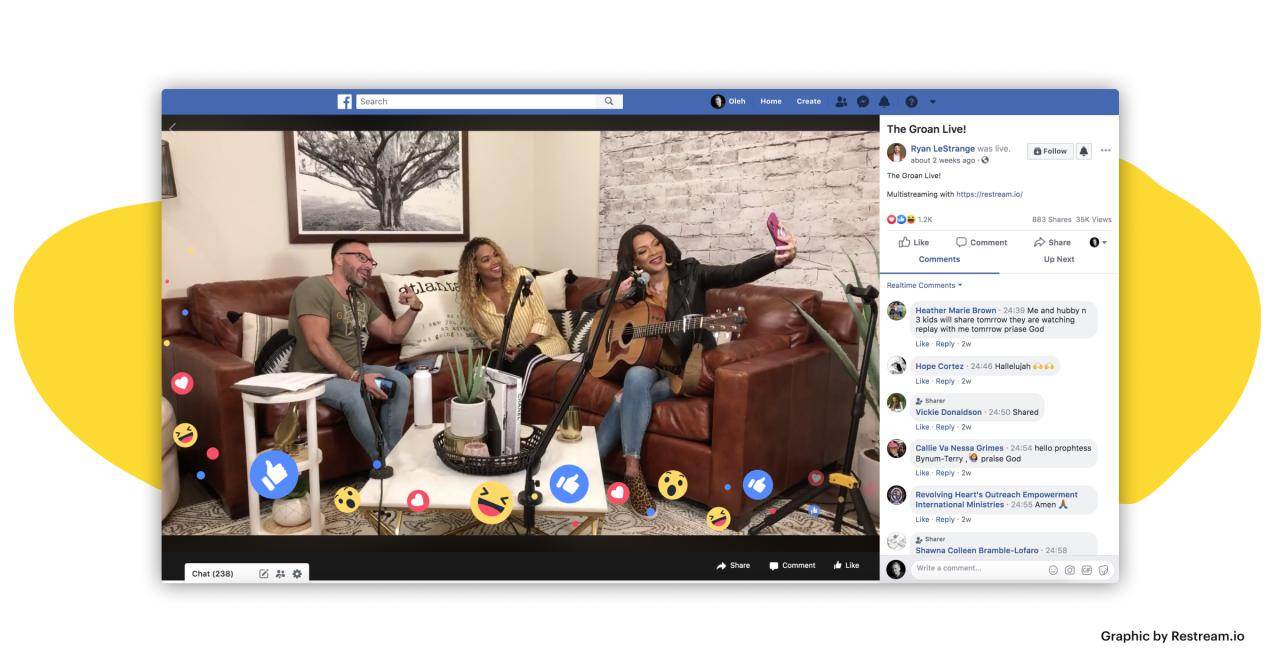
Facebook Live offers a powerful platform for connecting with audiences in real-time. However, simply hitting “go live” isn’t enough to ensure a successful stream. This section dives into best practices for optimizing your Facebook Live streams, focusing on maximizing viewer engagement, maintaining a professional image, and building a consistent brand presence.Effective Facebook Live streams require a strategic approach that extends beyond just the live broadcast itself.
From meticulous planning to post-stream engagement, understanding these best practices is key to achieving your desired results. Careful consideration of audience preferences and platform specifics is critical to a positive and memorable experience.
So, you’re ready to live stream on Facebook? It’s easier than you think! First, you’ll need to set up a Facebook page or profile. Then, you can start broadcasting! Remember, a great live stream often relies heavily on user-generated content, like viewer comments and questions, to keep things engaging. This can boost your audience’s interaction with user generated content , which, in turn, can help build a stronger online community.
Ultimately, incorporating viewer input is key to a successful live stream on Facebook.
Optimizing Live Streams for Viewers
Different approaches to optimizing live streams cater to varied viewer preferences. Short, engaging bursts of information can appeal to busy professionals, while longer, in-depth sessions can resonate with those seeking comprehensive knowledge. Consider your target audience and tailor your stream accordingly. Interactive elements, such as polls and Q&A sessions, can increase viewer participation and make the experience more dynamic.
Maximizing Audience Engagement
Audience engagement is paramount for a successful live stream. Building anticipation before the stream through social media promotions and pre-recorded teasers can significantly boost viewership. During the live stream, actively solicit viewer input using interactive tools. Polls, quizzes, and Q&A sessions encourage interaction and create a sense of community. Remember to respond to comments and questions promptly, fostering a sense of connection.
Learning how to live stream on Facebook is pretty straightforward. Just head to your Facebook page, click “Live,” and choose your settings. However, if you’re looking to boost your online sales, you might want to check out the recent integration of Google Merchant Center with PayPal, which is a big deal. Breaking news on this Google Merchant Center/PayPal integration could offer some amazing new opportunities for businesses selling through Facebook live streams.
No matter your goal, mastering the Facebook live stream is definitely worth your time.
Ensuring a Smooth and Professional Experience
A smooth and professional live stream experience hinges on careful preparation. A stable internet connection is crucial for avoiding disruptions. Testing the stream beforehand can identify and address potential issues. Having a clear and concise agenda or topic list helps maintain focus and ensures viewers receive valuable information. Well-lit and clear audio are essential for maintaining professionalism and clarity.
Examples of Successful Facebook Live Streams
Successful Facebook Live streams across various industries demonstrate the power of this platform. A tech company might host a product launch, showcasing new features in a live demo. A fitness influencer could guide viewers through a workout routine, offering real-time motivation and support. An educational institution could conduct a webinar, providing in-depth knowledge to a wide audience.
These examples highlight the diverse applications of Facebook Live, ranging from product demonstrations to educational sessions.
Importance of Branding and Consistency
Consistent branding and a clear brand identity are vital for establishing trust and recognition. Using branded backgrounds, logos, and colors in your stream can strengthen your brand presence. Creating a distinct and consistent style will help viewers recognize and connect with your brand during live streams. Regularly scheduled live streams cultivate viewer loyalty and establish you as a reliable source of information within your niche.
Troubleshooting Common Issues
Navigating the digital world of live streaming can sometimes feel like navigating a maze. Technical glitches, audience engagement challenges, and connectivity problems can easily derail a live stream. Knowing how to identify and fix these issues proactively can make a significant difference in the success and enjoyment of your Facebook Live sessions. This section will guide you through common problems and provide actionable solutions.Troubleshooting Facebook Live streams requires a multifaceted approach, focusing on technical aspects, audience interaction, and proactive problem-solving.
By understanding the potential pitfalls and having a structured troubleshooting plan, you can minimize disruptions and maximize the impact of your live streams.
Common Technical Problems
Understanding the technical components of your live stream setup is crucial for preventing and resolving issues. Problems often stem from unstable internet connections, faulty equipment, or incompatibility between software and hardware. A thorough check of your setup before starting your stream can significantly reduce the likelihood of unexpected problems.
- Internet Connectivity Issues: A weak or unstable internet connection is a frequent culprit. Verify your connection speed and stability. If possible, test your internet connection prior to going live to ensure it meets the minimum requirements for smooth streaming. Consider using a wired connection if possible for more reliable streaming.
- Audio Issues: Poor audio quality can significantly detract from the viewer experience. Check your microphone’s volume, ensure it’s properly connected, and test the audio levels before going live. Background noise can also significantly impact audio quality. Minimize or eliminate distracting sounds to achieve clear audio.
- Video Issues: Blurry or pixelated video can disrupt the viewer’s attention. Ensure your camera is properly focused, well-lit, and positioned correctly. Check your video settings and optimize for the best possible resolution and frame rate within Facebook Live’s guidelines. Experiment with different camera angles to find the most visually appealing and engaging perspective for your viewers.
Audience Engagement Issues
Maintaining audience engagement is paramount to a successful live stream. A lack of interaction can lead to a decreased viewership and a less fulfilling experience for everyone involved.
- Low Viewer Count: A low viewership could be due to various factors, including poor promotion, timing, or lack of engaging content. Consider promoting your live stream through various channels and targeting the right audience. Make your stream engaging by including interactive elements, polls, and Q&As.
- Lack of Interaction: Encouraging viewer interaction is key to a successful live stream. Ask questions, use polls, and respond to comments in real-time to keep the conversation flowing. Consider offering incentives or rewards to encourage participation.
Understanding Facebook Live Error Messages
Facebook Live error messages can sometimes be cryptic. A structured approach to understanding these messages can save time and effort.
| Error Message | Possible Cause | Solution |
|---|---|---|
| “Connection Error” | Poor internet connection, network issues, or server overload | Check your internet connection, try restarting your router, or wait for the server to clear. |
| “Stream Failed” | Technical glitches on Facebook’s end, device incompatibility, or exceeding data limits | Contact Facebook support or troubleshoot your device’s compatibility with Facebook Live. |
| “Audio or Video Problems” | Microphone or camera issues, background noise, or faulty equipment | Test your microphone and camera, minimize background noise, or use a different device. |
Advanced Techniques and Features
Mastering Facebook Live goes beyond simply broadcasting. Advanced features unlock powerful engagement tools, allowing you to interact with your audience in real-time and build a stronger connection. This section explores these advanced techniques, showing how they can boost viewership and amplify your message.
Interactive Elements
Interactive elements are crucial for fostering audience participation and turning viewers into active participants. Live polls, Q&A sessions, and interactive overlays create a dynamic experience, keeping viewers engaged throughout the broadcast. These features transform a one-way broadcast into a two-way conversation.
- Live Polls: Polls are a simple yet effective way to gauge audience opinion and incorporate their input directly into the stream. Use them to ask questions related to the topic, gather feedback on products or services, or even just for fun! For example, a live stream about a new product launch could include a poll asking viewers about their preferred features.
This generates excitement and shows the audience their feedback matters.
- Q&A Sessions: Q&A sessions are a fantastic way to address viewer questions and concerns in real-time. Encourage viewers to submit their questions via the Facebook Live chat, and then address them directly during the stream. This demonstrates transparency and builds trust with your audience. A webinar on a technical subject can use Q&A to clarify complex concepts.
- Interactive Overlays: These overlays can range from simple polls to more complex quizzes or games. These visual elements encourage viewers to actively participate during the live stream. They add a playful and engaging element to your broadcast. A cooking show, for example, can use overlays to prompt viewers to guess ingredients or follow along with recipe steps.
Boosting Viewership and Reach
Effective use of advanced features directly impacts your viewership and reach. Strategies for expanding your audience include thoughtful planning, leveraging Facebook’s algorithm, and understanding audience preferences.
- Scheduling and Promotion: Promote your live stream in advance across your social media channels, including your website and email list. Providing a clear schedule and compelling preview content helps attract a wider audience. Consider using Facebook’s event feature to create a dedicated event page.
- Targeting Specific Audiences: Leverage Facebook’s audience targeting tools to reach the most relevant viewers for your content. Utilize demographics, interests, and behaviors to refine your reach and ensure that your message resonates with the intended audience. For example, a business promoting its product could target users who have previously interacted with their brand or engaged with similar products.
- Collaborations and Partnerships: Partnering with other creators or businesses can significantly expand your reach. Cross-promotion and joint streams can expose your live stream to a new and engaged audience. This can be achieved through joint broadcasts or by inviting a guest speaker.
Integrating Facebook Live into Your Social Media Strategy
Integrating Facebook Live into your broader social media strategy is key for maximizing its impact.
- Content Calendar: Incorporate Facebook Live into your overall content calendar. Plan your streams in advance, ensuring they align with your broader social media strategy and goals. For example, use Facebook Live to promote a new blog post, announce upcoming events, or introduce new products.
- Repurposing Content: Repurpose your Facebook Live content into other formats. Create highlights, record the stream, and share the video on other platforms like YouTube or your website. This allows you to reach a wider audience and maximize the impact of your content.
- Community Building: Use Facebook Live to foster a sense of community among your followers. Encourage engagement through comments, questions, and interactions. This fosters loyalty and a deeper connection with your audience.
Advanced Facebook Live Features
This table Artikels some advanced Facebook Live features, their descriptions, use cases, and examples:
| Feature | Description | Use Case | Example |
|---|---|---|---|
| Live Polls | Interactive polls for audience input. | Gather feedback, gauge interest, create engagement. | “Do you prefer option A or B?” |
| Q&A | Live question-and-answer sessions. | Address audience questions, build trust, clarify information. | “Ask any questions about our new product.” |
| Interactive Overlays | Visual elements for active participation. | Enhance engagement, gamify experience. | Quizzes, countdown timers, recipe steps. |
| Live Reactions | Real-time audience reactions. | Monitor audience engagement, adjust content. | Observe reactions during a product demonstration. |
End of Discussion
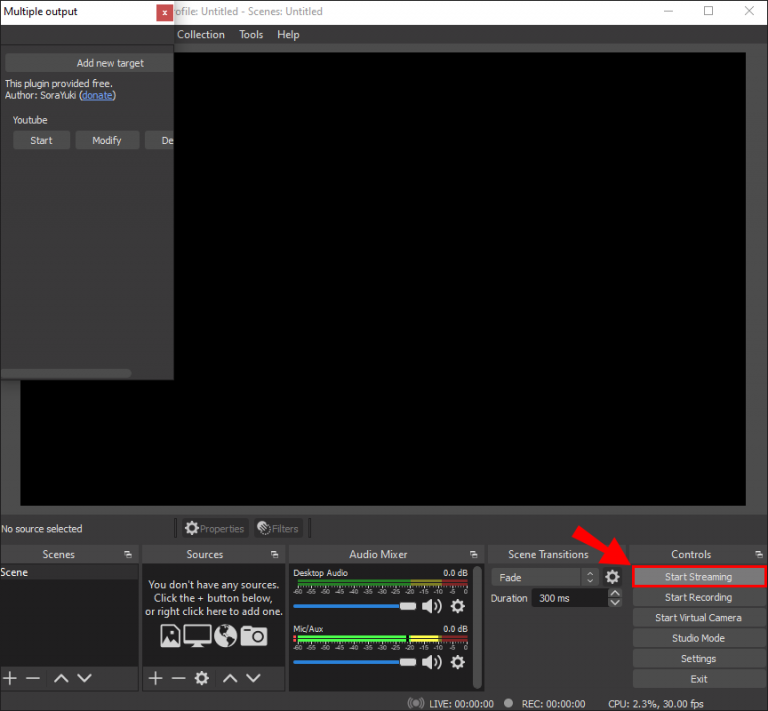
In conclusion, live streaming on Facebook can be a powerful tool for communication and connection. This guide provides a solid foundation for planning, executing, and optimizing your Facebook Live streams. By understanding the entire process, from pre-production to post-stream promotion, you can confidently leverage this platform to achieve your goals, whether personal or professional. Remember to practice, experiment, and most importantly, have fun!